Are you tired of your motion detector light switch turning on too late or staying on all night? Adjusting it the right way can save you energy and give you the perfect lighting exactly when you need it.
In this guide, you’ll discover simple steps to fine-tune your motion detector light switch quickly and easily. Whether you want it to react faster, stay on longer, or avoid false triggers, this article will help you get it just right.
Keep reading to take full control of your lighting and make your home smarter and safer.
Choosing The Right Motion Detector
Choosing the right motion detector is key for an effective light switch setup. It affects how well the light works and saves energy. Knowing the features helps you pick the best one for your needs. This guide covers types, sensor range, angle, and power options.
Types Of Motion Detectors
There are mainly two types of motion detectors: passive infrared (PIR) and microwave. PIR sensors detect body heat. They work well indoors and outdoors. Microwave sensors send out waves and detect movement by reflection. They cover larger areas but use more power. Choose based on where you will install the light.
Sensor Range And Angle
Sensor range means how far the detector can sense movement. The angle is the width of the detection area. A wide angle covers more space but may trigger false alarms. A narrow angle is good for focused areas like doorways. Check the product details for exact range and angle. Match these to your space size.
Power Source Options
Motion detector switches can use batteries or connect to electrical wiring. Battery-powered options are easy to install and move. Wired models need professional setup but are more reliable. Some models combine both for backup power. Consider your location and convenience before deciding.
Preparing For Installation
Preparing for installation is the first step to adjust your motion detector light switch. Proper preparation helps the process go smoothly and safely. You need to gather tools, follow safety rules, and turn off the power before starting.
Gathering Necessary Tools
Collect all tools before you begin. You will need a screwdriver, wire stripper, voltage tester, and electrical tape. Having these ready saves time and avoids interruptions. Check if your motion detector switch came with any special tools or instructions.
Safety Precautions
Safety is very important. Wear insulated gloves to protect your hands. Avoid working in wet or damp areas. Keep children and pets away from your work zone. Use a sturdy ladder if the switch is high on the wall. Double-check your tools for damage before use.
Turning Off Power
Turn off the power at the circuit breaker panel. This stops electricity from flowing to the switch. Use a voltage tester to confirm power is off. Never rely on the switch position alone. Turning off power prevents shocks and injuries during installation.
Mounting The Motion Detector Light Switch
Mounting the motion detector light switch correctly is key for its best performance. Proper placement and secure installation ensure the sensor detects motion accurately. This also helps avoid false triggers or dead zones. Follow these steps to mount your motion detector light switch effectively.
Selecting The Best Location
Pick a spot with a clear view of the area you want to monitor. Avoid placing it behind furniture or near heat sources. Choose a height between 6 to 8 feet for optimal coverage. Make sure the sensor faces the main traffic path. Avoid windows or direct sunlight to reduce false triggers.
Mounting Techniques
Use the mounting bracket that comes with your device. Align it with the wall switch box carefully. Mark the screw holes for precise drilling. Use a level tool to keep the switch straight. Drill holes gently to avoid damaging wires inside the wall. Attach the bracket securely before placing the sensor.
Securing The Device
Fasten screws tightly to keep the sensor stable. Check that the motion detector does not wobble. Connect the wiring as per the manufacturer’s instructions. Snap the switch cover plate into place. Test the switch to ensure it turns on with motion detection. Adjust the angle if needed for better sensor range.
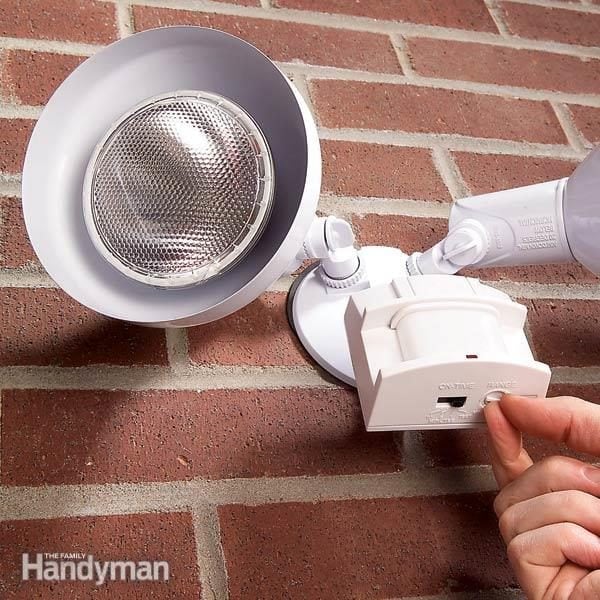
Credit: www.familyhandyman.com
Adjusting Sensitivity Settings
Adjusting the sensitivity settings of your motion detector light switch helps control how it reacts to movement. Proper sensitivity ensures the light turns on only when needed. It prevents the light from switching on too often or missing important motion.
Changing these settings can save energy and reduce annoyance. It also improves security by detecting motion accurately. Below are key tips on adjusting sensitivity for the best results.
Setting Detection Range
The detection range controls how far the sensor can see motion. Set this based on your space size and needs. A shorter range works well for small areas like hallways.
Larger spaces need a longer detection range. Avoid setting the range too wide. This can cause the light to activate from faraway movements.
Avoiding False Triggers
False triggers happen when the light turns on without real motion. Common causes include moving trees or passing cars. Adjust sensitivity to reduce these triggers.
Lower the sensitivity to ignore small movements. Position the sensor away from busy streets or plants. This keeps the light from turning on unnecessarily.
Testing Sensitivity Levels
After adjusting, test the sensor to check its response. Walk through the detection area at different distances. Note if the light switches on too early or late.
Fine-tune the sensitivity based on your test results. Repeat testing until you find the right balance. This ensures reliable and efficient operation of your motion detector light switch.
Configuring Light Duration
Configuring the light duration on a motion detector switch helps control how long the light stays on. Adjusting this setting saves energy and improves security. It also fits different needs around your home or office. Simple steps can change the time delay to suit your situation.
Setting Time Delay
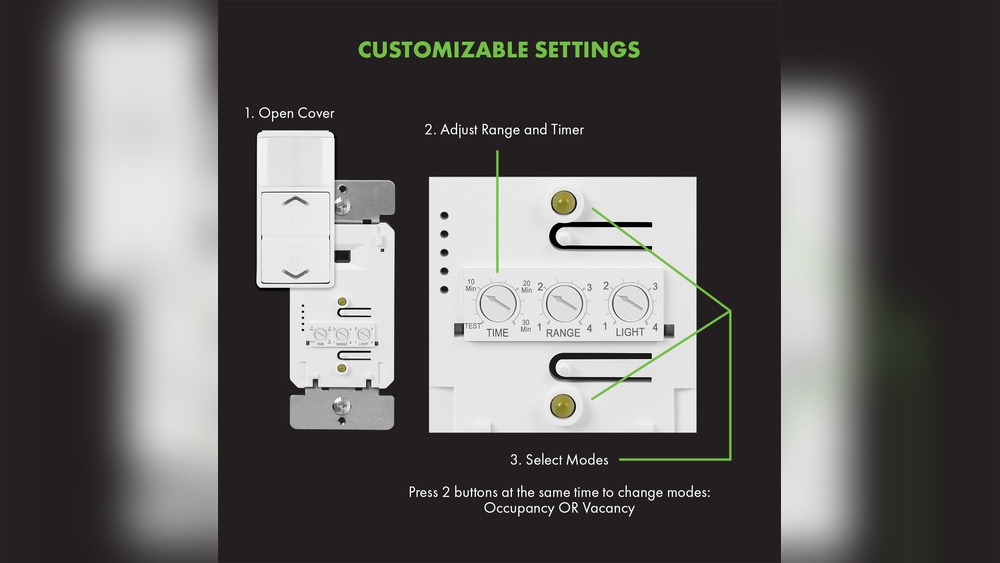
Most motion detector switches have a dial or button to set the time delay. This controls how long the light stays on after detecting motion. You can choose from a few seconds up to several minutes. Start with a moderate time, like 1 or 2 minutes. Test the setting and adjust based on your comfort and needs.
Balancing Energy Use And Security
Longer light duration means better security but uses more energy. Shorter time saves power but might turn off too soon. Find a balance that keeps your space safe without wasting electricity. For high-traffic areas, a longer time may be better. In less busy spots, choose shorter times.
Customizing For Different Scenarios
Different rooms need different light durations. A hallway might need a short delay since people pass quickly. A porch or driveway might need a longer delay for safety. Adjust the settings based on how you use each space. Changing the duration can improve comfort and security.

Credit: diy.stackexchange.com
Fine-tuning Light Level Settings
Fine-tuning the light level settings of your motion detector light switch helps save energy. It also ensures the light works only when needed. Adjusting these settings allows you to control when the light turns on based on surrounding brightness.
This step helps prevent the light from activating unnecessarily during the day. It also improves the sensor’s accuracy in low-light situations. Understanding how to adjust these settings is key to better performance.
Adjusting For Ambient Light
Ambient light means the natural light around your sensor. Adjust the sensor to react only in low light conditions. Use the dial or buttons on the switch to set this level. Turn it down if the light comes on too often. Turn it up if the light does not come on enough.
Using Photocells
Photocells detect the amount of daylight outside. Many motion detector switches have built-in photocells. They stop the light from turning on during the day. Check if your switch has this feature. Set the photocell to a brightness level that matches your environment.
Preventing Light Activation During Daytime
Daytime light can cause the sensor to turn on unnecessarily. Adjust the light level setting to a higher threshold. This stops the sensor from activating in bright conditions. Cover the sensor temporarily to test its response. Make small changes until the light only turns on at night.
Testing And Troubleshooting
Testing and troubleshooting your motion detector light switch ensures it works correctly. This process helps find and fix problems early. Proper testing saves time and prevents frustration.
Start by checking if the sensor detects motion and turns the light on. Watch for any delays or failures. Troubleshooting guides you through common issues and solutions. Sometimes, you may need expert help for complex problems.
Performing Initial Tests
Turn on the power to the switch. Move slowly in front of the sensor. Check if the light turns on immediately. Adjust the sensitivity if the light does not react.
Test the timer by moving away and seeing if the light turns off. Repeat tests at different times of day. This ensures the sensor works in all lighting conditions.
Common Issues And Fixes
The light does not turn on. Check the power supply and wiring connections. Clean the sensor lens from dust or dirt.
The light stays on too long. Adjust the timer setting to a shorter period. Make sure no objects block the sensor’s view.
The light flickers or turns off unexpectedly. Inspect the bulb and replace it if needed. Confirm the sensor’s angle covers the desired area.
When To Consult A Professional
Complex wiring issues require professional help. Call an electrician if tests do not solve the problem. Professionals ensure safety and proper installation.
Electrical faults or damage to the switch need expert repair. Avoid risking injury or further damage by attempting fixes beyond your skill.

Credit: www.youtube.com
Frequently Asked Questions
How Do I Adjust The Sensitivity Of A Motion Detector Light Switch?
To adjust sensitivity, locate the sensitivity dial on the switch. Turn it clockwise to increase range, counterclockwise to decrease. Test adjustments by walking past the sensor to ensure proper detection.
How Can I Change The Motion Detector Light Switch Timer?
Find the timer dial on the switch. Rotate it to set how long the light stays on after motion is detected. Adjust timing according to your needs, from seconds to several minutes.
What Is The Best Height To Install A Motion Detector Switch?
Install the motion detector switch at about 6 to 8 feet high. This height offers optimal detection range and accuracy for most residential and commercial areas.
How Do I Adjust The Detection Angle On A Motion Light Switch?
Detection angles can be changed by rotating or tilting the sensor head, depending on the model. Adjust it to cover the desired area and avoid false triggers.
Conclusion
Adjusting your motion detector light switch is simple and quick. You can control how long the light stays on. Set the sensor’s range to avoid false triggers. Test the settings to find what works best. Small changes can improve your home’s safety and convenience.
Keep your area well-lit and secure with ease. Take your time and enjoy the benefits of proper adjustment.