Changing the code on your Kwikset deadbolt lock might seem tricky at first, but it’s easier than you think. Whether you want to improve your home’s security or simply forgot your current code, knowing how to reset it is a smart move.
You’ll find clear, step-by-step instructions that anyone can follow. By the end, you’ll have full control over your lock’s code, giving you peace of mind and confidence in your home’s safety. Keep reading to unlock the secrets to resetting your Kwikset deadbolt quickly and easily.
Tools Needed
Resetting a Kwikset deadbolt lock code requires a few simple tools. Having the right tools makes the process easier and faster. These tools are common and easy to find. Keep them ready before you start resetting your lock.
Small Flathead Screwdriver
A small flathead screwdriver helps remove the lock’s cover. It fits into the tiny slots without damaging the lock. This tool allows access to the reset button inside the lock.
New Batteries (optional)
Some Kwikset models need good power to reset the code. Fresh batteries ensure the lock works smoothly during the reset. Having new batteries nearby can prevent interruptions.
Owner’s Manual Or Model Number
Keep the owner’s manual or model number on hand. It guides you through specific steps for your lock model. This helps avoid mistakes and speeds up the reset process.
Pen And Paper
Use a pen and paper to write down your new code. This prevents forgetting the code after resetting. It also helps keep a backup for future reference.
Locate The Programming Button
Locating the programming button is the first step to reset your Kwikset deadbolt lock code. This button controls the lock’s settings. Finding it makes the reset process simple and quick.
Most Kwikset models hide the button inside the lock’s interior. It is not visible from outside. You need to open the lock’s cover to see it.
Remove The Interior Cover
Start by removing the screws on the back of the lock. Use a screwdriver that fits well. Carefully lift off the interior cover. This exposes the lock’s inner parts.
Identify The Programming Button
Look for a small, round button usually colored black or red. It is often near the battery pack. The button is labeled “Program” or “Set” in some models.
Check Your Model’s Manual
Each Kwikset model can vary. The manual shows the exact location of the button. You can also find manuals online by entering your lock’s model number.
Prepare For Resetting
After locating the button, ensure the lock has fresh batteries. Weak batteries can cause errors. Pressing the button starts the reset process.
Remove The Battery Cover
Removing the battery cover is the first step to reset your Kwikset deadbolt lock code. This part protects the batteries that power the lock. You need to access the batteries to proceed with the reset process.
The battery cover is usually located on the inside part of the lock. It is designed for easy removal. This helps you change batteries or reset the lock without hassle.
Locate The Battery Cover
Look for a small panel on the interior side of the lock. It is often rectangular or square. The cover may have a small notch or indentation for gripping.
Use your fingers or a flat tool to pry off the cover gently. Avoid using too much force. The cover should pop off with a little pressure.
Check The Battery Placement
Once open, note how the batteries are placed. This helps when you put the cover back on. Make sure the batteries are secure and undamaged before proceeding.
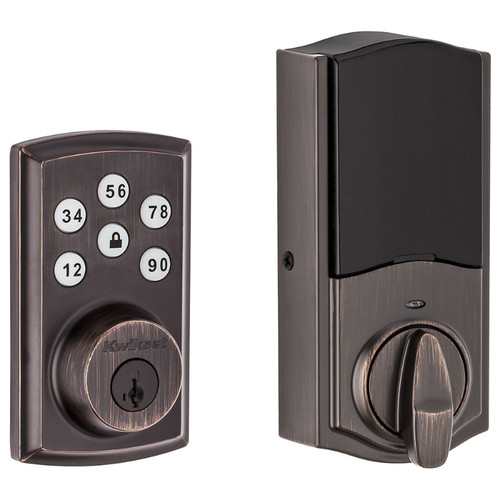
Credit: doorlocksdirect.com
Press The Programming Button
Pressing the programming button is the first step to reset your Kwikset deadbolt lock code. This button activates the lock’s programming mode. It allows you to change or add new codes safely and easily.
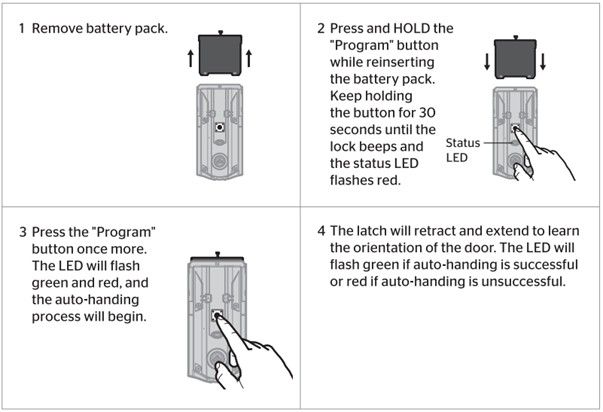
The programming button is usually inside the lock on the interior side. You may need to remove the battery cover to find it. Pressing this button puts the lock in a ready state for code changes.
Follow the instructions carefully after pressing the button. This step ensures the lock recognizes your commands. It helps avoid errors during the reset process.
Find the programming button on the inside of the deadbolt. Remove the battery cover carefully. The button is often small and round. Use a pen tip or small tool to press it.
Press And Hold The Button
Press the programming button firmly. Hold it for about five seconds. You will hear a beep or see a light flash. This signal means the lock is in programming mode.
Release The Button To Confirm
Let go of the button after the beep. The lock waits for your next steps. This pause allows you to enter new codes or reset old ones.
Start Entering New Codes
After pressing the button, type your new code. Follow the lock’s instructions for code length. Press the lock or enter button to save the new code.
Enter The New Code
Entering a new code for your Kwikset deadbolt is a simple step. It allows you to secure your home with a fresh, personal combination. This part of the process ensures your lock works with the new code only.
Follow the instructions carefully to avoid mistakes. The new code must be easy for you to remember. At the same time, it should be hard for others to guess.
Choose A Secure Code
Pick a code that is at least four digits long. Avoid common sequences like 1234 or 0000. Use numbers that are easy for you but tough for others to guess.
Enter The New Code On The Keypad
Press each number of your new code slowly. Make sure you press the buttons firmly. Do not rush to avoid entering the wrong digits.
Confirm The New Code
After entering the new code, press the lock or check button. The lock will beep or flash to confirm. If it does not, try entering the code again.
Close the door and lock it using the keypad. Enter the new code to unlock it. Confirm the code works before finishing the process.
Credit: www.kwikset.com
Test The New Code
Testing the new code is a crucial step after resetting your Kwikset deadbolt. It confirms the lock responds to the new code correctly. Without testing, you might face issues unlocking the door later.
Try the new code several times to ensure it works smoothly. This helps avoid any future problems with your lock.
Enter The New Code Carefully
Type your new code slowly and clearly. Watch for any mistakes as you press each button. This helps the lock register the code properly.
Check For Lock Response
Listen for the sound or feel the lock turn. The lock should open or close after entering the new code. If it does not respond, retry the code or reset it again.
Test Multiple Times
Repeat the process three to five times. This confirms the code works every time. Inconsistent responses mean the reset was not successful.
Use Backup Methods
Try your backup key or old code just in case. This ensures you can still access the lock if the new code fails.
Troubleshooting Tips
Troubleshooting a Kwikset deadbolt lock can save time and frustration. Problems with the lock code or buttons often come from simple issues. Check these common problems first. They usually have easy fixes.
Battery Issues
Weak or dead batteries cause many lock problems. Replace batteries with new ones. Use the correct type as stated in the manual. Low battery power can stop the keypad from working. Test the lock after changing batteries. This step often solves the issue.
Button Not Responding
Buttons may stop working due to dirt or damage. Clean the keypad gently with a soft cloth. Avoid using water or harsh chemicals. Press each button firmly but not hard. If buttons still do not respond, check the battery. Faulty wiring inside can also cause problems. Contact a technician if needed.
Code Not Working
Enter the code carefully. Make sure you press buttons in the correct order. Reset the lock code if you forget it. Follow the instructions in the user guide. Clear old codes that might cause confusion. Double-check the lock’s programming steps. This helps prevent errors when entering codes.
Safety Precautions
Safety is important when resetting your Kwikset deadbolt lock code. Taking the right steps keeps your home secure and prevents mistakes. Follow these safety tips before starting the reset process.
Work In A Well-lit Area
Good lighting helps you see the lock clearly. It reduces errors during the reset. Choose a place with enough light or use a flashlight.
Keep Your Tools Handy
Prepare all tools before you start. This saves time and avoids frustration. Use the correct screwdriver and other items needed for your lock model.
Protect Your Privacy
Reset the code where no one can watch you. Avoid public or open spaces. This stops others from learning your new code.
Write Down The New Code
Note the new code on paper. Store it safely where only you can find it. Losing the code can lock you out of your home.
Test The Lock After Reset
Check the lock works well after changing the code. Try locking and unlocking several times. Confirm the new code is active before finishing.

Credit: www.youtube.com
Frequently Asked Questions
How Do I Reset My Kwikset Deadbolt Code?
To reset your Kwikset deadbolt code, press the reset button inside the lock. Enter a new code on the keypad. Follow the lock’s manual for exact steps. This process ensures your lock is secure with a new access code.
Can I Reset Kwikset Deadbolt Without The Old Code?
Yes, you can reset the Kwikset deadbolt without the old code by using the programming button inside the lock. You must have physical access to the lock. This method allows you to set a new code if you forgot the old one.
How Long Does It Take To Reset Kwikset Lock Code?
Resetting a Kwikset lock code usually takes less than 5 minutes. The process is quick and user-friendly. Simply press the reset button, then enter the new code. Follow the instructions carefully to avoid errors.
What Tools Do I Need To Reset Kwikset Deadbolt Code?
You generally need no special tools to reset your Kwikset deadbolt code. Just a small screwdriver may be required to remove the battery cover. Most steps involve pressing buttons and entering codes on the keypad.
Conclusion
Resetting your Kwikset deadbolt code keeps your home safe and secure. Follow each step carefully to avoid mistakes. Keep your new code private and easy to remember. Test the lock after changing the code to ensure it works. Doing this regularly helps protect your property.
Stay confident knowing you control who can enter. Simple actions like these make a big difference. Your home’s safety is in your hands.