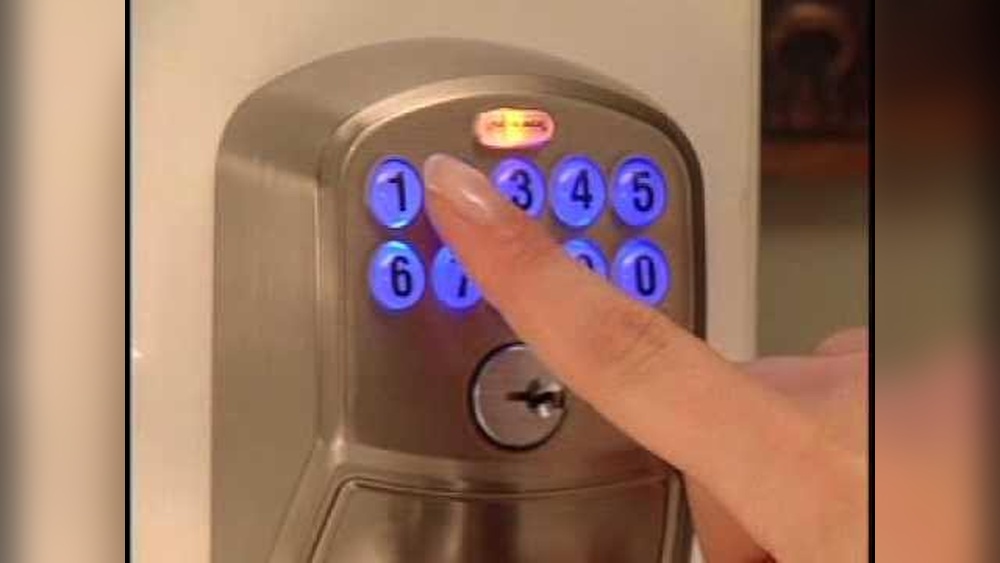
Changing the code on your Schlage keypad deadbolt is easier than you might think, and it’s one of the best ways to keep your home secure. Whether you’ve just moved in, lost your code, or want to give access to someone new, knowing how to update your lock’s code puts control right in your hands.
In this guide, you’ll get clear, simple steps to change your code quickly and safely. Keep reading to protect your home and make sure only the people you trust can get inside.

Credit: www.youtube.com
Tools Needed
Changing the code on a Schlage keypad deadbolt is simple. Having the right tools makes the process faster and easier. This guide lists the tools needed to help you change the code safely.
Small Phillips Head Screwdriver
You need a small Phillips head screwdriver to remove the screws on the interior side of the lock. This tool helps you open the battery cover and the lock’s interior panel.
New Batteries (optional)
Check the lock’s batteries before starting. It is good to have fresh batteries ready. Weak batteries can cause the lock to malfunction during code change.
Original Programming Code
Keep the original programming code handy. You need this code to enter programming mode and change the user codes.
Flashlight (optional)
A flashlight helps you see the small parts inside the lock. It is useful if you work in a dim area or during night time.
Credit: www.acslocks.com
Locate Programming Code
To change the code on a Schlage keypad deadbolt, first find the programming code. This code lets you add or remove user codes. Without it, you cannot make changes. The programming code is different from the user codes you use to unlock the door.
Knowing where to find this code saves time and avoids confusion. It is usually printed on a label or card that came with the lock. Keep this code safe and private to protect your home.
Check The User Manual
The programming code is often in the user manual. Look inside the manual for a sticker or printed code. This code usually has eight digits. If you lost the manual, try to find a digital copy online.
Look Inside The Battery Compartment
Open the battery cover on the lock’s interior side. Many Schlage models have a label inside this compartment. The label shows the programming code clearly. Write it down before changing the batteries.
Locate The Original Packaging
The programming code may be on a card or sticker in the box. Check the original packaging carefully. Sometimes the code is on a small card with the lock’s serial number. Keep this card safe for future use.
Access Programming Mode
Accessing programming mode on a Schlage keypad deadbolt lets you change the code easily. Press the Schlage button and enter the current code to start. This mode helps you update your lock’s security quickly.
Locate The Programming Code
The programming code is essential to enter programming mode. It is different from your entry codes. Find this code in the user manual or on the inside of the lock. Some models have a default code like 123456. Keep it ready before you start.
Press The Schlage Button
Start by pressing the Schlage button on the keypad. The button usually lights up or beeps. This shows the lock is ready to accept the programming code. Act quickly after this step.
Enter The Programming Code
Type the programming code using the keypad. Enter it carefully. A green light or a beep means the code is accepted. Red light or no response means the code is wrong. Try again if needed.
Confirm Access To Programming Mode
After entering the code, the lock confirms programming mode. The Schlage button may flash or beep twice. Now, you can change user codes or settings. Follow the next steps in your manual to change the code.
Erase Existing Codes
Erasing existing codes on your Schlage keypad deadbolt is an important step before adding new ones. It ensures old codes no longer work, keeping your home secure. This process clears all previous user codes but keeps the programming code intact.
Follow these steps carefully to erase codes. The process is simple and does not require special tools. You only need the programming code that came with your lock.
Locate The Programming Code
The programming code is a 6-digit number on the lock’s packaging or manual. It is different from user codes. This code lets you change settings and erase codes.
Enter Programming Mode
Press the Schlage button on the keypad. Enter the 6-digit programming code. The Schlage button will flash orange then green, showing you are in programming mode.
Erase All User Codes
Press the Schlage button again. Enter 7, then 0, then 0. The lock will beep to confirm all user codes are erased. Only the programming code remains active now.
Test The Lock
Try using an old user code. It should no longer work. Use the programming code to add new user codes as needed.
Add New User Codes
Adding new user codes to your Schlage keypad deadbolt lets you share access easily. Each code can be unique to a person. This way, you can control who enters your home or office. Changing or adding codes keeps your security up to date.
Follow simple steps to add new user codes. It takes only a few minutes and no special tools.
Locate The Programming Code
Find the factory-set programming code on your Schlage lock manual or the back of the keypad. This code is needed to add new user codes. It is usually a six-digit number.
Enter Programming Mode
Press the Schlage button on the keypad. Then enter the programming code. You will hear a beep or see a light indicating you are in programming mode.
Add A New User Code
Press “1” to add a new user code. Enter the new code you want to use. It must be 4 to 8 digits long. Press the Schlage button again to save the code. You will hear a beep confirming the new code is added.
Test The New Code
Close the door and lock it. Enter the new user code on the keypad. The lock should open if the code works correctly.
Test New Codes
Testing your new code on a Schlage keypad deadbolt is a crucial step. It ensures the lock works correctly with your chosen code. This step helps avoid lockouts and confirms the code is saved properly.
Try entering the new code several times. Make sure the lock responds each time. Testing helps you trust your new code before relying on it daily.
Testing The New Code For Entry
Enter the new code on the keypad. Press the Schlage button or the lock button after. The deadbolt should turn and unlock. If it does not, try again slowly and carefully.
Verifying The Lock’s Response
Listen for sounds or watch the lock’s movement. A click or a turn means the code worked. No sound or no movement means the code is not accepted. Repeat the code entry if needed.
Checking Old Codes Still Work
Try entering old codes to see if they are disabled. Only the new codes should unlock the door. This prevents anyone with old codes from entering.
Testing From Both Inside And Outside
Test the lock from outside using the keypad. Also, check the manual lock from inside. Ensure both methods work smoothly with the new code.
Troubleshooting Tips
Troubleshooting tips help solve common problems with Schlage keypad deadbolts. These tips save time and avoid frustration during code changes. Understanding common issues makes the process smoother. Follow these simple steps to fix common errors.
Check Battery Power
Low battery power causes keypad errors and unresponsive locks. Replace batteries with fresh ones. Use alkaline batteries for best results. Always test the keypad after changing batteries.
Reset The Lock Properly
Sometimes the lock needs a reset to accept new codes. Follow the manual’s reset instructions carefully. Press buttons in the correct order. A reset clears previous errors and allows new code entry.
Ensure Correct Code Length
Schlage locks require codes of specific lengths. Enter codes with the right number of digits. Too many or too few numbers cause rejection. Check the manual for the exact code length.
Clean The Keypad
Dirt and dust can block keypad buttons. Wipe the keypad gently with a soft cloth. Avoid liquids or harsh cleaners. Clean buttons respond better to touch.
Verify User Code Programming
Programming errors stop new codes from working. Follow programming steps carefully. Enter the programming code first, then the new user code. Confirm the lock beeps or flashes to accept the code.

Credit: www.wikihow.com
Frequently Asked Questions
How Do I Reset The Schlage Keypad Deadbolt Code?
To reset the code, press the Schlage button, enter the current code, then press 0. Enter a new code followed by the Schlage button to save it.
Can I Change Multiple User Codes On One Keypad?
Yes, you can add or delete multiple user codes. Use the programming code to manage each user code individually for enhanced security.
What If I Forget The Current Schlage Code?
If you forget the code, you must reset the lock to factory settings. This erases all codes and restores default programming.
How Long Does It Take To Change The Keypad Code?
Changing the code takes less than five minutes. The process is quick and straightforward with the keypad and programming code.
Conclusion
Changing the code on your Schlage keypad deadbolt is simple. Follow the steps carefully to keep your home secure. Regularly updating your code helps protect your property. Keep your new code easy to remember but hard to guess. Test the lock after changing the code to ensure it works.
Stay safe by managing your lock codes well. You can do it yourself without extra help. Trust your ability to maintain your lock’s security.


