Are you planning to mount your new Vizio TV on the wall but unsure if it comes with the right wall anchors? You might be wondering if you need to buy extra hardware or if everything you need is already in the box.
Getting this detail right can save you time, frustration, and even damage to your walls or TV. Keep reading to find out exactly what Vizio includes with their TVs and how to prepare for a smooth, secure installation. Your perfect TV setup starts here.

Credit: www.amazon.com
Vizio Wall Anchor Inclusion
Many people wonder if Vizio includes wall anchors with their TVs. Wall anchors help secure the TV safely to the wall. Knowing what comes with your Vizio TV can save you time and effort. This section explains what you get in the box, model differences, and buying options.
What Comes In The Box
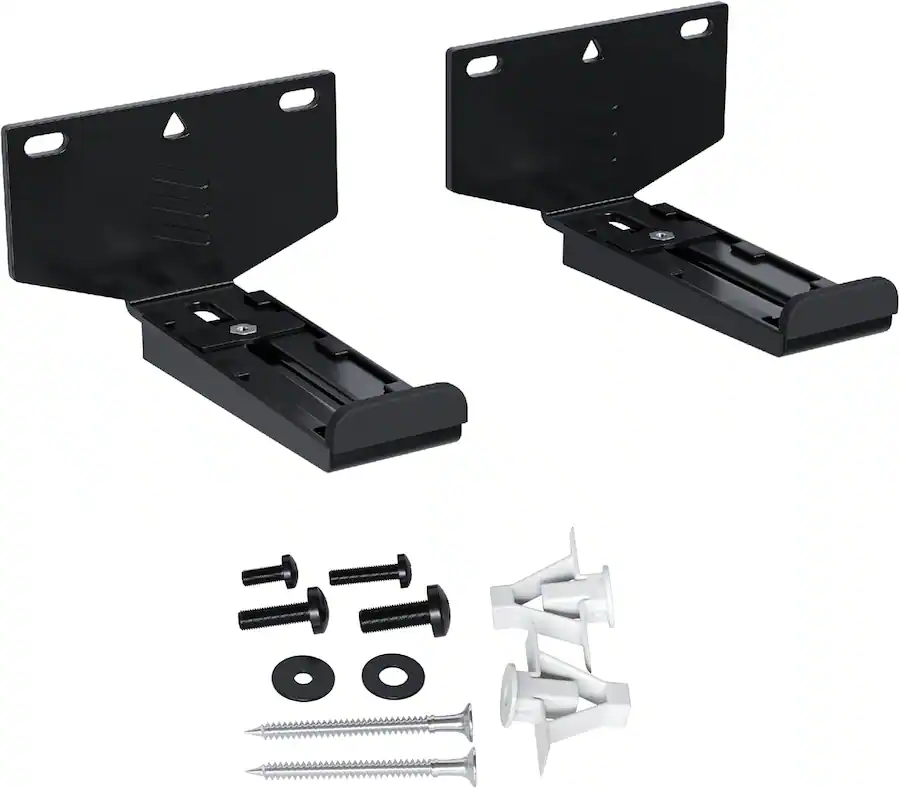
Most Vizio TVs come with basic mounting hardware. This usually includes screws and brackets. Wall anchors are not always included. The package often has only the parts for stand setup. Buyers may need to buy wall anchors separately for mounting.
Models And Variations
Different Vizio models may have different accessories. Higher-end models sometimes include wall anchors. Budget models typically do not include them. Check your model’s manual to see what is inside. It helps to know before starting the installation process.
Retail Vs. Online Purchases
Retail stores sometimes add extra accessories with the TV. They may include wall anchors as a bonus. Online purchases usually come as the manufacturer packs them. Sellers rarely add extra mounting parts online. Always check product details before buying.
Types Of Wall Anchors
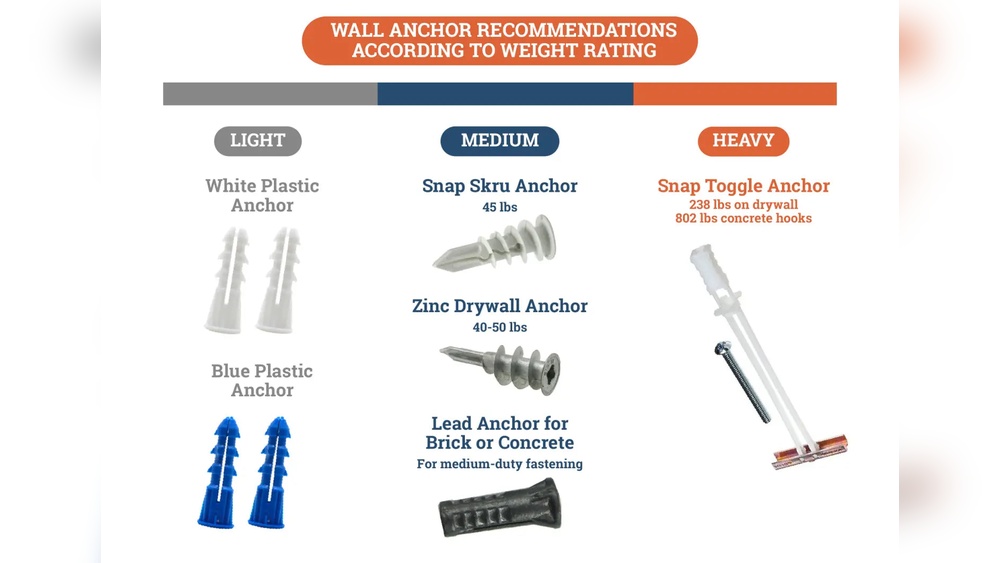
Wall anchors are important for hanging heavy items on walls safely. Different types of wall anchors fit different wall materials and weights. Knowing the right type helps you avoid damage and keeps your items secure. Here are the common types of wall anchors used for mounting.
Plastic Anchors
Plastic anchors are the most basic and affordable option. They work best in drywall or plaster walls. You drill a small hole, push the anchor in, then screw your item into it. They hold light to medium weight items like picture frames or small shelves.
Toggle Bolts
Toggle bolts are strong anchors designed for heavy loads. They have metal wings that open inside the wall to spread the weight. You insert them through a drilled hole, and the wings expand behind the wall. These anchors are great for hanging large mirrors, TVs, or cabinets.
Molly Bolts
Molly bolts are metal anchors that expand inside the wall when tightened. They provide good support in drywall and hollow walls. They can hold medium to heavy items securely. These bolts are ideal for mounting towel racks or curtain rods.
Mounting Requirements
Mounting your Vizio TV correctly ensures safety and stability. Knowing what you need helps prevent damage to your wall and device. This section covers essential mounting requirements for Vizio TVs. It guides you through weight limits, wall types, and tools needed.
Weight And Size Considerations
Check your TV’s weight and size before mounting. Vizio TVs come in different sizes, from small to large screens. The mount must support the TV’s weight. Use a mount rated for your specific model’s weight. Oversized TVs need stronger mounts for safety.
Wall Material Compatibility
Not all walls can hold a TV mount. Drywall alone may not support heavy TVs. Studs inside walls provide strong support points. Concrete or brick walls require special anchors. Match the wall anchors to your wall type for a secure mount.
Tools Needed
Gather tools before starting your mount installation. A drill helps make holes for anchors or screws. A stud finder locates strong points in your wall. A level keeps the TV straight after mounting. Screwdrivers and a tape measure also help in the process.
Credit: www.bestbuy.com
Alternative Mounting Options
Many people wonder about mounting options for their Vizio TVs. Some models do not include wall anchors. This can be a problem for easy installation. Luckily, there are alternative mounting options to explore. These choices help secure your TV safely without original anchors.
Third-party Anchor Kits
Third-party anchor kits offer a simple solution. They come with all parts needed for wall mounting. These kits fit most Vizio TVs and wall types. They include screws, anchors, and brackets. Buying a kit saves time and effort. Make sure to check weight limits before purchasing.
Professional Installation Services
Professional installers provide expert help for mounting. They know the best spots to place anchors. They bring the right tools and parts for the job. Hiring a professional reduces the risk of damage. This option is great for complex walls or large TVs.
Diy Solutions
Do-it-yourself methods work well with careful planning. Use strong anchors designed for your wall material. Measure twice to ensure correct TV placement. Follow step-by-step guides or video tutorials. DIY saves money and gives a sense of achievement. Always prioritize safety during installation.
Safety Tips For Mounting
Mounting your Vizio TV on the wall saves space and gives a clean look. Safety is key to keep your TV and wall safe. Follow these tips to mount your TV correctly and avoid problems later.
Avoiding Wall Damage
Use the right tools for your wall type. Drywall anchors help if you cannot find studs. Do not use nails alone; they can damage the wall and cause the TV to fall. Choose anchors made for your wall’s material. Take your time to drill holes carefully and measure twice before drilling.
Securing The Tv Properly
Attach the mounting bracket firmly to the TV. Use all screws included in the mounting kit. Tighten screws but do not over-tighten them. Over-tightening can break the bracket or TV frame. Double-check the bracket’s fit on the wall before hanging the TV. Make sure the TV feels secure and does not wobble.
Checking For Studs
Studs provide the strongest support for your TV mount. Use a stud finder to locate them. Mark stud locations clearly before drilling. Avoid mounting on drywall alone unless anchors are rated for TV weight. Mounting on studs prevents the TV from falling and damaging the wall. It also keeps your TV safe during vibrations or accidental bumps.

Credit: www.walmart.com
Frequently Asked Questions
Does Vizio Tv Come With Wall Anchors Included?
Vizio TVs typically do not include wall anchors in the package. They provide a mounting template and screws. You may need to buy wall anchors separately depending on your wall type for secure installation.
What Type Of Wall Anchors Work With Vizio Tvs?
Plastic expansion anchors or metal toggle anchors work well with Vizio TVs. Choose anchors based on your wall material, such as drywall, concrete, or brick, to ensure a safe and sturdy mount.
Can I Mount A Vizio Tv Without Wall Anchors?
Mounting without wall anchors is possible only on studs or solid walls. Anchors add extra support on drywall or hollow walls. For safety and stability, using appropriate wall anchors is highly recommended.
Are Wall Anchors Necessary For Vizio Tv Installation?
Yes, wall anchors are necessary if mounting on drywall or hollow walls. They prevent the TV from falling by securely holding the mounting bracket. Always check your wall type before installation.
Conclusion
Vizio TVs often do not include wall anchors in the box. Many users need to buy anchors separately for secure mounting. Wall anchors help keep the TV safe and steady on the wall. Always check the package contents before starting installation.
Using the right anchors prevents damage to your wall and TV. Choose anchors that fit your wall type and TV size. Proper mounting ensures a safe and neat setup. This small step makes a big difference in your TV experience.