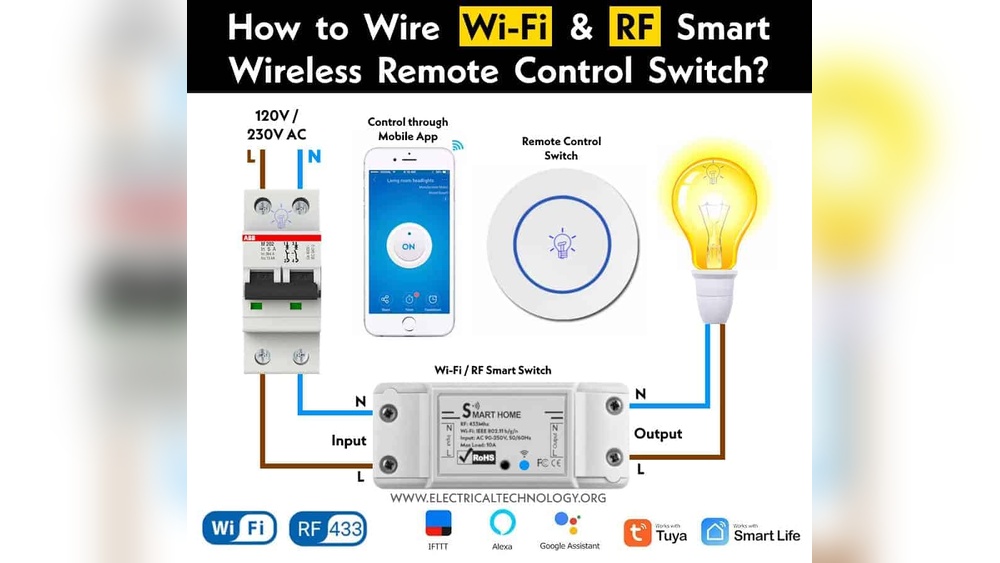
Have you ever wondered how your lights turn on with just a click, without any messy wires getting in the way? Wireless light switches are changing the way you control your home’s lighting, making it simpler and more convenient than ever.
But how exactly do these smart devices work behind the scenes to bring you this effortless control? Keep reading, and you’ll discover the surprising technology that powers wireless light switches—and how understanding it can help you make the best choices for your home.
Credit: www.blackhillsinc.com
Basics Of Wireless Light Switches
Wireless light switches offer a simple way to control lights without wires. They bring convenience and flexibility to homes and offices. Understanding their basics helps you see why they grow in popularity.
These switches send signals to control lights remotely. They work using small transmitters and receivers. This technology removes the need for physical wiring between switch and light.
What Are Wireless Light Switches
Wireless light switches are devices that control lighting without direct wiring. They use radio waves or other signals to communicate with light fixtures. You can place these switches anywhere, not just on walls.
This freedom lets you install switches in hard-to-wire spots. They often look like regular switches but work differently inside. The switch sends a command to turn lights on or off.
Key Components
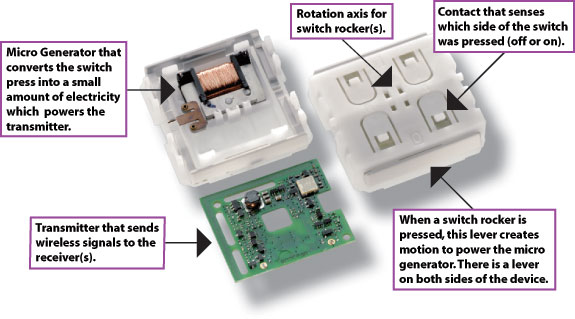
Wireless light switches have three main parts. First, the transmitter, which you press to send signals. Second, the receiver, which gets the signal and controls the light. Third, the power source, usually batteries for the switch.
The transmitter converts your press into a wireless message. The receiver acts on this message to power the light. Both parts work together to ensure quick and reliable control.
Types Of Wireless Technologies
Wireless switches use various technologies to send signals. Common types include radio frequency (RF), Bluetooth, and Wi-Fi. RF is popular for its long range and low power use.
Bluetooth works well for short distances and pairs easily with devices. Wi-Fi allows control through smartphones and smart home systems. Each technology suits different needs and setups.
How Wireless Communication Happens
Wireless light switches control lights without wires. They use signals to send commands from the switch to the light. This communication happens through different wireless technologies. These technologies help switches and lights talk to each other across a room or house.
Radio Frequency Signals
Radio frequency signals are common in wireless switches. They send radio waves to communicate with the light fixture. These waves travel through walls and furniture easily. The switch sends a unique code in the signal. The light receives the code and turns on or off. This method is simple and reliable for many homes.
Bluetooth And Wi-fi Integration
Bluetooth and Wi-Fi allow wireless switches to connect with smartphones and smart home systems. Bluetooth works well for short distances, like within one room. Wi-Fi covers larger areas and connects to the internet. This makes it possible to control lights remotely. Both use encrypted signals to keep the connection secure.
Zigbee And Z-wave Protocols
Zigbee and Z-Wave are special protocols designed for smart homes. They create a mesh network where devices pass messages through each other. This network improves signal strength and range. Zigbee and Z-Wave use low power and avoid interference. They are popular for their reliability and efficiency in wireless lighting control.
Power Sources For Wireless Switches
Wireless light switches need power to send signals. They do not use wires for electricity. Instead, they rely on small power sources inside the switch. These sources keep the switch working and allow it to control lights remotely. Two common types of power sources are battery-powered and energy harvesting switches.
Battery-powered Switches
Battery-powered switches use small batteries like AA, AAA, or button cells. These batteries provide electricity to the switch’s internal parts. Battery power lets the switch send wireless signals to the light fixture. The batteries usually last for months or even years. Replacing batteries is simple and keeps the switch working well. Battery-powered switches are popular because they are easy to install anywhere.
Energy Harvesting Switches
Energy harvesting switches do not need batteries. They create power from the push of the button itself. This method uses a small generator inside the switch. When pressed, the generator creates a little electrical charge. This charge powers the signal to turn the light on or off. Energy harvesting switches are eco-friendly and require less maintenance. They are ideal for places where changing batteries is hard.

Credit: www.youtube.com
Installation And Setup
Installing and setting up wireless light switches is simple and quick. It requires basic tools and a few clear steps. Following the right process ensures your switches work perfectly with your lights. Here is what you need to know.
Wiring Requirements
Wireless switches often need minimal wiring. Some models work without a neutral wire. Others require a neutral wire to function correctly. Check your home wiring before buying a switch. Turn off the power to avoid any accidents. Use a voltage tester to confirm wires are safe to handle. Connect the wires as the switch manual describes. Secure all connections tightly to prevent loose contacts.
Pairing Switches With Lights
Pairing links the wireless switch to your light fixture. Most switches use radio signals to communicate. Press the pairing button on the switch and the light device. Wait for a light blink or sound confirming the connection. Some switches allow pairing multiple lights. Test the switch to make sure it controls the lights properly. Re-pair if the connection fails or is unstable.
Mobile App Configuration
Many wireless switches come with a mobile app. Download the app from your device’s store. Open the app and create an account if needed. Follow the app instructions to add your switch. The app may ask for Wi-Fi credentials for remote control. Use the app to name switches and organize rooms. Set schedules or timers for automatic light control. The app often shows switch status and usage history.
Features Of Smart Lighting Systems
Smart lighting systems bring many useful features to homes and offices. They improve how you control and use lights. These systems offer convenience and help save energy. Understanding their features helps you choose the right setup.
Remote Control And Scheduling
Smart lights can be controlled from anywhere using a smartphone. Turn lights on or off without being near the switch. You can set schedules to automate lighting at specific times. This helps keep your home lit when you want. It also reduces energy waste by turning lights off automatically.
Voice Assistant Compatibility
Many smart lights work with voice assistants like Alexa or Google Assistant. You can control lights using simple voice commands. Say “turn on the living room light” to switch lights easily. This hands-free option adds comfort and speed. It is perfect when your hands are full or dirty.
Automation And Scenes
Smart lighting systems let you create scenes for different moods or tasks. For example, a “movie night” scene can dim lights automatically. You can also link lights with other smart devices for automation. Lights can turn on when you enter a room or at sunset. These features make daily life smoother and more enjoyable.
Benefits Of Wireless Light Switches
Wireless light switches offer many benefits for modern homes and offices. They improve how you control lighting. These switches do not need wires, making installation easier. They bring new levels of comfort and style to any space.
Flexibility And Convenience
Wireless switches can be placed anywhere in a room. No need to worry about wiring locations. You can control lights from multiple spots. This makes it simple to turn lights on or off. No more walking across the room in the dark. These switches often work with smartphones and voice assistants. Control your lights without even touching a switch.
Energy Efficiency
Many wireless switches include timers and sensors. These features help reduce wasted electricity. Lights turn off automatically when rooms are empty. You can set schedules for lights to save power. Using wireless switches can lower your energy bills. They help promote a greener lifestyle with less energy use.
Aesthetic And Design Options
Wireless switches come in many styles and colors. You can choose designs that match your decor. They create a clean and modern look without visible wires. Some switches have touch controls or sleek buttons. This adds a stylish element to your walls. Wireless switches blend well with any room design.
Common Challenges And Troubleshooting
Wireless light switches offer great convenience but can face some common challenges. Understanding these issues helps keep your system working smoothly. Troubleshooting is easier with basic knowledge of common problems.
Signal Interference Issues
Wireless switches use radio waves to send signals. Other devices like routers, microwaves, or cordless phones can block these signals. Thick walls or metal objects also weaken signal strength. Keep the switch and receiver away from such obstacles. Changing the wireless channel can improve communication. Regular checks help spot interference early.
Battery Maintenance
Most wireless switches need batteries to work. Weak or dead batteries cause the switch to stop responding. Check batteries regularly and replace them on time. Use high-quality batteries for longer life. Some switches show low battery alerts. Do not ignore these signals to avoid sudden failures.
Connectivity Problems
Sometimes, the switch may lose connection with the light receiver. This can happen after power outages or moving devices. Re-pairing the switch with the receiver usually fixes the issue. Follow the product manual to reset and reconnect. Keep the devices within the recommended distance to maintain a strong link.
Credit: illumra.com
Future Trends In Smart Lighting
The future of smart lighting brings exciting changes. Wireless light switches will become smarter and more useful. New technologies will make lighting systems easier to control and more energy-efficient. These trends will shape how people use light in homes and offices.
Integration With Iot
Wireless light switches will connect with many smart devices. This connection creates a smart home network. Lights can respond to commands from phones, voice assistants, or other gadgets. This integration allows better control and automation. For example, lights can turn on when you enter a room or turn off when you leave.
Advanced Sensors And Ai
Smart lighting will use sensors to detect motion, light, and temperature. These sensors help lights adjust automatically. Artificial intelligence will learn your habits and preferences. Lights will change brightness and color based on the time of day or activity. This makes lighting more comfortable and saves energy.
Sustainability Innovations
Future smart lighting will focus on saving energy and reducing waste. Wireless switches will work with energy-efficient bulbs and solar power. Systems will track energy use and suggest ways to cut costs. Sustainable materials and designs will make devices last longer and harm less to the environment.
Frequently Asked Questions
How Do Wireless Light Switches Transmit Signals?
Wireless light switches use radio frequency or Bluetooth to send signals. These signals communicate with a receiver to turn lights on or off without wiring.
Are Wireless Light Switches Easy To Install?
Yes, wireless light switches are simple to install. They require no wiring and can be mounted anywhere within signal range, making installation quick and hassle-free.
Can Wireless Light Switches Control Multiple Lights?
Many wireless light switches can control multiple lights. They connect to receivers or hubs that manage several fixtures simultaneously for flexible lighting control.
Do Wireless Light Switches Work Without Wi-fi?
Some wireless switches work without Wi-Fi using RF or Bluetooth. However, smart switches with advanced features often require an internet connection.
Conclusion
Wireless light switches use radio signals to control lights without wires. They send commands to a receiver connected to the light fixture. This setup allows easy installation and flexible placement. You can control lights from different rooms or use smart devices.
The technology saves time and avoids rewiring walls. Wireless switches offer convenience and modern functionality for any home. Understanding how they work helps in choosing the right system. Simple, efficient, and user-friendly—wireless light switches make lighting control easy.

