If you’ve ever lost your keys or moved into a new home, you know how important it is to keep your door secure. Rekeying your Kwikset SmartKey deadbolt lets you take control of your locks quickly and easily—without calling a locksmith.
In this guide, you’ll discover simple steps to rekey your lock yourself, saving time and money. Ready to make your home safer right now? Keep reading, and you’ll have your Kwikset SmartKey deadbolt working with your new key in no time.
Kwikset Smartkey Basics
The Kwikset Smartkey deadbolt is a popular lock for many homes. It offers a simple way to change your lock’s key without calling a locksmith. This feature makes it easy to control who has access to your house.
Understanding the basics of the Smartkey deadbolt helps you use it safely and effectively. This section explains what the lock is and why rekeying it is a smart choice.
What Is A Smartkey Deadbolt
A Smartkey deadbolt is a type of lock made by Kwikset. It allows you to reset the key yourself in seconds. You do not need to remove the lock or call a locksmith. The lock uses a special key and cylinder system. This system gives you control over who can open your door.
Benefits Of Rekeying
Rekeying changes the lock so old keys no longer work. It is cheaper than replacing the entire lock. Rekeying improves home security after losing keys. It also helps when moving to a new house. You can make sure only you have the key. Rekeying a Smartkey deadbolt is quick and easy. This saves time and money.
Credit: www.kwikset.com
Tools Needed
Before you start rekeying your Kwikset SmartKey deadbolt, gather the right tools. Using the correct tools makes the process easier and faster. It helps prevent damage to the lock or your door. Keep everything ready to avoid interruptions.
Essential Tools List
Here is a list of tools you need for rekeying:
- Kwikset SmartKey tool (usually comes with the lock)
- Flathead screwdriver
- Phillips screwdriver
- New keys (compatible with your lock)
- Paper towel or cloth (to protect surfaces)
- Small container (to hold screws and parts)
These tools help you remove the lock, change the pins, and reassemble it easily.
Safety Precautions
Work in a well-lit area to see small parts clearly.
Wear safety glasses to protect your eyes from springs or pins.
Keep small parts away from children and pets.
Handle tools carefully to avoid injury.
Do not force any parts; gentle pressure works best.
Remove The Existing Key
Removing the existing key is the first step in rekeying a Kwikset SmartKey deadbolt. This step allows you to safely reset the lock and prepare it for a new key. Understanding how to remove the key correctly prevents damage to the lock and ensures smooth rekeying.
Locate The Smartkey Button
Find the small SmartKey button on the lock face. It is usually near the keyhole. The button blends in but stands out by being slightly raised. Knowing its exact position helps in pressing it properly. This button controls the lock’s rekeying function.
How To Press The Button
Insert the key fully into the lock. Press and hold the SmartKey button firmly. Keep the key in place while holding the button. This action releases the lock cylinder. Now, gently pull the key out of the lock. The key should slide out smoothly without force.
Credit: www.kwikset.com
Insert The New Key
Inserting the new key is a crucial step in rekeying your Kwikset SmartKey deadbolt. This step ensures your lock works smoothly with the new key and keeps your home secure. Follow the right method to avoid any damage or issues.
Choose The Correct Key
Use the new key that came with your SmartKey rekeying kit. It must match the pins inside the lock cylinder. Using the wrong key can jam the lock or cause it to fail.
Check the key’s grooves and shape carefully. It should look like the original key but with new cuts. Never force a key that does not fit easily.
Aligning The Key Properly
Hold the key with the cuts facing upward. Insert it gently into the keyhole. Do not push too hard; the key should slide in smoothly.
Make sure the key is fully inserted. Partial insertion can stop the lock from turning. Turn the key slowly to test if it works well with the new pins.
Resetting The Lock
Resetting the Kwikset SmartKey deadbolt is an important step in rekeying your lock. This process clears the old key code and prepares the lock to accept a new key. It is simple and takes only a few moments. Follow these steps carefully to ensure your lock works properly after rekeying.
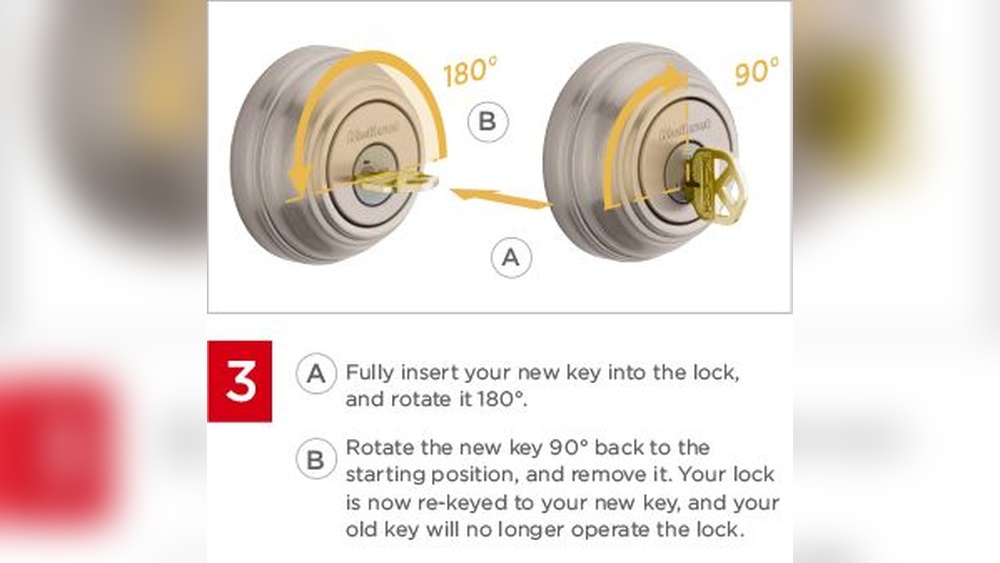
Turn The Key To Reset
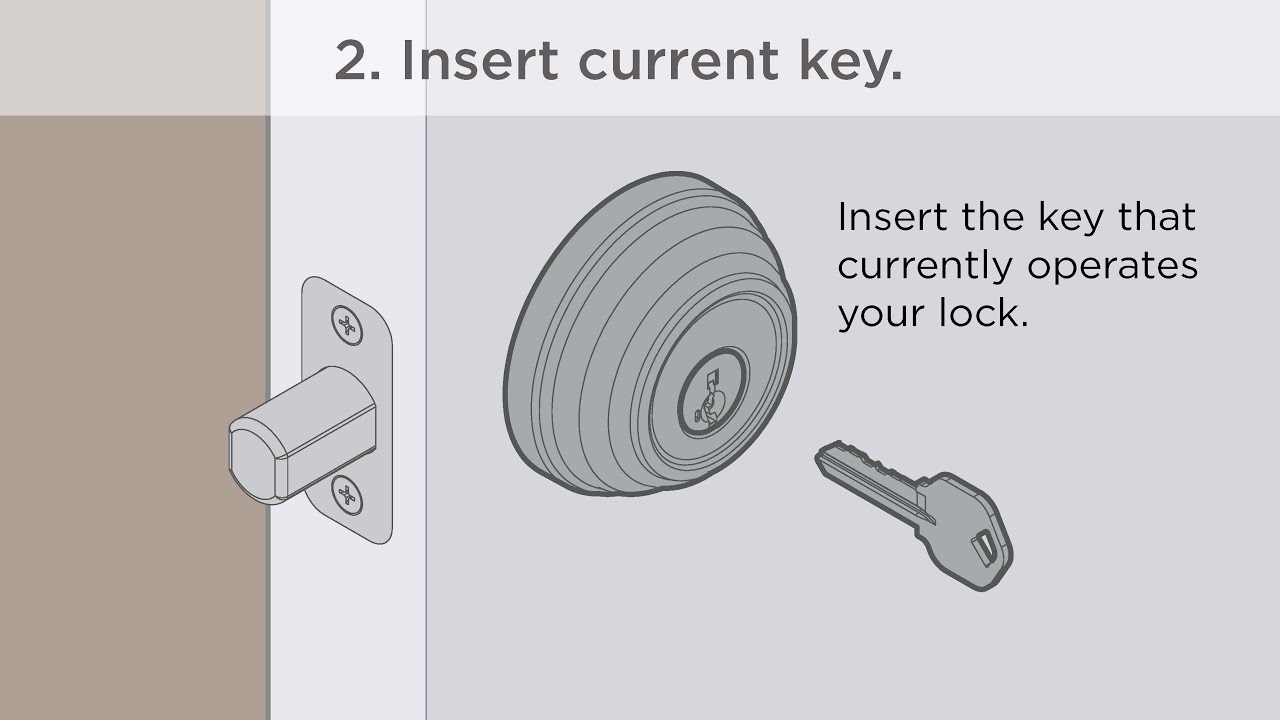
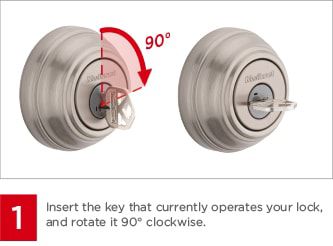
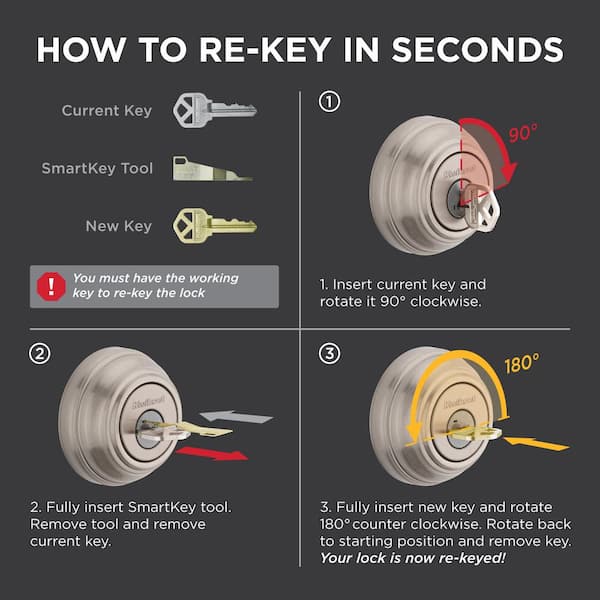
First, insert the current key into the lock. Turn the key 90 degrees clockwise. Keep the key turned and remove the SmartKey tool from the lock. Now, turn the key back to the original position. This action resets the lock’s internal mechanism. The lock is now ready to accept a new key.
Check The Lock Functionality
After resetting, test the lock with the new key. Insert the new key and turn it fully. Make sure the lock opens and closes smoothly. Try locking and unlocking several times. If the lock feels stiff, reset it again. Confirm the lock works well before finishing the job.
Troubleshooting Tips
Troubleshooting a Kwikset SmartKey deadbolt can save time and effort. Small problems often have simple fixes. Knowing what to check helps avoid frustration. Below are key tips to address common issues and advice on when to get expert help.
Common Issues
One frequent problem is the key not turning smoothly. Dirt or debris inside the lock can cause this. Try cleaning the key and the lock cylinder gently.
Another issue is the new key not working after rekeying. This often happens if the pins inside the lock are not aligned properly. Double-check the steps to ensure correct pin placement.
The lock may also jam or get stuck. This can be due to worn parts or improper installation. Lubricate the lock with graphite powder, not oil, to improve movement.
Sometimes the SmartKey tool does not reset the lock. Check if you are using the tool correctly and fully inserting it. Use steady pressure to avoid damage.
When To Seek Professional Help
Call a locksmith if the lock still does not work after basic fixes. Professionals have tools and skills to fix complex problems.
Seek help if the lock is damaged or the key breaks inside. Trying to fix it yourself might make it worse.
When the deadbolt jams repeatedly or feels loose, a technician can inspect and repair it safely. This prevents future lock failures.
Professional help is also wise if you cannot remove the lock from the door. Incorrect removal can damage the door or lock.
Maintenance Advice
Maintaining your Kwikset SmartKey deadbolt ensures it works well for a long time. Proper care helps avoid problems and keeps your home safe. Small efforts can prevent the need for frequent rekeying or repairs.
Keeping The Lock Smooth
Lubricate your lock every six months. Use graphite powder or a silicone-based spray. Avoid oil-based lubricants; they attract dust and dirt. Clean the key and lock cylinder gently before applying lubricant. This keeps the lock turning easily and prevents jamming. Also, check for any visible dirt or debris. Wipe it off with a soft cloth.
When To Rekey Again
Rekey your lock if you lose your key. Change it after moving to a new home. Rekey if someone you trust loses access. Watch for signs like difficulty turning the key. If the lock sticks or feels loose, consider rekeying. Regular checks help you decide the right time. Staying proactive keeps your home secure and gives peace of mind.
Credit: www.homedepot.com
Frequently Asked Questions
How Do I Start Rekeying A Kwikset Smartkey Deadbolt?
Begin by removing the deadbolt’s interior cover to access the SmartKey cylinder. Insert the current key, then use the SmartKey tool to reset the lock’s pins. Follow the specific Kwikset instructions carefully for a smooth rekeying process.
Can I Rekey A Kwikset Smartkey Without Professional Help?
Yes, rekeying a Kwikset SmartKey deadbolt is designed for DIY use. The process requires the SmartKey tool and the original key. Following the step-by-step guide ensures you can rekey the lock safely and efficiently without needing a locksmith.
How Long Does It Take To Rekey A Smartkey Deadbolt?
Rekeying a Kwikset SmartKey deadbolt typically takes 10 to 15 minutes. The process is quick if you have the SmartKey tool and follow instructions carefully. Practice and familiarity can reduce the time further.
Is Rekeying Better Than Replacing The Kwikset Lock?
Rekeying is often faster and cheaper than replacing the entire lock. It allows you to change your key without buying new hardware. Rekeying is ideal for security updates while keeping your existing Kwikset SmartKey deadbolt.
Conclusion
Rekeying a Kwikset SmartKey deadbolt is simple and quick. You only need a few tools and clear steps. Doing it yourself saves money and adds security to your home. Practice patience and follow the instructions carefully. Soon, your lock will work with your new key.
Stay safe and keep your home secure with this easy skill.