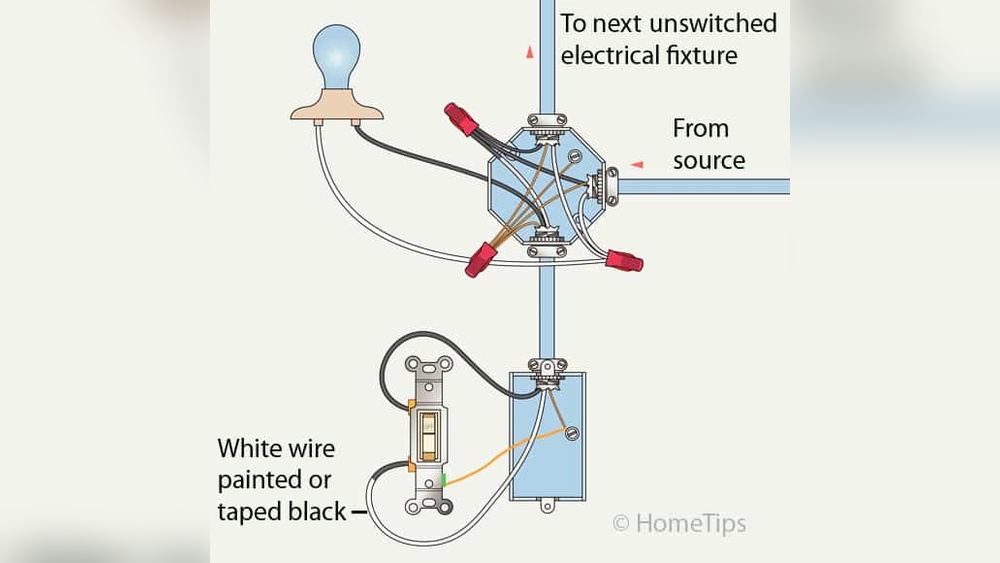
Is your ceiling fan light switch not working properly, or do you want to upgrade it? Changing a ceiling fan light switch might sound tricky, but you can do it yourself with the right steps.
Imagine saving money and avoiding the hassle of calling an electrician. In this guide, you’ll learn exactly how to change your ceiling fan light switch safely and quickly. Keep reading, and by the end, you’ll feel confident to handle this simple home fix on your own.
Tools And Materials Needed
Changing a ceiling fan light switch requires some basic tools and materials. Having the right items ready makes the task easier and safer. This section lists everything needed for the job.
Basic Tools
Start with a screwdriver set. A flathead and a Phillips screwdriver are essential. They help remove and install screws without damage.
A voltage tester is important. It checks if the power is off before you touch any wires. Safety first.
Wire strippers come next. They help strip insulation from wires cleanly. This step ensures a good connection.
Materials
You will need a new ceiling fan light switch. Make sure it matches the old one in size and type.
Electrical tape is useful. It secures wire connections and prevents shorts.
Wire nuts are small connectors. They join wires safely and keep them from coming apart.
Optional Tools
Needle-nose pliers can help bend wires and hold small parts. They offer better control.
A flashlight or headlamp is handy. It lights the work area inside the ceiling fan housing.

Credit: community.smartthings.com
Safety Precautions
Working with electrical parts needs care. Safety is the top rule. Before changing a ceiling fan light switch, follow these safety steps. They protect you from shocks and accidents.
Turn Off The Power
Switch off the circuit breaker that controls the fan. Do not trust the wall switch alone. Use a tester to check no electricity flows to the fan wires.
Use Proper Tools
Pick insulated tools for your task. These tools reduce the risk of electric shock. Avoid using damaged or worn-out tools.
Wear Safety Gear
Wear rubber-soled shoes and safety glasses. This gear protects you from electric shocks and flying debris. Do not work barefoot or with wet hands.
Work In A Well-lit Area
Good lighting helps you see wires and parts clearly. Avoid working in dim or dark places. Use a portable lamp if needed.
Double-check Connections
Make sure all wires are correctly connected before finishing. Loose wires can cause shorts or sparks. Secure wire nuts tightly over wire ends.
Turn Off Power
Turning off the power is the first step before changing a ceiling fan light switch. It keeps you safe from electric shocks. Safety must come first in every electrical task. Never skip this step.
Power can be off at the fan’s switch, but that might not stop all current. The best way is to switch off the power at the circuit breaker. This cuts all electricity flowing to the fan.
Locate The Correct Circuit Breaker
Find the breaker box in your home. It is often in the basement, garage, or closet. Look for labels that show which breaker controls the ceiling fan. If there are no labels, you may need to test each breaker.
Switch Off The Breaker
Flip the switch on the breaker to the off position. This stops the electricity flow completely. Use a steady hand to avoid sudden movements. Confirm the breaker stays off during your work.
Double-check Power Is Off
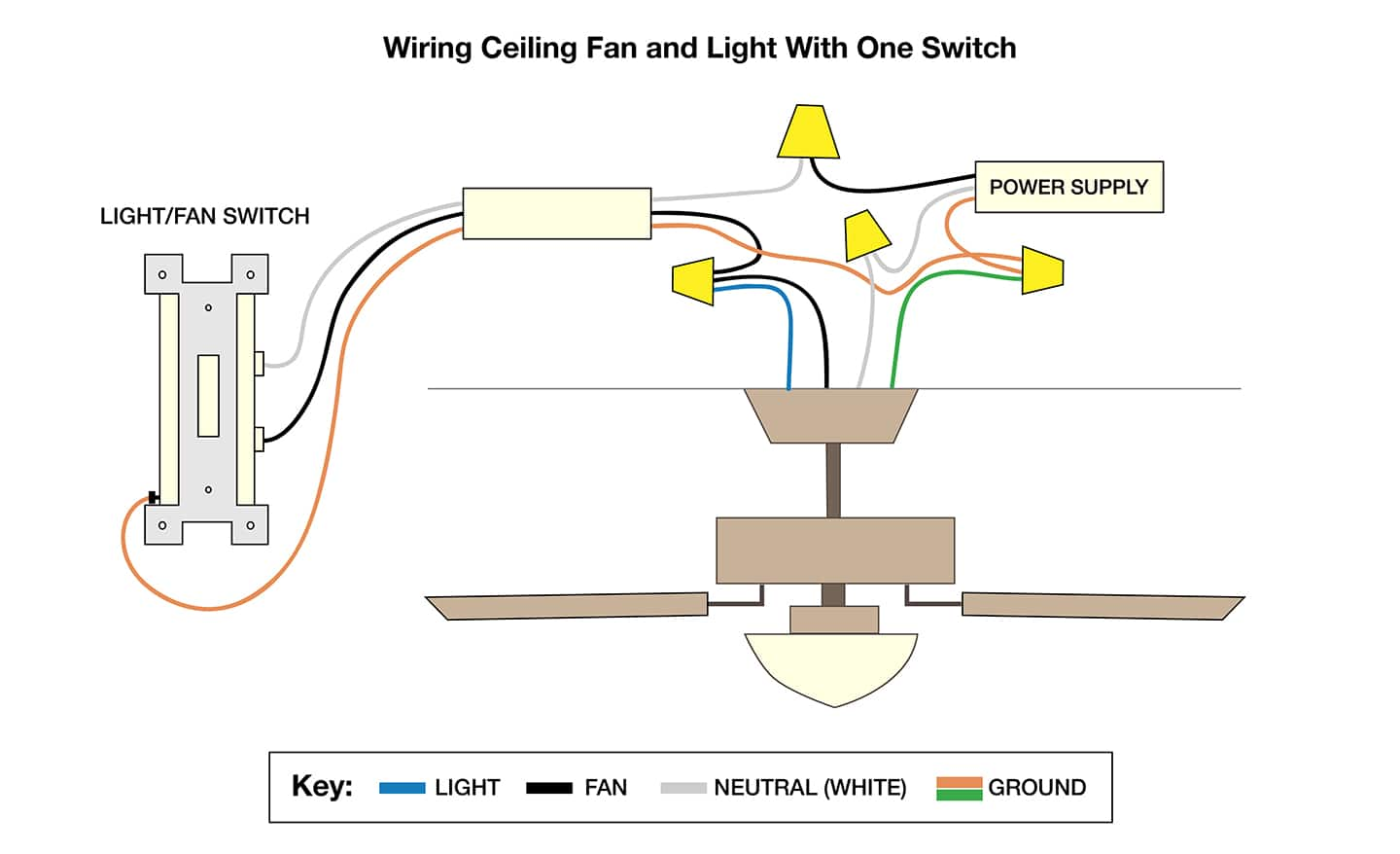
Use a non-contact voltage tester or a simple light tester. Touch the tester to the fan wires or switch terminals. No light or sound means the power is off. Never touch wires if the tester shows power.
Credit: www.homedepot.com
Remove The Old Switch
Removing the old ceiling fan light switch is the first step to installing a new one. This task needs care and attention to stay safe and avoid damage. Follow clear steps to take out the old switch smoothly.
Turn Off The Power
Switch off the circuit breaker for the fan’s power. Double-check by trying the fan switch. No power means safe work.
Remove The Fan Light Cover
Take off the light cover carefully. Use a screwdriver if screws hold it. Set the cover aside.
Unscrew The Old Switch
Look for screws holding the switch in place. Unscrew them with a screwdriver. The switch will come loose.
Disconnect The Wires
Note how wires connect to the switch. Use a screwdriver to loosen wire screws. Pull wires gently to free them.
Identify Wiring
Identifying the wiring is the first step in changing a ceiling fan light switch. This step helps you understand which wires connect to the switch. It makes the replacement safe and easy.
Before starting, turn off power at the circuit breaker. This stops any risk of electric shock. Use a voltage tester to be sure the power is off.
Locate The Switch Wires
Remove the switch cover plate carefully. Use a screwdriver to take out the screws. Pull the switch gently from the wall box.
Look for wires connected to the switch terminals. Usually, there are two or three wires: black, white, and sometimes red. The black wire is often the “hot” wire.
Understand Wire Colors
Black wires carry power from the circuit. White wires are neutral and complete the circuit. Red wires may control the fan or light separately.
Sometimes wires are wrapped with tape. This shows different roles. Check the wiring carefully before proceeding.
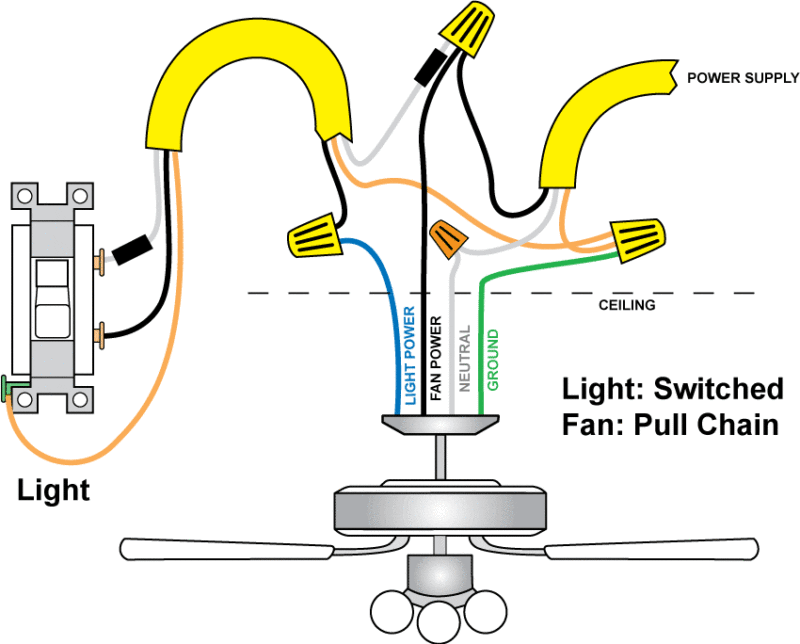
Use A Wiring Diagram
A wiring diagram helps identify each wire’s function. Many ceiling fan manuals include this diagram. It shows which wire connects to the light switch.
Follow the diagram to match wires with the new switch. This prevents mistakes and protects the fan and light.
Credit: www.protoolreviews.com
Install The New Switch
Installing the new switch is the key step to finish your ceiling fan light repair. This part controls the light and fan, so it must be done right. Take your time and follow each step carefully for safety and proper function.
Turn Off The Power
Before touching wires, switch off the power at the breaker box. This prevents electric shock during the installation. Double-check by testing the switch with a voltage tester.
Connect The Wires
Match the wires from the new switch to the ceiling wires. Usually, black wires connect to black, white to white, and green or copper to ground. Twist wire ends together and secure with wire nuts.
Secure The Switch In The Box
Push the connected wires gently into the electrical box. Align the switch with the screw holes in the box. Use screws to fasten the switch firmly in place.
Attach The Switch Plate
Place the switch plate over the switch. Screw it in carefully without cracking the plate. This keeps the switch protected and looks neat.
Test The New Switch
Testing the new ceiling fan light switch is a key step. It confirms that the installation works correctly and safely. This step ensures the light and fan respond as expected. You will know if the wiring is correct or needs adjustment. Testing also helps avoid future electrical problems.
Turn The Power Back On
Start by switching the circuit breaker back on. This restores electricity to the ceiling fan and switch. Do not touch wires before turning the power on. Safety first. Make sure the area is dry and safe before proceeding.
Operate The Switch
Flip the new switch to test its function. Turn it on and off several times. Watch the fan light closely. It should turn on immediately without flickering. The switch should feel smooth and firm when moved.
Check Fan And Light Response
Observe if the fan and light respond separately. The light should work independently from the fan speed. If the fan does not respond, check wiring again. Each function must operate without interference.
Listen For Unusual Sounds
Pay attention to any strange noises. Buzzing or humming can indicate wiring issues. The switch should operate quietly. If noise occurs, turn off the power and inspect connections.
Confirm Switch Stability
Ensure the switch stays in place when toggled. It should not feel loose or wobbly. A stable switch prevents accidental disconnections. Tighten mounting screws if needed to secure it firmly.
Tips For Troubleshooting
Troubleshooting a ceiling fan light switch can save time and effort. Problems can have simple fixes. Knowing what to check first helps. Follow clear tips to find the issue fast.
Check The Power Supply
Make sure the power is off before starting. Use a tester to check the switch wires. Confirm the circuit breaker is on. Sometimes power issues cause the switch to fail.
Inspect The Wiring Connections
Loose or damaged wires often cause problems. Look for disconnected or frayed wires. Tighten any loose screws on wire terminals. Proper wiring is key to a working switch.
Test The Switch With A Multimeter
A multimeter can check if the switch works. Set it to continuity mode. Press the switch and watch the meter. No change means the switch might be faulty.
Look For Visible Damage
Cracks or burns on the switch show damage. Replace the switch if you see any. Damaged switches can be unsafe and cause failure.
Try A Replacement Switch
Swap the old switch with a new one. This helps confirm if the switch is the problem. Use a switch that matches the original type and rating.
Frequently Asked Questions
How Do I Safely Turn Off Power To A Ceiling Fan?
To safely turn off power, switch off the circuit breaker controlling the fan. Verify power is off using a voltage tester before starting any work. Always prioritize safety to prevent electrical shocks while changing the ceiling fan light switch.
What Tools Are Needed To Change A Ceiling Fan Light Switch?
You need a screwdriver, voltage tester, wire stripper, and replacement switch. These tools help safely remove the old switch and install the new one. Having the right tools ensures a smooth and secure switch replacement process.
How Can I Identify The Wires For The Ceiling Fan Switch?
Typically, black or red wires are hot, white is neutral, and green or bare is ground. Use a voltage tester to confirm. Proper identification prevents wiring mistakes and ensures the new switch functions correctly.
How Long Does It Take To Replace A Ceiling Fan Light Switch?
Replacing a ceiling fan light switch usually takes 15 to 30 minutes. This includes turning off power, removing the old switch, wiring the new one, and testing. Time may vary based on experience and switch type.
Conclusion
Changing a ceiling fan light switch can be simple and safe. Always turn off the power before starting work. Use the right tools and follow each step carefully. Double-check your wiring to avoid mistakes. Testing the switch after installation ensures it works well.
Taking your time helps prevent accidents and damage. This small repair can improve your room’s lighting quickly. A little effort brings better control and comfort to your space. You can handle this task with confidence and care.