Setting up your wall TV looks sleek and saves space, but hooking up the cables can quickly turn into a frustrating mess. You want everything neat, hidden, and working perfectly without any tangled wires spoiling the view.
If you’ve ever struggled with messy cables dangling behind your TV, you’re not alone. This guide will show you simple, practical steps to connect and organize your cables like a pro. By the end, your setup will look clean and professional, making your viewing experience much more enjoyable.
Ready to transform your wall TV area? Let’s get started!

Credit: www.legrand.us
Choosing The Right Cables
Choosing the right cables is an important step for a clean and secure wall TV setup. The correct cables ensure good picture and sound quality. They also help avoid clutter and loose wires.
Focus on the type, length, and quality of cables to get the best results. This guide helps you pick the right cables for your wall-mounted TV.
Identify Cable Types
Know which cables your TV and devices need. HDMI cables carry both video and audio signals. They are the most common for modern TVs.
Other cables include optical audio cables, coaxial cables, and component cables. Each one serves a specific purpose. Check your TV’s manual to find the right types.
Check Cable Lengths
Measure the distance from your TV to the devices. Choose cables slightly longer than this distance. Too short cables cause tension and disconnection.
Too long cables can create extra clutter. Cut excess cable length with cable organizers to keep wires neat and tidy.
Consider Cable Quality
Pick cables with good build quality for durability. Look for cables with thick insulation and strong connectors. Cheap cables may fail and reduce signal quality.
High-quality cables help maintain clear images and sound. They also last longer, saving money on replacements.
Preparing The Wall And Tv
Preparing the wall and TV is the first step to mount your TV safely. This process ensures the TV stays secure and looks neat. Careful preparation helps avoid damage to your wall or TV. It also makes cable management easier and cleaner.
Select Mounting Location
Choose a spot with good viewing angles. Avoid places with direct sunlight or glare. Pick a height that fits your eye level when seated. Make sure there is enough space around the TV for cables.
Ensure Wall Compatibility
Check what type of wall you have. Drywall, concrete, or brick walls need different anchors. Use a stud finder to locate wall studs. Mounting on studs gives the best support and safety.
Gather Necessary Tools
Prepare all tools before starting. Common tools include a drill, screwdriver, level, and measuring tape. Have the mounting kit that comes with your TV. Keep a pencil handy to mark drill spots.
Cable Management Options
Managing cables around your wall TV keeps the space neat and safe. It stops cables from tangling and makes cleaning easier. Several options fit different needs and budgets. Choose one that works best for your setup and skill level.
Use Cable Clips
Cable clips are small and simple tools. They hold cables tightly along the wall or TV back. These clips keep wires organized and stop them from hanging loosely. They are easy to install with adhesive backs or nails. Cable clips work well for a few cables and low traffic areas.
Install Cable Raceways
Cable raceways hide cables inside a plastic or metal channel. These channels attach to the wall and paint over. Raceways create a clean look by covering all wires in one place. They protect cables from damage and keep pets or kids safe. Installation needs basic tools and some measuring for a neat finish.
Try In-wall Cable Kits
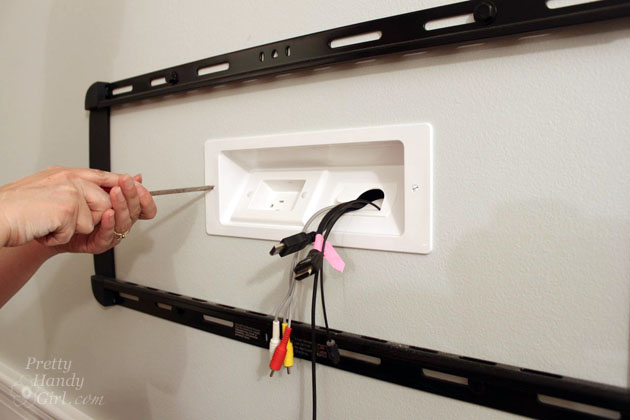
In-wall cable kits let you run cables behind the wall. This method gives the cleanest look with no visible wires. Kits include special plates, cables, and tools to guide wires through the wall. This option requires more work and care to avoid wall damage. It suits permanent setups and those wanting a sleek, modern space.

Credit: www.amazon.com
Step-by-step Cable Hooking
Hooking cables to a wall-mounted TV can seem tricky. This step-by-step guide makes it easy to follow. Each part ensures your cables stay neat and your TV works well.
Turn Off And Unplug Devices
First, turn off your TV and any connected devices. Unplug them from the power source. This keeps you safe and prevents damage to the electronics.
Attach Cables To Tv Ports
Find the matching ports on the TV and cables. Connect each cable firmly to its correct port. Avoid forcing cables; they should fit easily.
Secure Cables Along The Wall
Use cable clips or ties to fasten cables along the wall. Keep them close to avoid hanging wires. This prevents tripping and gives a clean look.
Tips For A Clean Look
Troubleshooting common issues when hooking cables to a wall TV helps keep the setup neat and functional. Small problems can cause big disruptions in your viewing experience. Identifying and fixing these issues saves time and frustration.
Avoid Cable Damage
Protect cables from sharp bends or tight loops. Bent cables break wires inside and stop signals. Use cable clips or covers to keep cables straight and safe. Avoid pulling cables too hard during installation. Check cables for cuts or wear before connecting.
Prevent Signal Interference
Keep power cables separate from signal cables. Crossing cables can cause interference and poor picture quality. Use shielded cables for better protection against noise. Place cables away from devices that emit strong signals. Clear cable clutter to reduce signal loss.
Fix Loose Connections
Check all cable ends for secure fits. Loose connections cause flickering or no signal. Push cables firmly into ports but do not force. Clean cable connectors to remove dust or dirt. Tighten any screws or clips holding cables in place.
Credit: prettyhandygirl.com
Frequently Asked Questions
How Do I Hide Cables Behind A Wall Tv?
To hide cables, use in-wall cable management kits. Cut holes behind the TV and near the outlet. Feed cables through and secure them for a clean look. This method keeps wires invisible and prevents clutter around your wall-mounted TV.
What Tools Are Needed To Hook Cables To A Wall Tv?
You need a drill, screwdriver, stud finder, cable management kit, and measuring tape. These tools help mount the TV and organize cables neatly. Using the right tools ensures a secure installation and prevents damage to your walls or cables.
Can I Hook Multiple Cables To One Wall Tv?
Yes, you can connect multiple cables like HDMI, power, and audio. Use cable organizers or clips to keep them tidy. Labeling cables helps identify connections easily. Proper management prevents tangling and improves your TV setup’s appearance and functionality.
Is It Safe To Run Power Cables Inside The Wall?
Running power cables inside walls must meet electrical codes. Use certified in-wall rated cables only. Consult a professional electrician if unsure. Following safety standards prevents fire hazards and ensures your TV installation is secure and compliant.
Conclusion
Hooking cables to your wall TV is easier than it seems. Start by organizing cables clearly and choosing the right hooks. Secure the hooks firmly to avoid loose wires. Keep cables neat to prevent damage and improve your room’s look.
This simple step helps your TV area stay clean and safe. Try these tips and enjoy a tidy, hassle-free setup. A small effort makes a big difference in your space.