Are you tired of your motion sensor light switch turning on at the wrong moments? Maybe it’s too sensitive, or it just doesn’t fit your daily routine.
Whatever the reason, knowing how to disable a motion sensor light switch can save you frustration and give you full control over your lighting. In this guide, you’ll discover simple steps to turn off that sensor quickly and safely. Keep reading, and you’ll learn exactly how to make your lights work the way you want—no more surprises, no more wasted energy.
Safety First
Safety is the top priority when disabling a motion sensor light switch. Electrical work can be risky without proper care. Taking the right safety steps protects you and your home.
Follow these simple safety tips before starting the process. They help prevent shocks and other accidents.
Turn Off Power
Always turn off the power at the circuit breaker before working on the switch. This stops electricity from flowing and keeps you safe. Use a tester to confirm the power is off. Never skip this step.
Use Proper Tools
Use insulated tools made for electrical work. These tools reduce the risk of electric shock. Avoid using metal tools without insulation. Keep your workspace clean and dry for better control.

Credit: www.youtube.com
Locate The Motion Sensor Switch
Disabling the sensor function on a motion sensor light switch can help control when the light turns on. This is useful if you want the light to stay on constantly or use a manual switch instead. There are simple ways to disable the sensor without removing the whole device.
Adjust Sensor Settings
Most motion sensor switches have settings to change sensitivity and timing. Find the small dials or buttons on the switch face or inside the cover. Turn the sensitivity dial to the lowest setting. This reduces the sensor’s ability to detect motion. Set the timer to the longest delay or off position. This keeps the light from turning off quickly. Some models let you disable the sensor by switching to manual mode.
Bypass The Sensor
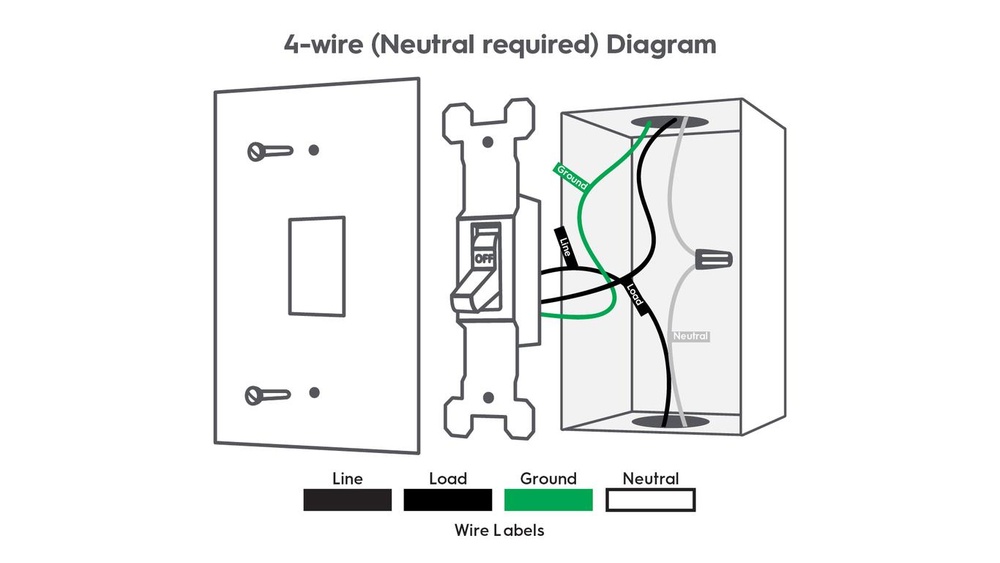
You can bypass the sensor by rewiring the switch. This connects the power directly to the light. First, turn off the power at the breaker. Remove the switch cover and locate the wires. Connect the load and line wires together, skipping the sensor. Use wire nuts to secure connections. Replace the switch cover and restore power. The light now works like a regular switch without sensor control.
Disable The Sensor Function
Manual override options let you control a motion sensor light switch easily. These options help turn off the automatic function. You can use these methods to stop the light from turning on by itself. Here are two simple manual override choices.
Install A Standard Switch
Replacing the motion sensor with a standard switch gives full control. You can turn the light on or off anytime. This switch works like any regular light switch. It removes the motion sensor’s automatic feature. Installation is simple for anyone with basic electrical skills. Always turn off power before starting the replacement. A standard switch is a reliable way to disable the sensor function.
Use A Timer Switch
A timer switch lets you set specific times for the light to work. It overrides the motion sensor during those times. You can keep the light off at night or during the day. The timer switch helps save energy and control lighting. It fits in place of the motion sensor switch. Setting the timer is easy and flexible for different needs. This option keeps some automation while giving you manual control.

Credit: www.reddit.com
Manual Override Options
Testing the motion sensor light switch after disabling it is important. It ensures the switch works as expected. This step helps you avoid any issues before finishing your project.
Restore Power
Turn the circuit breaker back on to restore power to the switch. Check that the light fixture is receiving electricity. If the power is off, the switch cannot be tested.
Verify Operation
Manually operate the switch to see if the light turns on and off. The light should respond only to your control, not motion. This confirms the motion sensor is successfully disabled.
Test The Switch
Troubleshooting a motion sensor light switch can save time and frustration. Small issues often cause the switch to behave oddly. Understanding common problems helps fix them quickly. Below are tips for two frequent issues with these switches.
Sensor Still Active
The sensor might keep detecting motion even when you want it off. Dirt, dust, or spider webs can block the sensor. Clean the sensor gently with a soft cloth. Bright sunlight or heat sources near the sensor may trigger it. Move or shield these objects if possible. Check the sensor’s sensitivity settings. Lowering the sensitivity can reduce false triggers. Some sensors have a test mode. Use it to see if the sensor responds correctly.
Switch Not Working
The switch might not turn the light on or off. Check if the circuit breaker is on. Reset the breaker if it tripped. Loose wiring connections cause many problems. Turn off power and tighten all wire nuts and screws. The switch may be faulty. Replace it with a new one if needed. Ensure the light bulb is not burnt out. Test the bulb in another socket to be sure. Confirm the switch matches your home’s wiring type.

Credit: www.youtube.com
Frequently Asked Questions
How Do I Turn Off A Motion Sensor Light Switch?
To turn off a motion sensor light switch, locate its control panel or switch. Use the manual override or disable the sensor feature following the manufacturer’s instructions.
Can I Disable A Motion Sensor Light Temporarily?
Yes, most motion sensor switches have a temporary disable option. Use the override switch or adjust settings to bypass motion detection for a set time.
Why Is My Motion Sensor Light Switch Not Turning Off?
If the light stays on, check for continuous motion or incorrect sensor settings. Clean the sensor lens and adjust sensitivity to fix the issue.
Is It Safe To Disable A Motion Sensor Light Switch?
Disabling a motion sensor switch is safe if done correctly. Ensure you follow electrical safety guidelines and switch off power before making changes.
Conclusion
Disabling a motion sensor light switch can be simple and safe. Always turn off the power before starting work. Follow the steps carefully to avoid mistakes. This helps control your lighting the way you want. You can switch back anytime if needed.
Taking your time ensures a good result. Now, you can enjoy your light settings without trouble.