Are you looking to brighten up your space without rewiring your entire home? Adding more lights to a switch might sound tricky, but it’s easier than you think.
Imagine controlling multiple lights with just one flick of your finger—more convenience, better ambiance, and a smarter way to light your room. You’ll discover simple, step-by-step ways to expand your lighting setup safely and efficiently. Ready to transform your lighting and make your home shine brighter?
Keep reading, and you’ll have it done in no time.
Tools And Materials Needed
Adding more lights to a switch requires some basic tools and materials. Preparing these items helps the work go smoothly. Safety and proper installation depend on having the right equipment.
Essential Tools
Start with a screwdriver set. Both flathead and Phillips types are useful. A voltage tester is important to check if the power is off. Wire strippers help remove insulation from wires safely. Needle-nose pliers are handy for bending and twisting wires. A drill may be needed to make holes for new fixtures. Finally, a tape measure ensures correct placement of lights.
Choosing The Right Lights
Pick lights that match your switch’s voltage and current ratings. LED lights use less energy and last longer. Incandescent bulbs work but waste more power. Consider the style and brightness for the room. Choose bulbs with the right base size for your fixtures. Check if dimmable lights fit your switch type.
Additional Supplies
Gather extra wire that matches your home’s wiring gauge. Wire nuts secure wire connections and prevent shorts. Electrical tape offers added insulation and safety. Wall plates cover switch boxes for a clean look. A flashlight helps when working in dark spaces. Safety gloves protect your hands during installation.

Credit: www.youtube.com
Safety Precautions
Adding more lights to a switch requires careful attention to safety. Electrical work can be dangerous without the right precautions. Taking simple safety steps helps prevent accidents and injuries. Always prioritize safety before starting any electrical project.
Turning Off Power
Always switch off the power at the circuit breaker before working on a switch. Confirm the power is off to avoid electric shocks. Never trust the switch alone to cut power. Double-checking saves lives and prevents damage.
Using Voltage Testers
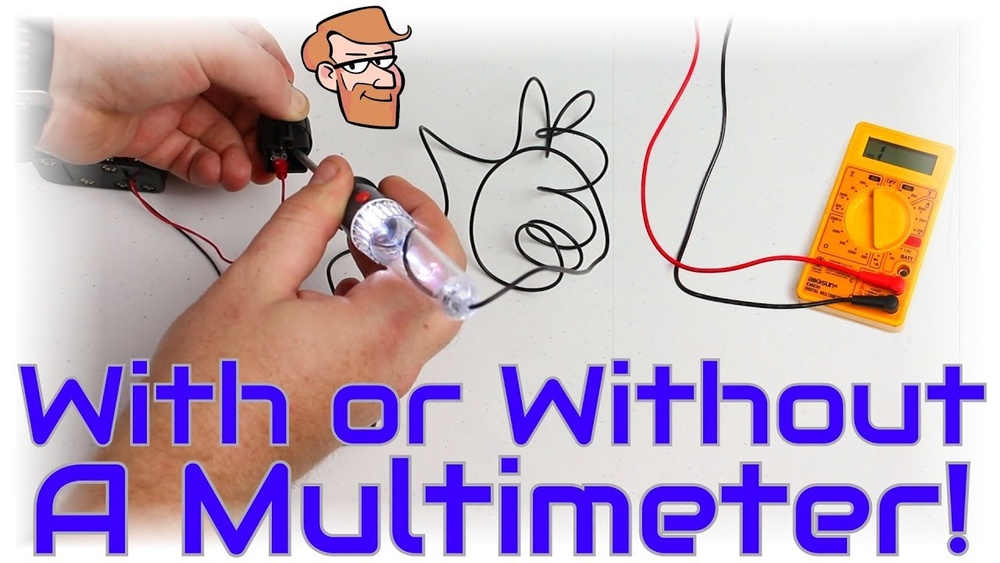
Use a voltage tester to ensure no electricity flows through the wires. Test all wires connected to the switch and nearby outlets. A clear reading means it is safe to proceed. Voltage testers are small but very important tools.
Wearing Protective Gear
Wear rubber gloves and safety goggles to protect yourself. Gloves reduce the risk of electric shock. Goggles shield your eyes from sparks or debris. Dress properly to stay safe during the work.
Identifying Your Switch Type
Identifying your switch type is the first step to adding more lights. Different switches work in different ways. Knowing the type helps you choose the right method and tools. It also keeps the wiring safe and effective. Below are common switch types you might find at home.
Single-pole Switch
A single-pole switch controls one light or a group of lights from one location. It has two terminals and a ground screw. These switches are simple and common in many homes. You can add more lights by connecting them to the same switch. Always turn off power before working on the wiring.
Three-way Switch
A three-way switch controls lights from two different locations. It has three terminals plus a ground screw. These are found in hallways or large rooms. Adding lights here needs careful wiring to maintain control from both switches. Understanding the wiring setup is key to avoid problems.
Smart Switch Considerations
Smart switches work with apps or voice controls. They often need a neutral wire for power. Not all homes have neutral wires in switch boxes. Check your wiring before buying a smart switch. Some models allow adding more lights easily, but others have limits. Read the instructions carefully to ensure compatibility.
Planning Your Wiring Layout
Planning your wiring layout is the first step to add more lights to a switch. A good plan makes the work easier and safer. It helps you know where wires run and where new lights should go. Taking time to plan saves effort and prevents mistakes later.
Locating Existing Wiring
Start by finding the current wires connected to the switch. Turn off power for safety. Use a voltage tester to check wires inside the switch box. Look for cables that run to the lights you want to control. Knowing where wires run helps avoid cutting into the wrong spots.
Determining New Light Placement
Choose where to install new lights. Think about the room size and purpose. Lights should brighten dark corners and work with existing fixtures. Mark spots on the ceiling or walls. Keep new lights close to the switch for easier wiring.
Mapping Circuit Paths
Draw a simple map of wires from the switch to each light. Plan routes that avoid obstacles like pipes or studs. Use existing wire channels if possible. Keep wire runs short to reduce voltage drop. Clear mapping helps during installation and future repairs.
Connecting Additional Lights
Connecting additional lights to a switch allows you to brighten more areas with one control. It saves energy and adds convenience. The process involves careful wiring and safety checks. Follow clear steps to get it done right.
Wiring In Parallel
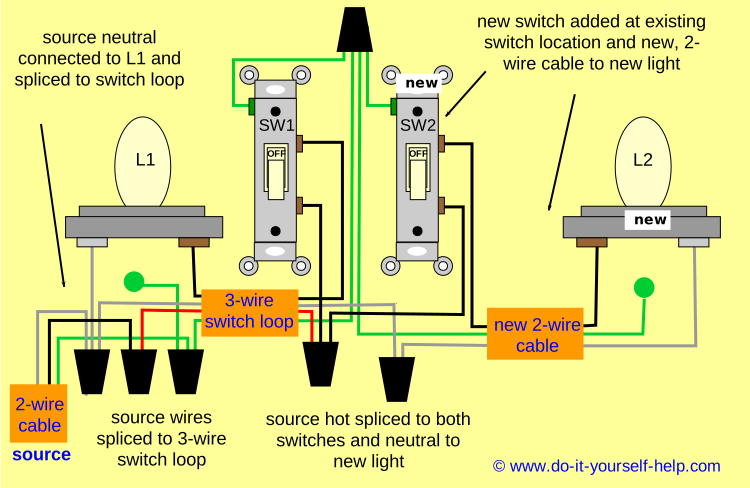
Wiring lights in parallel means each light connects directly to the power source. This way, each light works independently. If one light goes out, the others stay on. Use the same voltage for all lights to avoid damage. Connect the live wires from the switch to each light’s live terminal. Then, connect all neutral wires together and to the power source neutral. This setup keeps the circuit balanced.
Securing Wire Connections
Secure wire connections to avoid loose contacts and shorts. Strip the wire ends carefully without cutting the wire strands. Twist wires together tightly before inserting into wire nuts or connectors. Use electrical tape for extra security around wire nuts. Make sure no bare wire is exposed. Tight connections reduce fire risk and improve light performance.
Testing Connections
Test the new lights before closing the switch box. Turn on the switch and check each light. Use a voltage tester if a light doesn’t turn on. Confirm all wires are connected properly and no sparks appear. Testing ensures safe and functional lighting. Fix any issues before finishing the job.
Installing New Light Fixtures
Installing new light fixtures is a great way to brighten your space and add style. It also allows you to control more lights from one switch. This process involves careful planning and safe installation.
Each new fixture needs proper mounting, wiring, and adjustment. Following safety rules keeps your home safe and your lights working well. Let’s break down the key steps to install new light fixtures correctly.
Mounting Lights Safely
Start by turning off the power at the circuit breaker. Use a sturdy ladder to reach the installation area. Secure the fixture to a strong surface, like a ceiling joist or wall stud. Use the screws and brackets that come with the fixture. Make sure the fixture is tight and will not move.
Using Junction Boxes
Junction boxes protect wire connections and keep them safe. Always install a junction box before wiring new lights. The box should be big enough to hold all wires. Attach the box firmly to the wall or ceiling. Use wire nuts to connect wires inside the box. Cover the box with a proper lid after wiring.
Adjusting Light Angles
Many fixtures allow you to change the light angle. Adjust the lights to cover dark corners or highlight features. Aim lights away from eyes to reduce glare. Test different angles before finishing the installation. Proper angles improve both function and room mood.
Troubleshooting Common Issues
Adding more lights to a switch can sometimes cause issues. Troubleshooting helps you fix these problems quickly. This section covers common problems and simple solutions. Understanding these issues saves time and avoids frustration.
Lights Not Turning On
Check the power source first. Make sure the circuit breaker is on. Inspect the bulbs to see if they are burned out. Confirm that the switch is wired correctly. Loose connections can stop lights from working. Tighten all wires and test again.
Flickering Lights
Flickering can mean a bad connection. Look for loose wires or switches. Replace old or faulty bulbs. Check if the bulbs match the fixture’s wattage. Sometimes, dimmer switches cause flickering. Swap the switch for a regular one to test.
Overloaded Circuits
Adding many lights can overload a circuit. This causes breakers to trip often. Calculate the total wattage on the circuit. Stay within the safe limit for your wiring. Use a separate circuit for extra lights if needed. Consult an electrician for heavy loads.
Credit: www.do-it-yourself-help.com
Upgrading To Smart Lighting
Upgrading to smart lighting is a modern way to improve your home’s lighting. It lets you control lights easily and save energy. Smart switches work with your current setup and add flexibility to your lighting system.
Smart lighting can change how you manage your lights. It brings convenience and new features without complex rewiring.
Benefits Of Smart Switches
Smart switches offer many advantages. You can turn lights on or off from anywhere. They help reduce electricity bills by scheduling lights. Some switches adjust brightness for comfort. Many models work with voice assistants for hands-free control.
Integrating With Existing Wiring
Smart switches fit into most existing wiring systems. They replace old switches without extra wires. Some require a neutral wire; others do not. It is important to check your wiring before buying. Installation is usually simple and can be done by homeowners.
Remote Control Options
Remote control is a key feature of smart lighting. Use apps on your phone or tablet to control lights. Some systems allow control from outside your home. You can group lights to control them together. Remote access adds safety by turning lights on when away.

Credit: diy.stackexchange.com
Frequently Asked Questions
How Can I Add More Lights To One Switch?
To add more lights to one switch, connect the new lights in parallel to the existing wiring. Ensure the switch and circuit can handle the extra load. Turn off power before working and follow electrical codes for safety.
What Tools Do I Need To Add Extra Lights?
You need a voltage tester, wire strippers, screwdrivers, wire nuts, electrical tape, and additional light fixtures. Always use insulated tools and wear safety gear. Proper tools make installation safer and more efficient.
Can I Control Multiple Lights With One Switch?
Yes, one switch can control multiple lights wired in parallel. This setup allows all lights to turn on or off simultaneously. Ensure wiring and switch ratings support the total wattage.
Is It Safe To Add More Lights To An Existing Switch?
Adding lights is safe if done correctly. Turn off power, use proper wiring, and avoid exceeding circuit limits. If unsure, consult a licensed electrician to prevent hazards.
Conclusion
Adding more lights to a switch can brighten any room easily. Always turn off power before starting your work. Use the right tools and follow safety steps closely. Connecting extra lights helps save energy and adds style. Take your time and check all connections carefully.
Enjoy the new, brighter space you create yourself. Simple changes can make a big difference in your home.