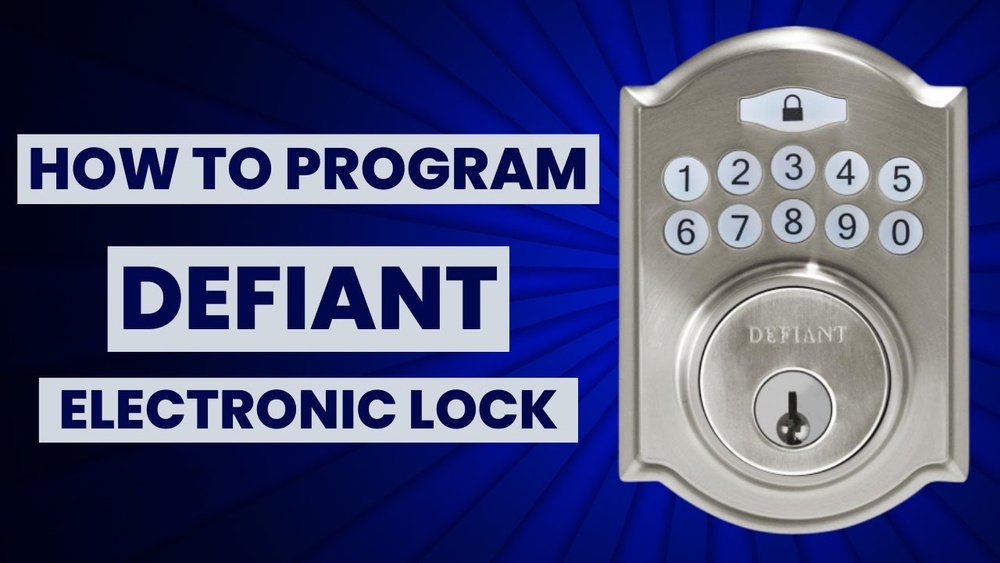
Are you struggling to set up your Defiant electronic deadbolt? You’re not alone.
Programming this smart lock might seem tricky at first, but once you know the simple steps, you’ll have full control over your home’s security in no time. Imagine never fumbling with keys again or worrying about who has access to your door.
In this guide, you’ll learn exactly how to program your Defiant electronic deadbolt quickly and easily. Keep reading, and you’ll master your lock’s features faster than you think.
Tools And Materials Needed
Preparing to program a Defiant electronic deadbolt requires some basic tools and materials. These items make the process smooth and efficient. Having everything ready saves time and reduces frustration.
Below is a list of essential tools and materials. Each plays a key role in programming your deadbolt correctly.
Electronic Deadbolt Kit
The kit contains the deadbolt, keypad, batteries, and mounting hardware. Check that all parts are included before starting. Using the original kit ensures compatibility and ease of installation.
Phillips Screwdriver
A Phillips screwdriver helps remove and secure screws. Choose a medium size for better control. It is necessary for opening the lock housing and attaching the new deadbolt.
Flathead Screwdriver
A flathead screwdriver assists in prying off covers or panels gently. It also helps in minor adjustments during installation. This tool prevents damage to the lock or door.
Fresh Batteries
Most Defiant deadbolts use AA or AAA batteries. Use fresh, high-quality batteries for reliable power. Weak batteries may cause programming errors or lock malfunctions.
Instruction Manual
The manual guides programming steps and troubleshooting. Follow it closely to avoid mistakes. Keep it handy during the entire process for quick reference.
Flashlight
A flashlight improves visibility in dim areas. It helps see small parts and wiring clearly. This tool makes programming easier, especially in low-light conditions.
Credit: www.ilockey.com
Preparing The Deadbolt
Preparing your door for a Defiant electronic deadbolt is the first step in a smooth installation. This phase ensures your door is ready to hold the new lock securely. Taking time here prevents problems later.
Removing The Old Lock
Start by unscrewing the old lock from the door. Keep all screws safe; some may be useful later. Remove both the interior and exterior parts carefully. Take out the latch from the edge of the door. Clean the door surface to remove dirt or debris. This clears the way for the new deadbolt.
Checking The Door Alignment
Close the door to see if it fits well in the frame. The latch must line up with the strike plate. If it does not, the door may need adjustment. Check for gaps or uneven spaces around the door. Make sure the door swings freely without sticking. Correct alignment helps the deadbolt lock smoothly and securely.
Installing The Electronic Deadbolt
Installing a Defiant electronic deadbolt is a straightforward process. This section guides you through the key steps to fit the lock properly. Follow these instructions carefully for a secure setup.
Mounting The Lock Components
Start by removing the old deadbolt from your door. Align the new lock’s faceplate with the hole on the door edge. Use the screws provided to secure the faceplate tightly.
Next, attach the exterior keypad to the front of the door. Make sure the tailpiece fits through the latch mechanism. Place the interior assembly on the opposite side of the door.
Hold both parts firmly together. Insert and tighten the mounting screws. Check that the lock is flush and does not wobble.
Connecting The Wiring
Open the battery compartment on the interior assembly. Connect the wiring harness from the keypad to the control board inside. Ensure each connector snaps into place firmly.
Do not force wires or bend pins. Insert the batteries as indicated by the polarity marks. Close the battery cover securely.
Test the lock by pressing buttons on the keypad. The lock should respond with sounds or lights. This confirms the wiring is correct and the deadbolt is ready.
Programming The Deadbolt
Programming your Defiant electronic deadbolt is simple. It lets you control who can enter your home. You can set a main code and add several user codes. You can also delete codes no longer needed. This section guides you step-by-step through the process.
Setting The Master Code
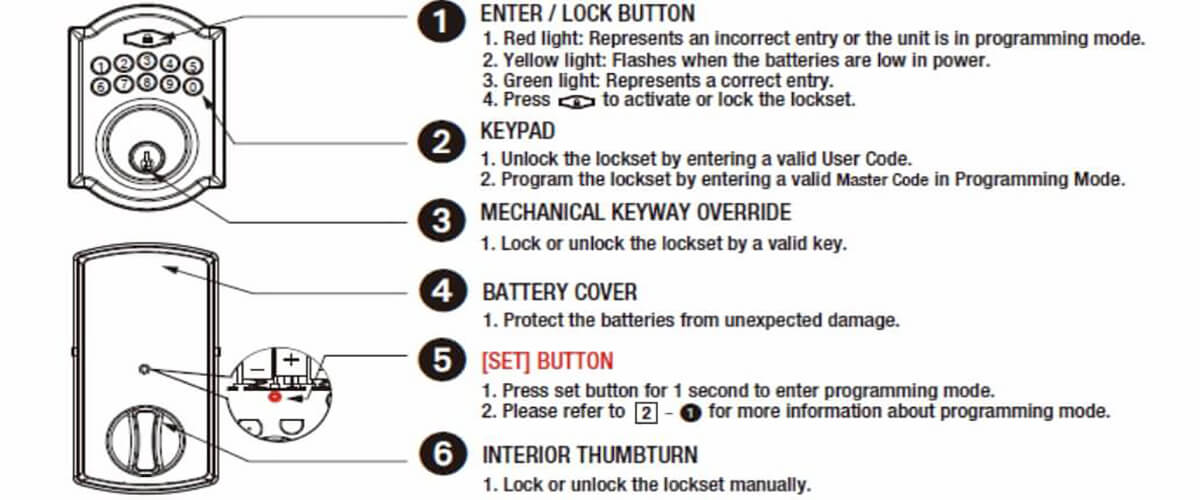
Start by finding the programming button inside the lock. Press and hold it until the keypad lights up. Enter the factory default code, usually found in the manual. Then press the programming button again. Now, enter your new master code. This code should be easy to remember but hard to guess. Press the programming button once more to save the code. Your master code controls all other settings.
Adding User Codes
Press the programming button once. Enter the master code you just set. Press the programming button again. Now, enter the new user code. This code can be shorter than the master code. Press the programming button to save this user code. You can add up to 20 user codes. Each code lets a different person enter your home.
Deleting User Codes
Press the programming button and enter the master code. Press the programming button to enter code deletion mode. Enter the user code you want to delete. Press the programming button to confirm. The code will no longer work on your lock. Repeat these steps for any code you want to remove. This keeps your lock secure and up to date.
Testing The Lock Functions
Testing the lock functions is a key step after programming your Defiant electronic deadbolt. This ensures the lock works correctly and keeps your home safe. You can check each feature carefully to spot any issues early. A properly tested lock gives peace of mind and smooth operation every day.
Lock And Unlock Features
Start by locking the door with the keypad or key fob. Listen for the sound of the bolt moving. Try unlocking the door the same way. Test multiple times to confirm the lock responds each time. Check the physical movement of the deadbolt inside the door. It should slide out and retract smoothly without sticking. Make sure the door locks firmly and opens easily after unlocking.
Battery Check And Replacement
The lock runs on batteries, so check battery power often. Low batteries can cause the lock to work slowly or fail. Most models have a low battery alert, like a blinking light. Replace batteries with fresh ones as soon as you see this alert. Use high-quality alkaline batteries for longer life. Remove old batteries carefully to avoid corrosion or damage. Test the lock again after battery replacement to confirm it works well.
Troubleshooting Common Issues
Programming a Defiant electronic deadbolt usually goes smoothly. Small problems can still appear during setup or use. Knowing how to fix these issues saves time and frustration. This section covers common problems and clear solutions. Follow these tips to keep your deadbolt working well.
Battery Issues And Power Problems
Deadbolts need fresh batteries to work properly. Check battery life if the lock is slow or unresponsive. Replace old batteries with new ones of the same type. Clean battery contacts to remove dirt or corrosion. Avoid mixing old and new batteries.
Programming Code Not Accepted
Enter the programming code carefully. The keypad must be clean and dry. Reset the lock by removing batteries for 30 seconds. Reprogram the code following the manual exactly. Make sure to use the default master code first.
Lock Does Not Engage Or Disengage
Check if the deadbolt is aligned with the door frame. Adjust the strike plate if the bolt sticks. Lubricate moving parts with graphite powder or silicone spray. Avoid oil-based lubricants that can attract dust.
Keypad Buttons Not Responding
Clean the keypad gently with a soft cloth. Dirt or moisture can block button presses. Remove batteries, wait, and reinstall them. Test the keypad after rebooting the lock.
Lock Freezes Or Works Slowly
Low battery power often causes slow response. Replace batteries immediately. Reset the lock if problems continue. Make sure the lock firmware is up to date if possible.
Security Tips For Electronic Deadbolts
Electronic deadbolts add convenience to home security. They use codes or apps to lock and unlock doors. Proper use is key to keeping your home safe. Follow these simple tips to improve the security of your electronic deadbolt.
Use Strong And Unique Access Codes
Create codes that are hard to guess. Avoid simple sequences like 1234 or 0000. Do not use birthdays or phone numbers. Change your code regularly to stop unwanted access. Share codes only with trusted people.
Enable Auto-lock Features
Set your deadbolt to lock automatically after closing the door. This prevents leaving your door unlocked by mistake. Auto-lock helps keep your home secure without extra effort. Check that the feature works correctly after installation.
Keep Firmware Updated
Regular updates fix bugs and improve security. Check the manufacturer’s website or app for updates. Apply updates as soon as possible to avoid risks. Updated firmware protects against hacking attempts.
Limit Temporary Access Codes
Create temporary codes for visitors or workers. Set expiration times for these codes. Remove codes immediately after use. This controls who can enter and for how long.
Secure Your Mobile App
Use strong passwords for apps controlling the lock. Enable two-factor authentication if available. Avoid using public Wi-Fi to control your lock. Protect your phone with a password or fingerprint.
Credit: www.homedepot.com
Credit: www.youtube.com
Frequently Asked Questions
How Do I Reset A Defiant Electronic Deadbolt?
To reset, locate the reset button inside the battery compartment. Press and hold it for 5 seconds. The lock will beep, indicating a successful reset. This clears all codes and restores factory settings.
Can I Program Multiple User Codes On This Deadbolt?
Yes, Defiant deadbolts allow multiple user codes. You can store up to 30 unique codes. This feature is ideal for families or businesses needing different access levels.
What Batteries Are Required For A Defiant Electronic Deadbolt?
Most Defiant electronic deadbolts use four AA alkaline batteries. Replace them every 6 to 12 months for optimal performance. Low battery alerts will notify you before power runs out.
How Do I Add A New User Code To The Lock?
Enter programming mode using the master code. Select the option to add a new user code. Input the new code and confirm. The lock will beep to confirm successful programming.
Conclusion
Programming a Defiant electronic deadbolt is simple and quick. Follow each step carefully to avoid errors. Test your code after programming to ensure it works well. Keep your code private to maintain security. Regularly update your deadbolt’s settings for safety.
This guide helps you control access easily at home. Enjoy the convenience and peace of mind your deadbolt offers.