Are you ready to take full control of your home’s security? Programming your Schlage Sense Smart Deadbolt might sound tricky, but it’s easier than you think.
With just a few simple steps, you can customize your lock to fit your lifestyle, giving you peace of mind and convenience. In this guide, you’ll learn exactly how to set up and program your Schlage Sense Deadbolt so it works perfectly for you.
Keep reading—your smarter, safer home is just moments away.
Getting Started With Schlage Sense
Getting started with the Schlage Sense smart deadbolt is simple. This guide helps you set up your new lock quickly. Follow these steps to ensure a smooth installation and programming process.
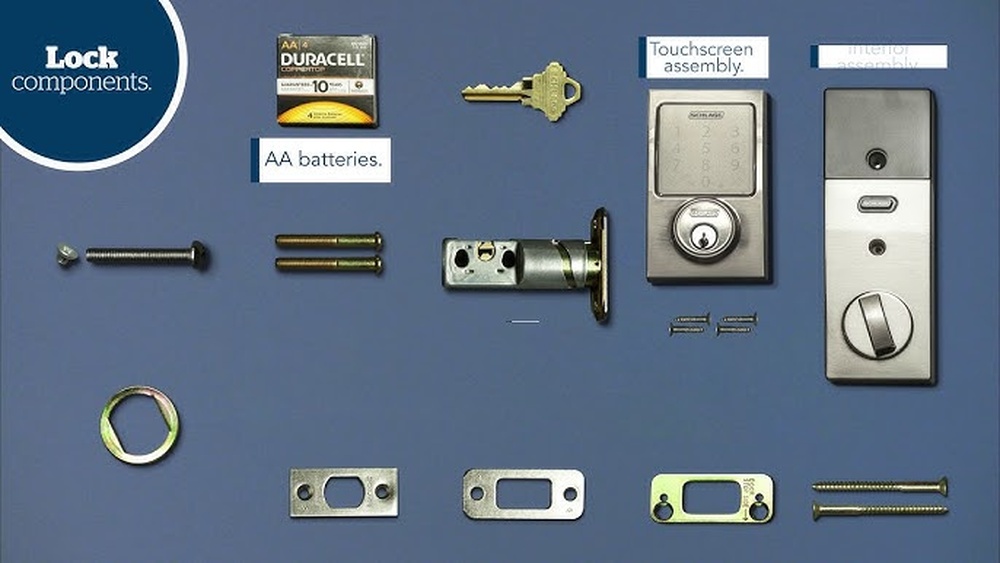
Checking Package Contents
First, open the box and check all parts. You should find the lock assembly, mounting hardware, and two keys. Also, look for the installation guide and the keypad. Confirm nothing is missing before starting.
Gathering Required Tools
Prepare a Phillips screwdriver for installation. You might also need a tape measure to check door fit. No special tools are required beyond these basics. Having tools ready saves time.
Installing Batteries
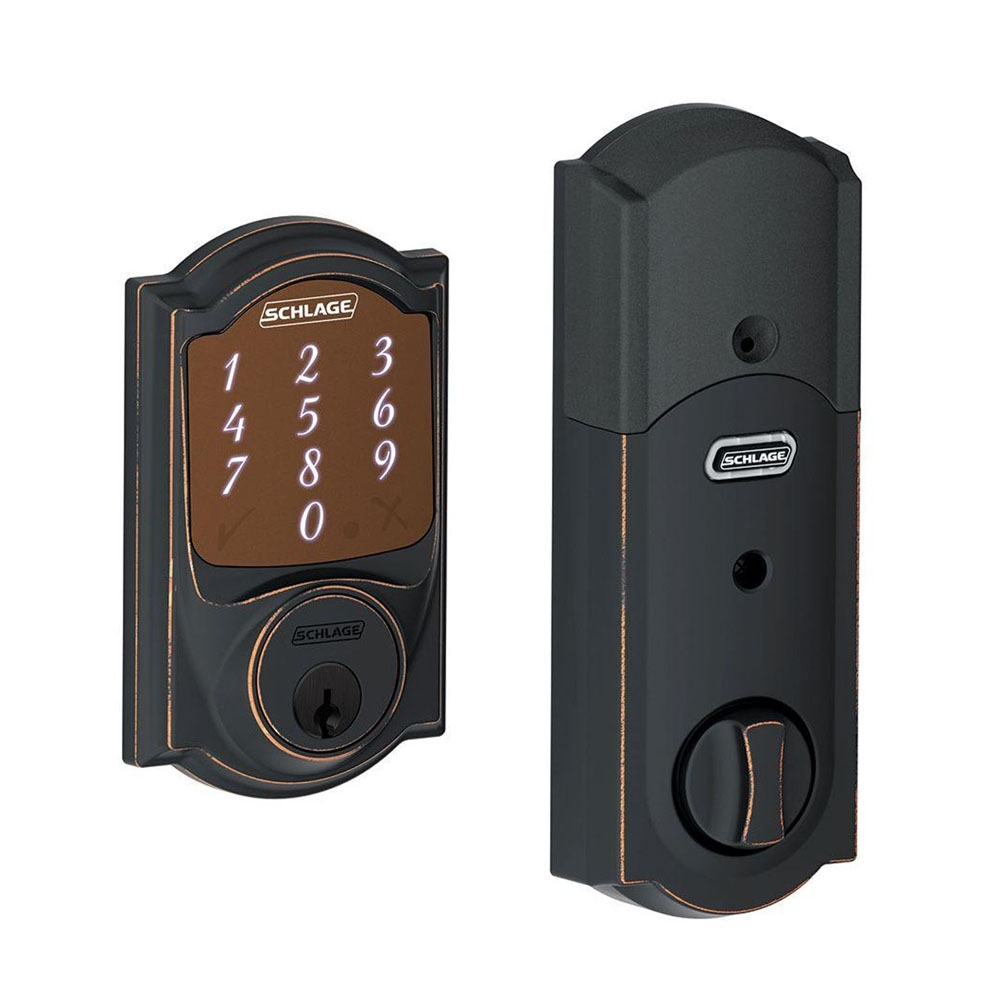
Insert four AA batteries into the lock’s battery compartment. Use fresh, high-quality alkaline batteries for best results. Align the batteries correctly, matching the plus and minus ends. Close the compartment securely to power the lock.
Credit: www.craftmasterhardware.com
Installing The Deadbolt
Installing the Schlage Sense Smart Deadbolt is a straightforward process. This guide helps you fit your new lock quickly and safely. Follow the steps carefully to ensure the best fit and security for your door.
Removing Old Lock
Start by removing the old lock from your door. Use a screwdriver to take out the screws on the interior side. Gently pull off the lock parts from both sides of the door. Remove the latch from the edge of the door. Clean the door surface to prepare for the new deadbolt.
Aligning New Deadbolt
Place the new latch into the door’s edge. Make sure the bolt faces the correct direction. Align the exterior keypad with the holes on the front side of the door. Hold the interior assembly on the inside of the door. Check that all parts fit flush and line up well.
Securing The Lock
Insert the screws through the interior plate into the exterior keypad. Tighten screws evenly to avoid shifting the lock. Attach the battery cover and insert batteries as instructed. Test the deadbolt by turning the thumb turn inside. Confirm the lock moves smoothly and locks securely.
Setting Up The Schlage Sense App
Setting up the Schlage Sense app is the first step to control your smart deadbolt easily. This app lets you lock and unlock your door from anywhere. It also helps manage user codes and monitor access. Follow these simple steps to get started quickly.
Downloading The App
Search for “Schlage Sense” in the App Store or Google Play. The app is free and small in size. Download and install it on your smartphone or tablet. Make sure your device has a stable internet connection during this process.
Creating An Account
Open the Schlage Sense app. Tap on “Create Account” to start. Enter your email address and set a secure password. Verify your email if the app asks you to. This account keeps your lock data safe and secure.
Connecting To The Lock
Turn on Bluetooth on your phone. Open the app and tap “Add Lock” or the plus sign. Follow the on-screen instructions to find your lock. Enter the lock’s programming code found on the inside of the deadbolt. Wait for the app to confirm the connection.

Credit: www.youtube.com
Programming User Codes
Programming user codes on your Schlage Sense Smart Deadbolt is simple and helps control who can enter your home. Each code gives access to one person, making it easy to manage family or guests. You can add, change, or remove codes anytime through the app or the lock itself.
Adding New Users
Start by opening the Schlage Sense app on your phone. Select the lock you want to program. Find the option for user codes or access codes. Tap “Add User” and enter a name for the new user. Create a new code with 4 to 8 digits. Save the code and sync it to your lock. The new user can now unlock the door with their code.
Editing Existing Codes
Go to the user codes list in the app. Choose the code you want to change. Enter a new 4 to 8 digit code. Confirm the change and save it. The lock updates automatically. The old code will no longer work. This helps keep your home secure if you suspect a code is shared.
Deleting User Codes
Open the user codes section in the app. Find the code you want to delete. Tap “Delete” or “Remove” next to the code. Confirm the deletion. The code is erased from the lock. This stops access for that user immediately. It’s useful for removing codes of guests or workers after visits.
Customizing Lock Settings
Customizing your Schlage Sense Smart Deadbolt lets you tailor its features. You can control how the lock behaves and notifies you. This helps improve security and convenience in your home. Adjust settings easily through the Schlage app on your phone. Here are key ways to customize your lock settings.
Adjusting Auto-lock Features
The auto-lock feature secures your door automatically after a set time. You can choose how many seconds after closing the door the lock activates. This prevents you from forgetting to lock the door. Set the timer to as little as 30 seconds or up to 4 minutes. Turn off auto-lock if you prefer manual control. Adjusting this feature adds peace of mind to your daily routine.
Enabling Notifications
Notifications keep you informed about lock activity. Enable alerts for locking, unlocking, or failed attempts. Get notified when someone uses a code or the app to enter. This feature helps monitor who accesses your home. Customize notifications to appear on your phone or via email. You can choose which events send alerts. Notifications add an extra layer of security.
Managing Lock Sound And Volume
Lock sounds confirm when the door locks or unlocks. Adjust volume to suit your preference or environment. Turn sounds off for quiet settings like nighttime. Use louder tones to hear the lock from a distance. The app allows easy sound adjustments. Managing sound settings makes your lock less intrusive and more user-friendly.
Troubleshooting Common Issues
Troubles with your Schlage Sense Smart Deadbolt can stop it from working right. Many common problems have simple fixes you can try at home. Knowing these easy solutions saves time and keeps your lock secure.
Resetting The Lock
Resetting the lock clears errors and restores factory settings. Press and hold the Schlage button for about 10 seconds. Wait for the lock to beep and the light to flash. This process removes all user codes and resets the lock.
After resetting, reprogram the lock using the app or keypad. Resetting helps if the lock is not responding or acting strange. It is a quick way to fix software glitches.
Battery Replacement Tips
Low battery power causes many lock issues. Replace batteries when the lock beeps or shows a low battery warning. Use four new AA alkaline batteries for best results.
Remove the battery cover carefully to avoid damage. Insert batteries with correct polarity. Avoid mixing old and new batteries to prevent power problems.
Regular battery checks keep your lock working smoothly. Battery life can vary depending on use and temperature.
Connectivity Problems
Connection issues stop the lock from syncing with your phone. Check that Bluetooth is on and the phone is near the lock. Restart the app or phone to refresh the connection.
Ensure the lock’s firmware is up to date. Update the app to the latest version from your app store. Remove and re-add the lock in the app if problems persist.
Good Wi-Fi or Bluetooth signals improve lock performance. Interference from walls or devices can cause connection drops.
Maintenance And Security Tips
Keeping your Schlage Sense Smart Deadbolt in good shape is key to home safety. Regular care and smart updates help the lock work well. They also keep your home more secure. Below are simple tips to maintain and improve your lock’s security.
Regular Lock Inspection
Check the lock often for any signs of damage. Look at the deadbolt, keypad, and battery compartment. Clean the lock gently with a soft cloth to remove dirt. Avoid using harsh chemicals that can harm the finish.
Test the lock by locking and unlocking it several times. Make sure the bolt moves smoothly. Replace batteries at least once a year to avoid lockouts.
Updating Firmware
Keep the lock’s software up to date. Schlage often releases updates to fix bugs and improve security. Use the Schlage app to check for updates regularly. Installing updates is simple and fast.
Updated firmware helps protect your lock from new security threats. It also adds new features that enhance usability.
Enhancing Home Security
Use strong, unique codes for each user. Change codes periodically to keep access safe. Limit who can add or delete codes through the app.
Consider adding a security camera near the door. This adds an extra layer of protection. Check that your Wi-Fi network is secure to protect the lock’s connection.
Credit: www.schlage.com
Frequently Asked Questions
How Do I Program A Schlage Sense Lock?
To program, download the Schlage Home app and connect via Bluetooth. Follow app instructions to set up users and codes.
Can I Add Multiple Users On Schlage Sense?
Yes, you can add up to 30 unique user codes via the app for family or guests.
What If I Forget My Schlage Sense Programming Code?
Use the default code on the lock or reset the lock to factory settings to regain access.
How Do I Reset Schlage Sense To Factory Settings?
Press and hold the reset button inside the lock for 10 seconds until the LED flashes.
Conclusion
Programming your Schlage Sense smart deadbolt is simple and quick. Follow the steps carefully to set up your lock. You can change codes and manage access anytime. This smart lock adds safety and convenience to your home. Enjoy easy control through your phone or keypad.
Keep your home secure with just a few taps. Stay confident knowing your door lock works for you. Smart security made easy.