Are you tired of dealing with bulky TV stands taking up space? Anchoring your TV to the wall can transform your room, making it look sleek and organized.
But if you’re worried about safety or unsure where to start, you’re not alone. This guide will walk you through simple, step-by-step instructions to securely anchor your TV, so it stays put and looks great. By the end, you’ll have the confidence to do it yourself and enjoy a clutter-free, stylish space.
Ready to get started? Let’s dive in!
Choosing The Right Wall Mount
Choosing the right wall mount for your TV is key to a safe and neat setup. The mount holds your TV in place and keeps it secure on the wall. Picking the correct type helps avoid damage to the TV and the wall. It also makes sure the TV fits well in your room and looks good.
Types Of Wall Mounts
There are three main types of wall mounts: fixed, tilting, and full-motion. Fixed mounts keep the TV flat against the wall. Tilting mounts allow you to angle the TV up or down. Full-motion mounts let you move the TV side to side and tilt it. Choose the type based on how you want to view the screen.
Weight And Size Compatibility
Check the mount’s weight limit and size range. The mount must support your TV’s weight. It should also fit the TV’s screen size. Using the wrong mount can cause the TV to fall or be unstable. Always match the mount specs with your TV details.
Material And Build Quality
Strong materials like steel provide good support. Look for mounts with solid construction and good reviews. Quality build means the mount will hold the TV safely for a long time. Avoid mounts made from weak or cheap materials.
Tools And Materials Needed
Before you start anchoring your TV to the wall, gather all necessary tools and materials. Having everything ready makes the process smooth and safe. It also saves time and prevents mistakes. Below are the key items needed for this task.
Essential Tools
You will need a drill to make holes in the wall. A screwdriver helps to fix screws tightly. A stud finder locates wall studs for secure mounting. A level ensures your TV stays straight. A tape measure helps with accurate placement. A pencil marks the spots where you drill.
Mounting Hardware
Use the wall mount bracket that fits your TV size. Screws and anchors hold the mount firmly on the wall. Sometimes bolts come with the mount for extra support. Check if your TV has the right holes for mounting. Read the mount’s instructions for the correct hardware.
Safety Gear
Wear safety glasses to protect your eyes from dust and debris. Gloves keep your hands safe from sharp tools. Use a dust mask if drilling creates a lot of dust. Make sure the area is clear to avoid tripping or falling. Safety first keeps your project trouble-free.
Finding The Ideal Mounting Spot
Finding the ideal mounting spot for your TV is the first step. This choice affects safety, viewing comfort, and room aesthetics. Picking the right place avoids damage and gives the best experience. Several key points help you select the perfect spot on the wall.
Stud Location Techniques
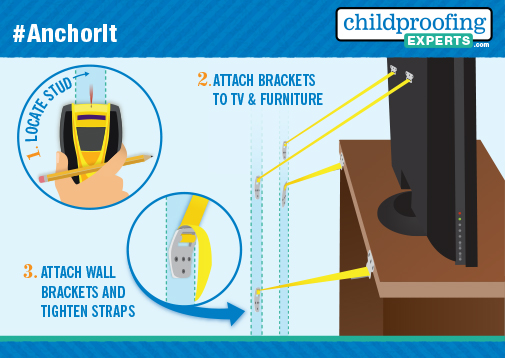
Finding studs is essential for a secure TV mount. Studs hold the TV’s weight and prevent wall damage. Use a stud finder tool to locate wooden beams behind drywall. Tap the wall gently and listen for a solid sound. You can also measure 16 or 24 inches from a corner. These are common stud intervals in many homes.
Avoiding Electrical And Plumbing Hazards
Check for electrical wires and pipes before drilling. Drilling into wires or pipes can cause serious harm. Use a wire detector to scan for live electrical cables. Avoid spots near power outlets, switches, and water fixtures. Confirm the area is safe to prevent costly repairs or accidents.
Optimal Viewing Height
Mount your TV at eye level for comfortable viewing. The center of the screen should align with your seated eye height. This is usually about 42 inches from the floor. Avoid mounting the TV too high or too low. This reduces neck strain and improves the watching experience.

Credit: www.amazon.com
Preparing The Wall
Preparing the wall is a key step before anchoring your TV. It ensures the TV stays secure and safe. Proper preparation protects your wall and your device. Take your time to do this right. A solid foundation makes installation easier and more reliable.
Marking Drill Points
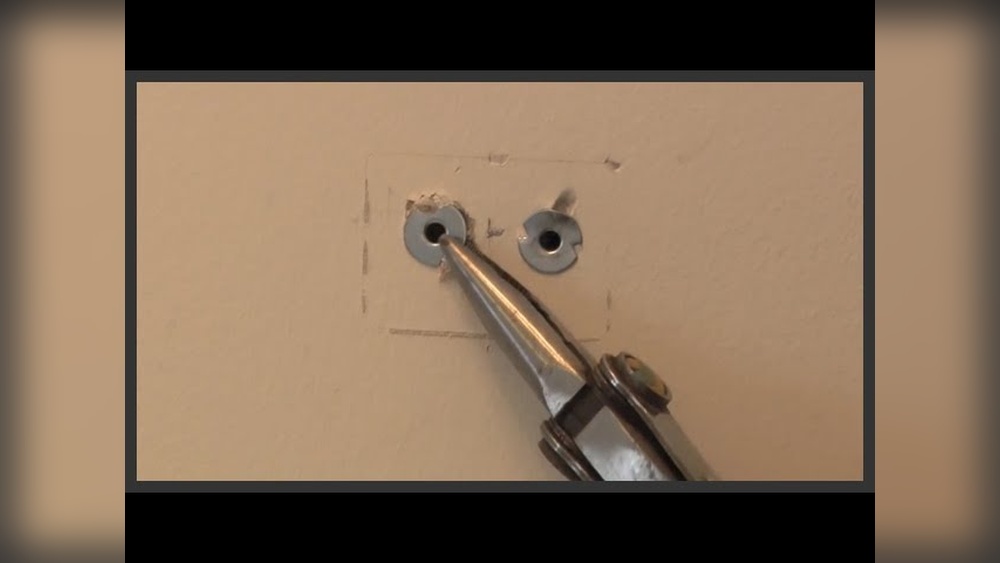
Start by holding the TV mount against the wall. Use a pencil to mark where the screws will go. Double-check the marks to match the mount holes. Clear, accurate marks guide your drilling and keep the mount steady.
Using A Level For Accuracy
Place a level on the marked points. Make sure the marks line up straight. A crooked mount can cause the TV to tilt or fall. Adjust the marks until the bubble is centered. This step ensures your TV hangs perfectly flat.
Drilling Pilot Holes
Choose a drill bit smaller than your wall anchors. Drill slowly at each marked spot. Pilot holes help screws go in smoothly. Avoid drilling too deep or wide. Proper holes keep the mount tight and the wall intact.
Installing The Wall Bracket
Attaching the TV to the mount is a key step in securing your television safely. This process requires care and the right approach to avoid damage and ensure stability. Follow the steps below to attach your TV confidently and correctly.
Connecting Mounting Plate To Tv
Start by locating the mounting holes on the back of your TV. Align the mounting plate with these holes carefully. Use the screws provided with the mount to attach the plate. Tighten the screws firmly but avoid over-tightening. Make sure the plate is flush against the TV for a strong hold.
Lifting And Securing Tv
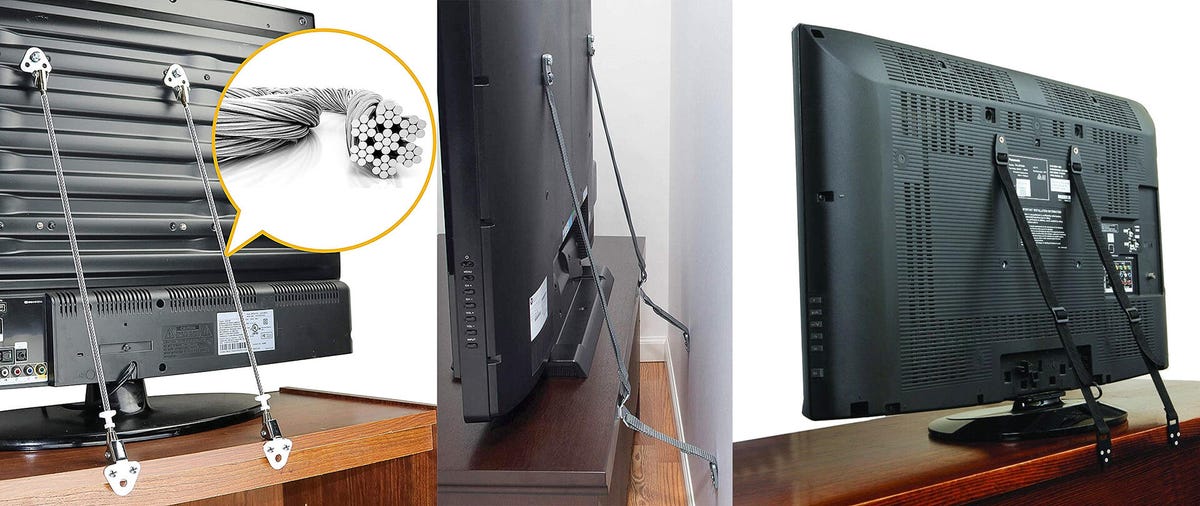
With help, lift the TV and line up the mounting plate with the wall bracket. Gently hook the plate onto the bracket. Check that the TV sits evenly and is secure. Some mounts have locking screws or clips—use these to lock the TV in place. Double-check the fit to prevent any movement.
Adjusting Tilt And Swivel
Adjust the tilt by loosening the tilt screws or knobs. Set your desired angle for the best view. Tighten the screws once the tilt is right. For swivel, gently move the TV side to side. Stop at the angle that suits your room. Ensure all adjustments are secure before finishing.
Credit: www.cnet.com
Attaching The Tv To The Mount
After anchoring your TV to the wall, safety checks are very important. These steps make sure your TV stays secure and works well. Taking time for final tips improves the setup and protects your device. Follow these simple guidelines to keep everything safe and neat.
Confirming Secure Attachment
Check all screws and bolts are tight. The TV mount should not move or wiggle. Give a gentle pull to test the hold. Make sure the wall anchors are strong and fixed. If anything feels loose, tighten it again. A secure attachment prevents accidents and damage.
Cable Management Ideas
Organize your cables to avoid clutter and hazards. Use cable clips or covers to keep wires tidy. Run cables along the wall or behind furniture. Label cords to know which device they belong to. Neat cables make cleaning easier and reduce tripping risks.
Regular Maintenance
Check the mount and cables every few months. Look for any signs of wear or loosening. Clean dust from the TV and mount regularly. Replace damaged parts immediately to keep safety high. Regular care helps your TV setup last longer and stay safe.
Credit: www.childproofingexperts.com
Frequently Asked Questions
How Do I Choose The Right Wall Anchor For My Tv?
Selecting the correct wall anchor depends on your wall type and TV weight. Use heavy-duty anchors for drywall and toggle bolts for plaster. Always check the anchor’s weight capacity to ensure it supports your TV securely.
What Tools Are Needed To Anchor A Tv To The Wall?
You’ll need a drill, stud finder, level, screwdriver, and measuring tape. These tools help locate studs, make precise holes, and securely fasten the TV mount to the wall.
How High Should I Mount My Tv On The Wall?
Mount your TV at eye level when seated for comfortable viewing. Generally, the center of the screen should be about 42-48 inches from the floor.
Can I Anchor A Tv On Drywall Without Studs?
It’s not recommended to mount heavy TVs on drywall alone. Use specialized anchors like toggle bolts for light TVs, but always try to secure the mount into studs for safety.
Conclusion
Anchoring your TV to the wall keeps it safe and saves space. Start by choosing the right wall mount for your TV size and weight. Always find the studs in the wall for strong support. Use the correct tools and follow instructions step by step.
Take your time and double-check each step. A well-anchored TV looks neat and stays secure. Enjoy your viewing without worries. Simple steps lead to a safe and tidy setup.