Imagine controlling your home’s lighting with just your voice. Sounds convenient, right?
If you’ve ever wondered how Alexa light switches work and how they can make your life easier, you’re in the right place. This guide will show you exactly how these smart switches connect with Alexa to give you hands-free control.
By the end, you’ll understand how simple it is to upgrade your home and enjoy the comfort of voice-activated lighting. Ready to see how it all comes together? Let’s dive in.

Credit: www.bseed.com
Alexa Light Switch Basics
Alexa light switches bring smart control to your home lighting. These switches replace regular ones and connect to your Alexa device. You can then control lights by voice or app. The basics help you understand how they work and what to expect.
They make managing lights simple and hands-free. No need to walk to the switch or use multiple remotes. Alexa light switches blend technology with everyday convenience.
What Makes A Light Switch Smart
A smart light switch connects to Wi-Fi or a smart hub. It lets you control your lights remotely. You can turn lights on or off using your phone or voice. Many smart switches also let you set schedules and timers.
These switches have built-in chips and software. They talk to Alexa and other smart devices. Smart switches often work with other home automation tools. This adds comfort and energy savings.
Key Features Of Alexa-compatible Switches
Alexa-compatible switches respond to voice commands. You say simple phrases like “Alexa, turn on the light.” The switch listens and acts quickly. Many models support dimming and scene settings.
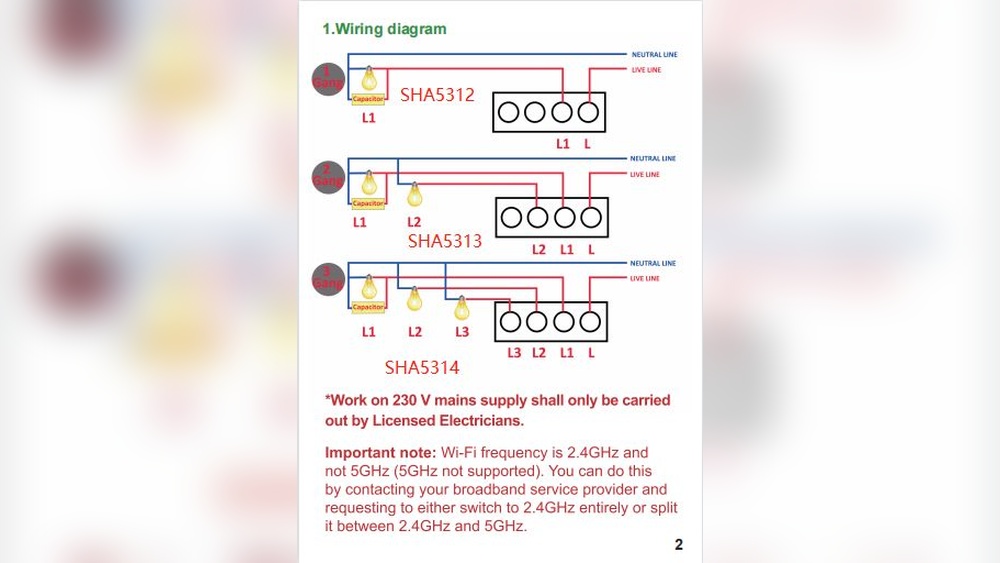
They offer easy installation and work with standard wiring. Most include a companion app for extra control. Security and privacy features protect your data. These switches fit various home styles and needs.
Installation Process
Installing an Alexa light switch is simple with the right guidance. This process lets you control lights using voice commands. Follow clear steps to set up your smart switch safely and correctly.
Tools Needed For Setup
Gather a flathead screwdriver and a Phillips screwdriver. You will also need a voltage tester and wire strippers. Electrical tape and a wire nut set come in handy. Have a ladder ready if your switch is high on the wall.
Step-by-step Wiring Guide
First, turn off the power at the circuit breaker. Use the voltage tester to confirm the power is off. Remove the old switch by unscrewing the faceplate and mounting screws. Note the wiring layout before disconnecting wires. Connect the new switch wires to the matching house wires. Usually, black to black, white to white, and green or bare copper to ground. Secure the connections with wire nuts. Carefully tuck the wires into the box. Screw the switch into place and attach the faceplate. Turn the power back on and test the switch.
Safety Tips During Installation
Always switch off the power to avoid shocks. Double-check with a voltage tester before touching wires. Wear insulated gloves for extra protection. Avoid working in wet areas or with wet hands. If unsure about wiring, ask a professional for help. Keep children and pets away during installation. Follow local electrical codes to ensure safety.
Connecting To Alexa
Connecting Alexa light switches to your smart home system lets you control lights with your voice. This connection makes managing your lighting simple and hands-free. It requires a few clear steps to link the switch to Alexa.
Setting Up The Alexa App
Download the Alexa app on your phone or tablet. Open the app and sign in with your Amazon account. Follow the on-screen instructions to set up your device. Make sure your phone is connected to Wi-Fi. This step prepares the app to find new smart devices.
Linking The Switch To Alexa
Put your Alexa light switch into pairing mode. This usually means pressing a button on the switch. In the Alexa app, go to “Devices” and tap “Add Device.” Select “Light” and then “Light Switch.” Follow the prompts to connect the switch to your Wi-Fi network. The app will search for the switch and link it to Alexa.
Troubleshooting Connection Issues
If the switch does not connect, check your Wi-Fi signal strength. Move the switch closer to your router if needed. Restart your router and the Alexa app. Make sure the switch is in pairing mode during setup. Reset the switch if problems continue. Confirm your phone and switch use the same Wi-Fi network.

Credit: www.ebay.com
Control Options
Alexa light switches offer multiple ways to control your home lighting. These options make managing lights easy and flexible. You can choose the method that fits your daily routine best. Each control type helps save time and energy.
Voice Commands For Lighting
Speak to Alexa and control your lights without moving. Say simple commands like “Turn on the living room light.” Alexa listens and acts quickly. You can adjust brightness or switch lights off with your voice. This hands-free option suits busy moments.
Using Routines And Schedules
Create routines to automate your lighting. Set specific times for lights to turn on or off. For example, lights can come on at sunset. Routines can include other smart devices too. This control saves energy and adds comfort.
Remote Control Via Smartphone
Use the Alexa app on your phone to control lights anywhere. Turn lights on or off even when not at home. The app shows which lights are active. This control helps you check and adjust lighting for safety and convenience.
Compatibility And Integration
Alexa light switches work best when they fit smoothly into your smart home setup. Compatibility and integration play a big role in how well these switches perform. They connect with other devices and platforms, making your home smarter and easier to control.
Working With Other Smart Devices
Alexa light switches can link with many smart devices. They communicate through Wi-Fi or Zigbee protocols. This allows them to work with smart bulbs, sensors, and security systems. You can create routines that control multiple devices at once. For example, turning on the lights and adjusting the thermostat together. This teamwork makes your daily tasks simpler and faster.
Supported Home Automation Platforms
Most Alexa light switches support popular home automation platforms. They work well with Amazon Alexa, of course. Some also support Google Assistant and Apple HomeKit. This gives you options to control your lights with different apps or voice commands. Platforms like SmartThings or Hubitat also connect with these switches. Such broad support ensures your devices stay connected and responsive.

Credit: www.amazon.com
Benefits Of Alexa Light Switches
Alexa light switches bring many benefits to your home. They make daily life easier and more efficient. These smart switches connect to Alexa, letting you control lights with your voice or phone. This simple change can improve your home’s comfort and safety in many ways.
Explore the main benefits below to see how Alexa light switches can help you save energy, add convenience, and boost security.
Energy Savings
Alexa light switches help cut down electricity use. You can turn off lights remotely when not needed. Set schedules to switch lights off during daytime or when you leave. This prevents wasting power and lowers your energy bills. Smart controls encourage better habits for saving energy.
Enhanced Convenience
Control your lights without reaching the switch. Use voice commands to turn lights on or off. Manage lights from anywhere using your smartphone. Set routines so lights adjust automatically at specific times. This frees your hands and saves time every day.
Improved Home Security
Smart light switches make your home safer. Turn lights on remotely to make it look like someone is home. Schedule lights to come on at night or when you are away. Bright, well-lit spaces deter intruders and improve safety. Alexa light switches add a layer of protection easily.
Common Issues And Fixes
Alexa light switches bring ease to home lighting control. Yet, users may face some common issues. These problems can disrupt your smart home experience. Knowing how to fix them helps keep your system running smoothly.
This section covers common problems and easy fixes. It focuses on connectivity, switch malfunctions, and app performance. Clear steps guide you through troubleshooting.
Connectivity Problems
Alexa light switches rely on Wi-Fi to work. Weak or lost Wi-Fi signals cause connection issues. Check your router and move it closer if needed. Restart your router and the switch to refresh connections.
Make sure your switch is within Wi-Fi range. Avoid thick walls or metal objects blocking the signal. Confirm your Wi-Fi password is correct in the Alexa app. Update your router firmware for better performance.
Switch Malfunctions
Sometimes the physical switch may stop responding. Check if the switch is properly wired. Turn off the power before inspecting wires for safety. Tighten loose wires or call an electrician if unsure.
Reset the switch by turning it off and on again. If the switch feels hot or sparks appear, stop use immediately. Replace the switch if it shows signs of damage or wear. Regularly clean the switch to avoid dirt buildup.
App Performance Troubleshooting
The Alexa app controls your light switches. App glitches can cause control delays or failures. Close and reopen the app to clear minor bugs. Update the app to the latest version for new fixes.
Clear the app cache in your phone’s settings to improve speed. Log out and log back into your Alexa account if issues continue. Reinstall the app if problems persist. Ensure your phone has a stable internet connection.
Choosing The Right Alexa Light Switch
Choosing the right Alexa light switch can make your home smarter and more convenient. The perfect switch fits your needs, budget, and home setup. It should work well with your Alexa devices and provide reliable control over your lights.
Understanding the key features, pricing, and trusted brands helps you pick the best option. Each home and user need differs. Consider what matters most for your daily use and comfort.
Features To Consider
Check if the switch supports voice control with Alexa. Look for compatibility with your home’s wiring and voltage. Dimming ability is useful for mood lighting. Some switches offer remote control via smartphone apps. Energy monitoring can help track your electricity use. Easy installation and clear instructions save time. Also, verify if the switch fits your wall plate size.
Price Vs. Performance
Higher price does not always mean better quality. Balance cost with important functions like durability and responsiveness. Basic models may cover simple on/off needs. Mid-range switches often add dimming and app control. Premium switches might include extra features like scheduling. Choose a product that meets your daily needs without overspending.
Top Brands To Explore
Amazon’s own brand offers good Alexa integration. Lutron is known for reliable smart lighting products. TP-Link provides affordable options with solid features. Leviton has a long history in electrical devices and smart switches. GE’s smart switches work well in many homes. Each brand offers unique benefits and support options.
Frequently Asked Questions
How Do Alexa Light Switches Connect To Wi-fi?
Alexa light switches connect through your home’s Wi-Fi network using built-in wireless modules. This allows them to communicate with Alexa for voice control and remote access via the Alexa app.
Can Alexa Light Switches Control Multiple Lights?
Yes, Alexa light switches can control multiple lights if wired correctly or grouped in the Alexa app. This enables simultaneous control with a single voice command.
Do Alexa Light Switches Work Without Internet?
Alexa light switches need internet to work with Alexa voice commands. However, manual control through the switch itself works without internet.
Are Alexa Light Switches Compatible With All Alexa Devices?
Most Alexa light switches are compatible with all Alexa-enabled devices, including Echo speakers and displays. Compatibility depends on the switch brand and model.
Conclusion
Alexa light switches make home control simple and smart. You just speak to turn lights on or off. They connect through Wi-Fi and work with Alexa devices. Setup is easy and takes little time. These switches can save energy and add convenience.
Smart homes feel more modern and comfortable. Try using Alexa switches for a better lighting experience. It’s a small step toward a smarter home life.