Are you having trouble with your Wemo light switch? Maybe it’s not responding or acting strangely.
Resetting your Wemo light switch can often fix these issues quickly. But how do you do it without messing up your settings? In this guide, you’ll learn the simple steps to reset your Wemo light switch and get it working like new again.
Keep reading—you’ll be back in control of your smart lighting in no time.

Credit: www.youtube.com
Resetting Your Wemo Light Switch
Resetting your Wemo Light Switch can solve many common issues. It helps clear bugs and restore normal function. Knowing how to reset your switch saves time and avoids frustration. This guide explains when and how to reset your Wemo Light Switch step by step.
When To Reset Your Switch
Reset your switch if it stops responding. If it does not connect to Wi-Fi, a reset may help. Use reset if the switch behaves oddly or does not turn on or off. Resetting can fix problems from software glitches or lost settings. Try other fixes first, but reset if nothing else works.
Types Of Resets Available
Wemo switches offer two reset types: soft reset and factory reset. A soft reset restarts the switch without erasing settings. Use this for minor issues or connection problems. A factory reset erases all settings and returns the switch to original state. Use factory reset as a last step if soft reset fails.
Step-by-step Reset Guide
Resetting your Wemo light switch can fix many issues quickly. This step-by-step guide shows how to reset your device safely. Follow each step carefully to avoid problems.
Locating The Reset Button
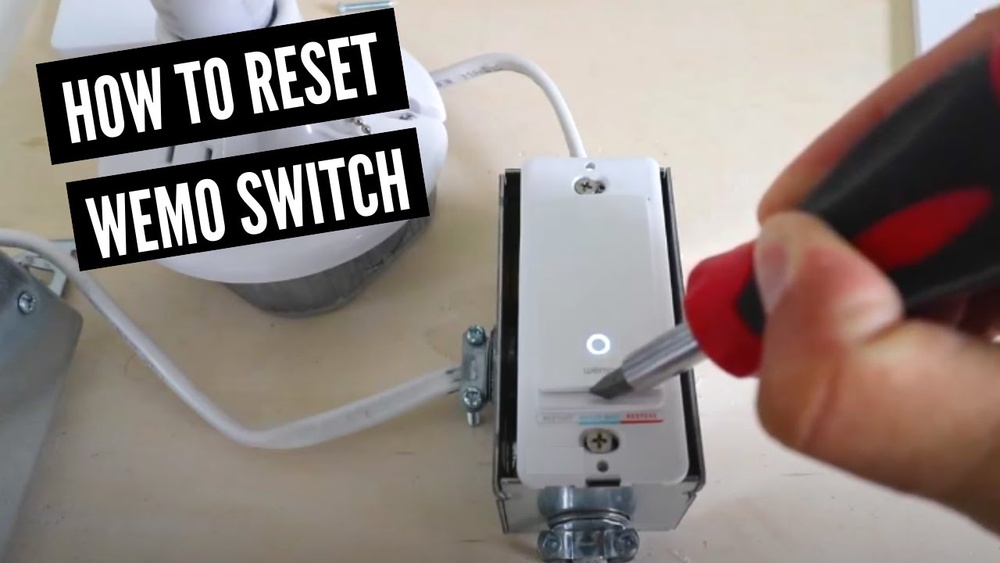
First, find the reset button on your Wemo light switch. It is usually small and recessed. Look near the bottom or side of the switch. Use a paperclip or a small tool to press it.
Performing A Soft Reset
Press and hold the reset button for about 3 seconds. Release the button when the LED light starts blinking. This resets the network connection without deleting your settings. Wait for the switch to reconnect to your Wi-Fi.
Performing A Hard Reset
Press and hold the reset button for 10 seconds or more. Release it when the LED light blinks rapidly. This clears all settings and restores factory defaults. You will need to set up the switch again from the app.
Troubleshooting Common Issues
Troubleshooting common issues with your Wemo Light Switch can save time and frustration. Problems like the switch not responding or connection errors are typical. Understanding these issues helps fix them quickly. This section covers easy solutions for frequent problems.
Switch Not Responding
The switch may not respond due to power issues or faulty wiring. Check the circuit breaker to ensure power is on. Press the reset button for 10 seconds to reboot the switch. If the problem stays, test the switch on another circuit.
Wi-fi Connectivity Problems
Wi-Fi issues often cause the switch to lose connection. Confirm your router is working and within range. Restart the router and the Wemo switch to refresh the connection. Use a 2.4 GHz network for better compatibility.
App Integration Errors
The Wemo app may show errors or fail to control the switch. Ensure the app is updated to the latest version. Log out and log back into the app to refresh settings. Reinstall the app if issues continue.

Credit: www.belkin.com
After Reset: Reconnecting Your Switch
After resetting your Wemo Light Switch, reconnecting it is crucial. This step makes sure the switch works with your home network and app. A smooth reconnection lets you control your lights again easily.
Setting Up Through The Wemo App
Open the Wemo app on your smartphone. The app guides you to add a new device. Follow the on-screen instructions to find your switch. Connect the switch to your Wi-Fi network. Enter your Wi-Fi password carefully. Wait for the app to confirm the switch is connected. This process links your switch to your home network.
Verifying Switch Functionality
Test the switch using the Wemo app controls. Turn the light on and off to check. Watch for a quick response from the switch. If the switch responds properly, it’s ready to use. Check the switch’s status in the app. The app should show it as “online.” This confirms a successful connection and reset.
Tips To Avoid Future Problems
Resetting your Wemo light switch solves many issues. To keep it working well, follow some simple tips. These steps help avoid future problems and save time.
Proper care keeps your device reliable and responsive. Small actions make a big difference in performance and durability.
Maintaining Firmware Updates
Firmware controls how your Wemo switch works. Updates fix bugs and improve features. Check for updates often in the Wemo app. Install updates as soon as they are available. This helps your switch stay secure and function smoothly.
Ensuring Stable Wi-fi Connection
Your Wemo switch needs a strong Wi-Fi signal. Weak or unstable Wi-Fi causes connection problems. Place your router near the switch if possible. Avoid thick walls or metal objects that block signals. Restart your router regularly to keep the network fresh. A stable connection keeps your switch responsive and reliable.

Credit: www.belkin.com
Frequently Asked Questions
How Do I Perform A Factory Reset On Wemo Light Switch?
To factory reset your Wemo Light Switch, press and hold the reset button for 10 seconds. Release when the LED starts blinking rapidly. This clears all settings and restores defaults, allowing fresh setup with the Wemo app.
Why Won’t My Wemo Light Switch Reset Properly?
Reset issues often stem from power interruptions or holding the reset button too briefly. Ensure constant power and hold the reset button for at least 10 seconds until LED blinks rapidly.
Can I Reset Wemo Light Switch Without The App?
Yes, you can reset the switch manually by pressing the physical reset button. No app is needed to perform a factory reset on the device.
What Happens After Resetting Wemo Light Switch?
After reset, the switch loses all Wi-Fi and user settings. You must reconfigure it using the Wemo app to reconnect and control your lights.
Conclusion
Resetting your Wemo Light Switch is simple and quick. Just follow the steps carefully to avoid mistakes. This process helps fix many common issues. You can enjoy smooth and reliable control of your lights again. Keep your device updated and reset it whenever it acts strange.
Troubleshooting becomes easier with this handy skill. Stay confident in managing your smart home devices. A little effort goes a long way in keeping everything working well. Try resetting whenever your Wemo switch does not respond as expected.