Are you ready to take control of your home’s security with a Defiant Keypad Deadbolt? Programming it yourself might seem tricky at first, but with the right steps, you can have it up and running in no time.
Imagine the convenience of locking and unlocking your door without a key, simply by entering your unique code. In this guide, you’ll discover easy-to-follow instructions that make programming your deadbolt straightforward and stress-free. Keep reading to unlock the full potential of your Defiant Keypad Deadbolt and enjoy peace of mind every time you come home.
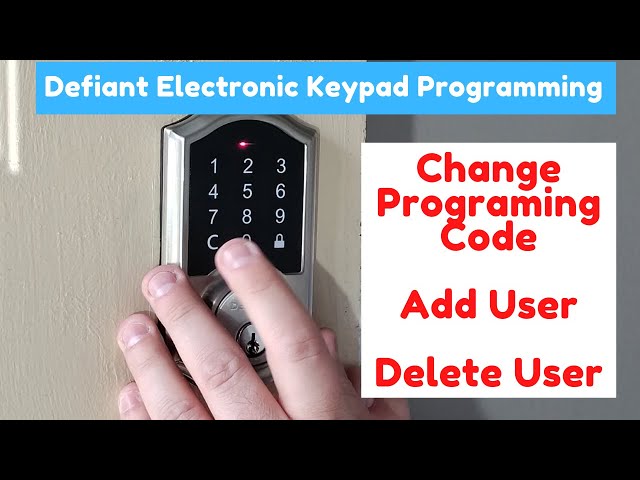
Credit: www.youtube.com
Tools And Materials Needed
Before you start programming your Defiant keypad deadbolt, gather all necessary tools and materials. Having everything ready makes the process smooth and quick.
Using the right tools ensures you do not damage the lock or door. It also helps you avoid frustration and mistakes during setup.
Basic Tools
Prepare a small Phillips screwdriver to remove the battery cover and screws. A flathead screwdriver may help with prying off parts carefully. Keep a pen or pencil handy to write down the programming code if needed.
Materials Needed
Make sure you have fresh batteries for the keypad, usually AA or AAA. Old batteries can cause errors or prevent programming. Have the instruction manual nearby to follow the steps accurately.
Additional Items
A flashlight can be useful if you work in a dim area. A clean cloth helps wipe dust or dirt from the lock before programming. Keep your phone or camera ready to take pictures of setup screens or codes for reference.
Locate The Programming Code
Start by finding the programming code on your Defiant keypad deadbolt. This code is usually inside the battery cover or on the back of the lock. Keep it handy for easy setup and changes.
What Is The Programming Code?
The programming code is a special number that controls the lock’s settings. It allows you to add or remove user codes. Without this code, you cannot change the lock’s functions. Finding it is the first step in programming your Defiant keypad deadbolt.
Where To Find The Programming Code
Check the inside part of the lock. Remove the battery cover or the back panel. The code is often printed on a sticker or label inside. Sometimes, it is on the user manual that came with the lock. Keep this code safe and private.
What To Do If You Can’t Find The Code
Look for the original packaging or paperwork. The code might be on a card or sheet included there. If lost, try resetting the lock to factory settings. This step will erase all codes and restore the original programming code. Follow the lock’s manual for reset instructions.
Enter Programming Mode
Entering programming mode is the first step to set up your Defiant keypad deadbolt. This mode lets you change codes and adjust settings. It ensures only you can make changes to your lock.
Each model has a simple way to enter programming mode. Knowing this process helps avoid errors and saves time.
Locate The Programming Button
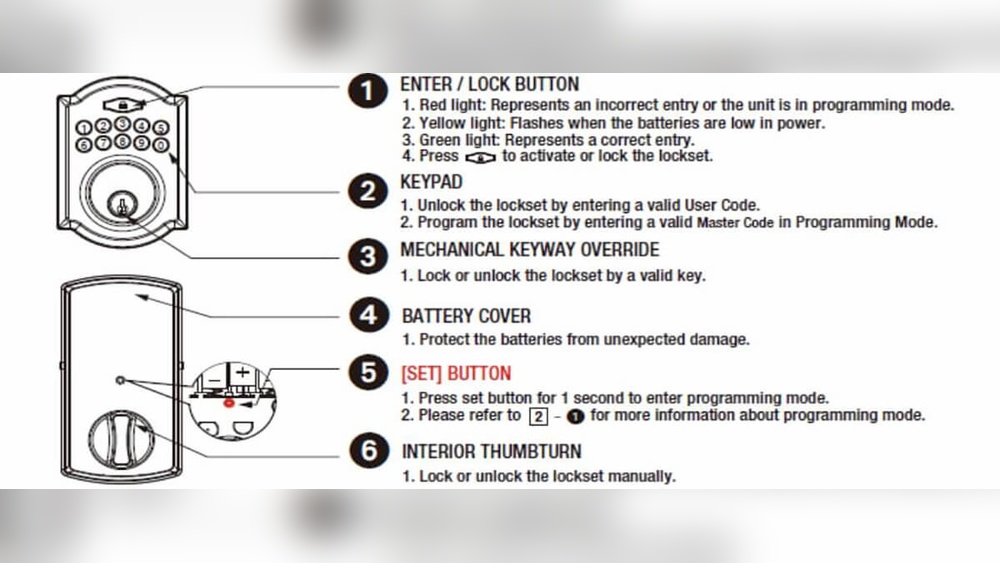
Open the battery cover on the inside of the lock. Find the small button labeled “Program” or “Prog”. This button starts the programming mode.
Press And Hold The Programming Button
Press the programming button for about 5 seconds. Wait until you hear a beep or see a light flash. This signal means the lock is ready for programming.
Enter The Current Programming Code
Use the keypad to type the current programming code. This code is usually found in the user manual or on the lock itself. Entering the correct code confirms your access.
Confirm Entry Into Programming Mode
The lock will beep twice or flash its light again. This confirms it is now in programming mode. You can now add or change user codes safely.

Credit: www.youtube.com
Add New User Codes
Adding new user codes to your Defiant Keypad Deadbolt keeps your home secure. You control who can enter by assigning unique PINs. This feature is useful for family members, friends, or service workers. Follow the steps below to create and set new codes easily.
Create Master Code
Start by creating a master code. This code controls all other user codes. To set it, enter programming mode on the keypad. Follow the instructions in your lock’s manual. Choose a code that is easy to remember but hard to guess. Your master code should be different from user PINs.
Set User Pins
After setting the master code, add user PINs next. Each user PIN lets a person unlock the door. Enter programming mode using the master code. Select the option to add new user codes. Enter each new user PIN and confirm it. Make sure each PIN is unique and secure.
Delete Existing Codes
Start by clearing all old codes from the keypad to ensure only new ones work. This step keeps your lock secure and easy to manage. Simply follow the keypad instructions to delete existing codes before adding new ones.
Why Delete Existing Codes?
Deleting old codes keeps your lock secure. It prevents unwanted access from former users. Clearing codes helps avoid confusion about active entries.
Regularly updating codes makes sure only trusted people can enter. It is a simple step to protect your home or office.
How To Enter Programming Mode
Start by pressing the programming button on your keypad. This button is usually found inside the lock or on the interior side. Hold it until you hear a beep or see a light flash.
This signals that the lock is ready to accept commands. Follow the lock’s manual for exact timing and button location.
Steps To Delete A Single Code
Press the programming button to enter setup mode. Enter the code number you want to delete. Press the delete or clear button.
Wait for a beep or light to confirm the code is removed. Try entering the deleted code to confirm it no longer works.
How To Delete All Codes At Once
Enter programming mode by pressing the programming button. Press and hold the clear or reset button for several seconds. The lock will beep or flash to confirm all codes are deleted.
This resets the lock to factory settings. Use this option if many codes need removal or if the lock is changing users.
Change Master Code
Changing the master code on your Defiant keypad deadbolt helps keep your home safe. The master code controls all other codes and settings. You should update it regularly to prevent unauthorized access. The process is simple and only takes a few steps.
Locate The Programming Button
First, open the battery cover on the inside of the door. Find the small programming button near the batteries. Press and hold this button until you hear a beep or see a light flash. This step puts the lock into programming mode.
Enter The Current Master Code
Type your current master code on the keypad. This code is usually a 4 to 8 digit number. After entering the code, press the lock or unlock button. The lock will beep or flash to confirm the code is accepted.
Input The New Master Code
Now, enter your new master code. Choose a number that is easy to remember but hard for others to guess. Press the lock or unlock button again to save the new code. Listen for a beep or watch for a flash to confirm the change.
Test The New Code
Close the door and lock it. Enter the new master code on the keypad. The deadbolt should unlock smoothly. If it does not work, repeat the process carefully. Testing ensures your new code is active and correct.
Test The Keypad
Testing the keypad is an important step after programming your Defiant Keypad Deadbolt. It ensures your new codes work correctly. It also confirms the lock responds to your commands. Proper testing helps avoid lockouts and saves time.
Spend a few minutes checking each function. This way, you know the lock is ready to use. Let’s break down the testing process into simple steps.
Enter The Master Code
Start by entering your master code on the keypad. This code controls all lock settings. If the lock does not respond, recheck the programming steps. A successful entry will trigger a sound or light.
Test User Codes
Next, try each user code you programmed. Enter them one by one on the keypad. The lock should unlock with each correct code. If a code fails, reprogram it or check for errors.
Check Lock And Unlock Functions
Use the keypad to lock and unlock the door several times. Listen for the locking sound and watch the bolt move. This confirms the mechanical parts work well with the keypad.
Test The Keypad’s Timeout
After entering wrong codes multiple times, the keypad should lock temporarily. This feature protects your lock from guessing attempts. Make sure the timeout activates correctly by entering wrong codes.
Verify Battery Status
Check the keypad display or indicator for battery life. Low batteries can cause problems with programming or operation. Replace batteries if the display shows a low battery warning.
Troubleshooting Tips
Programming a defiant keypad deadbolt usually goes smoothly. Sometimes, problems arise. These troubleshooting tips help fix common issues. Follow these steps to get your lock working correctly again.
Check The Batteries
Deadbolts need fresh batteries to work well. Low power can cause the keypad to stop responding. Replace old batteries with new ones. Use the recommended battery type for best results. Test the keypad after changing batteries.
Reset The Lock
Resetting clears any programming errors. Locate the reset button inside the lock. Press and hold it for about 10 seconds. Wait for the lock to beep or flash. Reprogram your access codes after the reset.
Ensure Proper Code Entry
Enter codes slowly and clearly. Press each button fully. Avoid pressing multiple buttons at once. Check if the lock uses a specific code length. Refer to the manual for code format details.
Inspect The Lock Mechanism
Look for physical damage or dirt inside the lock. Clean the keypad and deadbolt area gently. Tighten any loose screws. Make sure the bolt slides smoothly without resistance.
Verify Programming Steps
Follow the exact programming instructions. Skipping steps can cause failure. Use the original user manual or official guide. Confirm each step before moving to the next.
Maintenance And Battery Replacement
Maintaining your Defiant keypad deadbolt ensures it works smoothly and lasts longer. Proper care helps avoid lockouts and costly repairs. Battery replacement is a key part of this maintenance. A fresh battery keeps the lock responsive and secure.
Regular checks and timely battery changes prevent unexpected failures. Keep the keypad clean and dry to protect its electronic parts. Follow simple steps to maintain and replace batteries easily.
Checking The Battery Life
Most Defiant keypad deadbolts alert you when the battery is low. Look for a flashing light or hear a beep when pressing buttons. Test the lock regularly to spot any delay or weak response. Replace the battery soon after the low battery signal appears.
How To Replace The Battery
Start by removing the keypad cover gently. Find the battery compartment inside the lock. Remove the old batteries carefully and dispose of them properly. Insert new batteries, usually AA or AAA, matching the correct polarity. Close the cover firmly until it clicks into place. Test the keypad to confirm the lock works well.
Cleaning And General Maintenance
Use a soft, dry cloth to clean the keypad surface. Avoid water or harsh chemicals that can damage electronics. Check the lock mechanism for dirt or debris. Lubricate the deadbolt with graphite or a dry lubricant yearly. This keeps the lock turning smoothly without sticking.

Credit: device.report
Frequently Asked Questions
How Do I Reset A Defiant Keypad Deadbolt?
To reset, press and hold the reset button inside the battery compartment for 10 seconds. The keypad will blink, signaling a successful reset. This clears previous codes and restores factory settings.
How Can I Add New User Codes To Defiant Deadbolt?
Enter programming mode by pressing the programming button, then input a new user code followed by the lock button. The keypad will confirm with a green light. Repeat for multiple codes.
What Should I Do If The Keypad Is Unresponsive?
Check and replace the batteries first; low power often causes unresponsiveness. If that doesn’t help, reset the lock and try programming again.
Can I Program Multiple User Codes On One Lock?
Yes, Defiant deadbolts support several user codes. Each code is programmed individually through the programming mode for different users.
Conclusion
Programming a Defiant keypad deadbolt is simple and quick. Follow each step carefully and take your time. Your door will stay secure with the new code. Change codes often to keep your home safe. Remember to write down your new code somewhere safe.
Enjoy the convenience of keyless entry every day. Stay safe and confident with your programmed deadbolt.