If you’re having trouble with your Kwikset deadbolt keypad or need to change your access codes, knowing how to reset it quickly can save you time and frustration. Whether you forgot your code or want to update your security, resetting your Kwikset keypad is easier than you think.
In this guide, you’ll get clear, simple steps to reset your deadbolt keypad and get back to feeling safe and in control of your home. Keep reading—your peace of mind is just a few clicks away.
Kwikset Deadbolt Keypad Basics
Kwikset deadbolt keypads offer a simple way to secure your home. They let you lock and unlock doors without a key. Instead, you enter a code on the keypad. This adds convenience and control over who can enter.
Understanding the basic features and common models will help you use your keypad better. It also makes resetting or programming easier. Let’s explore the keypad features and popular models.
Keypad Features
Kwikset keypads have buttons to enter codes. Most models allow multiple user codes. This lets several people have access. Some keypads have backlit buttons for use in the dark. Many models include a low battery indicator. The keypad locks automatically after a few seconds. Some models allow you to set temporary codes. This is useful for guests or service workers.
Common Models
Kwikset offers several popular keypad deadbolt models. The SmartCode 910 and 914 are common. They support up to 30 user codes. The 909 model supports fewer codes but is budget-friendly. The Halo model connects to Wi-Fi for remote control. Most models use AA batteries that last months. They all share similar programming steps for ease of use.
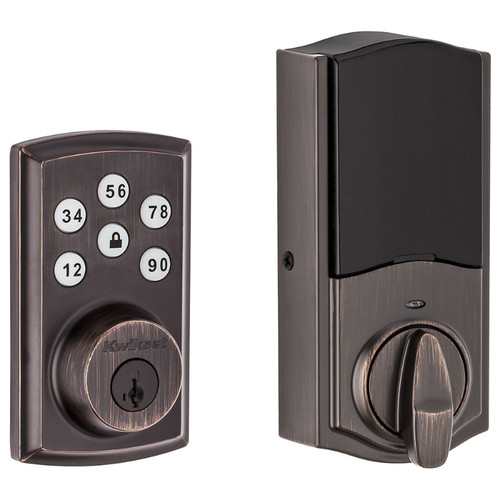
Credit: doorlocksdirect.com
When To Reset Your Keypad
Knowing when to reset your Kwikset deadbolt keypad is important for security and proper function. Resetting helps keep your home safe and ensures the lock works right. Certain situations require a reset to protect your property or fix issues.
Lost Or Forgotten Codes
Losing your access code means you cannot unlock the door. Resetting the keypad allows setting a new code quickly. This step is vital to keep control of who enters your home. It stops strangers from using old codes to get inside.
Battery Replacement
Low battery can cause keypad errors and lock problems. After changing batteries, a reset may be needed to restore normal function. This process helps the keypad recognize the new power source. It prevents lock failures and keeps your system reliable.
Troubleshooting Malfunctions
Keypad glitches or unresponsive buttons signal a problem. Resetting often fixes minor software or hardware issues. It clears errors and refreshes the lock’s settings. This step can save time and avoid calling a technician.
Tools Needed For Reset
Resetting a Kwikset deadbolt keypad requires a few simple tools. Having the right items ready makes the process smoother. It helps avoid mistakes and saves time.
Gathering the necessary tools before you start ensures a successful reset. This section lists what you need and how to stay safe during the task.
Required Items
You will need a small flathead screwdriver or a Phillips screwdriver. This helps remove the battery cover and screws. A fresh 9-volt battery is important to power the keypad after resetting. Keep the user manual handy for specific instructions related to your model. A clean cloth can help wipe the keypad and keep parts clean during the reset.
Safety Precautions
Work in a well-lit area to see all parts clearly. Avoid forcing any screws or parts to prevent damage. Remove the old battery carefully to avoid leaks. Wash your hands after handling the battery. Keep small parts away from children and pets. Follow the manual’s safety advice to protect yourself and the lock.
Resetting The Kwikset Keypad
Resetting the Kwikset keypad is simple and useful. This process clears old codes and allows fresh ones. It helps keep your lock secure and easy to manage. Follow easy steps to reset and program new codes.
Step-by-step Instructions
First, remove the battery cover on the lock’s interior side. Press and hold the Program button until the keypad light blinks. Release the button once the light turns green. Enter the current programming code, then press the lock button. Press the Program button again. The keypad will flash, showing it is ready to reset. Now, enter a new programming code and press the lock button. The lock confirms with a beep and a green light. Replace the battery cover. Your keypad is reset and ready.
Programming New Codes
Press the Program button on the interior assembly. Wait for the green light to appear. Enter the new user code, using 4 to 8 digits. Press the lock button to save it. The lock beeps once for success. Test the new code on the keypad. Repeat these steps to add more codes. Remove codes by resetting or overwriting them. Keep your codes private and easy to remember.
Tips For Maintaining Your Keypad
Keeping your Kwikset deadbolt keypad in good condition helps it work well for a long time. Regular care avoids problems and keeps your home safe. Small steps can make a big difference in the keypad’s life and performance.
Battery Care
Check the battery often to avoid sudden power loss. Use fresh, high-quality batteries for better performance. Replace batteries at least once a year or when the keypad beeps. Clean battery contacts gently to prevent corrosion. Avoid mixing old and new batteries in the keypad.
Regular Code Updates
Change your entry codes regularly to improve security. Remove codes for people who no longer need access. Use simple but unique codes that you can remember easily. Avoid using obvious numbers like birthdays or “1234”. Test new codes right after setting them to ensure they work.

Credit: www.youtube.com
Troubleshooting Reset Issues
Resetting a Kwikset deadbolt keypad can sometimes cause issues. These problems may stop the lock from working properly. Knowing how to fix common reset problems helps save time and frustration. This section guides you through simple troubleshooting steps.
Common Problems
One common problem is the keypad not responding after reset. This can happen if the batteries are low or dead. Check the battery level and replace them if needed.
Another issue is the lock not accepting the new code. This may occur if the reset procedure was not followed correctly. Make sure to hold the reset button long enough and enter the new code carefully.
Sometimes the lock stays in programming mode and does not exit. Press the lock button or remove and reinsert the batteries to fix this.
Errors can also happen if the keypad is dirty or wet. Clean the keypad gently with a dry cloth to avoid malfunction.
When To Contact Support
Contact Kwikset support if reset problems continue after trying fixes. Persistent errors may need expert help. Do not force the lock or try unsafe methods.
Support can guide you through advanced troubleshooting or arrange repairs. Keep your model number and purchase details ready for faster service.

Credit: www.reddit.com
Frequently Asked Questions
How Do I Reset My Kwikset Deadbolt Keypad?
To reset your Kwikset deadbolt keypad, press the programming button inside the lock. Enter a new master code to complete the reset. This process clears previous codes and allows fresh programming for enhanced security.
Can I Reset Kwikset Keypad Without A Master Code?
No, you need the master code to reset the Kwikset keypad. The master code authorizes changes and resets, ensuring only authorized users can modify settings.
What If My Kwikset Keypad Won’t Reset?
If your Kwikset keypad won’t reset, check the battery first. Replace weak batteries and try again. If the problem persists, consult the user manual or contact Kwikset support.
How Often Should I Reset My Kwikset Deadbolt Keypad?
Reset your Kwikset keypad regularly for security, especially after lost keys or unauthorized access. A reset every 6-12 months helps maintain control over who can enter.
Conclusion
Resetting your Kwikset deadbolt keypad is simple and quick. Follow the steps carefully to avoid mistakes. Keep your new code safe and easy to remember. Regularly update your code for better security. This helps protect your home and family. Now, you can manage your lock with confidence.
Stay safe and enjoy the convenience of your keypad lock.