Have you ever needed to change the code on your Schlage deadbolt lock but didn’t know where to start? Reprogramming your lock might sound tricky, but it’s easier than you think—and it puts you in full control of your home’s security.
Whether you want to add a new code, delete old ones, or reset your lock completely, this step-by-step guide will walk you through the process quickly and clearly. Keep reading to learn how to make your Schlage deadbolt work exactly the way you want it to.
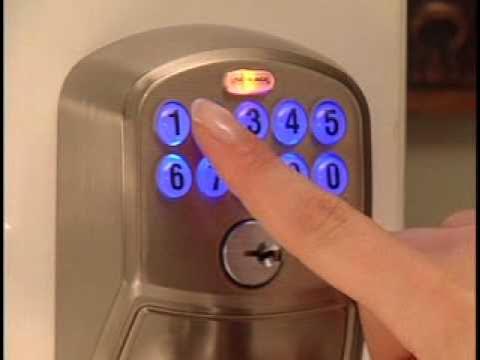
Credit: www.youtube.com
Tools Needed
Reprogramming a Schlage deadbolt lock is simple with the right tools. Having these tools ready makes the process faster and smooth. You do not need many items, but each one plays a key role.
Gather the tools before starting. It saves time and avoids frustration during reprogramming.
Small Phillips Head Screwdriver
This screwdriver helps remove the lock’s interior cover. It fits the screws perfectly. Without it, you cannot access the lock’s programming button.
New Batteries
Fresh batteries ensure the lock works well during and after reprogramming. Old batteries may cause errors or fail to save new codes.
Program Code
The factory default program code is needed to enter programming mode. Find it on the lock’s manual or inside the battery compartment.
Smartphone Or Paper For Notes
Use a phone or paper to write down new user codes. This prevents forgetting important codes after reprogramming.
Credit: www.schlage.com
Locate Programming Code
Locating the programming code is the first step to reprogram a Schlage deadbolt lock. This code lets you change settings and manage access. Without it, you cannot make any changes to the lock’s programming.
The programming code is a unique number, usually six digits long. It acts like a master key for the lock’s software. Finding this code quickly saves time and avoids frustration.
Check The User Manual
The easiest place to find the programming code is in the user manual. Look inside the booklet that came with your lock. The code is often printed on the first few pages. Keep this manual safe for future reference.
Look Inside The Lock’s Interior
If you do not have the manual, remove the lock from the door. The programming code is sometimes printed on a sticker inside the lock’s battery compartment. Handle the lock carefully to avoid damage.
Find The Original Packaging
The programming code may also be on the original box or packaging. Check all labels and stickers on the box. Sometimes, the code is printed on a card included with the lock.
Contact Schlage Support
If you cannot find the programming code anywhere, contact Schlage customer support. They can guide you through the process or help reset the lock. Have your lock model number ready for faster assistance.
Enter Programming Mode
Entering programming mode is the first step to reprogram your Schlage deadbolt lock. This mode lets you change settings like user codes and lock functions. Without entering this mode, you cannot make any changes.
The process is simple but must be done carefully. Follow these steps to access programming mode quickly and safely.
Locate The Programming Code
Find the programming code on the lock’s manual or inside the battery cover. This code is usually six digits long. It is different from user codes.
Press The Schlage Button
Press the Schlage button on the keypad. The button will light up, signaling the lock is ready. This action prepares the lock for programming.
Enter The Programming Code
Type the six-digit programming code. After entering the code, the Schlage button will flash green. This confirms you are in programming mode.
Confirm Programming Mode
Once the button flashes green, programming mode is active. You can now add or delete user codes. The lock will exit programming mode after a few seconds of inactivity.
Add New User Codes
Adding new user codes to your Schlage deadbolt is simple and secure. It lets you control who can enter your home. Each code is like a key but easier to manage. You can create codes for family, friends, or guests.
Keep codes unique and easy to remember. Avoid common sequences like 1234. Unique codes help keep your home safe. You can add or delete codes anytime.
Create Unique Codes
Choose a code with 4 to 8 digits. Use a mix of numbers that are not easy to guess. Avoid birthdays or repetitive numbers. Each user should have a different code. This helps you know who used the lock. It also stops unauthorized access.
Save User Codes
After entering a new code, save it in the lock’s memory. Follow the lock’s instructions to store the code properly. Test the code before using it regularly. Keep a list of all user codes in a safe place. This way, you can manage codes easily. Delete codes you no longer need to keep control.
Delete Existing Codes
Deleting existing codes on your Schlage deadbolt is a key step in reprogramming. It clears old access and keeps your lock secure. You can remove one code or all codes depending on your needs. This section guides you through both processes clearly and simply.
Remove Single Code
Start by entering the current programming code on the keypad. Press the Schlage button. Then press the number associated with the user code you want to delete. Finally, press the Schlage button again to confirm the removal. The lock will beep to show the code is deleted. This method keeps other codes intact while removing only one.
Clear All Codes
To erase all user codes, find the reset button on the inside of the lock. Hold it down for about 10 seconds until the lock beeps twice. This action deletes all codes except the original programming code. Use this option to start fresh and add new codes from scratch. It ensures no old codes remain active on your lock.
Test New Settings
After reprogramming your Schlage deadbolt lock, testing the new settings is essential. This step confirms the lock works correctly with the new codes. It helps avoid lockouts and ensures security.
Testing is simple and quick. It checks if the lock accepts the new codes and rejects old ones. Follow these steps carefully for a smooth experience.
Enter The New Code
Start by entering the new code on the keypad. Press each number slowly and clearly. Listen for a beep or a click sound. This signal means the code is accepted. If it doesn’t respond, try again. Make sure each button is pressed fully.
Test The Lock Mechanism
After entering the new code, turn the thumb turn or handle. The lock should open smoothly. If it stays locked, the code may not be set properly. Repeat the programming steps if needed. The lock must open easily for safety.
Try Old Codes
Enter any old codes you used before. The lock should not open. This confirms the old codes are erased. If the lock opens, reprogram the lock again. Protect your home by removing old codes completely.
Check Multiple Times
Test the new code several times. Try opening and locking the door. This reduces errors caused by quick button presses. Consistent success means your lock is ready to use. Reliable testing ensures your new settings are correct.
Troubleshooting Tips
Troubleshooting a Schlage deadbolt lock can be simple with the right steps. Problems may arise during reprogramming or use. Identifying common issues helps save time and effort. Below are key tips to fix common problems quickly.
Check The Battery Life
Weak batteries cause many lock issues. Replace the batteries if the lock is unresponsive. Use fresh, high-quality batteries for best results. Low battery power may prevent programming changes.
Verify The Programming Code
Double-check the programming code you enter. A wrong code stops the reprogramming process. Make sure to use the original factory code or your updated code. Enter codes slowly and carefully.
Reset The Lock
Resetting can clear errors in the lock’s memory. Follow the manual’s reset instructions carefully. After reset, reprogram the lock from the start. This often solves stubborn programming problems.
Confirm Proper Button Pressing
Press buttons firmly and in the correct order. Quick or light taps may not register. Hold buttons for the time shown in the manual. Proper pressing ensures commands are accepted.
Inspect For Physical Damage
Look for signs of damage on the lock or keypad. Dirt or debris can block buttons or sensors. Clean the lock gently with a soft cloth. Broken parts may need professional repair or replacement.

Credit: www.wikihow.com
Safety Precautions
Safety is very important when reprogramming a Schlage deadbolt lock. Taking the right steps keeps you and your home secure. Small mistakes can cause problems with your lock or allow unwanted access.
Before starting, understand the risks. Follow safety rules to avoid damage and confusion. Protect your personal information and the lock’s settings.
Turn Off Power Sources
Remove batteries or power sources before you begin. This prevents accidental lock activation. It also protects the lock’s internal parts during programming.
Keep Your Code Private
Do not share your new code with others. Only trusted people should know it. A private code keeps your home safer from intruders.
Work In A Well-lit Area
Good lighting helps you see the lock clearly. It reduces mistakes during programming. Choose a bright room or use a flashlight.
Follow The Manufacturer’s Instructions
Read the Schlage manual carefully before reprogramming. Steps vary by model and type. Correct instructions prevent lock damage and errors.
Test The Lock After Programming
Check the lock works with the new code before closing the door. Test multiple times to confirm. This ensures your lock is safe and functional.
Frequently Asked Questions
How Do I Reset A Schlage Deadbolt Lock?
To reset, remove the lock’s battery cover and batteries. Press and hold the reset button for 10 seconds. Release when the LED flashes. This clears all user codes and restores factory settings.
Can I Add Multiple User Codes To Schlage Locks?
Yes, Schlage deadbolts allow multiple user codes. You can program up to 30 unique codes. This helps manage access for family, friends, or service providers easily.
What Tools Are Needed To Reprogram A Schlage Lock?
No special tools are required. You only need the existing programming code and access to the lock’s keypad. The process is simple and can be done manually.
How Often Should I Change My Schlage Lock Codes?
Change your codes every 3 to 6 months for security. Also update codes after losing keys or sharing access with new people.
Conclusion
Reprogramming a Schlage deadbolt lock is simple and quick. Follow the steps carefully to change your code. Keep your new code safe and easy to remember. Doing this helps keep your home secure. Practice a few times to feel confident.
Regularly updating your lock code adds extra protection. Stay safe with these easy reprogramming tips.