Imagine walking into a room and having the lights turn on automatically, without you lifting a finger. Sounds convenient, right?
Automating your light switch can make your daily life easier, safer, and even save energy. If you’ve ever wondered how to do this yourself, you’re in the right place. This guide will show you simple steps to transform your ordinary light switch into a smart, automated one.
By the end, you’ll know exactly how to control your lights with ease—whether through your phone, voice, or motion. Ready to make your home smarter and more comfortable? Let’s dive in!
Credit: zionssecurity.com
Benefits Of Automating Light Switches
Automating light switches offers many advantages that improve daily life. It saves energy, adds comfort, and increases home security. These benefits make smart lighting a smart choice for any home.
Energy Savings
Automated light switches help reduce electricity use. Lights turn off automatically when not needed. This lowers energy bills and helps the environment. Scheduled lighting keeps power use in check all day.
Convenience And Comfort
Control lights from anywhere using a smartphone or voice commands. No need to get up to switch lights on or off. Adjust brightness or color easily to fit your mood. Automation fits your daily routine without effort.
Enhanced Security
Smart lights can turn on and off even when you are away. This makes it look like someone is home. Timed lighting deters burglars and protects your house. Motion sensors can trigger lights to warn of movement.
Choosing The Right Smart Switch
Choosing the right smart switch is important for automating your lights easily. The right switch fits well with your home’s wiring and meets your needs. It also works with your devices and stays within your budget. This makes your smart home setup smooth and reliable.
Compatibility With Existing Wiring
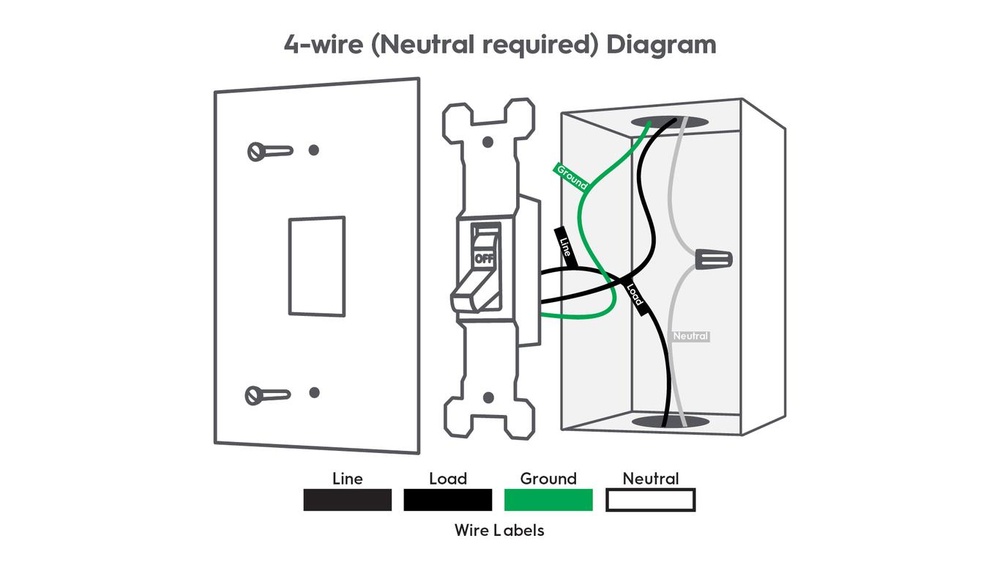
Check your home’s wiring before buying a smart switch. Some switches need a neutral wire to work. Older homes might not have this wire in the switch box. Without the right wiring, the switch will not function correctly. Look for switches designed for your wiring setup. This avoids extra work and costs.
Types Of Smart Switches
Smart switches come in many types. Some replace your wall switch and control one light. Others can control multiple lights or scenes. Choose between single-pole or three-way switches based on your needs. Some switches work with voice assistants like Alexa or Google. Pick a switch type that fits your home and lifestyle.
Budget Considerations
Smart switches vary in price. Basic models cost less but have fewer features. Advanced switches offer more control and smart functions but cost more. Decide how much you want to spend before buying. Think about what features matter most. This helps avoid overspending on features you won’t use.
Tools And Materials Needed
Automating a light switch can make your home smarter and more convenient. To start this project, gather the right tools and materials. This step is crucial for a safe and smooth installation.
Having the proper equipment helps avoid mistakes and saves time. Below is a list of essential items to prepare before you begin.
Basic Electrical Tools
- Screwdrivers (flathead and Phillips)
- Wire strippers
- Voltage tester
- Needle-nose pliers
- Electrical tape
- Wire nuts
These tools help you handle wires and secure connections safely.
Smart Switch Components
- Smart light switch device
- Compatible dimmer or rocker switch (if needed)
- User manual and wiring diagram
- Smartphone or tablet for setup
Choose a smart switch that matches your home’s wiring and system.
Safety Gear
- Insulated gloves
- Safety goggles
- Non-conductive shoes
- Flashlight or headlamp
Protect yourself from electric shocks and sharp objects during installation.
Preparing For Installation
Preparing for installation is a key step before automating a light switch. It ensures safety and smooth progress. Proper preparation helps avoid accidents and damage. Take your time to check everything carefully.
Turning Off Power Safely
First, turn off power at the circuit breaker. This stops electricity to the light switch. Use a voltage tester to confirm power is off. Never skip this step. Safety is the top priority.
Removing Old Switch
Remove the switch cover plate with a screwdriver. Unscrew the old switch carefully from the wall box. Gently pull the switch out to see wires clearly. Keep track of how wires connect to the switch.
Checking Wiring
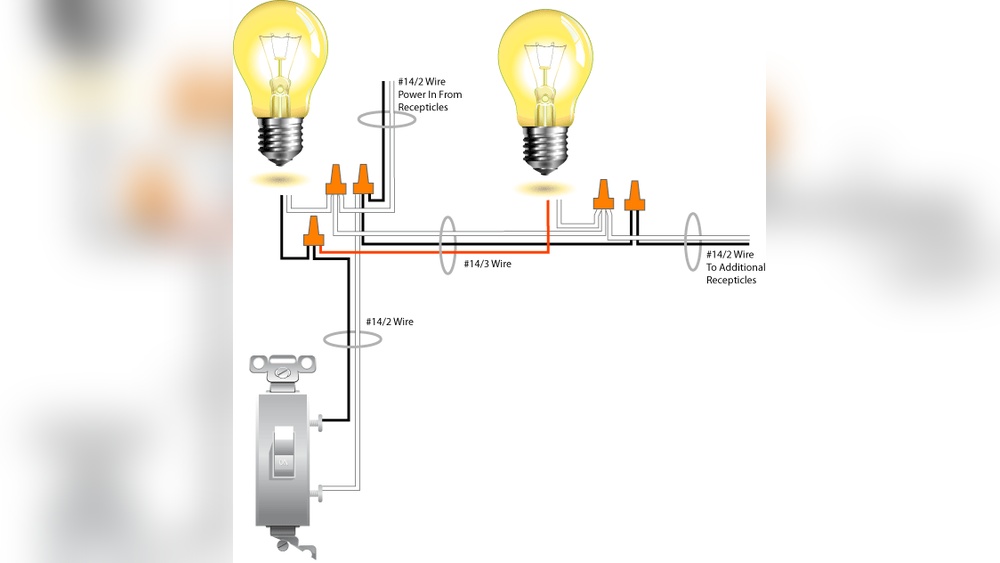
Inspect wires for any damage or wear. Make sure wires are clean and tight. Identify the line, load, and ground wires. Correct wiring is crucial for your smart switch to work. Label wires if needed for easier installation.
Step-by-step Installation Process
Installing a smart light switch can improve your home’s convenience and energy use. The process is simple and safe if you follow clear steps. This guide shows how to install a smart switch step-by-step. Each step helps you work carefully and correctly.
Wiring The Smart Switch
Turn off the main power to avoid electric shock. Remove the old switch cover and take out the switch. Note the wires connected to it. Connect the new smart switch wires to the matching house wires. Use wire nuts to secure each connection tightly. Follow the wiring diagram that comes with the switch. Double-check all wires are secure and correctly placed.
Securing The Switch
Push the wires gently back into the electrical box. Align the smart switch with the screw holes. Use a screwdriver to fasten the switch to the box. Do not overtighten the screws; the switch should be firm but not damaged. Attach the switch cover plate. Make sure the cover fits well and looks neat.
Restoring Power
Turn the main power back on at the breaker panel. Test the smart switch by turning the light on and off. Use the switch’s app or controls to check connectivity. If the light responds correctly, installation is complete. If not, turn off power and recheck wiring connections. Safety is key during every step.

Credit: www.reddit.com
Setting Up The Smart Features
Setting up the smart features of your automated light switch is key to enjoying convenience. This process connects your switch to your home network and devices. It allows remote control and customization for your lighting. Follow these steps to get your smart switch running smoothly.
Connecting To Wi-fi
Start by powering on your smart light switch. Open the switch’s setup mode, usually by pressing a button. On your phone, go to Wi-Fi settings and find the switch’s network. Connect to this network to link the switch with your home Wi-Fi. Enter your home Wi-Fi password in the app when prompted. This step connects your switch to the internet for remote access.
Configuring With Apps
Download the app recommended by your switch’s manufacturer. Open the app and create an account or log in. Follow the app instructions to add your new smart switch. Give your switch a name to identify it easily. The app lets you control the light from anywhere. It also allows changing settings and updating firmware.
Creating Schedules And Scenes
Use the app to create lighting schedules for different times. Set the light to turn on or off automatically. This helps save energy and improves security. Scenes combine multiple actions into one command. For example, set a “Movie Night” scene that dims the lights. Customize scenes to fit your daily routine or mood.
Troubleshooting Common Issues
Troubleshooting common issues can save time and reduce frustration. Automating a light switch involves both hardware and software. Problems can arise in either area. Understanding typical issues helps fix them fast.
Connectivity Problems
Wireless signals often cause connectivity problems. Check if your Wi-Fi network is working well. Move the light switch closer to the router if the signal is weak. Restart your router and smart switch to refresh connections. Make sure your switch supports your home network type.
Switch Not Responding
A switch that won’t respond might have a power or wiring issue. Verify all wires are connected properly and tightly. Look for loose or damaged wires behind the switch. Reset the switch by turning off power and turning it back on. Update the switch’s firmware through its app.
Power Fluctuations
Power fluctuations can cause the switch to malfunction. Use a voltage tester to check your home’s power stability. Avoid using the switch with old or faulty wiring. Install a surge protector to protect the switch from spikes. Contact an electrician if power issues continue.
Expanding Your Smart Home
Expanding your smart home starts with simple steps. Automating one light switch is just the beginning. You can make your home smarter and more comfortable by adding new devices and features. Each new element works together to create a smooth, easy living experience.
Integrating With Voice Assistants
Voice assistants like Alexa, Google Assistant, and Siri make controlling lights easy. You can turn lights on or off by speaking. Set schedules or scenes using just your voice. This hands-free control adds comfort and convenience to your daily life.
Adding More Automated Switches
Adding more smart switches lets you control multiple rooms. Each switch connects to your home network. You can manage all lights from one app or voice assistant. This keeps your home organized and saves energy by controlling lights remotely.
Using Smart Sensors
Smart sensors detect motion, light, and temperature. They can turn lights on when you enter a room. Lights turn off automatically when no one is there. These sensors save energy and make your home safer and more efficient.

Credit: community.smartthings.com
Frequently Asked Questions
How Do I Automate A Standard Light Switch?
To automate a standard light switch, install a smart switch compatible with your wiring. Connect it to your Wi-Fi and configure it via a smartphone app for remote control and scheduling.
What Tools Are Needed To Automate A Light Switch?
You will need a smart switch, screwdriver, voltage tester, wire stripper, and a smartphone. Always turn off power before installation for safety.
Can I Automate A Light Switch Without Rewiring?
Yes, using smart bulbs or plug-in smart adapters can automate lighting without rewiring. These options are easy and require minimal installation.
Is Automating A Light Switch Energy Efficient?
Automated switches save energy by enabling scheduling and remote control. They reduce unnecessary usage and help lower electricity bills effectively.
Conclusion
Automating a light switch saves time and effort every day. It makes your home smarter and more convenient. You can control lights with a phone or voice commands. The process is simple and affordable for most people. Small steps lead to big changes in your daily routine.
Start with one light switch and see the benefits. Enjoy the comfort and ease of smart lighting today.