Have you ever wondered how keypad deadbolts keep your home secure without a traditional key? Understanding how these smart locks work can give you peace of mind and make your life easier.
Whether you want to upgrade your door security or just curious about the technology, this guide will walk you through everything you need to know. By the end, you’ll see why keypad deadbolts are becoming a must-have for many homeowners—and how they can protect what matters most to you.
Keep reading to discover how these clever devices work and why they might be the perfect fit for your door.
Types Of Keypad Deadbolts
The core components of a keypad deadbolt work together to secure your door. Each part plays a key role in making the lock function smoothly and safely. Understanding these parts helps you see how the lock keeps your home safe.
Keypad Interface
The keypad interface is where you enter your code. It usually has buttons with numbers. Pressing the right code sends a signal to the lock mechanism. This part is designed to be easy to use and weather-resistant.
Locking Mechanism
The locking mechanism controls the bolt that locks the door. It moves the bolt in and out based on the keypad signal. This part is strong and built to resist force. It keeps your door securely closed.
Power Source
The power source provides energy to the lock. Most use batteries that last many months. Some models may connect to your home’s electricity. Power is needed to operate the keypad and bolt motor.

Credit: www.amazon.com
Core Components
Installing a keypad deadbolt can improve your home security quickly. The process is simple and does not take much time. Understanding the steps helps avoid mistakes and ensures the lock works well. This section breaks down the installation process clearly.
Tools Needed
Gather these tools before starting the installation:
- Screwdriver (Phillips and flathead)
- Drill with drill bits
- Measuring tape
- Pencil or marker
- Chisel (if needed for fitting)
- Level tool
Having these ready makes the process smoother and faster.
Step-by-step Setup
Start by removing the old lock from your door. Next, align the keypad deadbolt with your door’s holes. Mark any new drill spots with a pencil. Drill holes carefully if needed. Insert the deadbolt latch into the door edge. Attach the keypad and the interior thumb turn on each side. Connect all wiring if your model requires it. Secure the lock with screws. Test the keypad and deadbolt several times to ensure smooth locking.
Common Installation Challenges
Doors with uneven edges can make fitting difficult. Old doors may need extra drilling or chiseling. Some locks have complex wiring that can confuse beginners. Misaligned holes cause the lock to jam or not work properly. Using the wrong tools can damage the lock or door. Taking time to measure and check parts reduces these problems. Patience and careful work lead to a successful installation.
Installation Process
Programming codes are the heart of keypad deadbolts. They control who can enter your home or office. These codes replace traditional keys, offering more convenience and security. You can change, add, or remove codes anytime. This flexibility makes keypad deadbolts popular for modern security.
Setting User Codes
To set user codes, start by accessing the lock’s programming mode. Usually, this requires a master code or physical key. Enter the new user code on the keypad. The code should be easy to remember but hard to guess. Most locks allow codes between 4 to 8 digits. After entering the code, confirm it to save. Each user code grants access without needing a physical key.
Managing Multiple Users
Many keypad deadbolts let you add several user codes. This feature is ideal for families or small offices. Assign unique codes to each user for better tracking. You can see who entered and when if the lock has a logging feature. Removing a code is simple if access needs to be revoked. Managing users keeps your space secure and organized.
Resetting And Updating Codes
Resetting codes is important after losing a code or a security breach. Most locks have a reset button or require a master code to start the process. Follow the lock’s instructions to clear old codes. Then, enter new codes to maintain security. Regularly updating codes adds an extra layer of protection. It helps keep unwanted visitors out.

Credit: www.amazon.com
Programming Codes
Keypad deadbolts offer more than just keyless entry. They include smart security features to protect your home and give peace of mind. These features help prevent break-ins and alert you to suspicious activity. Let’s explore some common security functions found in keypad deadbolts.
Tamper Alarms
Tamper alarms activate if someone tries to force the lock. Loud sounds scare off intruders and alert neighbors. The alarm triggers after several wrong code attempts. This feature stops burglars from guessing your code repeatedly.
Auto-lock Functions
Auto-lock automatically secures the door after closing. No need to worry about forgetting to lock it. This function ensures your door stays locked at all times. It helps keep your home safe, especially with busy schedules.
Audit Trails
Audit trails record every time the lock is used. You can see who entered and when they did. This feature is helpful for monitoring family or workers. It adds a layer of control and security to your door.
Security Features
Keypad deadbolts do more than secure your door. They also connect easily with smart home systems. This integration makes your home safer and more convenient. You can control your lock from anywhere. It fits well with other smart devices.
Compatibility Options
Most keypad deadbolts work with popular smart home brands. Look for locks that support systems like Alexa, Google Home, or Apple HomeKit. Some locks connect through Wi-Fi, others use Bluetooth or Z-Wave. Check the lock’s details to see which systems it fits. This helps you build a smart home that works smoothly.
Remote Access
Remote access lets you lock or unlock your door from anywhere. Use a phone app to control the keypad deadbolt. This feature helps when friends or family visit. You don’t need to be home to let them in. You can also check if your door is locked anytime. This adds peace of mind and saves trips back home.
Voice Control
Voice control adds hands-free convenience. You can lock or unlock doors using voice commands. Alexa, Google Assistant, and Siri often support this feature. Just say the command, and your lock responds. This makes entering your home easy when your hands are full.
Integration With Smart Home Systems
Battery life and maintenance are key for keypad deadbolts. They keep the lock working without interruptions. Knowing how to care for the battery helps avoid lockouts. It also extends the lock’s lifespan.
Regular checks and timely battery changes keep the lock reliable. Simple steps ensure your keypad deadbolt stays powered and secure.
Battery Types
Most keypad deadbolts use AA or 9V batteries. Some models have rechargeable lithium-ion batteries. Check your lock’s manual to find the right type. Using the correct battery improves performance and safety. Avoid mixing old and new batteries in the lock.
Replacing Batteries
Replace batteries when the lock shows low battery alerts. Some locks beep or flash a warning light. Remove the battery cover carefully before replacing. Insert new batteries in the correct direction. Test the lock after replacing to confirm it works well.
Routine Maintenance Tips
Clean the keypad and battery compartment regularly. Use a dry cloth to avoid moisture damage. Check for corrosion or dirt on battery contacts. Remove batteries if the lock won’t be used for a long time. Keep spare batteries handy for quick replacement.
Battery Life And Maintenance
Keypad deadbolts offer clear benefits over traditional locks. They combine technology with security to meet modern needs. Many users find them easier and safer to use every day. These locks change how people think about door security.
Convenience And Speed
No need for physical keys. Just enter a code to unlock the door. This saves time, especially when hands are full. No more fumbling or searching for keys. Multiple users can have their own codes. Easy to change or remove codes as needed.
Enhanced Security
Keypad deadbolts reduce the risk of lost keys. Codes can be changed anytime to prevent unauthorized access. Many models include features like automatic locking. Some alert you if someone tries to break in. Strong materials and design make them hard to pick.
Access Control
Control who can enter your home or office. Assign different codes for family, friends, or workers. Track who used the lock and when with some models. Temporary codes can be given to visitors or delivery people. Remove access easily without changing the whole lock.
Advantages Over Traditional Locks
Keypad deadbolts offer convenience and security, but they have some drawbacks. Understanding these issues helps you decide if this lock fits your needs. Below are key concerns to consider before installing one.
Technical Failures
Keypad deadbolts rely on batteries and electronics. Batteries can die, leaving you locked out. Sometimes, the keypad may stop responding. Mechanical parts can also wear out over time. These failures may cause inconvenience or require repairs.
Hacking Risks
Electronic locks can be targets for hackers. Skilled criminals might bypass codes or electronic signals. Some models have weak security features. Using simple codes increases the risk of unauthorized entry. Regularly changing codes can reduce hacking chances.
Cost Considerations
Keypad deadbolts usually cost more than traditional locks. Installation may require a professional. Batteries and occasional repairs add to expenses. Budgeting for these costs is important before choosing a keypad lock.
Potential Drawbacks
Selecting the right keypad deadbolt is important for your home’s safety. It ensures easy access while keeping intruders out. The right choice depends on your specific needs and preferences.
Consider several factors before buying. This helps you pick a lock that fits your lifestyle and budget. Focus on security, cost, and product reliability.
Assessing Security Needs
Think about the level of security your home requires. High-traffic areas may need stronger locks with advanced features. For low-risk homes, simple models might work well.
Check for features like anti-pick pins and auto-lock functions. These improve protection against break-ins. Also, consider if you want remote access or temporary codes for guests.
Budget Factors
Keypad deadbolts come in various price ranges. Set a budget before shopping. Basic models cost less but offer fewer features.
More expensive locks provide better security and convenience. Balance your budget with the features you truly need. Avoid overspending on unnecessary extras.
Brand And Warranty
Choose a reputable brand known for quality locks. Reliable brands often have better customer support and product durability.
Check the warranty period. Longer warranties show confidence in product quality. It also protects you from defects and early failures.
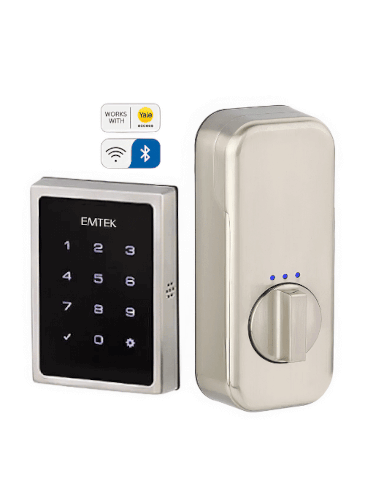
Credit: www.pivotdoorcompany.com
Frequently Asked Questions
How Do Keypad Deadbolts Operate?
Keypad deadbolts use a code entered on a numeric keypad to unlock. The mechanism replaces traditional keys, offering keyless entry for convenience and security.
Are Keypad Deadbolts More Secure Than Traditional Locks?
Yes, they reduce risks of lost or copied keys. Many models include features like auto-locking and alarm systems for enhanced protection.
Can Keypad Deadbolts Be Programmed For Multiple Users?
Most keypad deadbolts allow multiple user codes. This feature helps control access for family, friends, or service providers easily and securely.
What Happens During A Power Failure With Keypad Deadbolts?
Many keypad deadbolts have backup batteries. In case of failure, the lock still functions, ensuring continuous access without interruption.
Conclusion
Keypad deadbolts offer secure, easy access without keys. You just enter a code to lock or unlock. They use simple electronics and mechanical parts to work smoothly. Many people choose them for convenience and safety. Remember to change your code often to keep security strong.
These locks fit many doors and require little maintenance. Understanding how they work helps you make smart choices. Safe homes start with smart locks like keypad deadbolts.