Locked out of your home because of a Kwikset deadbolt? It’s frustrating, stressful, and can happen to anyone.
But don’t worry—you don’t have to call a locksmith right away or break your door down. In this guide, you’ll learn simple and effective ways to unlock your Kwikset deadbolt quickly and safely. Whether you lost your keys or the lock just won’t budge, the solutions here will help you regain access without damage.
Keep reading—you’ll feel confident and ready to handle the situation yourself.
Types Of Kwikset Deadbolts
Kwikset deadbolts come in different types to fit various security needs. Each type offers unique features and ways to operate. Understanding these types helps in choosing the right deadbolt for your door. Below are the main types of Kwikset deadbolts you may find.
Single Cylinder Deadbolts
Single cylinder deadbolts use a key on the outside and a thumb turn inside. They are common in many homes. Easy to use and install, they provide good security for most doors. You only need a key to lock or unlock from outside.
Double Cylinder Deadbolts
Double cylinder deadbolts require a key on both sides of the door. They add extra security for doors with glass near the lock. This design prevents someone from breaking glass and unlocking the door from inside. Use double cylinder locks carefully to avoid safety risks in emergencies.
Smart Lock Deadbolts
Smart lock deadbolts connect to your phone or smart home system. You can lock or unlock them without a key. Some models use codes, fingerprints, or apps for access. These deadbolts offer convenience and modern security features. They also allow remote control and notifications.
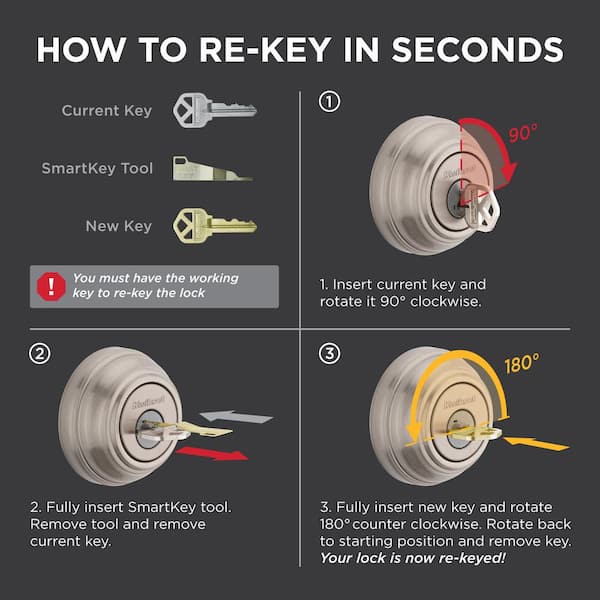
Credit: www.homedepot.com
Tools Needed For Unlocking
Knowing the right tools helps open a Kwikset deadbolt quickly. Different methods need different tools. Some tools are simple, while others use technology. Understanding these tools saves time and stress.
Basic Lock Picking Tools
Basic tools include a tension wrench and a pick. The wrench turns the lock cylinder gently. The pick lifts the pins inside the lock. These tools work together to open the deadbolt without a key. Practice is needed to use these tools well. Many kits are affordable and easy to find online.
Using A Key
The key is the easiest tool to open a Kwikset deadbolt. Always keep a spare key in a safe place. If the original key is lost, a locksmith can create a new one. Keys fit the lock pins perfectly and turn the cylinder. No special skills are needed when using a key.
Smartphone Apps For Smart Locks
Some Kwikset deadbolts connect to smartphones. Special apps control these smart locks remotely. The app sends signals to lock or unlock the door. Users can share access with family and friends. These apps require internet or Bluetooth connection. Using apps is fast and convenient for smart lock users.
Unlocking With A Key
Using a key to open a Kwikset deadbolt is simple and reliable. This method works best when the key and lock are in good condition. Understanding how to insert and turn the key can save time and avoid damage.
Proper Key Insertion
Hold the key so the teeth face the correct direction. Insert the key gently into the keyhole. Push it in fully, but do not force it. A fully inserted key aligns the pins inside the lock correctly.
Turning The Key Smoothly
Turn the key slowly to the right or left, depending on the lock. Do not use too much force. A smooth turn moves the deadbolt back into the door. Stop turning once you hear a click or feel the lock open.
Troubleshooting Key Issues
If the key won’t insert, check for dirt or debris in the keyhole. Clean the lock with compressed air or a soft brush. If the key sticks while turning, avoid twisting hard. Try applying a small amount of graphite lubricant to the keyhole.
Manual Picking Techniques
Manual picking techniques help open a Kwikset deadbolt without a key. These methods use simple tools and careful movements. They work by moving the lock’s pins into the right position. Understanding these techniques can be useful in an emergency or for learning about locks.
Raking Method
The raking method uses a rake tool to push the pins. Move the rake back and forth inside the lock. This motion sets multiple pins quickly. It is faster but less precise than other methods. Practice helps improve success with raking.
Single Pin Picking
Single pin picking targets one pin at a time. Use a pick to lift each pin carefully. Feel for the pin that is stuck. Set it above the shear line. Repeat this for all pins until the lock turns. This method takes patience but is very effective.
Using A Tension Wrench
A tension wrench applies small pressure to the lock cylinder. Insert it at the bottom of the keyway. Twist gently in the direction the key would turn. This pressure holds pins in place as you pick them. Without it, pins will drop back down. Control and light pressure are important.
Unlocking Smart Deadbolts
Smart deadbolts offer a modern way to secure your home. They use technology instead of just keys. This technology can sometimes cause confusion if you do not know how to operate it. Understanding how to unlock these smart locks can save time and reduce stress.
Smart deadbolts often have features like keypads, fingerprint readers, or remote controls. These features make them convenient but also require different methods to open. Below are simple ways to open a Kwikset smart deadbolt safely and easily.
Resetting The Lock
Resetting the lock is useful if you forget your code or the lock malfunctions. Start by removing the lock cover on the inside. Press and hold the reset button for about 10 seconds. Wait for the light to blink or hear a beep, which means the lock reset.
After resetting, set a new code through the lock’s app or keypad. This process restores factory settings, so all old codes will be erased. Use this method only when necessary to avoid losing important codes.
Using A Backup Key
Most smart deadbolts come with a physical backup key. This key is a simple way to open the door if the smart features fail. Locate the keyhole, which is often hidden behind a cover near the keypad.
Insert the backup key and turn it as you would with a traditional lock. Keep the backup key in a safe place. It ensures you can enter your home without tech problems or dead batteries.
Remote Access Options
Remote access allows you to control your lock from a phone or computer. Use the lock’s app to lock or unlock the door from anywhere. This is helpful if you need to let someone in while you are away.
Set up remote access by connecting the lock to your home Wi-Fi. Ensure the app is updated for smooth operation. Remember, remote access depends on a stable internet connection.
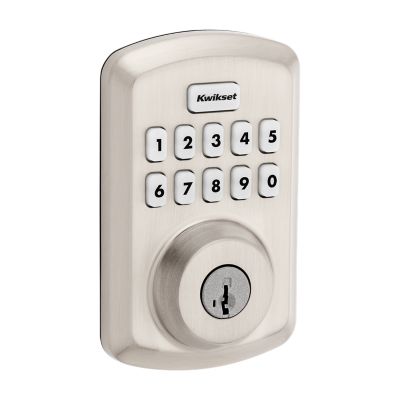
Credit: www.kwikset.com
Emergency Unlocking Options
Quick access to your Kwikset deadbolt saves time and stress. Being prepared helps avoid lockouts and frustration. Simple steps keep your lock working smoothly and ready.
Spare Keys Management
Keep spare keys in safe, easy-to-reach places. Give copies to trusted friends or family members. Avoid hiding keys in obvious spots outside. Check spare keys regularly to ensure they work well.
Regular Maintenance
Clean your deadbolt to prevent dirt build-up. Use a dry cloth to wipe the lock surface. Lubricate the lock with graphite powder, not oil. Test the lock often to catch issues early.
Upgrading To Smart Locks
Smart locks offer keyless entry for convenience. Use a code or app to open your door. They reduce the risk of losing physical keys. Choose smart locks compatible with your door type.

Credit: www.youtube.com
Frequently Asked Questions
How Do I Unlock A Kwikset Deadbolt Without A Key?
You can unlock a Kwikset deadbolt by using the keypad code if it’s a smart lock. For traditional models, try a lock pick or call a locksmith for safe unlocking.
Can I Unlock Kwikset Deadbolt With A Bump Key?
Bump keys are generally not effective on Kwikset deadbolts due to their security pins. Using bump keys may damage the lock, so it’s best to avoid this method.
What Should I Do If My Kwikset Deadbolt Is Jammed?
If your Kwikset deadbolt is jammed, try lubricating the lock with graphite spray. If it still won’t turn, gently tap the lock or consult a locksmith.
Is It Possible To Unlock Kwikset Deadbolt Using A Credit Card?
Unlocking a Kwikset deadbolt with a credit card is usually ineffective. This method works on spring locks but not on deadbolts, which have a more secure mechanism.
Conclusion
Knowing how to open a Kwikset deadbolt helps in many situations. You can save time and avoid calling a locksmith. Always keep the right tools ready and stay calm. Practice the steps carefully to get better. Remember, safety first—never try to force the lock.
Small efforts make a big difference. Keep your home secure by understanding your lock well. This knowledge gives you control and peace of mind. Simple skills can solve common lock problems easily.