Choosing the right smart lock can feel overwhelming, but picking a Kwikset Smart Key Deadbolt doesn’t have to be complicated. You want a lock that keeps your home secure, is easy to use, and fits your lifestyle perfectly.
In this guide, you’ll discover simple tips to help you make the best choice for your front door. By the end, you’ll feel confident about which Kwikset model meets your needs and why it’s a smart investment for your home’s safety.
Keep reading to unlock the secrets to a smarter, safer home.
Why Choose Kwikset Smart Key Deadbolts
Kwikset Smart Key Deadbolts offer a modern way to secure your home. These locks combine ease of use with strong security features. They allow quick rekeying without a locksmith. This makes them a smart choice for many homeowners.
Key Features To Consider
Kwikset Smart Key Deadbolts have a special key system. It allows you to change your key in seconds. No need to remove the lock from your door. The locks fit most standard doors easily. They come with strong metal construction for durability. Some models include smart technology for remote access. Look for features like anti-drill plates and bump resistance. Choose a finish that matches your door and style.
Advantages Over Traditional Locks
Smart Key Deadbolts save time and money on rekeying. You can control who has access to your home. Lost keys do not mean changing the whole lock. These deadbolts offer higher security than regular locks. They resist picking and bumping better. Smart models offer convenience with app control or keypads. You get peace of mind with advanced safety features. These benefits make Kwikset Smart Key a practical choice.
Types Of Kwikset Smart Key Deadbolts
Kwikset offers several types of Smart Key deadbolts. Each type has unique features. Choose based on your security needs and convenience.
Understanding these types helps you pick the right model for your door and lifestyle.
Single Cylinder Models
Single cylinder deadbolts use a key outside and a thumb turn inside. Easy to lock and unlock from indoors. Ideal for most residential doors. Provides good security without extra complexity.
Double Cylinder Models
Double cylinder deadbolts require a key both outside and inside. This adds security to doors with glass near the lock. Prevents someone from unlocking the door by breaking the glass. Best for homes needing extra protection.
Keyless Entry Options
Keyless models use codes or smart devices instead of keys. Enter a PIN or use a smartphone app to unlock. No need to carry keys. Convenient and modern for busy households. Some models offer temporary codes for guests.
Security Ratings And Standards
Security ratings and standards help you pick the right Kwikset Smart Key Deadbolt. They show how strong and safe the lock is. Knowing these ratings makes your choice easier. You get a lock that protects your home well.
Ansi/bhma Grading System
The ANSI/BHMA grading system rates locks by quality and security. Grade 1 is the strongest, used for commercial doors. Grade 2 is good for homes and offers solid protection. Grade 3 provides basic security, suitable for interior doors.
Check the lock’s grade before buying. A higher grade means better durability and safety. Kwikset Smart Key Deadbolts often meet Grade 2 or Grade 1 standards.
Pick And Bump Resistance
Pick and bump resistance shows how hard it is to open a lock without a key. Pick resistance means the lock stops tools from opening it easily. Bump resistance means the lock blocks bump keys, a common break-in tool.
Choose a Kwikset deadbolt with strong pick and bump resistance. It keeps your home safer against break-ins. Smart Key technology also helps by letting you rekey the lock quickly.
Compatibility And Installation
Choosing the right Kwikset Smart Key Deadbolt means checking compatibility and installation needs. A lock must fit your door perfectly. Installation should feel easy and secure. Understanding these points saves time and effort.
Door Thickness And Prep
Check your door thickness first. Most Kwikset locks fit doors between 1 3/8 and 1 3/4 inches thick. Measure carefully with a tape measure. If your door is thicker, you may need special parts.
Also, look at your door’s prep. The lock hole size and placement must match the lock. Standard door prep works well with Kwikset deadbolts. If your door has a different setup, you may need to drill or modify it slightly.
Diy Vs Professional Installation
Installing a Kwikset Smart Key Deadbolt can be a DIY project. Instructions are clear and tools are simple. If you feel confident, you can do it yourself and save money.
Some situations call for a professional. If your door needs major changes or you want extra security, hire a locksmith. Professionals ensure the lock works well and lasts long. Choose the option that fits your skills and needs best.
Smart Features And Connectivity
Smart features and connectivity are key when choosing a Kwikset Smart Key Deadbolt. These features make your lock more convenient and secure. They also allow you to control your door from anywhere. This section explains the main smart functions and how the lock connects with other devices.
Integration With Home Automation
Kwikset smart deadbolts work well with many home automation systems. You can connect them to systems like Alexa, Google Home, or Apple HomeKit. This lets you control your lock using voice commands. You can also link the lock to other smart devices. For example, you can set your lights to turn on when you unlock the door. Integration helps make your home smarter and easier to manage.
Mobile App Controls
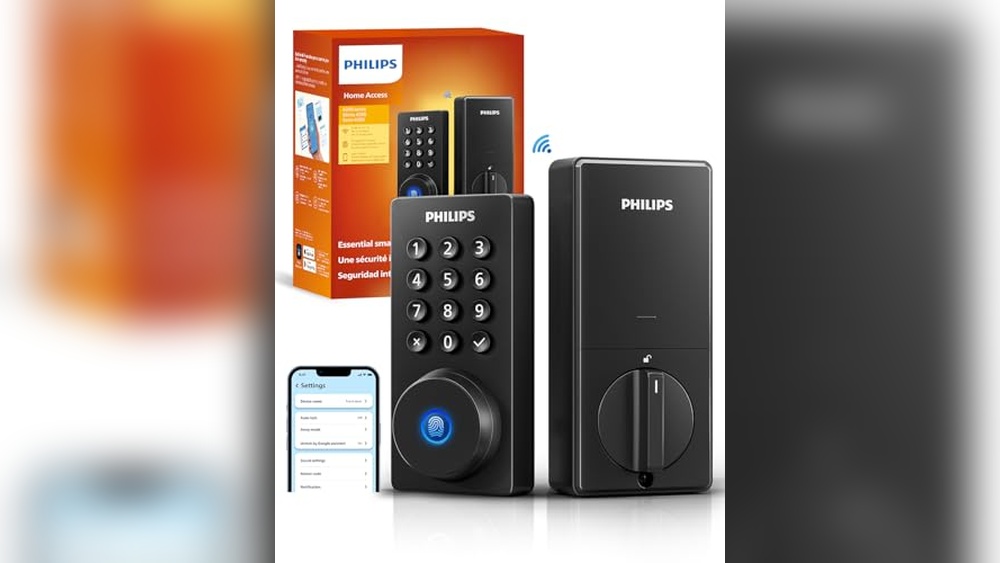
Most Kwikset smart locks come with a mobile app. The app lets you lock and unlock your door from anywhere. You can also check if your door is locked. The app allows you to give temporary access to friends or family. You get notifications when someone uses the lock. These controls add safety and convenience to your daily routine.

Credit: www.youtube.com
Battery Life And Maintenance
Battery life and maintenance are key factors when choosing a Kwikset Smart Key Deadbolt. A lock with good battery life ensures your door stays secure without frequent interruptions. Proper maintenance keeps the lock working smoothly for a long time. Understanding power options and simple upkeep helps you pick the right model.
Power Source Options
Kwikset smart locks usually run on AA or AAA batteries. These batteries are easy to find and replace. Some models use rechargeable batteries for convenience. Check if the lock shows battery status on its app or keypad. This feature helps you know when to change batteries. Avoid using old or cheap batteries to prevent problems. Always have spare batteries at home for emergencies.
Routine Maintenance Tips
Keep the battery contacts clean and dry to avoid power loss. Wipe the lock surface gently with a soft cloth. Do not use water or harsh chemicals. Test the lock regularly to make sure it responds well. Change batteries before they get too low to avoid lockouts. Update the lock’s firmware if available to keep it secure. Simple care extends the life of your smart deadbolt.
Price Range And Warranty
Choosing the right Kwikset Smart Key Deadbolt means thinking about price and warranty. These two factors help find a lock that fits your needs and budget. Price shows what you pay at first. Warranty protects your purchase for the future.
Budget Options
Kwikset offers smart key deadbolts for many budgets. Some models cost less but still give strong security. Basic versions have simple features and easy installation. These are good for renters or small homes. More expensive locks add features like smartphone control or voice commands. Pick a model that fits your price range and needs.
Extended Warranty Benefits
Many Kwikset locks come with a limited warranty. This covers defects and some repairs. Extended warranties give longer protection. They can save money on fixes after buying. Some plans include free replacements if the lock breaks. Extended coverage adds peace of mind for your investment. Always check the warranty terms before buying.
Credit: www.kwikset.com
User Reviews And Ratings
User reviews and ratings provide real insights into the Kwikset Smart Key Deadbolt. They show how the lock works in everyday use. Reading what others say helps you make a smart choice. Reviews highlight what people like and what problems they face.
Common Praise
Many users praise the easy installation of the Kwikset Smart Key Deadbolt. It fits most doors without extra tools. The smart key feature gets special mention for quick rekeying. People find it saves time and money. The lock’s strong build and good design get positive feedback. Several reviews note the smooth locking and unlocking process. Many appreciate the reliable security it offers for home use.
Reported Issues
Some users report occasional trouble with the smart key function. A few say the key can stick or jam. Others mention the lock’s battery life could be better. Some customers face problems with the lock’s compatibility with certain door types. A small number have found the instructions unclear or confusing. These issues seem rare but worth noting before buying.
Tips For Choosing The Right Model
Choosing the right Kwikset Smart Key Deadbolt is important for safety and convenience. This guide helps you pick a model that fits your needs. Focus on key points to make a smart choice.
Think about what you want from your deadbolt. Security level, style, and ease of use matter a lot. These tips make the decision easier.
Assessing Your Security Needs
Start by deciding how much security your door needs. High-traffic doors need stronger locks. Homes in busy areas benefit from advanced security features.
Consider if you want keyless entry options. Some models offer smart features like remote locking. These add convenience and control.
Check if the lock fits your door type. Some deadbolts work better on certain doors. Measure your door thickness before buying.
Matching Style And Finish
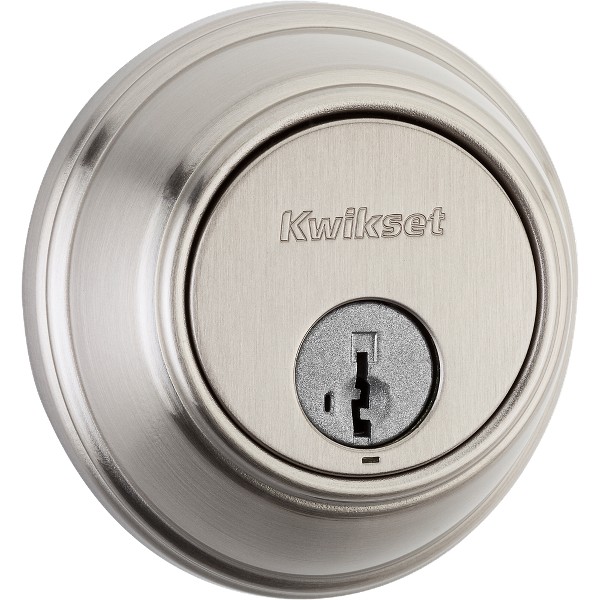
The lock should match your door and home style. Choose a finish that blends well with your door color. Common finishes include satin nickel, bronze, and brass.
Simple designs suit modern homes. More detailed styles fit classic houses. This choice keeps your entryway looking neat.
Think about wear and tear. Some finishes resist scratches and fingerprints better. This keeps your lock looking new longer.
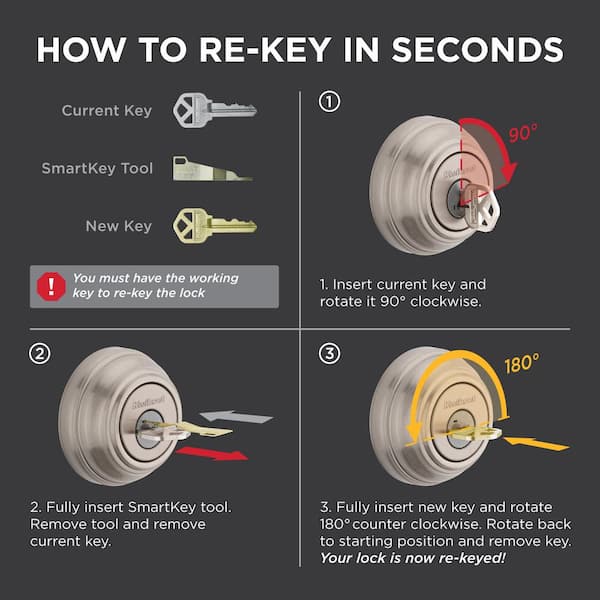
Credit: www.homedepot.com
Frequently Asked Questions
What Features Make Kwikset Smart Key Deadbolt Secure?
Kwikset Smart Key Deadbolts use advanced SmartKey technology. They resist lock picking and bumping. The deadbolt allows you to rekey quickly without a locksmith. This adds convenience and enhanced security for your home.
How Do I Rekey A Kwikset Smart Key Deadbolt?
Rekeying a Kwikset Smart Key Deadbolt is simple. Insert the current key and turn it 90 degrees. Press the SmartKey tool into the keyhole and remove the old key. Insert a new key, turn, and remove. This process takes just minutes.
Can I Install Kwikset Smart Key Deadbolt Myself?
Yes, Kwikset Smart Key Deadbolts are designed for easy DIY installation. Most models fit standard door preparations. Installation requires basic tools and typically takes about 30 minutes. Detailed instructions are included for a smooth setup.
Which Kwikset Smart Key Deadbolt Suits My Door Type?
Choose a deadbolt matching your door’s thickness and style. Check Kwikset’s specifications for compatibility. Most models fit standard residential doors. Consider keyless options for extra convenience. Always verify measurements before purchasing.
Conclusion
Choosing the right Kwikset Smart Key Deadbolt keeps your home safe and simple. Consider your door type, security needs, and ease of use. Check features like key control and smart technology options. Installation should fit your comfort level too. This helps you pick a lock that matches your lifestyle and budget.
Remember, a good deadbolt adds peace of mind every day. Take your time and choose wisely for lasting security.