Are you tired of juggling multiple switches just to control your ceiling fan and its light? Installing a ceiling fan light switch can simplify your life and give you full control right at your fingertips.
Whether you want to upgrade your existing setup or add a new switch, this guide will walk you through every step with clear, easy instructions. By the end, you’ll have the confidence to handle the installation yourself—and enjoy the convenience and comfort that comes with it.
Ready to make your ceiling fan work smarter for you? Let’s get started!
Credit: www.homedepot.com
Tools And Materials Needed
Before starting to install a ceiling fan light switch, gather all necessary tools and materials. Having everything ready makes the process smoother and safer. It also saves time and avoids interruptions.
Use tools that are in good condition. This ensures safety and better results. The materials must match the switch and the wiring in your home.
Essential Tools For Installation
You will need a screwdriver set, including both flathead and Phillips types. A voltage tester is important to check if wires carry electricity. Wire strippers help remove insulation without damaging wires. Needle-nose pliers allow for easy bending and twisting of wires. A drill might be necessary to make holes for screws. Electrical tape secures wire connections safely.
Materials Required
Choose a ceiling fan light switch compatible with your fan model. Electrical wire connects the switch to the power source and fan. Wire nuts join wires safely and prevent shorts. A wall plate covers the switch for a neat finish. Use screws that fit the switch and wall plate properly. Make sure all materials meet local electrical codes.
Safety Precautions
Safety is the top priority when installing a ceiling fan light switch. Working with electricity needs care to avoid accidents. Taking the right steps keeps you safe and protects your home.
Follow these safety tips closely before and during the installation. A small mistake can cause shocks or damage. Stay alert and prepared for every step.
Turn Off The Power
Switch off the main power at the breaker box. Do not rely on the wall switch alone. Use a tester to confirm the power is off. Never touch wires if you feel power is still on.
Use Proper Tools
Use insulated tools made for electrical work. Avoid metal tools without covers. Keep tools clean and in good condition. This reduces the risk of electric shock.
Wear Safety Gear
Wear rubber-soled shoes to avoid grounding yourself. Use safety glasses to protect your eyes from dust. Gloves help protect your hands from cuts and shocks. Dress in clothes that cover your arms and legs.
Check For Damaged Wires
Inspect wires for cracks or wear before connecting. Replace any damaged wires to avoid fires or shorts. Proper wire condition is vital for a safe installation.
Work In A Dry Area
Never install a switch in wet or damp places. Water and electricity do not mix well. Wait until the area is dry to start working.
Follow Instructions Carefully
Read the switch manufacturer’s guide before starting. Use the wiring diagram exactly as shown. Incorrect wiring can cause faults or hazards.
Turn Off Power
Turning off the power is the first and most important step before installing a ceiling fan light switch. It keeps you safe from electric shock. Always treat electricity with respect. Never skip this step.
Before starting, make sure you know which breaker controls the room’s power. This knowledge prevents accidents and protects your tools and body. Safety first.
Locate The Circuit Breaker
Go to your home’s electrical panel. Find the breaker that controls the room where you will install the switch. The breaker usually has labels. If not, test to find the right one.
Switch Off The Power
Flip the breaker switch to the OFF position. This stops electricity flow to the ceiling fan and switch. Do not guess or rely on the wall switch alone. Confirm power is off.
Test For Power
Use a voltage tester or a non-contact voltage detector. Check the wires where you will work. The tester should show no electricity. Double-check to avoid any risk.
Remove Existing Switch
Removing the existing switch is the first step in installing a ceiling fan light switch. This task prepares the space for the new switch. It ensures safety and makes the installation smoother. Follow simple steps to take out the old switch carefully.
Switch off the power at the circuit breaker. Confirm the power is off using a voltage tester. Never skip this step to avoid electric shock.
Remove Switch Cover Plate
Unscrew the cover plate using a screwdriver. Take off the plate gently to expose the switch. Keep the screws safe for later use.
Unscrew The Switch
Loosen the screws holding the switch in place. Pull the switch out slowly from the electrical box. Handle wires with care to avoid damage.
Disconnect The Wires
Note how wires connect to the switch. Loosen the terminal screws to free the wires. Separate the wires carefully and keep them untangled.
Identify Wiring
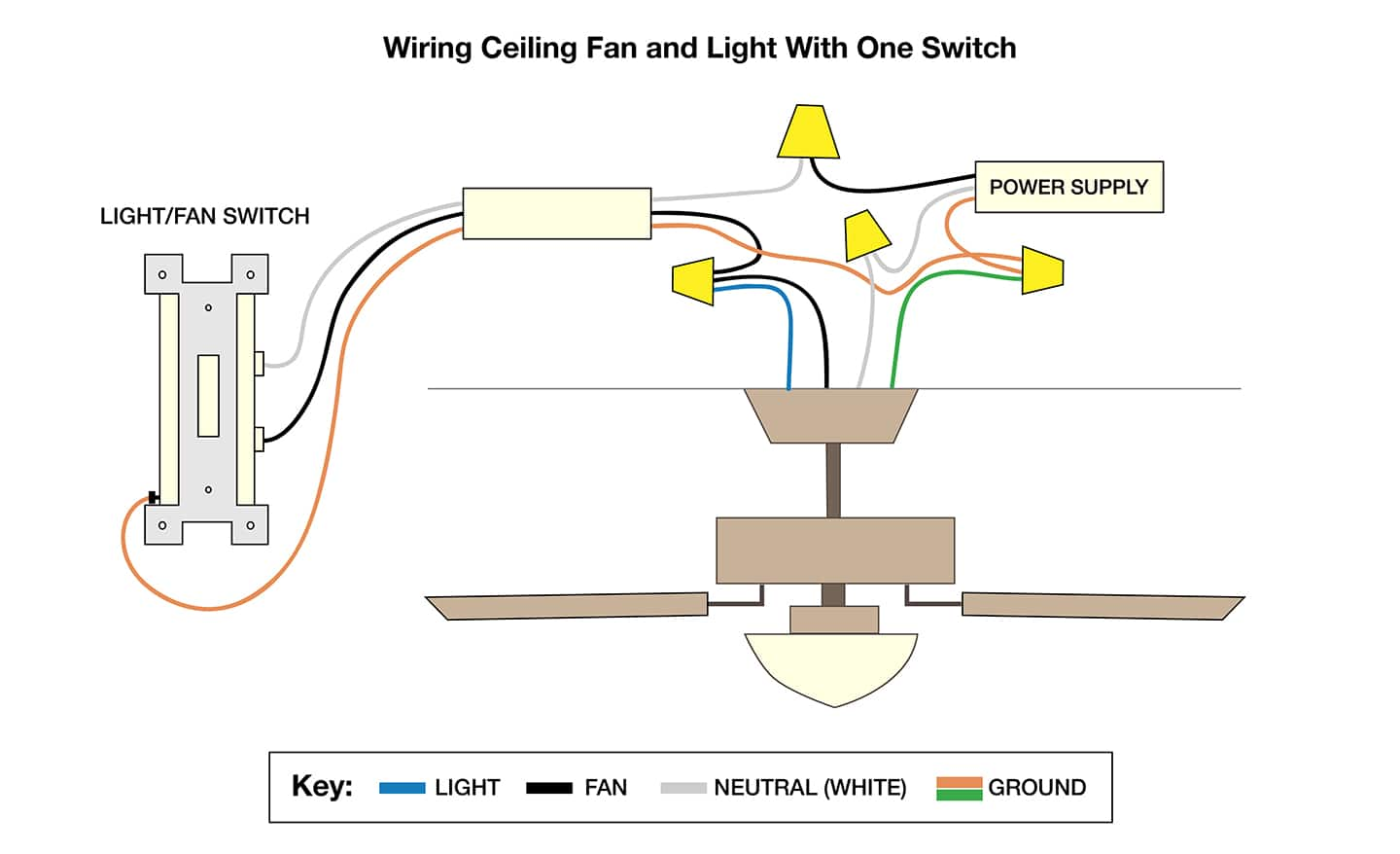
Start by turning off the power to avoid shocks. Next, find the black, white, and ground wires to connect the switch correctly. Identifying each wire helps ensure a safe and proper ceiling fan light switch installation.
Understanding The Basics Of Ceiling Fan Wiring
Before installing a ceiling fan light switch, identify the wires carefully. This step is important for safety and proper function.
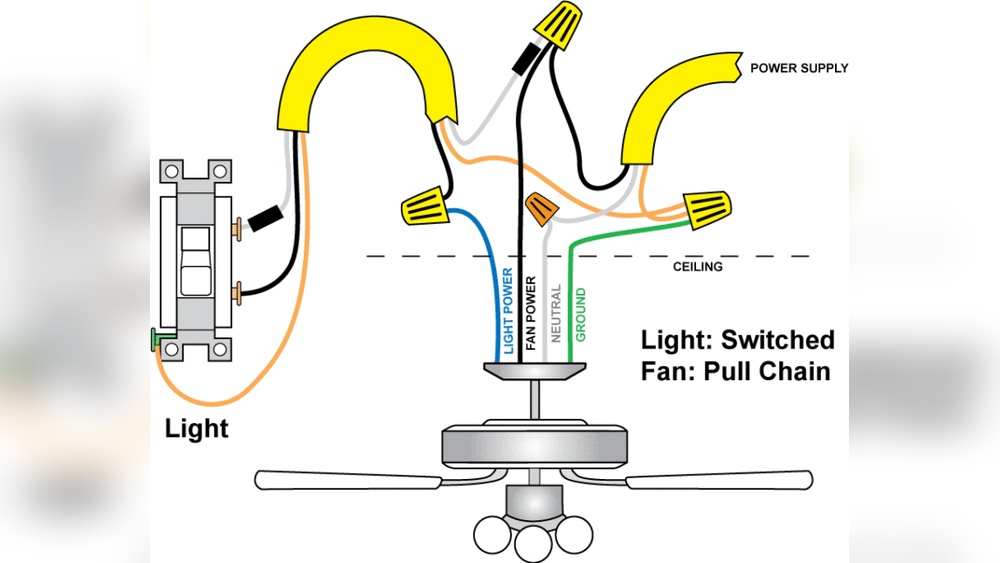
Most ceiling fans have three wires: one for power, one for the light, and one for the fan motor. Each wire has a different color.
Turn Off The Power
Always switch off the power at the circuit breaker. This prevents electric shock during wiring checks.
Use a voltage tester to confirm no current flows through the wires before touching them.
Identify Wire Colors
Look for the common wire colors: black, white, and green or bare copper.
Black usually means power to the fan motor, white is neutral, and green or bare is ground. The light wire can be blue or red.
Use A Voltage Tester To Confirm Wires
Test each wire with a voltage tester to check which one carries power.
The live wire will show voltage. Neutral and ground wires will not show power.
Label Each Wire
Use tape or markers to label each wire. This helps during the switch installation.
Clear labels reduce confusion and mistakes while connecting wires to the new switch.
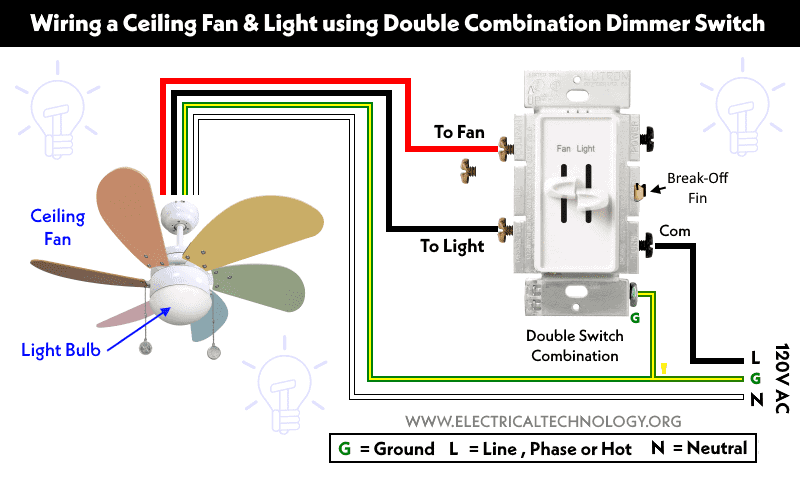
Credit: www.electricaltechnology.org
Connect New Switch
Connecting the new switch is a key step in installing your ceiling fan light switch. It involves joining the wires correctly and making sure the connections are tight and safe. This step ensures your switch works smoothly and avoids electrical issues.
Attach Wires To Switch
Start by matching the wires from the wall to the switch terminals. Usually, black or red wires connect to the brass screws. The white wire, if present, goes to the silver screw. Use a screwdriver to wrap the wire ends around the screws clockwise. Tighten the screws firmly to hold the wires in place.
Secure Connections
Double-check each wire connection to prevent loose contacts. Loose wires can cause flickering or no power to the fan light. Use wire nuts if needed for extra safety. Gently tug on each wire to confirm it stays secure. After securing, push the switch back into the box carefully.
Install Switch In Wall Box
Installing a ceiling fan light switch in a wall box is a key step for controlling your fan and light. This process requires care to ensure safety and proper function. The wall box holds the switch securely and connects the wires. Follow the steps below to install the switch correctly.
Turn Off Power At Circuit Breaker
Always start by turning off power to the room. Find the correct circuit breaker and switch it off. Test the switch with a voltage tester to confirm no electricity flows. Safety first.
Prepare The Wall Box
Remove the old switch if there is one. Check the wall box for damage or loose wires. Clean the box and make sure it fits the new switch. The box should be sturdy and secure.
Connect Wires To The Switch
Identify the wires: usually black (hot), white (neutral), and green or bare (ground). Attach the wires to the switch terminals. Tighten screws firmly to hold wires in place. Match wire colors to switch labels.
Secure The Switch In The Wall Box
Push the wires gently into the wall box. Align the switch with the box holes. Use screws to fix the switch tightly. The switch should not wiggle or feel loose.
Attach The Switch Cover Plate
Place the cover plate over the switch. Screw it in carefully without cracking the plate. The cover plate protects the switch and gives a neat finish.
Restore Power And Test The Switch
Turn the circuit breaker back on. Test the switch by turning the fan and light on and off. Check that both respond correctly. If not, turn off power and review connections.

Credit: community.smartthings.com
Restore Power And Test
Restoring power and testing your new ceiling fan light switch is a crucial step. It confirms that the installation works correctly and safely. This part must be done carefully to avoid electrical issues or damage.
Start by turning the main power back on. Make sure the circuit breaker or fuse you turned off is now active. This restores electricity to the switch and fan.
Turn On The Main Power
Locate your home’s circuit breaker panel. Flip the switch that controls the ceiling fan’s circuit back to the ON position. This action restores electricity to your ceiling fan and light switch wiring.
Test The Ceiling Fan Light Switch
Press the new switch to check the fan and light functions. The fan should start spinning, and the light should turn on or off as expected. Watch for any flickering or unusual noises.
Check For Proper Operation
Make sure the fan speeds change if your switch has multiple settings. The light should respond instantly to the switch. If something does not work, turn off the power and recheck your wiring connections.
Troubleshooting Tips
Troubleshooting is important when installing a ceiling fan light switch. Small issues can stop the fan or light from working. Finding and fixing these problems saves time and frustration. This section helps you check common problems and fix them easily.
Check The Power Supply
Make sure the power is off before testing. Use a voltage tester to confirm no electricity flows. Check the circuit breaker to see if it tripped. Reset the breaker if needed. Without power, the fan switch will not work.
Inspect The Wiring Connections
Loose or wrong wiring causes many issues. Look at all wire connections in the switch box. Tighten any loose wires. Match colors correctly: black to black, white to white. Use wire nuts to secure connections. Wrong wiring can stop the switch from working.
Test The Switch Itself
Sometimes the switch is faulty. Use a multimeter to test for continuity. If no continuity shows, replace the switch. Faulty switches can cause fan or light failure.
Examine The Fan And Light Fixtures
The problem might be in the fan or light. Check bulbs to see if they are burned out. Make sure fan blades spin freely. Faulty bulbs or stuck blades stop operation.
Verify The Wall Switch Compatibility
Not all switches work with every fan. Check if the switch matches your fan’s voltage and type. Using the wrong switch can cause problems. Use a compatible switch for best results.
Frequently Asked Questions
How Do I Install A Ceiling Fan Light Switch?
Turn off power at the breaker. Remove the old switch carefully. Connect the new switch wires matching color codes. Secure the switch and restore power. Test the fan and light to ensure proper operation.
What Tools Are Needed To Install A Fan Light Switch?
You need a screwdriver, wire stripper, voltage tester, electrical tape, and pliers. These tools help safely remove the old switch and connect the new one correctly.
Can I Install A Ceiling Fan Switch Myself?
Yes, if you follow safety steps and have basic electrical knowledge. Always turn off power first. If unsure, consult a professional electrician to avoid hazards.
How Do I Wire A Ceiling Fan Light Switch Correctly?
Connect black (hot) wires to the switch terminals. Match white (neutral) wires together. Attach ground wires to the grounding screw. Follow your switch’s wiring diagram for best results.
Conclusion
Installing a ceiling fan light switch can save you time and effort. Follow each step carefully for safety and success. Always turn off power before starting any electrical work. Use the right tools to avoid mistakes or damage. Test the switch after installation to ensure it works well.
A well-installed switch makes your fan and light easy to control. Take your time and stay patient throughout the process. With these simple tips, you can handle the job confidently and safely.