Are you tired of your motion sensor light switch turning on at the wrong moments? Maybe it’s too sensitive, or you simply want to control your lighting manually.
Whatever the reason, disabling a motion sensor light switch can be easier than you think. In this guide, you’ll discover simple steps to regain control over your lights without any hassle. Keep reading, and you’ll learn how to make your lighting work exactly the way you want it to.

Credit: www.youtube.com
Tools Needed
Disabling a motion sensor light switch requires a few basic tools. Having the right tools makes the job easier and safer. Gather these tools before starting the work. This helps avoid interruptions and mistakes.
Flathead Screwdriver
A flathead screwdriver helps remove the switch cover plate. It also loosens screws holding the switch in place. Choose one that fits your screws well to avoid damage.
Phillips Screwdriver
A Phillips screwdriver is useful for removing screws with a crosshead. Some motion sensor switches use these screws. This tool ensures you can access all parts easily.
Voltage Tester
Safety is important. Use a voltage tester to check if power is off. This tool prevents electric shock by confirming no current flows to the switch.
Wire Nuts
Wire nuts secure electrical wires after disconnecting the switch. They keep wires from touching and causing shorts. Have a few sizes ready to match your wires.
Electrical Tape
Electrical tape insulates wire connections. Use it to wrap wires for extra safety. It helps prevent accidental contact and keeps wires stable.
Locate The Motion Sensor Switch
Locating the motion sensor switch is the first step to disable it. The switch controls the light by detecting movement. It looks different from regular light switches. Finding it is simple with a few easy tips.
Check Common Areas For Installation
Motion sensor switches usually sit near doors or hallways. These areas need lights that turn on automatically. Look around entrances, staircases, or garages. The sensor often has a small lens or window on the switch.
Identify The Sensor Features
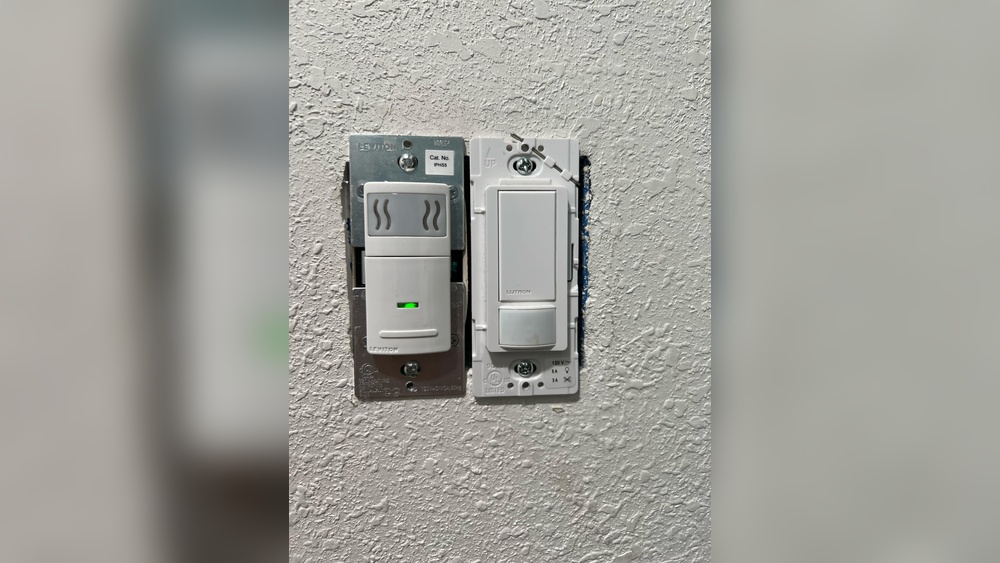
The sensor switch may have a small round or square lens. This lens detects motion to turn the light on or off. Some switches have extra buttons or dials to adjust settings. These features help you spot the sensor quickly.
Look For Electrical Panels If Needed
Some motion sensors connect directly to the electrical panel. Check the main fuse box or circuit breaker if you cannot find the switch. Labels on the panel may help identify the motion sensor circuit.
Use A Flashlight For Dark Areas
Dark corners or closets might hide the sensor switch. Shine a flashlight to see better. Light reflection can reveal the sensor’s lens or buttons. This step helps if the sensor is not in plain sight.
Turn Off Power Safely
Turning off the power safely is the first step before disabling a motion sensor light switch. It protects you from electrical shocks and damage. Always treat electricity with respect and care.
Follow these steps carefully to ensure safety. Do not skip or rush through the process.
Locate The Circuit Breaker
Find the main electrical panel in your home. It usually sits in the basement, garage, or utility room. Look for the breaker labeled for the light switch or the room it controls.
Switch Off The Correct Breaker
Flip the breaker switch to the OFF position. This stops the flow of electricity to the motion sensor light switch. Double-check that the switch no longer has power.
Use A Voltage Tester
Test the light switch with a voltage tester. This tool confirms no electricity runs through the wires. Touch the tester to the wires; no light or sound means it is safe.
Wear Safety Gear
Put on rubber gloves and safety glasses. These protect you from accidental shocks and sparks. Safety gear is a simple way to stay protected.
Remove The Switch Cover
Removing the switch cover is the first step in disabling a motion sensor light switch. This step lets you see the wiring and switch inside. It is important to do this carefully to avoid damage and stay safe.
Always turn off the power at the circuit breaker before touching the switch. Safety first. Use a screwdriver that fits the screws on the switch cover. Most covers have two screws, one at the top and one at the bottom.
Gather Necessary Tools
Prepare a flathead or Phillips screwdriver. Some covers need a specific type. Keep a small container nearby to hold screws safely. This prevents losing them during removal.
Remove Screws Carefully
Loosen screws slowly and gently. Do not strip or force them. Hold the cover with one hand to stop it from falling. Put screws in your container right away.
Take Off The Switch Cover
After unscrewing, pull the cover straight off. Avoid twisting or bending it. Place the cover on a soft surface to prevent scratches or cracks. Now you have clear access to the switch inside.
Identify Wiring Setup
Start by locating the wires connected to your motion sensor switch. Identify the live, load, neutral, and ground wires carefully. Knowing the wiring setup helps safely disable the motion sensor function.
Understanding Your Motion Sensor Light Switch
Before disabling a motion sensor light switch, know its wiring setup. The wiring controls how the switch receives power and connects to the light. Identifying wires helps avoid mistakes and ensures safety.
Most motion sensor switches have three or four wires. These include a line wire, load wire, neutral wire, and sometimes a ground wire. Each wire has a specific role in the circuit.
Turn Off The Power
Always switch off the power at the breaker box before touching wires. Use a voltage tester to confirm no electricity flows. Safety first. Never work on live wiring.
Locate And Identify Wires
Remove the switch cover to see the wires inside the electrical box. Look for color-coded wires: black (line or load), white (neutral), and green or bare copper (ground). Use a wiring diagram if available.
Check The Wiring Connections
Check how wires connect to the motion sensor switch. The line wire brings power in. The load wire sends power to the light. The neutral wire completes the circuit. The ground wire connects to the metal box or switch ground screw.
Take Notes Or Photos
Take clear photos or write notes of the wire connections. This helps when installing a new switch or restoring the original setup. Proper documentation avoids confusion.
Disconnect The Motion Sensor
Disconnecting the motion sensor is the first step to disable the motion sensor light switch. This stops the sensor from detecting movement and turning the light on. It involves careful handling of the electrical parts inside the switch.
Safety is important. Always turn off the power at the circuit breaker before starting. This prevents electric shocks and keeps the process safe.
Gather Necessary Tools
Prepare tools like a screwdriver, voltage tester, and wire nuts. These help to open the switch and test the wires safely.
Turn Off Power Supply
Switch off the power from the circuit breaker. Use a voltage tester to confirm no electricity flows to the switch.
Use a screwdriver to take off the switch cover. This exposes the wires and the motion sensor inside.
Identify The Motion Sensor Wires
Look for wires connected to the motion sensor. Usually, these are different from the regular switch wires.
Disconnect The Sensor Wires
Carefully disconnect the sensor wires. Use wire nuts to safely cover the ends and avoid contact.
Reassemble The Switch
Put the switch cover back on. Screw it in place tightly to secure the switch.
Restore Power And Test
Turn the power back on at the breaker. Test the switch to ensure the light no longer reacts to motion.
Install A Standard Switch
Installing a standard switch is a simple way to disable a motion sensor light switch. It replaces the sensor with a regular on/off control. This lets you control the light manually without sensor interruptions.
Choosing the right switch and wiring it correctly ensures safety and functionality. The process requires basic tools and careful attention to wiring details.
Turn Off Power At The Circuit Breaker
Start by cutting power to the light switch. Find the correct breaker and switch it off. Use a voltage tester to confirm no electricity flows to the switch box.
Remove The Motion Sensor Switch
Unscrew the cover plate and the sensor switch. Gently pull the switch out from the wall. Disconnect the wires carefully, noting their connections for reference.
Connect The Standard Switch Wires
Match the wires from the wall to the new switch terminals. Typically, connect the hot wire to the switch’s input. Attach the load wire to the output terminal. Secure ground wires to the switch’s green screw.
Secure The Switch And Replace Cover Plate
Push the switch back into the box. Tighten the mounting screws to hold it firmly. Snap the cover plate back on to finish the installation.
Restore Power And Test The Switch
Turn the circuit breaker back on. Flip the new switch to check if the light works. The light should turn on and off without sensor control.
Test The New Switch
Testing the new switch is a key step after installation. It ensures the light works correctly and safely. This step helps catch any wiring errors or faulty parts early. Testing also confirms the motion sensor is fully disabled, so the light stays on only when you want it to.
Turn On The Power
First, restore power at the circuit breaker. This activates the new switch. Watch for any sparks or unusual smells. If you see or smell anything strange, turn off the power immediately.
Check The Light Operation
Flip the switch to the ON position. The light should turn on without delay. Move around the room to verify the sensor does not trigger the light.
Test Manual Control
Toggle the switch several times. The light must respond each time you switch it on or off. This confirms the manual control works properly.
Observe For False Triggers
Stay still and wait for a few minutes. The light should not turn off or on by itself. This shows the motion sensor is disabled as intended.
Troubleshooting Tips
Troubleshooting motion sensor light switches can save time and effort. Some common issues occur during or after disabling the sensor. This guide helps identify and fix these problems quickly.
Switch Won’t Turn On
Check the power supply first. Make sure the breaker is on and the switch is properly wired. Loose wires can stop the switch from working. Use a voltage tester for safety. Replace the switch if it still won’t turn on.
Light Flickers
Flickering lights often mean a loose connection or bad bulb. Tighten the bulb or try a new one. Inspect the wiring inside the switch box. Faulty wiring can cause flickers and should be fixed by a professional.
Sensor Still Active
The sensor may stay active if it was not fully disabled. Double-check the settings on the switch. Some switches require pressing a reset button or holding a specific switch position. Consult the manual for exact steps to turn off the sensor fully.

Credit: www.reddit.com
When To Call A Professional
Knowing when to call a professional is important for safety and proper handling. Some issues with motion sensor light switches require expert care. Trying to fix complex problems alone can cause damage or injury. A professional has the right tools and knowledge. They can ensure the job is done safely and correctly.
Electrical Wiring Problems
Wiring faults can be dangerous and hard to spot. Loose wires or incorrect connections need expert attention. A professional can safely fix wiring issues without risk.
Unknown Switch Models
Some motion sensor switches have unique designs. If the model is unfamiliar, a professional can identify the right way to disable it. This avoids damage to the device or your home’s wiring.
Persistent Malfunctions
If the switch keeps turning on or off unexpectedly, it might have a deeper problem. A professional can diagnose and fix hidden faults quickly.
Safety Concerns
Handling electricity without proper skills is risky. If you feel unsure or unsafe, calling a professional is the best choice. Safety should always come first.

Credit: www.youtube.com
Frequently Asked Questions
How Do I Disable A Motion Sensor Light Switch?
To disable a motion sensor light switch, turn off the power first. Then, locate the sensor settings or remove the sensor module. Alternatively, replace it with a standard light switch. Always follow safety guidelines when working with electrical components.
Can I Turn Off Motion Sensing Temporarily?
Yes, many motion sensor switches have a manual override or disable option. Check the switch’s user manual for specific instructions. You can also adjust the sensor’s sensitivity or timer settings to reduce or stop motion detection temporarily.
Will Disabling Affect Energy Savings?
Disabling a motion sensor light switch may increase energy use. These switches save power by turning lights off automatically. Without the sensor, lights may stay on longer, causing higher electricity bills. Consider alternative energy-saving methods if disabling is necessary.
Is It Safe To Disable Motion Sensor Switches Myself?
Yes, if you have basic electrical knowledge and follow safety precautions. Always turn off the power at the breaker before starting. If unsure, consult a licensed electrician to avoid risks like electrical shock or damage.
Conclusion
Disabling a motion sensor light switch is simple and quick. Follow the steps carefully to avoid mistakes. Turn off the power before you start working. Adjust the settings or disconnect the sensor as needed. This helps control when and how lights turn on.
Save energy and avoid unwanted light activation. Stay safe by using the right tools and instructions. You can always change the switch back later. Enjoy better control over your home lighting today.