Are you ready to give your living room a sleek, modern look by mounting your flat screen TV on the wall? Anchoring your TV properly isn’t just about style—it’s about safety and making sure your investment stays secure.
But where do you start? What tools do you need? And how can you be sure it’s done right the first time? In this guide, you’ll discover simple, step-by-step instructions that anyone can follow. By the end, you’ll feel confident and in control, ready to enjoy a clutter-free space with your TV perfectly anchored.
Keep reading, and let’s make your wall-mounted TV a reality.
Choosing The Right Wall Mount
Choosing the right wall mount is key to safely anchoring your flat screen TV. The right mount holds your TV firmly and fits your room style. Picking a wrong mount may cause damage or poor viewing angles. Consider the type, size, and strength of the mount before buying.
Types Of Wall Mounts
There are three main types of wall mounts: fixed, tilting, and full-motion. Fixed mounts keep the TV flat against the wall. Tilting mounts let you adjust the screen up or down. Full-motion mounts allow movement in many directions. Choose a type based on your room layout and how you watch TV.
Weight Capacity And Size Compatibility
Check the mount’s weight limit before buying. Your TV should not exceed this limit. Also, match the mount with your TV size. A small mount may not fit a large TV securely. Always use a mount designed for your TV’s size and weight.
Material And Build Quality
Strong materials keep your TV safe on the wall. Look for mounts made of steel or heavy-duty metal. Avoid mounts made from cheap plastic or thin metal. A well-built mount lasts longer and supports your TV better.
Credit: www.gilgharda.com
Tools And Materials Needed
Anchoring a flat-screen TV to the wall requires the right tools and materials. Having these ready makes the process easier and safer. It helps to avoid damage to the TV or walls. This section lists all items you need before starting the installation.
Essential Tools
- Power drill with drill bits
- Stud finder
- Level
- Screwdrivers (Phillips and flathead)
- Measuring tape
- Socket wrench
- Pencil for marking
Safety Gear
- Safety goggles to protect eyes
- Work gloves to protect hands
- Dust mask if drilling into drywall
Additional Supplies
- Wall anchors suitable for your wall type
- Mounting bracket designed for your TV size
- Lag bolts or screws recommended by the bracket
- Cable ties or clips for organizing wires
Preparing The Wall
Preparing the wall is the first step to safely anchor a flat screen TV. Proper preparation keeps your TV secure and your wall intact. You need to find the best place to install the mount and avoid damage. This part is easy if you follow clear steps carefully.
Locating Studs
Studs are wooden beams behind the wall that hold weight well. Use a stud finder to locate these beams. Move the device slowly across the wall. Mark the edges of each stud with a pencil. Anchoring into studs ensures your TV stays firm and safe.
Marking Drill Points
After finding the studs, mark where to drill. Hold the TV mount on the wall at the desired height. Use a pencil to mark holes on the studs through the mount’s slots. Double-check the marks are level. Accurate marks prevent uneven mounting and damage.
Checking For Obstructions
Check for pipes, wires, or cables hidden behind the wall. Use a wire detector or knock on the wall to listen for hollow spots. Avoid drilling where obstructions might exist. This step protects your home and ensures a smooth installation.
Credit: centrerest.com
Mounting The Bracket
Mounting the bracket is a key step to safely anchor your flat screen TV. It holds the TV firmly and ensures it stays in place. Careful work during this step prevents damage and keeps the TV secure.
Follow the steps below to mount the bracket correctly. Take your time and use the right tools for the best results.
Drilling Holes
Mark the spots where the bracket will attach to the wall. Use a pencil and a level to get straight marks. Choose a drill bit that matches the size of the wall anchors or screws.
Drill holes carefully at the marked points. Make sure the drill goes straight into the wall. Avoid making holes too big or too small for the anchors.
Securing The Bracket
Insert wall anchors into the drilled holes if you use them. Hold the bracket against the wall. Align it with the holes.
Screw the bracket firmly into the wall. Tighten the screws but do not over-tighten. Over-tightening can damage the wall or bracket.
Ensuring Level Alignment
Check the bracket with a level tool. It must be perfectly horizontal. Adjust the bracket slightly if it is not level.
A level bracket keeps the TV straight and prevents it from tilting. Double-check before attaching the TV to avoid problems later.
Attaching The Tv
Attaching the TV to the wall is a critical step in securing your flat screen. This process requires careful handling and precise connection. Follow these steps to ensure the TV is safely anchored and stable.
Connecting Mounting Plates
Start by locating the mounting plates on the back of your TV. Align these plates with the wall bracket. Use screws to attach the plates firmly. Make sure the screws fit tightly. Loose screws can cause the TV to fall. Double-check the alignment before tightening all screws completely.
Lifting And Securing The Tv
Lift the TV with help to avoid dropping it. Hold the TV close to the wall bracket. Carefully hook the mounting plates onto the bracket. Listen for a click or feel the lock. Secure the safety locks or screws on the bracket. This prevents the TV from slipping off. Keep steady hands and move slowly.
Testing Stability
Gently shake the TV to check its hold. The TV should not wobble or move. If it shifts, tighten the screws again. Check the wall bracket for any gaps. Make sure all locking mechanisms are engaged. Test the stability before releasing the TV fully. A stable TV is safe for your home.
Cable Management Tips
Proper cable management keeps your flat screen TV area neat and safe. It prevents cables from tangling and reduces tripping hazards. Well-organized cables also improve the overall look of your setup. Here are simple tips to manage your TV cables effectively.
Hiding Cables
Hiding cables gives your wall a clean, uncluttered look. Use the space behind the TV to tuck wires out of sight. Run cables through wall plates or small holes. This method keeps wires completely hidden and protected.
Using Cable Covers
Cable covers are easy to install and keep wires together. They come in different colors to match your wall. Simply stick or paint them to blend with your room. Covers protect cables from damage and keep them neat.
Organizing Power And Av Wires
Separate power cables from AV wires to reduce interference. Use cable ties or Velcro straps to bundle cables by type. Labeling each wire helps find connections quickly. Organized cables make maintenance easier and safer.
Safety Checks And Maintenance
Securing your flat screen TV to the wall is only part of the process. Safety checks and maintenance keep your TV stable and protect your home. Regular attention helps avoid accidents and costly repairs. Simple steps make a big difference in safety and durability.
Regular Stability Inspections
Check the TV mount every few months. Look for loose screws or bolts. Gently shake the TV to test firmness. Tighten any loose parts immediately. Inspect the wall anchors for damage or wear. These checks prevent the TV from falling unexpectedly.
Avoiding Common Mistakes
Do not ignore weight limits on mounts. Use the right tools for installation. Avoid drilling into weak or hollow walls. Always follow the manufacturer’s instructions. Avoid hanging cables that pull on the TV. These errors weaken the setup and risk accidents.
When To Reinstall Or Upgrade
Reinstall if the TV wobbles or shifts easily. Upgrade if the mount shows rust or cracks. Change mounts when buying a bigger or heavier TV. Replace old wall anchors with stronger ones. These actions keep your TV safe and secure over time.
Enhancing Style Around The Tv
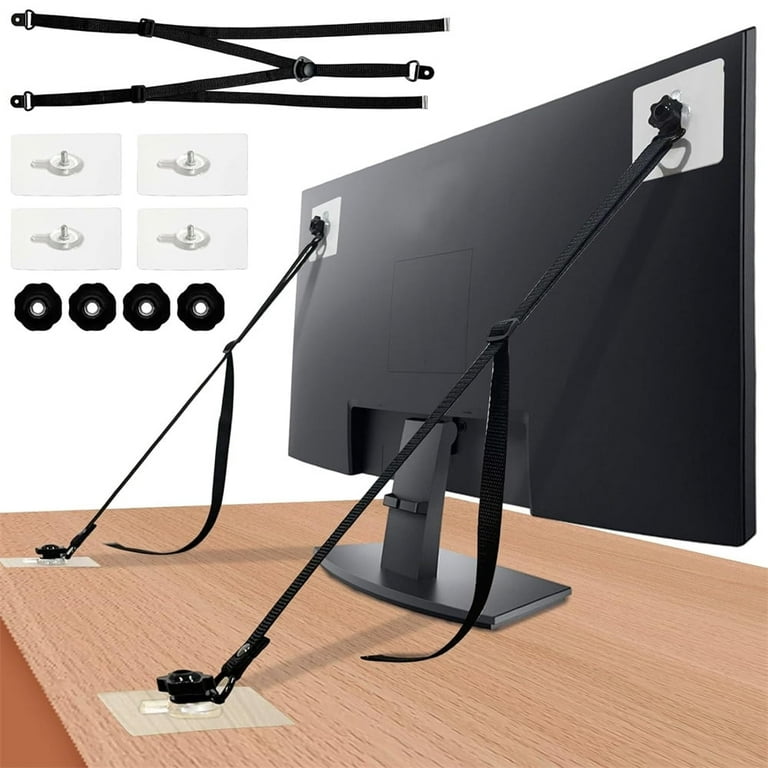
Anchoring a flat screen TV to the wall saves space and looks modern. Styling the area around the TV makes the room feel warm and inviting. Small touches can create a balanced and beautiful space. Focus on frames, lighting, and furniture to enhance the style.
Decorative Frames And Panels
Adding a decorative frame around the TV gives it a polished look. Choose a frame that matches your room’s colors and design. Wood frames add warmth, while metal frames bring a sleek feel. Wall panels behind the TV create texture and depth. They also protect the wall from marks. Frames and panels turn the TV into a design feature, not just a screen.
Lighting Effects
Light changes the mood of any room. Use soft LED lights behind the TV for a gentle glow. This reduces eye strain and adds style. Spotlights above or below the TV highlight the screen area. Color-changing lights can create different atmospheres. Keep the lighting subtle to avoid glare on the screen.
Furniture Placement Ideas
Arrange furniture to focus on the TV without crowding the space. Use low shelves or cabinets under the TV to hold devices and decor. Keep pathways clear for easy movement. Place seating at a comfortable distance for good viewing. Balance the room by adding plants or small tables nearby. Furniture helps define the TV zone and keeps the room tidy.
Credit: www.walmart.com
Frequently Asked Questions
How Do I Choose The Right Wall Mount For My Tv?
Select a wall mount based on your TV’s size, weight, and VESA pattern. Check the mount’s weight capacity. Ensure it fits your wall type for secure installation.
What Tools Are Needed To Anchor A Flat Screen Tv?
You will need a stud finder, drill, screwdriver, level, tape measure, and wall anchors. These tools help ensure a safe and precise TV installation.
How Do I Find Studs To Mount My Tv Safely?
Use a stud finder to locate studs behind the wall. Mark their positions clearly. Mounting on studs ensures your TV is securely anchored and prevents damage.
Can I Mount A Flat Screen Tv On Drywall Alone?
Drywall alone is not strong enough. Always anchor the TV mount into wall studs or use appropriate drywall anchors rated for your TV’s weight.
Conclusion
Anchoring your flat screen TV to the wall keeps it safe and tidy. It saves space and gives your room a neat look. Follow each step carefully to avoid mistakes. Use the right tools and anchors for your wall type.
Double-check that the TV is secure before use. A well-mounted TV brings better viewing comfort and peace of mind. Take your time, and enjoy your new setup.