Changing the code on your Schlage deadbolt is easier than you might think, and it’s a smart step to keep your home secure. Whether you’ve just moved in, lost your key, or want to update your code regularly for safety, knowing how to do this yourself saves time and money.
In this guide, you’ll get simple, clear instructions that anyone can follow—no tech skills needed. Ready to take control of your home’s security? Let’s get started.
Gather Necessary Tools
Before changing the code on a Schlage deadbolt, gather all the tools needed. Having the right tools makes the job easier and faster. It also helps avoid mistakes that could damage the lock. Preparation saves time and effort.
Most Schlage deadbolt models require just a few simple tools. These tools are common and easy to find at home or in a toolbox. Knowing what to have ready helps you start the task with confidence.
Phillips Head Screwdriver
A Phillips head screwdriver is essential. It fits the screws on the lock’s faceplate and inside parts. This tool helps you remove and replace screws securely. Using the right screwdriver prevents stripping screws.
Flat Head Screwdriver
A flat head screwdriver can be helpful. It assists in gently prying parts if needed. This tool is useful for small adjustments during the process. It also helps when removing the battery cover on some models.
New Batteries (optional)
Some Schlage deadbolts use batteries for electronic features. Changing the code often requires fresh batteries. New batteries ensure the lock works smoothly after programming. Keep them ready to avoid interruptions.
Owner’s Manual Or Instructions
Having the owner’s manual nearby is smart. It provides step-by-step guidance tailored to your model. The manual explains specific tools and steps clearly. You can follow it to avoid errors and confusion.
Locate The Programming Code
Locating the programming code is the first step to change your Schlage deadbolt code. This code lets you add or delete user codes. Without it, you cannot make any changes. Finding the programming code is simple and quick.
Check The User Manual
The programming code is usually in the user manual. Look for a section called “Programming” or “Setup.” The manual shows the default code and how to use it. Keep the manual safe for future reference.
Look Inside The Lock
Some Schlage models have the programming code inside the lock. Remove the lock cover carefully. The code may be printed on a sticker or metal plate. Write it down before closing the lock again.
Use The Default Programming Code
Most Schlage locks come with a default code. This code is often a six-digit number like 000000 or 123456. Try using the default code if you never changed it. It allows access to the programming mode.
Reset The Lock To Factory Settings
If the programming code is lost, reset the lock. This returns the code to the factory default. Follow the reset instructions in the manual. After reset, use the default code to program new user codes.
Access The Deadbolt Interior Panel
Accessing the interior panel of your Schlage deadbolt is the first step to change the lock code. This panel holds the important parts that control your lock’s code system. Opening it carefully is important to avoid damage.
The process is simple and does not require special tools. You only need a screwdriver and a bit of patience. Follow these steps to reach the interior panel safely and easily.
Locate The Screws On The Interior Side
Look at the inside part of the deadbolt. You will see a few screws. These screws keep the interior panel attached to the door. Usually, they are on the round part of the lock.
Use a screwdriver to check if all screws are visible and not covered. If you cannot see them, check for a small cover that hides the screws. Remove this cover gently.
Remove The Screws Carefully
Use the screwdriver to unscrew the screws. Turn each screw counterclockwise. Keep the screws in a safe place. You will need them to put the panel back.
Do not force the screws out. If they do not move easily, try a different screwdriver size. This avoids stripping the screw heads.
Lift Off The Interior Panel
After removing the screws, hold the panel firmly. Pull it straight off the door. Do this slowly to avoid damaging wires or small parts inside.
If the panel feels stuck, check for any hidden screws. Sometimes, panels have extra clips to hold them. Press these clips gently to release the panel.
Enter Programming Mode
Entering programming mode is the first step to change the code on a Schlage deadbolt. This mode lets you make changes to the lock settings. You must activate it before adding or deleting user codes. The process is simple and only takes a few moments.
Follow these steps carefully to enter programming mode. The lock must be powered, and the door should be open. This ensures the lock works correctly during programming.
Locate The Programming Button
Open the interior cover of your Schlage deadbolt. Inside, find the small black button. This is the programming button. It is usually near the batteries.
Press The Programming Button
Press and release the programming button. The lock will beep once. A light will flash, showing the lock is in programming mode.
Enter The Programming Code
Type your current programming code on the keypad. This code is different from user codes. After entering, the lock will beep twice, confirming programming mode activation.
Change The Access Code
Changing the access code on your Schlage deadbolt is a simple process. It helps keep your home secure by updating who can enter. Follow these clear steps to change your code quickly and easily.
Enter Current Code
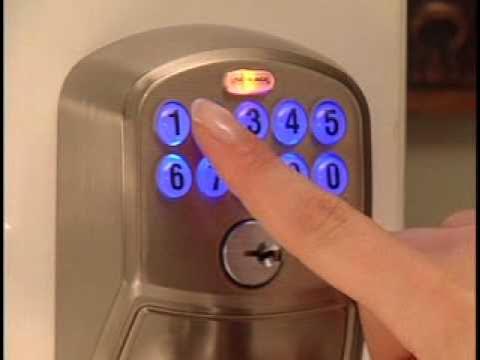
Start by waking the keypad with your hand. Enter your existing access code carefully. This confirms you have permission to change the code. Wait for the green light or a beep sound. It signals your code was accepted.
Input New Code
Now, type the new code you want to use. Choose a code that is easy for you to remember. Avoid simple sequences like 1234 or repeated digits. The new code usually needs 4 to 8 digits.
Confirm New Code
Re-enter the new code to confirm it. The lock will check if both entries match. Look for the green light or a beep again. This means your new code is set and ready to use.

Credit: www.wikihow.com
Test The New Code
Testing the new code on your Schlage deadbolt is a key step. It ensures the lock works with your new settings. This step helps you avoid getting locked out later. Take your time to check the code carefully.
Enter The New Code On The Keypad
Stand in front of your door. Press the buttons of your new code slowly. Wait for a sound or light from the lock. This shows the code is accepted by the deadbolt.
Try The Lock Several Times
Repeat entering the code at least three times. This checks if the lock opens every time. Testing more than once helps avoid surprises later. Make sure the lock clicks open smoothly.
Test With The Door Closed
Close the door fully before entering the code. This checks the lock in real use. Some locks act differently when the door is closed. Confirm the deadbolt retracts easily with the new code.
Use The Old Code To Confirm It No Longer Works
Try the previous code to ensure it is disabled. The lock should not open with the old code. This step confirms the new code is active. It keeps your home secure from old codes.
Troubleshooting Common Issues
Troubleshooting common issues with your Schlage deadbolt saves time and stress. Problems can stop your lock from working right. Knowing what to check helps fix these fast. Below are common problems and simple fixes.
Code Not Accepted
Check if you entered the code correctly. Numbers can be mixed up easily. Try typing the code slowly. Make sure the lock is in programming mode before entering the code. If the code still fails, reset the lock and start fresh. The battery might be weak, causing errors. Replace batteries if needed. A worn-out keypad can also cause trouble. Clean the keypad gently and try again.
Deadbolt Not Responding
The deadbolt might not respond due to dead batteries. Replace them with fresh ones. Look for any blockage inside the lock mechanism. Dirt or dust can stop the bolt from moving. Lubricate the bolt with a small amount of graphite powder. Avoid oil sprays as they attract dirt. Check if the lock is properly installed. Loose screws can affect its function. If the deadbolt still does not respond, a reset may be necessary.
Credit: www.youtube.com

Credit: www.wikihow.com
Frequently Asked Questions
How Do You Reset A Schlage Deadbolt Code?
To reset a Schlage deadbolt code, locate the programming button inside the lock. Press it, then enter a new code followed by the lock button. This process updates your access code quickly and securely.
What Tools Are Needed To Change Schlage Lock Codes?
No special tools are needed. Simply use the keypad on your Schlage deadbolt. Access the programming mode by pressing the programming button inside the lock. Follow the instructions to change the code easily.
Can I Change The Code Without The Original One?
Yes, if you have the programming code, you can change the user codes without the original user code. The programming code allows full control over the lock’s settings.
How Often Should I Change My Schlage Lock Code?
It’s recommended to change your Schlage lock code every 3 to 6 months. Regular updates improve security and prevent unauthorized access.
Conclusion
Changing the code on a Schlage deadbolt is simple and quick. Follow the steps carefully for a smooth process. Keep your new code easy to remember but hard to guess. Regularly update your code to keep your home safe. Now, you can control who enters your house with ease.
Stay safe and confident with your Schlage deadbolt.