If you’ve just installed a Honeywell deadbolt lock, the first thing you need to do is delete the default code. Leaving it unchanged can put your home’s security at risk.
But don’t worry—deleting the default code is easier than you think. In this guide, you’ll learn simple, step-by-step instructions to make your lock uniquely yours. Keep reading to protect your home and gain peace of mind with just a few easy actions.
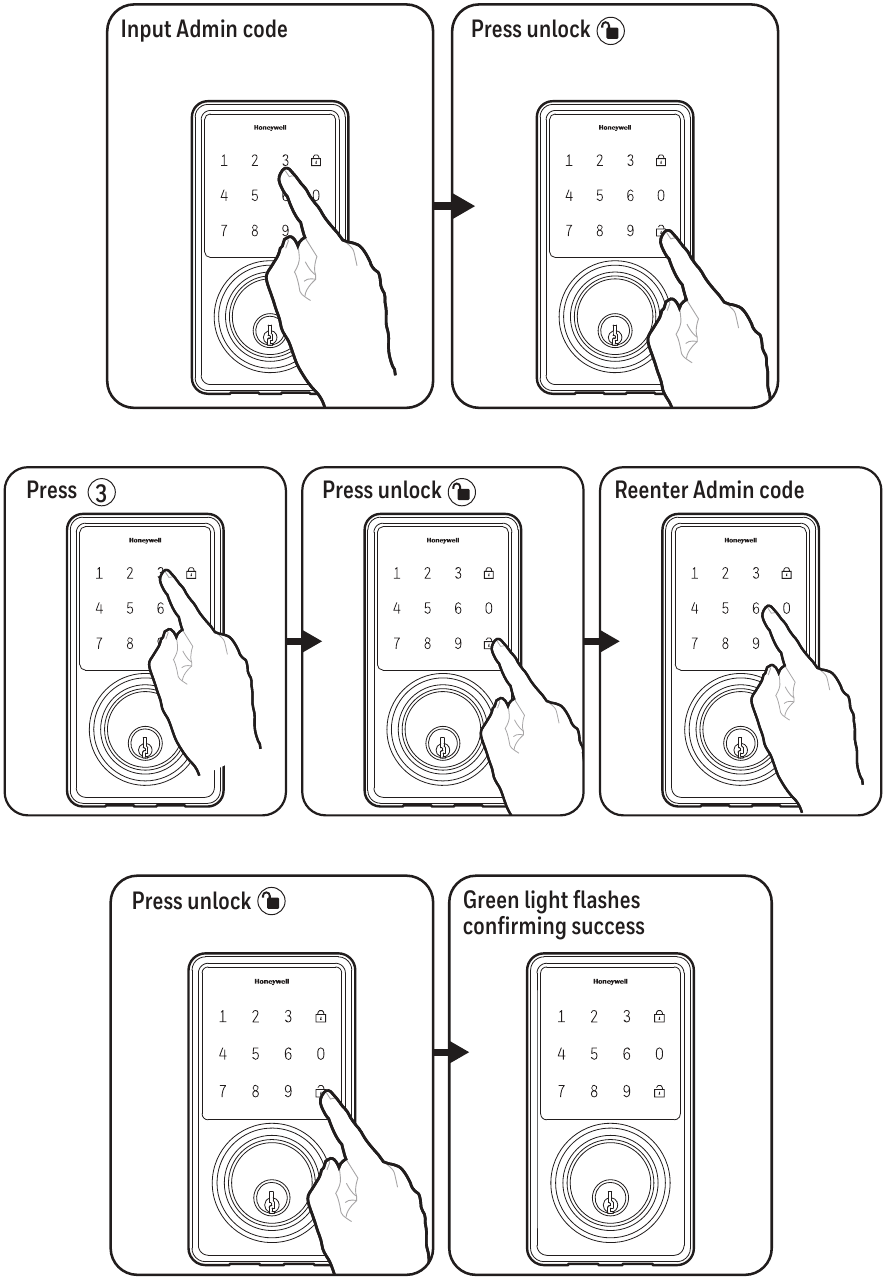
Credit: www.manualslib.com
Honeywell Deadbolt Basics
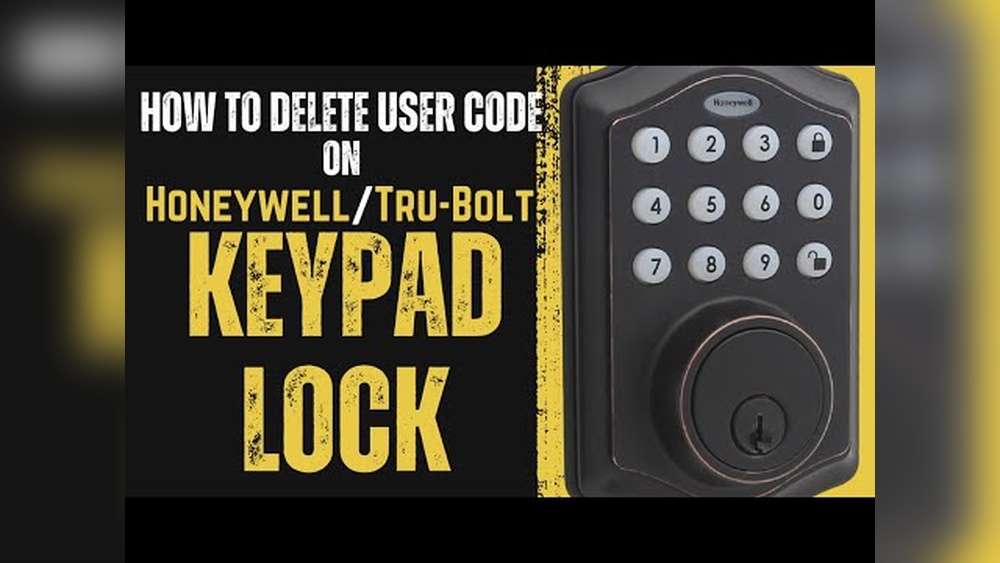
The Honeywell deadbolt is a popular choice for home security. It combines sturdy design with easy-to-use digital features. This lock uses a code system to allow keyless entry. Understanding its basic functions helps you manage it better.
One important step is changing or deleting the default code. This keeps your home safe from unauthorized access. Knowing the key features and purpose of the default code makes this process clear.
Key Features
Honeywell deadbolts offer simple installation and reliable locking. They include a keypad for entering codes. The lock stores multiple user codes for family or trusted people. Battery power allows operation without wiring. A low battery warning helps you replace batteries on time.
Default Code Purpose
The default code helps set up the lock at first use. It lets you enter the programming mode. From there, you can add or delete user codes. This code is usually simple, like “1234” or “0000”. Changing or deleting it prevents others from using it to access your lock.

Credit: www.youtube.com
Preparing To Delete Default Code
Before deleting the default code on your Honeywell deadbolt lock, proper preparation is key. This step ensures a smooth process and avoids any lock issues. Preparing means gathering tools and understanding safety measures.
Taking time to prepare helps protect your lock and your home’s security. It makes the code deletion easier and safer.
Required Tools
You need a few simple tools before starting. A small flathead screwdriver is essential. It helps open the lock’s battery cover and access the reset button. Sometimes, a Phillips screwdriver might be needed for screws.
Make sure you have fresh batteries. Low power can cause errors during code deletion. Keep a pen and paper handy to note new codes or instructions.
Safety Precautions
Safety is important when handling electronic locks. Remove the lock’s batteries before opening it. This prevents accidental short circuits. Avoid forcing any parts; gentle handling prevents damage.
Keep children and pets away during the process. This avoids distractions and accidents. Follow the lock’s manual carefully to prevent mistakes.
Step-by-step Code Deletion
Deleting the default code on your Honeywell deadbolt lock is important for security. This guide shows you clear steps to remove the factory-set code. Follow each step carefully to keep your home safe.
Accessing Programming Mode
Start by locating the programming button on the lock’s interior keypad. Press and hold this button until the LED light blinks or you hear a beep. This signals the lock is in programming mode. Now, you can make changes to the codes stored in the lock.
Deleting The Default Code
Enter the current default code using the keypad. Press the delete or clear button. The lock will confirm this action with a light or sound. This removes the default code from the system. Be sure not to press any other buttons during this step.
Confirming Code Removal
Test the lock by entering the deleted default code. The lock should not open or respond. This confirms the code removal was successful. If the lock still opens, repeat the deletion process carefully.
Setting A New Access Code
Setting a new access code for your Honeywell deadbolt lock is important for security. The default code is easy to guess. Changing it keeps your home safe. This section explains how to pick a strong code and program it into the lock.
Choosing A Secure Code
Pick a code that is hard to guess. Avoid simple numbers like 1234 or 0000. Use a mix of numbers that you can remember easily. Do not use your birthday or phone number. A good code has at least four digits. Change the code regularly to stay secure.
Programming The New Code
Start by opening the lock’s programming mode. Usually, press and hold the reset button until the light blinks. Enter your new code using the keypad. Press the lock button to save it. Test the new code by locking and unlocking the door. If it works, the new code is set.
Troubleshooting Common Issues
Deleting the default code from your Honeywell deadbolt lock should be simple. Sometimes, small issues can stop the process. Knowing how to fix these common problems helps save time and frustration.
Code Deletion Fails
Code deletion may fail if the lock is not in programming mode. Check the manual to enter the correct mode first. Enter the master code carefully before deleting the default code. Mistyping the code causes the lock to ignore commands. Try resetting the lock if deletion still fails. Resetting clears all codes and allows fresh setup.
Lock Not Responding
The lock may not respond if the batteries are low. Replace batteries with fresh ones to ensure proper power. Dirt or debris inside the keypad can block button presses. Clean the keypad gently with a soft cloth. If the lock still does not respond, restart it by removing and reinserting the batteries. This simple step often solves unresponsiveness.
Maintaining Your Deadbolt Lock
Maintaining your Honeywell deadbolt lock is important for security and smooth operation. Regular care helps keep the lock working well. It also protects your home from unwanted access. Simple steps can extend your lock’s life and performance.
Regular Code Updates
Change your lock code often. This stops others from using old codes to enter. Use a code that is easy for you to remember. Avoid simple sequences like 1234 or 0000. Update the code every few months for better safety.
Deleting the default code is the first step. Then add your unique code that only you know. This small act makes your lock more secure.
Lock Maintenance Tips
Keep the lock clean. Wipe it with a dry cloth regularly. Dirt and dust can cause problems over time. Do not use water or strong chemicals on the lock.
Check the batteries often. Weak batteries may cause the lock to fail. Replace batteries as soon as you see low power signs. Also, test the lock functions after changing batteries.
Lubricate the lock once a year. Use graphite or a dry lubricant. Avoid oil-based lubricants as they attract dirt. Proper lubrication helps the lock move smoothly.

Credit: www.safeandvaultstore.com
Frequently Asked Questions
How Do I Delete The Default Code On Honeywell Deadbolt?
To delete the default code, access the programming mode by pressing the “Program” button. Enter the existing default code, then press the “Delete” key followed by the code you want to remove. Confirm the deletion to finalize the process.
Can I Reset Honeywell Deadbolt To Factory Settings?
Yes, you can reset the Honeywell deadbolt to factory settings. Hold the reset button for 10 seconds until the lock beeps. This will erase all user codes, including the default code, restoring it to original factory settings.
What Tools Are Needed To Delete Default Code?
No special tools are needed to delete the default code. You only need access to the lock’s keypad and the existing default or admin code to enter programming mode and delete unwanted codes.
How Long Does It Take To Remove Default Code?
Removing the default code usually takes less than two minutes. The process involves entering programming mode, selecting the code to delete, and confirming the action quickly and easily.
Conclusion
Deleting the default code on your Honeywell deadbolt keeps your home safe. Follow the steps carefully to avoid mistakes. Changing the code is quick and simple. You control who can enter your house. Keep your lock’s instructions handy for reference.
Regularly update your code for better security. Stay confident knowing your lock works for you. Protect your home with just a few easy actions.