Is your deadbolt lock feeling loose or wobbly? A shaky lock not only makes your door less secure but can also be frustrating every time you try to lock or unlock it.
You might think it’s time to replace the entire lock, but tightening your deadbolt is often a quick fix you can do yourself. You’ll discover simple, step-by-step tips to make your deadbolt lock firm and reliable again. Keep reading to protect your home and gain peace of mind with a few easy tools you probably already have.
Signs Of A Loose Deadbolt
A deadbolt lock that feels loose can cause many problems. It may not secure your door properly. Detecting early signs helps keep your home safe. Pay attention to how the lock feels and works.
Loose deadbolts often show specific signs. You might notice the key turns with extra play. The lock may wiggle in the door. Sometimes, the bolt does not slide smoothly into the strike plate. These signs tell you the deadbolt needs tightening or repair.
Common Issues With Deadbolt Fit
Loose screws are the main cause of a loose deadbolt. Over time, screws may become loose or fall out. The door or frame might shift, causing misalignment. This misalignment stops the bolt from fitting tightly.
The strike plate can also be a problem. If it is loose or damaged, the bolt won’t lock firmly. Worn or broken parts inside the lock can cause extra space around the bolt. These issues reduce the lock’s effectiveness.
Risks Of A Loose Lock
A loose deadbolt weakens your door’s security. It becomes easier for intruders to force the lock open. The lock may fail to keep the door closed during strong winds or impacts.
Loose locks can also cause damage to the door. Constant movement may wear down the wood or metal around the lock. This damage can lead to costly repairs or replacement.
Ignoring a loose deadbolt can put your home and family at risk. Fixing it early saves money and keeps your property safe.
Credit: www.youtube.com
Tools Needed For Tightening
Tightening a deadbolt lock improves security and smooth operation. This step-by-step process guides you through tightening the lock carefully. Follow each step for better lock performance and safety.
Removing The Deadbolt Cover
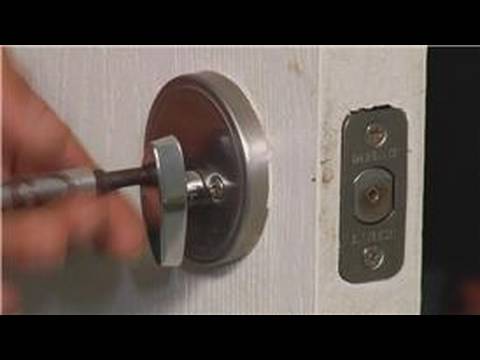
Start by removing the deadbolt cover. Look for small screws on the faceplate. Use a screwdriver to take out these screws. Gently pull off the cover to expose the lock mechanism. Keep the screws safe for later.
Adjusting The Mounting Screws
Next, find the mounting screws holding the lock in place. Tighten these screws using your screwdriver. Do not over-tighten to avoid damaging the lock. Ensure the lock sits firmly against the door. This step helps prevent wobbling and looseness.
Securing The Strike Plate
Check the strike plate on the door frame. Tighten its screws to secure it firmly. If screws are loose, the lock may misalign. Use longer screws for extra strength if needed. Proper strike plate alignment ensures smooth deadbolt operation.
Step-by-step Tightening Process
Testing the alignment of your deadbolt lock is an important step after tightening it. Proper alignment ensures the lock works smoothly and secures your door correctly. Misalignment can cause the lock to stick or not close fully, reducing your home’s safety.
Testing lock alignment takes only a few minutes but saves future trouble. Pay close attention to how the lock turns and fits into the strike plate. This check helps spot any small adjustments needed for perfect operation.
Checking Smooth Operation
Turn the deadbolt key or thumb turn slowly. Notice if the bolt moves easily inside the door frame. It should slide in and out without resistance or sticking. Stiff or rough movement means the lock parts do not line up well.
Open and close the door a few times. Watch how the bolt meets the strike plate. The bolt should enter fully and stop firmly. If it stops early or jams, the alignment needs correction.
Making Final Adjustments
Loosen the screws on the strike plate slightly. Move the plate up, down, left, or right in small steps. After each move, tighten screws and test the lock again. This trial and error helps find the best position for smooth locking.
If the bolt still does not align, check the door’s position in the frame. Adjust the door hinges if necessary. Proper door alignment also improves deadbolt function and security. Repeat testing until the lock turns freely and fits perfectly every time.
Credit: www.doityourself.com

Credit: www.reddit.com
Frequently Asked Questions
How Do I Fix A Loose Deadbolt Lock?
To fix a loose deadbolt lock, tighten the mounting screws on the interior side. Also, check the strike plate screws and tighten them. If needed, replace worn screws with longer ones for a better grip. This ensures the deadbolt is secure and functions properly.
What Tools Are Needed To Tighten A Deadbolt?
You typically need a Phillips or flathead screwdriver to tighten a deadbolt. Sometimes, an Allen wrench or hex key is required for specific models. Having a drill can help for stubborn screws. These tools make the tightening process efficient and straightforward.
Why Is My Deadbolt Lock Still Loose After Tightening?
If the deadbolt remains loose after tightening screws, check for stripped holes or damaged parts. Replacing worn screws with longer ones or using wall anchors may help. Also, ensure the lock components align correctly. Misalignment can cause looseness despite tightening efforts.
Can Tightening A Deadbolt Improve Home Security?
Yes, tightening a deadbolt lock improves home security by preventing easy tampering. A securely fastened deadbolt resists forced entry better. Regular maintenance, including tightening, ensures the lock operates smoothly and provides maximum protection against break-ins.
Conclusion
Tightening a deadbolt lock keeps your home safer and more secure. Small steps make a big difference in lock performance. Regular checks help prevent problems before they start. Tools needed are simple and easy to use. Follow each step carefully for the best results.
Taking time now saves frustration later. Protect your home with proper lock care. Stay safe with a tight, well-maintained deadbolt.