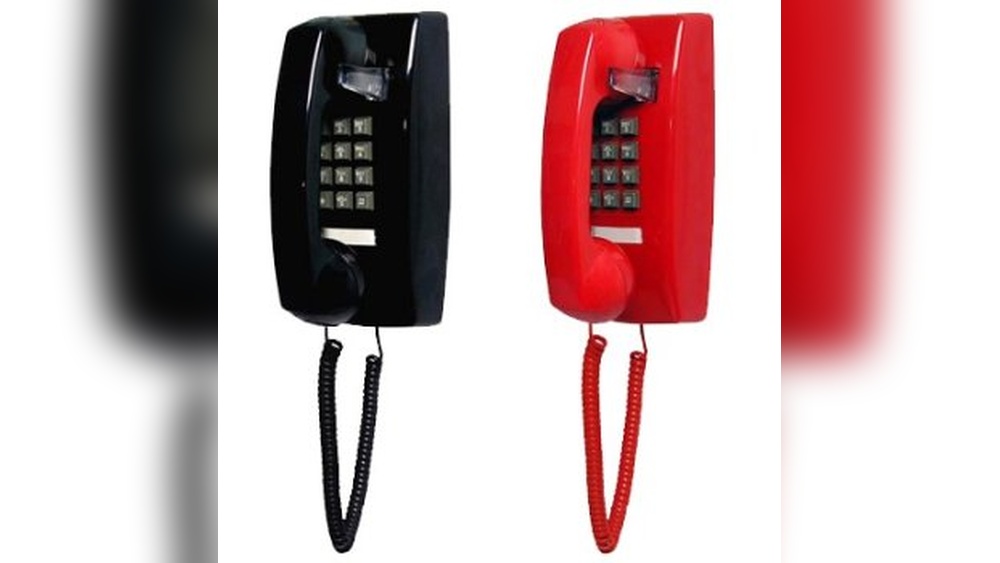
Have you ever wondered how to hook a phone to the wall quickly and securely? Whether you want to save space, keep your phone charged, or just have it handy, knowing the right steps can make all the difference.
This guide will walk you through simple, clear instructions that anyone can follow. By the end, you’ll feel confident setting up your phone exactly where you need it. Ready to make your space more organized and efficient? Let’s get started!

Credit: www.amazon.com
Tools And Materials Needed
Preparing to hook a phone to the wall requires specific tools and materials. Having the right items makes the job easier and safer. Each tool has a role in ensuring a secure connection. Materials help support the phone and maintain signal quality.
Gather all tools and materials before starting. This prevents interruptions and delays. Organize them in a clean, reachable space.
Phone Line Cord
The phone line cord connects the phone to the wall jack. Choose a cord with the correct length for your room. Make sure the connectors fit your phone and wall jack.
Wall Jack
The wall jack is the socket where you plug in the phone line. Use a new or tested wall jack for better connection. It should match the phone line type and phone plug.
Screwdriver
A screwdriver helps mount the wall jack or secure any covers. Use a Phillips or flat-head screwdriver, depending on the screws used. Keep it handy for quick adjustments.
Wire Stripper
A wire stripper removes the outer layer of the phone wire. It exposes the inner wires for connection. Use a tool sized for phone wires to avoid damage.
Telephone Wire
Telephone wire connects the wall jack to your phone system. Choose the right gauge and length for your installation. High-quality wire supports clear sound and signal.
Mounting Screws And Anchors
Mounting screws and anchors fix the wall jack to the wall. Use screws that fit the wall type. Anchors provide extra support in drywall or plaster walls.
Electrical Tape
Electrical tape secures wire connections and prevents short circuits. Wrap exposed wires carefully. It offers safety and keeps wires tidy.
Choosing The Right Location
Choosing the right location to hook a phone to the wall is important. The spot affects how well your phone works and how easy it is to use. Picking a good place saves space and keeps your phone safe.
Consider the room and how you move around in it. The phone should be within reach but not in the way. Think about the phone cord length and where the power outlet is.
Near A Power Outlet
Place the phone close to a power outlet. This helps avoid long cords that look messy. It also reduces trip hazards. The phone needs power to work properly.
At Comfortable Height
Install the phone at a height that is easy to reach. This makes dialing and answering calls simple. Avoid placing it too high or low. A height near your waist or chest works best.
Away From Noise
Choose a quiet spot for clear sound during calls. Avoid noisy places like kitchens or near TVs. A calm area helps you hear better and focus on conversations.
Close To Frequent Activity Areas
Put the phone where people spend most time. Near the living room or hallway is good. This keeps the phone handy for quick calls.
Preparing The Wall
Preparing the wall is an important step before hooking a phone. It ensures a secure and neat installation. Taking time to prepare the wall helps avoid mistakes and damage.
Marking The Spot
Start by choosing the right place on the wall. Use a pencil to mark the exact spot where the phone will hang. Measure twice to be sure of the placement. Check that the spot is level and at a comfortable height.
Mark the spots for the screws clearly. This makes drilling easier and more accurate. Avoid placing marks too close to edges or corners.
Drilling Holes
Pick a drill bit that matches the size of your wall anchors or screws. Wear safety glasses to protect your eyes from dust. Hold the drill steady and start drilling slowly at the marked spots.
Drill straight into the wall to create clean holes. Do not force the drill if it feels stuck. Clean the holes from dust using a small brush or cloth. This helps the anchors fit tightly and hold well.

Credit: www.amazon.com
Installing The Phone Jack
Installing the phone jack is an important step to connect your phone to the wall. It allows the phone to receive signals from the telephone line. This process is simple and does not take much time. Follow the steps carefully to avoid mistakes. Use the right tools and materials for a safe installation.
Connecting Wires
First, turn off the power to avoid any shocks. Open the phone jack cover gently. Inside, you will see small metal clips or screws. These hold the wires in place. Identify the wires by their colors, usually red and green. Strip a small part of each wire’s end to expose the metal. Attach each wire to the correct terminal. Tighten the screws or clips to secure the wires. Make sure no wires touch each other to prevent short circuits. Double-check the connections before closing the cover.
Securing The Jack
Once the wires are connected, place the jack into the wall box. Align the screw holes with the wall anchors. Use a screwdriver to fix the jack firmly to the wall. Do not over-tighten, as this may crack the jack or wall. After securing, snap the faceplate onto the jack. This keeps dust out and gives a clean look. Test the phone connection by plugging in your phone. If you hear a dial tone, the installation is successful.
Mounting The Phone
Testing the connection is a key step after hooking a phone to the wall. It ensures the phone works correctly. Without testing, problems may go unnoticed. A quick test saves time and avoids frustration later.
Check the line and the phone for any issues. Confirm the phone can send and receive calls. This step shows the connection is set up right.
Check The Phone Dial Tone
Pick up the phone receiver. Listen carefully for a clear dial tone. A steady tone means the line is active. No tone or a crackling sound suggests a problem. Check the wiring or the wall socket if issues appear.
Make A Test Call
Dial a known number, like a friend or voicemail. Listen for ringing on the other end. Speak and check if your voice is clear. Ask the person on the other end if they hear you well. This confirms the call quality and connection.
Inspect The Phone Jack And Cable
Look closely at the phone jack and cable. Ensure the cable is plugged in firmly. Check for any visible damage or loose wires. A damaged cable can cause poor sound or no connection. Replace any faulty parts for best results.
Testing The Connection
Troubleshooting common issues helps fix phone connection problems fast. Understanding basic problems saves time and avoids extra costs.
Most phone connection issues come from simple mistakes. Checking these issues first often solves the problem.
No Dial Tone
No dial tone means the phone is not ready to call. First, check if the phone is properly plugged into the wall jack. Unplug and plug it back to make sure the connection is tight.
Try another phone in the same jack. This tests if the problem is with the phone or the line. If the second phone works, your phone may need repair.
Check the phone cord for cuts or damage. Damaged cords can stop the signal. Replace the cord if it looks worn out.
Loose Connections
Loose connections cause static or no sound during calls. Inspect the cords at both ends. Make sure they click into place securely.
Check the wall jack for dust or debris. Clean the jack gently with a dry cloth if needed. Dirt can block the connection.
Sometimes, the wiring inside the jack becomes loose. If comfortable, use a screwdriver to open the jack. Tighten any loose wires carefully.
Try a different wall jack to see if the problem moves. This helps find if the issue is with the jack or the wiring.

Credit: www.livingbasics.in
Frequently Asked Questions
How Do I Connect A Phone To A Wall Jack?
To connect a phone to a wall jack, plug the phone’s RJ11 cable into the jack. Ensure the connection is secure and test the phone for dial tone.
What Tools Are Needed To Hook A Phone To Wall?
You need a phone with an RJ11 cable and access to a wall phone jack. A screwdriver may be useful for jack installation.
Can I Hook Multiple Phones To One Wall Jack?
Yes, you can connect multiple phones using a phone splitter. This allows several phones to share one wall jack line.
How To Troubleshoot No Dial Tone After Hooking Phone?
Check the cable connection and wall jack for damage. Test the phone with another jack to identify the issue.
Conclusion
Hooking a phone to the wall is simple and useful. You only need a few tools and careful steps. Follow the instructions step by step to avoid mistakes. Make sure the wires connect securely for a clear signal. Taking your time ensures a safe and neat setup.
Now, you can enjoy a stable phone connection at home or office. Try this easy task yourself and save time and money. It feels good to do it right without help.