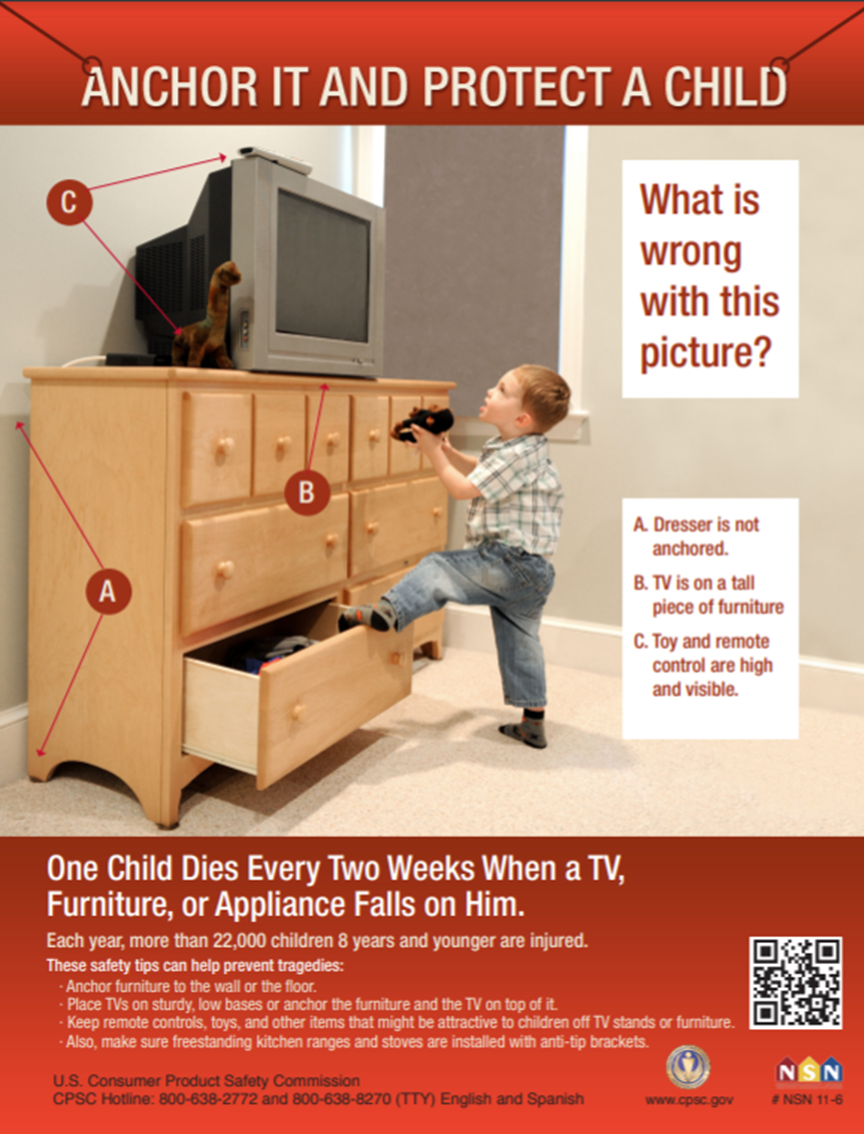
Have you ever worried about your TV stand tipping over? Whether you have kids, pets, or just want extra safety, anchoring your TV stand to the wall is a smart step.
It keeps your TV secure and gives you peace of mind. In this guide, you’ll learn simple, clear steps to anchor your TV stand quickly and safely. By the end, you’ll feel confident that your setup is stable and protected.
Keep reading to discover how easy it is to make your TV stand safe for your home.
Credit: basc.pnnl.gov
Choosing The Right Anchor
Choosing the right anchor is important for safely attaching your TV stand to the wall. The correct anchor holds the stand firmly. It stops the stand from tipping over. Using the wrong anchor can cause damage or accidents. Understanding the types of anchors and matching them to your wall is key.
Types Of Wall Anchors
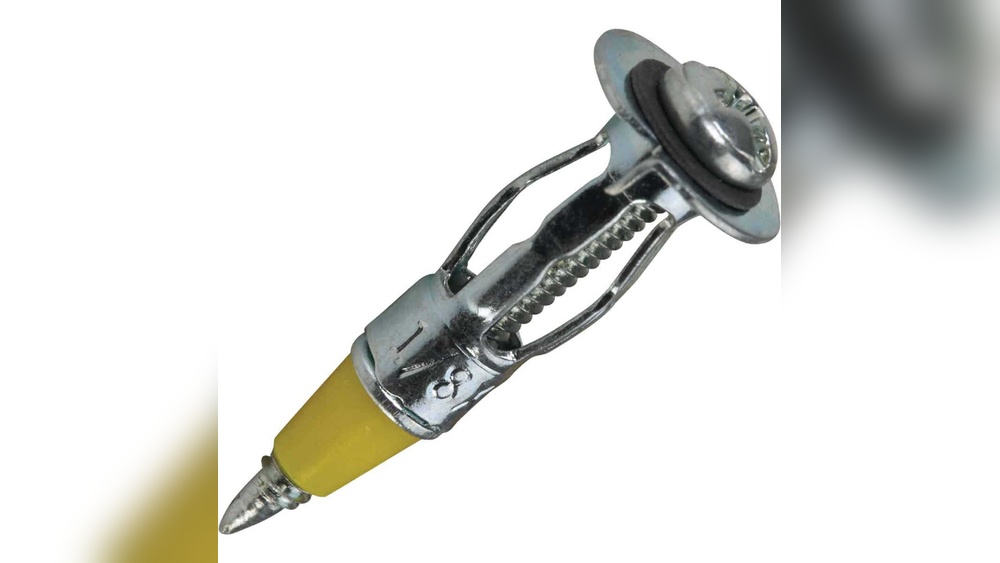
Plastic anchors are common and easy to use. They work well with light loads on drywall. Metal anchors offer stronger support for heavier items. They expand inside the wall for a tight grip. Toggle bolts have wings that open behind the wall. They hold very heavy loads and provide extra security. Molly bolts are metal sleeves that expand inside the wall. They give solid support for medium to heavy items.
Matching Anchors To Wall Material
Drywall requires anchors like plastic, toggle bolts, or molly bolts. These spread the load and prevent damage. For concrete or brick walls, use masonry anchors or screws with plugs. These anchors drill into hard surfaces for a firm hold. Wood walls allow direct screwing into studs without anchors. Find the studs first for the strongest support. Matching the anchor to your wall ensures safe and steady mounting.
Tools And Materials Needed
Anchoring a TV stand to the wall keeps your TV safe and stable. You need the right tools and materials to do this job well. Preparing these items before you start makes the process smoother and faster.
Essential Tools
Gather a drill with drill bits for making holes in the wall. A screwdriver is needed for tightening screws and bolts. Use a stud finder to locate the wall studs. This helps to attach the TV stand firmly. A tape measure is useful to check distances and alignment. Level ensures your TV stand stays straight. Pencil marks the spots on the wall for drilling.
Safety Gear
Wear safety goggles to protect your eyes from dust and debris. Use gloves to keep your hands safe during drilling and handling screws. Ear protection is helpful if you use a loud power drill. Dust masks prevent breathing in dust particles. Safety gear reduces risks and helps you work with confidence.
Preparing The Wall And Stand
Preparing the wall and TV stand is the first step to safe anchoring. It helps keep the TV stable and prevents accidents. Taking time to prepare ensures a strong hold. This part is about finding the right spots on the wall and marking them clearly.
Locating Studs
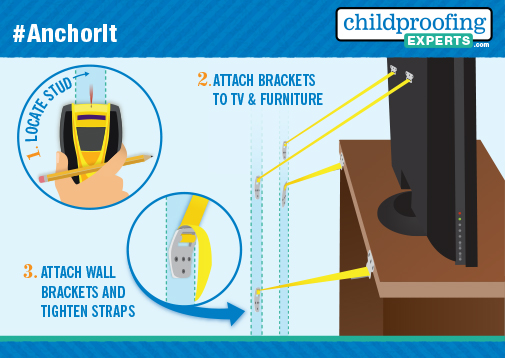
Studs are the wooden beams inside the wall. They hold the most weight. Use a stud finder to find them. Move the finder slowly across the wall. The device beeps or lights up over a stud. Mark the spot lightly with a pencil. Avoid drywall areas without studs. Anchoring directly to drywall is unsafe.
Measuring And Marking
Measure the width of the TV stand base. Find the center point of the stand’s back. Match this with the stud marks on the wall. Use a tape measure for accuracy. Mark points on the wall where screws will go. Check that marks line up with the stand’s holes. Double-check all measurements before drilling. Precise marking helps a smooth installation.
Installing The Anchors
Installing the anchors is a key step to keep your TV stand safe and steady. Anchors hold the stand firmly to the wall. This helps prevent tipping and accidents. Follow simple steps to place the anchors correctly and securely.
Drilling Pilot Holes
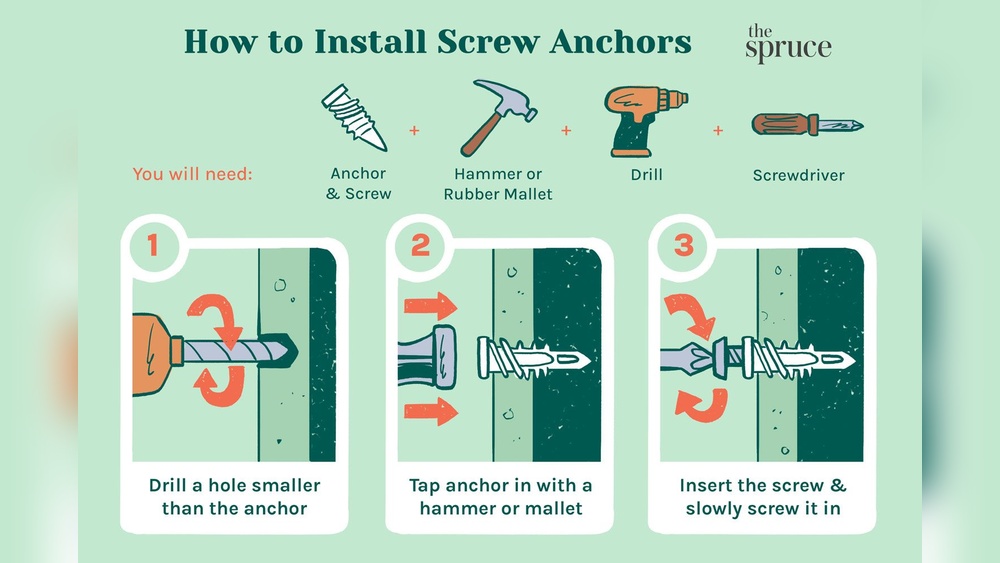
First, mark the spots on the wall where the anchors will go. Use a pencil and level to make sure marks are even. Choose a drill bit that matches the anchor size. Drill small pilot holes at the marked points. Drill straight and steady for a clean hole. Pilot holes make it easier to insert anchors without cracking the wall.
Securing The Anchors
Push the anchors into the pilot holes gently. Use a hammer if needed, tapping lightly. Make sure anchors sit flush with the wall surface. Once anchors are set, align the TV stand brackets with them. Insert screws through the brackets into the anchors. Tighten screws firmly but do not over-tighten. The anchors should hold the stand tight and secure.
Attaching The Tv Stand To Wall
Attaching the TV stand to the wall helps keep your TV safe and steady. It stops the stand from tipping over. This is very important in homes with children or pets. Follow simple steps to secure your TV stand correctly.
Aligning The Stand
Place the TV stand close to the wall. Check that it sits flat and straight. Use a level tool to make sure it is even. Mark the wall where the stand will be fixed. These marks help position the screws accurately.
Fastening The Stand
Use strong screws and anchors made for your wall type. Drill holes at the marked points carefully. Insert the anchors if needed for extra support. Attach the stand using screws and tighten them well. Check the stand is secure and does not move.
Credit: www.childproofingexperts.com
Testing Stability And Safety
Testing the stability and safety of your TV stand after anchoring is important. It ensures the stand stays secure and prevents accidents. Take time to check every detail to protect your TV and your family.
Checking For Movement
Gently push the TV stand from different sides. See if it wobbles or shifts. Even small movements can be risky. Use your hands to feel any loose spots. Watch the wall anchor points closely. If the stand moves, the anchor may not be tight enough.
Adjusting As Needed
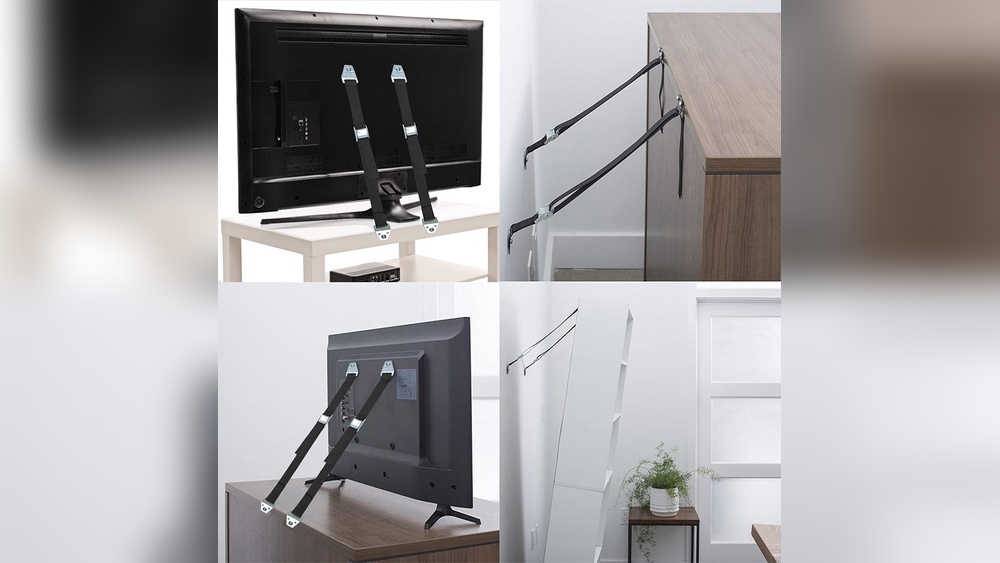
Tighten screws or bolts if the stand moves. Use a screwdriver or drill for better grip. Replace anchors if they do not hold firmly. Make sure the straps or brackets are snug and secure. Test the stand again after adjustments. Repeat until there is no movement at all.
Tips For Maintaining Safety
Anchoring your TV stand to the wall is a smart way to prevent accidents. Safety is not just about installation. It is also about regular care and attention. Follow these tips to keep your TV stand secure and your home safe.
Regular Inspections
Check the TV stand and wall anchors often. Look for loose screws or cracks. Tighten any screws that feel loose. Watch for signs of wear or damage on the brackets. Early detection stops accidents before they happen.
Avoiding Common Mistakes
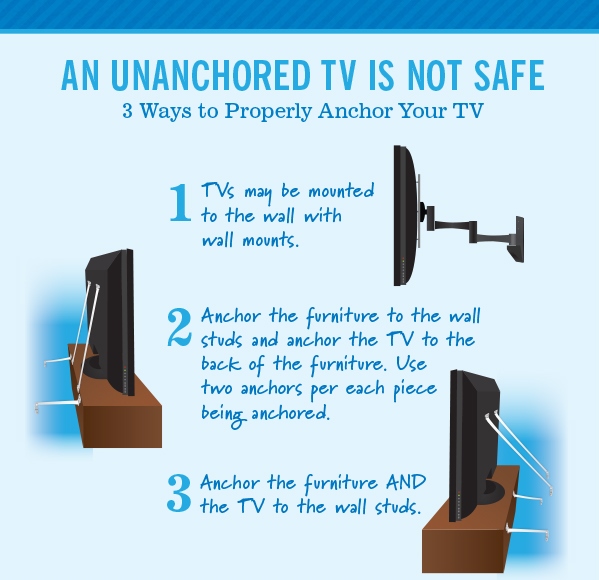
Use the right tools for anchoring. Don’t skip reading the instructions. Avoid using weak or old wall anchors. Place the stand on a flat, stable surface. Never rely only on the stand’s weight to hold the TV.
Credit: www.childproofingexperts.com
Frequently Asked Questions
How Do I Anchor A Tv Stand To A Wall Safely?
To anchor a TV stand safely, use sturdy wall anchors or studs. Secure the bracket to the wall, then attach it firmly to the TV stand. This prevents tipping and ensures stability, protecting your TV and family from accidents.
What Tools Are Needed To Anchor A Tv Stand?
Common tools include a drill, screwdriver, stud finder, level, measuring tape, and wall anchors or brackets. These tools help you find studs, align the stand correctly, and securely fasten it to the wall for maximum safety.
Can I Anchor A Tv Stand To Drywall Only?
Drywall alone is not strong enough to hold a TV stand securely. Use wall studs or heavy-duty anchors designed for drywall. This ensures the stand won’t tip over or cause damage to your walls.
How High Should I Anchor A Tv Stand To The Wall?
Anchor the TV stand at a height that prevents tipping and matches your viewing comfort. Typically, brackets are placed near the top of the stand or behind the TV for optimal safety and aesthetics.
Conclusion
Anchoring your TV stand to the wall keeps it safe and steady. It prevents accidents and protects your devices. Follow clear steps and use the right tools for success. Double-check your work to ensure everything is secure. A stable TV stand gives peace of mind at home.
Take a little time now to avoid big problems later. Stay safe and enjoy your viewing experience without worry.