
Changing the code on your electronic deadbolt might seem tricky, but it’s easier than you think. Whether you want to boost your home’s security or just update your access, knowing how to change the code gives you control and peace of mind.
You’ll learn simple, step-by-step instructions that anyone can follow. By the end, you’ll feel confident managing your electronic lock like a pro. Keep reading to unlock the secrets to keeping your home safe and secure.
Types Of Electronic Deadbolts
Electronic deadbolts come in several types. Each offers different ways to secure your door. Understanding these types helps you pick the right one for your needs. Here are the main types of electronic deadbolts you might find.
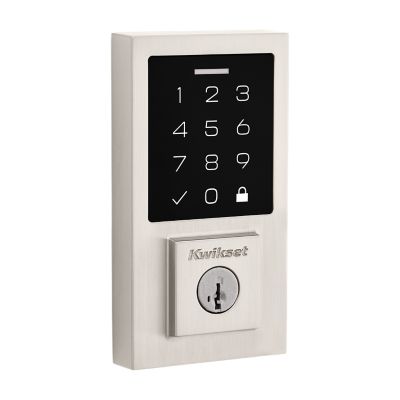
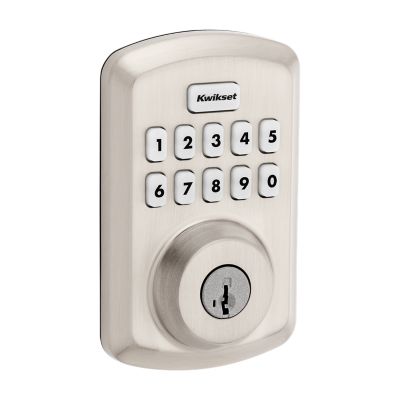
Keypad Deadbolts
Keypad deadbolts use numbers for entry. You enter a code on a small keypad. They do not need keys. You can change the code easily for security. These deadbolts are simple and reliable.
Smart Deadbolts
Smart deadbolts connect to your phone or home system. You can lock or unlock remotely. Some models send alerts about door status. They often support voice commands. Smart deadbolts offer convenience and control.
Biometric Deadbolts
Biometric deadbolts use fingerprints for access. They scan your finger to open the door. No code or key is needed. This type is very secure and fast. It is ideal for homes needing quick access.
Credit: www.kwikset.com
Tools Needed For Code Change
Changing the code on an electronic deadbolt requires a few simple tools. Having the right tools ready helps make the process smooth and quick. You do not need many items, but some are essential for safety and ease.
Common Tools
Most electronic deadbolt code changes need a small screwdriver. Usually, a Phillips-head screwdriver works best. Some locks use flathead screws, so keep that screwdriver handy too. A flashlight can help if you work in dim light. A small paper or cloth can clean the keypad before you start. Keep everything nearby to avoid interruptions.
Battery Check
Always check the battery before changing the code. Low battery can cause errors during programming. Most electronic deadbolts use AA or 9-volt batteries. Carry spare batteries to replace if needed. Open the battery compartment carefully with the screwdriver. Replace old batteries with new ones for better performance.
Locating The Programming Button
Changing the code on an electronic deadbolt starts with finding the programming button. This button lets you enter programming mode to set a new code. Knowing where to find it is key to a smooth process. Most locks hide this button in easy-to-reach spots. The exact location depends on your lock model. Below are common places to check.
Inside The Battery Compartment
Many electronic deadbolts place the programming button inside the battery compartment. Remove the battery cover gently. You may need a screwdriver or just slide the cover off. Look carefully near the batteries. The button is often small and round. Pressing it activates programming mode. Always keep the battery cover close to avoid misplacing it.
On The Interior Side Of The Lock
Some locks have the programming button on the inside part of the lock. This side faces inside your home. Check near the thumb turn or handle. The button might be hidden under a small panel. Open or slide the panel to find it. This design keeps the button out of reach from outside. Pressing it starts the code change process quickly.
Credit: www.kwikset.com
Step-by-step Code Change Process
Changing the code on an electronic deadbolt keeps your home safe. The process is simple and quick. Follow the steps below to update your lock code.
Entering Programming Mode
Start by locating the lock’s programming button. This is usually inside the battery compartment. Press and hold the button for a few seconds. The lock will beep or flash to show it is in programming mode. Now you can change the codes.
Deleting Old Codes
Clear old codes to avoid confusion. Enter the current master code first. Then press the button to delete the old user codes. Some locks let you delete one code at a time. Others erase all codes at once. Check your lock’s manual for details.
Adding New Codes
After deleting old codes, add new ones. Enter the master code again to confirm programming mode. Then type the new user code you want. Press the button or “” to save it. Repeat for multiple codes if needed. Make sure each code is easy to remember but hard to guess.
Testing The New Code
Test the new code before closing the battery cover. Lock the door and enter the new code. The deadbolt should unlock smoothly. Test all new codes you added. If a code doesn’t work, repeat the steps carefully.
Troubleshooting Common Issues
Troubleshooting common problems with electronic deadbolts helps keep your home secure. Small issues can stop your lock from working. Understanding simple fixes saves time and stress. This guide covers frequent problems and easy solutions. Follow these steps to get your lock working again quickly.
Unresponsive Keypad
The keypad may not respond due to dirt or damage. Clean the keypad with a soft cloth gently. Avoid using water or harsh chemicals. Check if the lock is powered on. Sometimes, a full reset of the lock helps restore function. Press the reset button carefully or follow the manual.
Code Not Accepted
Wrong codes cause many frustrations. Verify you enter the correct code slowly. Make sure the lock is in programming mode if changing codes. Clear any previous codes before adding new ones. The lock may reject codes if too many attempts fail. Wait a few minutes before trying again.
Battery Problems
Low battery is the most common cause of failure. Replace batteries with new ones regularly to avoid issues. Use the recommended battery type for your lock. Check battery contacts for corrosion or dirt and clean them gently. Some locks warn with blinking lights or sounds before dying.
Security Tips For Code Management
Managing the code on your electronic deadbolt is key to keeping your home safe. Simple steps can greatly improve your lock’s security. Careful code management reduces the risk of unwanted access. Follow these tips to protect your property and loved ones.
Choosing Strong Codes
Select codes that are hard to guess. Avoid common numbers like 1234 or 0000. Use a mix of digits that only you know. Longer codes often offer better protection. Keep your code unique and avoid personal dates.
Regular Code Updates
Change your code often to stay secure. Regular updates prevent old codes from being used. Set reminders to change codes every few months. Update codes after guests or service workers visit. Frequent changes keep your lock secure.
Limiting Access
Only share your code with trusted people. Avoid giving the code to too many individuals. Remove codes that are no longer needed. Use temporary codes for visitors or workers. Limiting access lowers the risk of unauthorized entry.
When To Call A Professional
Changing the code on an electronic deadbolt seems simple at first. Some locks have easy steps you can follow. Yet, there are times to call a professional locksmith. They have the skills to handle tricky situations. Calling a pro saves time and prevents damage to your lock.
Complex Lock Systems
Some electronic deadbolts have complicated designs. They use advanced technology and many settings. Trying to change the code without knowledge can cause errors. A professional knows how to manage these systems safely. They can update your code without harming the lock.
Repeated Malfunctions
Your lock may stop working after code changes. If it keeps failing, a problem exists beyond the code. A pro can find hidden issues quickly. They check wiring, batteries, and internal parts. This ensures the lock works well and stays secure.
Lost Programming Instructions
Many locks come with a manual for changing codes. Losing these instructions makes the process hard. Professionals know different brands and models. They can reset or reprogram your lock without the guide. This helps keep your lock functional and protected.

Credit: www.youtube.com
Frequently Asked Questions
How Do You Reset An Electronic Deadbolt Code?
To reset the code, locate the reset button on the lock’s interior. Press and hold it until the LED blinks. Enter the new code and confirm it. This process varies by model, so consult your lock’s manual for exact instructions.
Can I Change The Code Without Removing The Deadbolt?
Yes, most electronic deadbolts allow code changes without removal. Use the keypad to enter the current code, then follow the lock’s programming steps. This lets you update the code quickly and securely without disassembling the lock.
What If I Forget My Electronic Deadbolt Code?
If you forget your code, use the lock’s reset option or backup key. Some models require a master code or physical reset button. Refer to the manual for recovery steps to regain access safely.
How Often Should I Change My Deadbolt Code?
Change your electronic deadbolt code every 3-6 months. Regular updates enhance security and prevent unauthorized access. Also, update codes after moving or sharing with temporary users.
Conclusion
Changing the code on an electronic deadbolt is simple and quick. Follow the steps carefully for safety and ease. Keep your new code private and easy to remember. Test the lock after changing the code to ensure it works. Regularly updating your code helps protect your home.
This small task improves your security every time. Stay safe by keeping your electronic deadbolt code fresh.

