
Have you ever found yourself locked out or struggling with your Defiant electronic deadbolt? Resetting it might seem tricky, but you’re closer to solving the problem than you think.
In this guide, you’ll discover simple, clear steps to reset your deadbolt quickly and safely. Whether you want to change your code or fix a glitch, this article will give you the confidence to take control of your lock. Keep reading, and you’ll have your door working perfectly again in no time.
Tools Needed
Basic tools like a small screwdriver and fresh batteries are needed. A reset pin or paperclip might help for pressing the reset button. Keep these items ready before starting the reset process.
Resetting a Defiant electronic deadbolt requires a few simple tools. These tools help you open the lock and access its internal components safely. Having the right tools ready makes the process faster and easier.
Gather all tools before starting. This prevents interruptions and helps keep the lock safe from damage. Here are the main tools you need for the job.
Small Phillips Head Screwdriver
A small Phillips head screwdriver is needed to remove the screws on the lock’s faceplate. These screws hold the deadbolt’s cover in place. Use a screwdriver that fits well to avoid stripping the screws.
Flathead Screwdriver
A flathead screwdriver helps to gently pry open parts if they are stuck. It also assists in removing battery covers or clips inside the lock. Use it carefully to prevent scratching the lock.
Replacement Batteries
New batteries are often needed during a reset. Most Defiant locks use AA or AAA batteries. Fresh batteries ensure the lock works correctly after resetting.
Reset Pin Or Paperclip
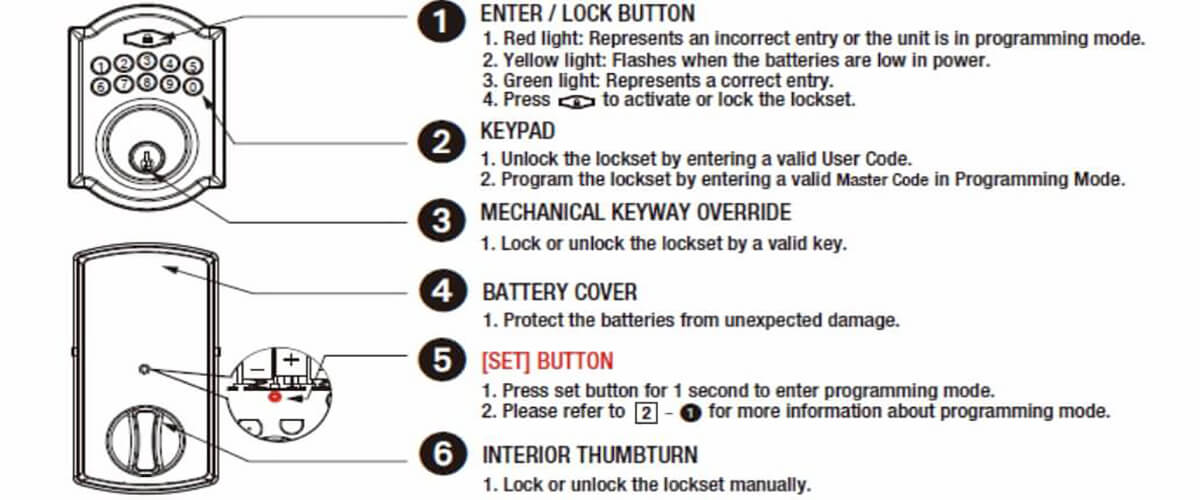
A reset pin or a straightened paperclip is useful to press the reset button. This small tool fits into the tiny reset hole on the lock. It triggers the reset process without damaging the lock.
Locate The Reset Button
Locating the reset button on your Defiant electronic deadbolt is the first step in resetting the lock. This button allows you to restore the lock to its original factory settings. Knowing exactly where to find it saves time and avoids frustration.
The reset button is usually small and recessed. It is designed this way to prevent accidental resets. You might need a small tool like a paperclip to press it.
Check The Interior Side Of The Lock
Start by opening the door and looking at the interior part of the lock. The reset button is often found on the back of the keypad or inside the battery compartment. Remove the battery cover carefully to see the button clearly.
Look Inside The Battery Compartment
Remove the battery cover. You will find the reset button near the batteries. It may be a tiny hole or a small button. Use a small pointed object to press it.
Identify The Reset Button By Its Shape And Size
The reset button is small and round. It is usually a different color than the surrounding area. It might be black or red. It is often labeled as “Reset” or “RST.”
Remove The Battery Cover
Removing the battery cover is the first step to reset your Defiant electronic deadbolt. This step gives access to the batteries and reset button inside the lock. It’s simple but needs care to avoid damage.
The battery cover usually sits on the interior side of the lock. It protects the batteries and the lock’s electronic components. Removing it lets you replace batteries or press the reset button to start the reset process.
Locate The Battery Cover
Find the battery cover on the inside part of the deadbolt. It is often a small panel or plate. Look for a visible seam or a slight gap around the cover edge. This shows where to lift or slide the cover off.
Prepare To Remove The Cover
Clear the area around the lock. Use your fingers or a flat tool. Do not use sharp objects that might scratch the lock. Gently press or slide the cover in the direction it moves. Some covers lift up; others slide down or sideways.
Remove The Battery Cover Carefully
Lift or slide the cover slowly. Keep it steady to avoid dropping it. Set the cover aside in a safe place. Check inside for batteries and the reset button. Be careful not to touch any parts inside the lock.
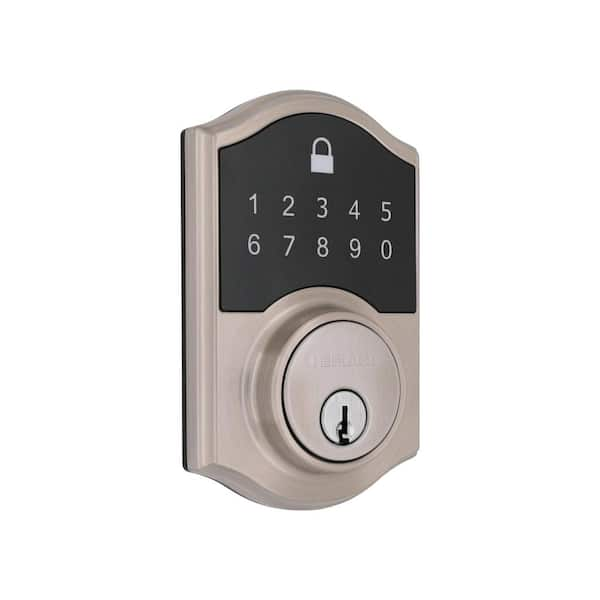
Credit: www.homedepot.com
Perform The Reset
Performing the reset on your Defiant electronic deadbolt is a simple process. It helps clear any old codes and settings. This makes the lock ready for new programming. Follow the steps carefully to avoid any issues.
Pressing The Reset Button
Locate the reset button on the interior side of the lock. Use a small tool like a paperclip to press the button. Press it firmly but gently. This action starts the reset process.
Holding The Reset Button
Keep the reset button pressed for about 10 seconds. Hold it steadily without releasing. The lock will begin to clear its memory. This step is necessary for a full reset.
Reset Confirmation
Release the reset button after holding it. Watch for a light or sound signal. The lock usually beeps or flashes to confirm reset. This means your deadbolt is now reset and ready.
Reinstall The Battery Cover
Reinstalling the battery cover is an important final step after resetting your Defiant electronic deadbolt. This step protects the battery compartment and ensures the lock works properly. A secure cover keeps dirt and moisture out, which helps the lock last longer.
Make sure the battery cover fits tightly. A loose cover can cause the batteries to shift or lose contact. This can lead to malfunctions or the lock not responding.
Align The Battery Cover Correctly
Place the battery cover over the battery compartment. Check the edges and corners to match the shape. Proper alignment makes the cover fit snugly. Avoid forcing the cover in the wrong position.
Press The Cover Firmly Into Place
Once aligned, press the cover gently but firmly. You should feel it snap or click into place. This ensures a secure fit and good battery contact. Do not press too hard to avoid damage.
Check For A Secure Fit
After pressing, test the cover by lightly tugging it. The cover should stay in place and not move. If it feels loose, remove and try again. A secure cover prevents battery issues.
Reprogram The Deadbolt
Reprogramming the Defiant electronic deadbolt lets you control who can enter. It helps keep your home safe. You can change codes anytime you want. This section shows how to set up a new master code and add user codes.
Setting Up Master Code
Start by pressing the program button inside the lock. Enter the default master code found in your manual. Press the lock button to confirm. Then, enter your new master code. It must be 4 to 8 digits. Press the lock button again to save. Your new code is now active. Use this code to manage the lock settings.
Adding User Codes
Press the program button once more. Enter your master code. Press the lock button. Choose a user slot number from 1 to 19. Enter a new user code. It should be 4 to 8 digits long. Press the lock button to save the user code. Repeat for more users. Each user gets a unique code. This lets family or friends enter safely.
Troubleshooting Tips
Resetting a Defiant electronic deadbolt can sometimes be tricky. Problems may arise during the process. This section covers common issues and easy solutions. Follow these tips to fix your deadbolt quickly and safely.
Battery Issues
Weak or dead batteries cause many lock problems. Check the battery power first. Replace batteries with fresh ones. Use the correct battery type recommended by Defiant. Ensure batteries fit tightly in the compartment. Clean battery contacts if they look dirty or rusty. This step often solves most power-related issues.
Reset Button Not Responding
The reset button may fail due to dirt or mechanical problems. Press the button firmly but gently. Use a small tool like a paperclip to reach the button if needed. Clean around the button to remove dust and debris. If the button still does not work, check the battery. Low power can affect button response.
Lock Not Resetting
Sometimes the lock does not reset despite pressing the button. Confirm you hold the reset button for the correct time. Follow the instructions exactly as shown in the manual. Remove and reinsert batteries before trying again. If the issue persists, test the lock’s motor. A faulty motor may need professional help.

Credit: www.youtube.com
Credit: www.ilockey.com
Frequently Asked Questions
How Do I Reset A Defiant Electronic Deadbolt?
To reset, remove the battery cover and take out batteries. Press and hold the reset button for 10 seconds. Release the button and reinsert batteries. The lock will beep, indicating a successful reset. This clears all stored codes and restores factory settings.
Can I Reset The Defiant Deadbolt Without A Code?
Yes, you can reset without a code by using the reset button inside the battery compartment. Remove the batteries first, then press and hold the reset button while reinserting batteries. Release the button after the beep. This resets the lock to factory defaults.
What Should I Do If My Defiant Deadbolt Won’t Reset?
If it won’t reset, check the batteries first; replace if low. Ensure you press and hold the reset button long enough. If problems persist, consult the user manual or contact Defiant support for troubleshooting.
Will Resetting Erase All User Codes On My Defiant Lock?
Yes, resetting the lock erases all user codes and settings. You must reprogram new user codes after a reset. This helps protect your lock’s security if codes are lost or compromised.
Conclusion
Resetting your Defiant electronic deadbolt is simple and quick. Follow the steps carefully for best results. Keep your new codes private and easy to remember. Regularly check the lock’s batteries to avoid problems. A working deadbolt keeps your home safe and secure.
Practice resetting a few times to feel confident. Now you can manage your lock without stress. Enjoy peace of mind with your secured door.


