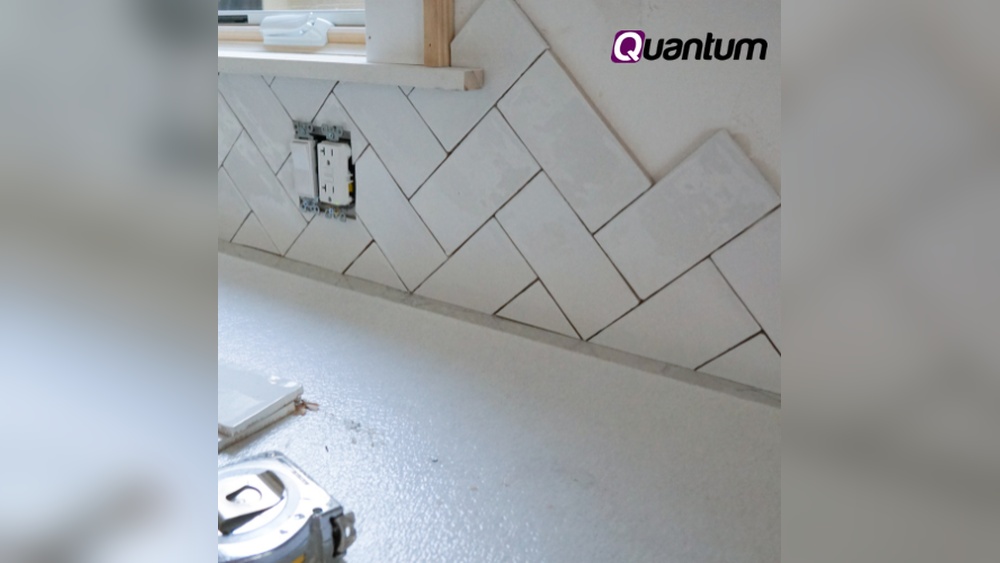
Cutting tile around a light switch can feel tricky, but it doesn’t have to be. If you want a clean, professional-looking finish without the hassle, you’re in the right place.
This guide will walk you through simple steps to make precise cuts, so your tiles fit perfectly around your switches. By the end, you’ll have the confidence to tackle this task yourself and avoid costly mistakes. Ready to transform your space with a flawless tile job?
Let’s get started!

Credit: www.youtube.com
Tools Needed
Cutting tile around a light switch requires the right tools. Using the proper equipment makes the job easier and more precise. Prepare all tools before starting to avoid interruptions. Below are the tools you need for a clean and safe tile cut.
Essential Cutting Tools
A tile cutter or wet saw is best for straight cuts. A tile nipper helps remove small tile pieces for curves. A pencil or marker marks the tile where it needs cutting. A tape measure ensures accurate measurements around the switch. A ruler or square helps keep your lines straight. A drill with a small bit can start holes near corners.
Safety Equipment
Wear safety glasses to protect your eyes from tile shards. Use gloves to protect your hands from sharp edges. A dust mask prevents inhaling tile dust during cutting. Ear protection reduces noise from power tools. Work in a well-ventilated area to avoid dust buildup. Keep a first aid kit nearby for minor cuts.

Credit: www.youtube.com
Preparing The Workspace
Preparing your workspace is the first step to safely and neatly cut tile around a light switch. A well-prepared area helps avoid accidents and makes the job easier. Take time to set up correctly before starting.
Turn Off Power
Switch off the power to the light switch at the circuit breaker. This stops electricity flow and reduces shock risk. Use a voltage tester to check the switch is not live. Safety comes first.
Clear And Clean Area
Remove any objects near the switch and clear the workspace. Dust and dirt can get in the way and cause mistakes. Clean the wall surface and floor for better focus and accuracy. A tidy space helps you work faster and safer.
Measuring The Cutout
Measuring the cutout for a tile around a light switch is a critical step. Accurate measurements ensure a clean fit and professional look. Taking your time here prevents mistakes and saves effort later.
Marking Tile Dimensions
Start by measuring the exact size of the light switch box. Use a ruler or tape measure for precision. Transfer these measurements onto the tile with a pencil. Draw clear, straight lines to mark the cutout area. Double-check the lines before cutting. Precise markings guide your cutting tool and avoid errors.
Accounting For Switch Plate
Remember to include extra space for the switch plate edges. The plate needs room to fit over the tile without gaps. Add about 1/8 inch around the cutout size for the plate. This space prevents the tile from pressing against the plate. Measure the plate size separately to confirm the needed allowance.
Marking The Tile
Marking the tile correctly is the first step to a clean cut around a light switch. Accurate marks ensure the tile fits perfectly without gaps or overlaps. Take your time to measure and mark carefully. This reduces mistakes and saves effort during cutting.
Transferring Measurements
Start by measuring the light switch box on the wall. Use a ruler or tape measure for precise numbers. Note the height, width, and position of the box.
Place the tile on a flat surface. Use a pencil to mark the tile edges that align with the switch box. Transfer the measurements from the wall to the tile carefully.
Double-check your marks before cutting. Small errors can cause big problems later.
Using A Template
Create a paper or cardboard template of the light switch opening. Cut out the shape matching the switch box size. This template helps mark the tile more easily and accurately.
Place the template on the tile and trace around it with a pencil. This method is useful for tricky shapes or uneven walls.
Templates save time and make your markings precise. They reduce the chance of mistakes during cutting.
Cutting Techniques
Cutting tile around a light switch requires careful techniques. The goal is to create a clean, precise cut. This helps the tile fit perfectly without cracks or gaps. Using the right tools makes the job easier and safer. Below are three common cutting techniques for this task.
Using A Tile Cutter
A tile cutter is simple and perfect for straight cuts. Score the tile along the desired line. Then, snap the tile cleanly along the scored mark. This tool works best for ceramic and porcelain tiles. It is quiet and does not create dust. However, it cannot make curved or angled cuts needed around switches.
Employing A Wet Saw
A wet saw uses water to cool the blade. This prevents the tile from cracking. It cuts through hard tiles with ease. You can make straight and angled cuts with this tool. It is ideal for large or thick tiles. Always wear safety glasses and gloves while using a wet saw.
Drilling For Corners
Drilling holes at corners helps when cutting around switches. Use a small drill bit to make holes at each cut corner. This prevents the tile from breaking beyond the cut line. After drilling, use a tile nipper or saw to connect the holes. This technique is important for neat, rounded edges.
Fitting The Tile
Fitting the tile around a light switch needs careful work. The tile must fit snugly to look neat and hold well. This step shows how to check and adjust the tile piece before fixing it in place.
Testing The Cut
Place the cut tile near the light switch. Check if the hole lines up with the switch box. The tile should sit flat without gaps or wobbling. Small gaps can cause an uneven look. Make sure the edges match the wall space. Take your time to see if the cut is right.
Making Adjustments
Use a tile file or sandpaper to smooth tight spots. Remove small amounts to widen the hole carefully. Avoid making the hole too big. Check the fit again after each adjustment. Trim any rough edges for a clean finish. Repeat this until the tile fits perfectly around the switch.
Installing The Tile
Installing tile around a light switch needs care and precision. Proper installation ensures the tile fits well and looks neat. Follow clear steps to place the tile securely and correctly.
Applying Adhesive
Start by spreading tile adhesive on the wall. Use a notched trowel to make even grooves. These grooves help the tile stick better. Apply enough adhesive to cover the area behind the tile fully. Avoid putting too much adhesive to prevent messes.
Positioning And Securing
Place the tile carefully over the adhesive. Align the tile cutout with the light switch opening. Press the tile firmly to ensure good contact with the adhesive. Use tile spacers to keep even gaps between tiles. Check the tile is level and straight before the adhesive sets. Hold the tile in place for a few seconds if needed.
Finishing Touches
Finishing touches bring your tile work to life around a light switch. This step makes the installation look neat and professional. Small details here improve the overall appearance and durability. Take time to do these steps carefully. The result will be clean and safe.
Grouting Around The Switch
Apply grout carefully around the tile edges near the switch. Use a small rubber float or a grout sponge. Press grout firmly into gaps to seal them well. Avoid getting grout inside the switch box. Smooth the grout lines for a consistent look. Let the grout set for the time stated on the package.
Cleaning Excess Materials
Remove grout residue and dust from the tile surface quickly. Use a damp sponge and clean water for wiping. Rinse the sponge often to avoid spreading grout smears. After the grout dries, polish tiles with a dry cloth. Check for any leftover grout near the switch plate. Clean all edges to make the area safe and tidy.

Credit: kyleswitchplates.blogspot.com
Frequently Asked Questions
How Do You Measure Tile For A Light Switch Cut?
Measure the switch plate dimensions first. Mark the tile using a pencil. Double-check measurements before cutting to ensure accuracy.
What Tools Are Best For Cutting Tile Around Switches?
A tile cutter or a rotary tool with a diamond blade works best. Use a stencil for precise cuts and safety goggles for protection.
How To Safely Cut Tiles Near Electrical Switches?
Turn off power before cutting near switches. Use insulated tools and avoid contact with wires. Work slowly and wear safety gear.
Can I Reuse Tile Pieces Cut For Light Switches?
Yes, small tile pieces can be reused for other projects. Keep cut pieces intact and store them properly to avoid damage.
Conclusion
Cutting tile around a light switch is a simple skill to learn. Take your time and measure carefully for the best fit. Use the right tools to make clean, precise cuts. Practice on scrap tile before working on the wall.
This helps avoid mistakes and saves material. With patience and care, your tile job will look neat and professional. Keep safety in mind and wear protective gear. Now, you can confidently tile around switches in any room.