If you’ve ever needed to change the code on your Kwikset deadbolt, you know it can feel a bit tricky at first. But don’t worry—resetting your lock code is easier than you think.
Whether you want to improve your home’s security or simply update your access, this guide will walk you through every step clearly and quickly. By the end, you’ll have full control over your lock’s code, giving you peace of mind and convenience.
Keep reading to unlock the simple process that puts security back in your hands.
Prepare For Reset
Start by gathering all tools needed to reset the Kwikset deadbolt code. Ensure the lock is in the correct mode before beginning the reset process. Clear steps make the reset quick and simple.
Gather Required Tools
Start by collecting all tools needed for the reset. Usually, you will need a small Phillips screwdriver. Some models may require a flathead screwdriver or a paperclip. Have these ready to avoid delays during the process.
Keep the new batteries nearby if you plan to replace them. Fresh batteries help the lock reset smoothly. A clean workspace is also helpful to keep small parts safe.
Locate The Reset Button
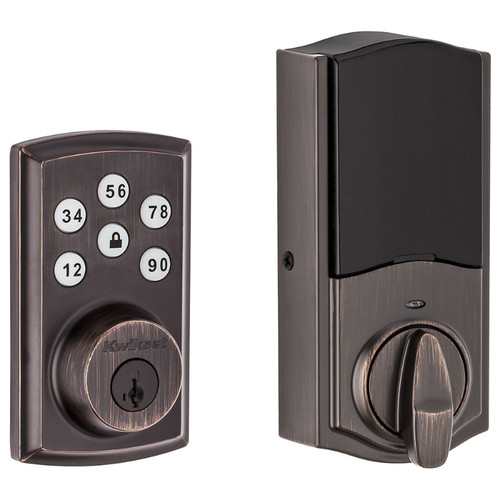
Find the reset button on your Kwikset deadbolt. It is often inside the interior assembly. Remove the battery cover to access the inside part of the lock. Look for a small, round button, usually red or black.
This button resets the lock to factory settings. Knowing its exact position saves time. Use a flashlight if the area is dim. Pressing this button correctly is key to a successful reset.
Credit: doorlocksdirect.com
Remove The Deadbolt Cover
Removing the deadbolt cover is the first step in resetting the code on your Kwikset deadbolt. This process lets you access the internal parts safely. Taking off the cover carefully prevents damage to the lock and its components.
Unscrew The Interior Plate
Start by locating the screws on the inside of the lock. Use a screwdriver to remove these screws. Keep them in a safe place to avoid losing them. Gently pull the interior plate away from the door. This exposes the inner parts of the deadbolt.
Access The Battery Compartment
Behind the interior plate, find the battery compartment. Open it by sliding or lifting the cover. Remove the batteries to prevent power issues during resetting. This step also reveals the reset button or switch inside.
Perform The Reset
Performing a reset on your Kwikset deadbolt is simple and quick. This step clears old codes and lets you add new ones. Follow the steps carefully to avoid any trouble.
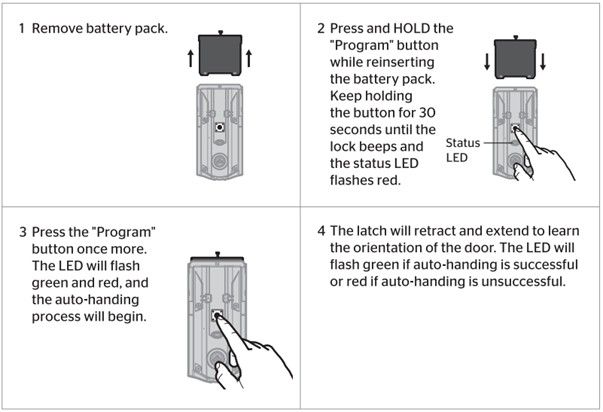
Press And Hold The Reset Button
Find the reset button inside the lock. It is usually near the battery pack. Press and hold this button firmly. Keep holding it for about 5 seconds. The lock will start the reset process.
Wait For Confirmation Light
Watch the lock’s light closely. It will blink or change color to show the reset is done. This light is your confirmation. Once the light changes, release the reset button. Your Kwikset deadbolt is now reset and ready for new codes.
Credit: www.kwikset.com
Set A New Code
Setting a new code on your Kwikset deadbolt keeps your home secure. This process is simple and quick. Follow the steps carefully to change your code successfully.
Enter Programming Mode
Start by pressing the Program button on the inside of the lock. Hold it until you hear a beep. This sound shows the lock is in programming mode. You have about 30 seconds to enter the next step.
Choose And Enter New Code
Pick a new code with 4 to 8 digits. Avoid simple patterns like 1234 or repeated numbers. Enter your new code on the keypad. Press the Program button again to save it. A beep confirms your code is set.
Test The New Code
Close the door. Enter the new code on the keypad. The lock should open smoothly. Try locking and unlocking several times to be sure. If it works, your new code is ready to use.
Troubleshoot Common Issues
Troubleshooting common issues can save time and hassle when resetting a Kwikset deadbolt code. Many problems arise from simple errors or worn parts. Understanding these issues helps fix them quickly. The following tips cover frequent problems users face during the reset process.
Reset Button Not Responding
The reset button may not respond due to dirt or stuck parts. Clean around the button gently with a soft cloth. Press the button firmly but avoid using too much force. Check if the battery is weak, as low power can cause unresponsiveness. Try removing and reinserting the battery to reset the system.
Deadbolt Not Accepting New Code
Ensure you follow the correct steps for entering the new code. The keypad must be active and the lock in programming mode. Avoid pressing buttons too fast or too slow. Clear any previous codes before setting a new one. Double-check the code length matches the lock’s requirements.
Battery Replacement Tips
Use fresh batteries with the correct voltage for your model. Replace all batteries at once to prevent power issues. Remove old batteries carefully to avoid damage. Clean battery contacts with a dry cloth before inserting new ones. Test the lock after replacement to confirm proper function.

Credit: www.youtube.com
Frequently Asked Questions
How Do I Reset The Code On My Kwikset Deadbolt?
To reset your Kwikset deadbolt code, locate the programming button inside the lock. Press and hold it until the light flashes, then enter a new code. This process clears old codes and sets a new one quickly and securely.
Can I Reset Kwikset Deadbolt Without The Original Code?
Yes, you can reset the Kwikset deadbolt without the original code by removing the lock from the door. Press the programming button and follow the reset steps to set a new master code, ensuring you regain full access.
How Long Does It Take To Reset Kwikset Deadbolt Code?
Resetting a Kwikset deadbolt code typically takes under 5 minutes. The process involves pressing the programming button and entering a new code, which is quick and straightforward for most users.
Is It Necessary To Have A Reset Tool For Kwikset Deadbolt?
No, a reset tool is not necessary. Most Kwikset deadbolts have a built-in programming button inside the lock, allowing you to reset the code easily without extra tools.
Conclusion
Resetting the code on your Kwikset deadbolt is quick and simple. Follow the steps carefully to avoid mistakes. Keep your new code safe and easy to remember. Changing codes often helps keep your home secure. Always test the lock after resetting to ensure it works well.
Now, you can feel confident about managing your deadbolt code. Stay safe and enjoy the convenience of your Kwikset lock.