Are you tired of worrying about your TV tipping over or taking up too much space? Anchoring your TV to the wall is the smart way to keep it safe, secure, and stylishly displayed.
But if you’re unsure where to start or worried about making mistakes, you’re not alone. This guide will walk you through simple, clear steps to anchor your TV like a pro. By the end, you’ll feel confident and ready to transform your space with a sleek, wall-mounted TV.
Let’s get started!
Choosing The Right Wall Mount
Choosing the right wall mount is crucial for safely anchoring your TV. The right mount holds your TV firmly and fits your room setup. It also helps you get the best viewing angle. Picking the correct mount means your TV stays secure and looks good on your wall.
Types Of Wall Mounts
There are three main types of TV wall mounts: fixed, tilting, and full-motion. Fixed mounts keep the TV flat against the wall. Tilting mounts let you angle the TV up or down. Full-motion mounts allow you to pull out, swivel, and tilt the TV. Choose the type that fits your viewing needs and room layout.
Weight And Size Compatibility
Check your TV’s size and weight before buying a mount. Each mount has a weight limit and size range. Use a mount that supports your TV’s weight to avoid accidents. Make sure the mount matches your TV’s size for a proper fit and secure hold.
Material And Build Quality
Look for mounts made from strong, durable materials like steel. Good build quality ensures the mount holds the TV safely for years. Avoid cheap mounts with weak parts. A sturdy mount protects your TV and gives you peace of mind.

Credit: www.amazon.com
Gathering Necessary Tools
Gathering the right tools is the first step to anchor a TV to the wall safely. Having everything ready helps the process go smoothly. It saves time and prevents mistakes. Knowing what you need ensures a strong, secure mount for your TV.
Basic Tools Checklist
Start with essential tools. A drill is key to make holes in the wall. A stud finder locates the best spot to anchor. A level keeps the TV straight and balanced. Screwdrivers help tighten screws and bolts. A tape measure checks distances and placement. A pencil marks where to drill.
Safety Equipment
Protect yourself with safety gear. Safety goggles shield your eyes from dust and debris. Gloves protect your hands from sharp tools. Ear protection guards against loud drill sounds. Wearing the right gear reduces injury risks. Safety comes first during any wall mounting task.
Optional Accessories
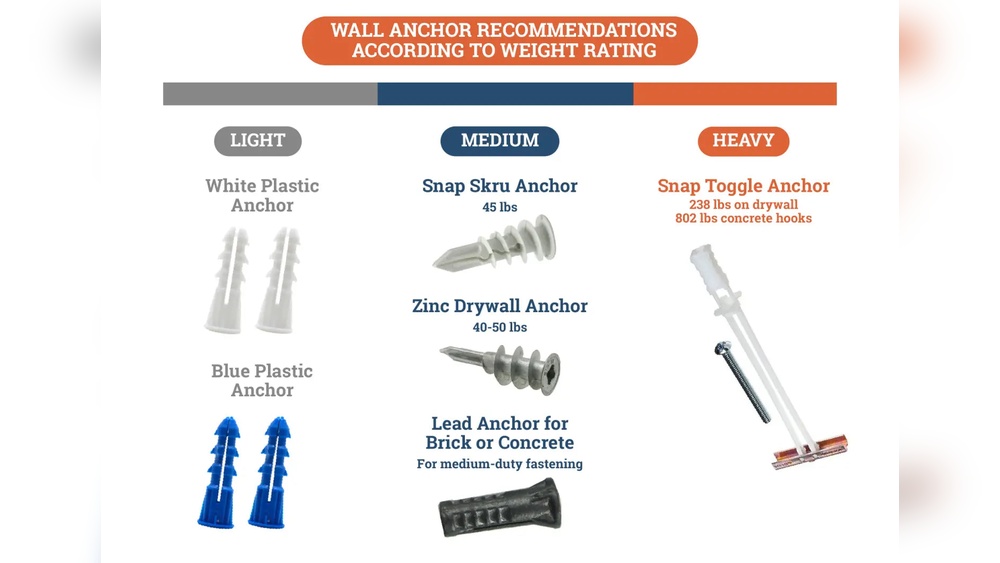
Some extra items make the job easier. Anchors secure screws in drywall. Cable clips organize TV wires neatly. A magnetic tray holds screws to avoid losing them. A helper can assist with lifting and positioning. These accessories improve efficiency and keep things tidy.
Locating Wall Studs
Locating wall studs is a key step before anchoring a TV to the wall. Studs are the wooden or metal supports inside the wall. Screwing directly into studs keeps your TV safe and secure. Drywall alone cannot hold the weight of a TV. Finding the exact stud position helps you mount the TV bracket correctly. This section explains easy ways to find studs and mark them clearly.
Using A Stud Finder
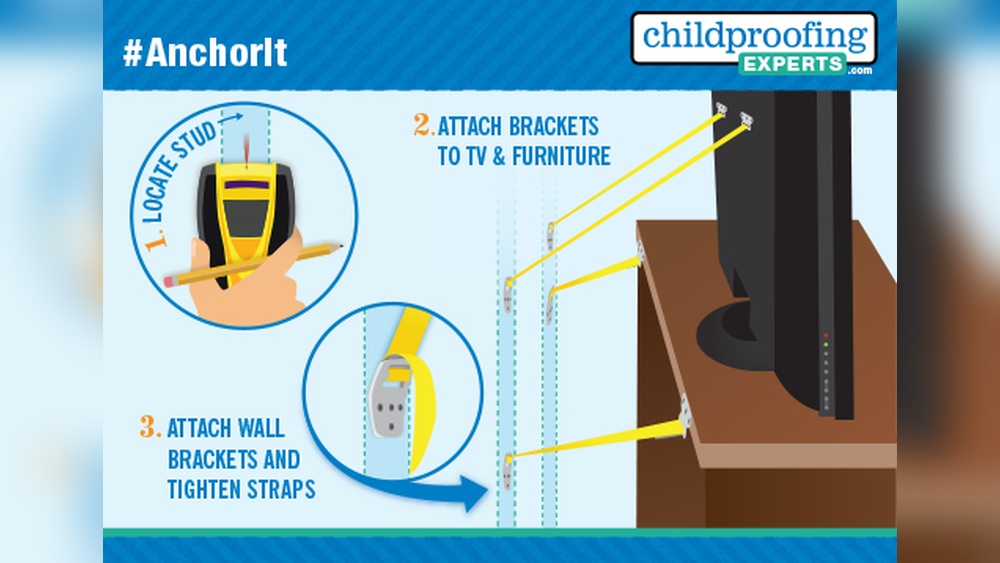
A stud finder is a small device that detects wood or metal behind walls. Turn it on and slowly move it across the wall surface. The tool will beep or light up when it finds a stud. This method is fast and accurate. Most stud finders work on battery power and are easy to use. They save time and avoid damage to your wall.
Alternative Stud Detection Methods
If you do not have a stud finder, use other ways to locate studs. Tap the wall gently and listen for a solid sound. A hollow sound means no stud behind. Check near electrical outlets or light switches; studs are usually close to them. Measure about 16 or 24 inches from corners or edges. These are common stud spacing distances. Use a strong magnet to find nails or screws in studs.
Marking Stud Positions
Once you find a stud, mark its position on the wall. Use a pencil to make small marks at the top and bottom of the stud. Draw a light vertical line connecting the marks. This line shows where to drill holes for the TV mount. Double-check the marks before drilling. Correct marking ensures the TV bracket is stable and secure.
Credit: www.walmart.com
Preparing The Wall
Preparing the wall is the first step in anchoring your TV safely. It ensures the mount holds well and your TV stays secure. This step requires careful measuring, marking, and avoiding hazards inside the wall. Taking time here makes the installation smooth and safe.
Measuring And Marking Mounting Points
Measure the height where you want the TV to hang. Use a tape measure for accuracy. Mark the spots for the mounting holes on the wall. Check the TV mount instructions for the exact distance between holes. Use a level to keep marks straight. This avoids a crooked TV later.
Drilling Pilot Holes
Drill small pilot holes at the marks. These guide screws and prevent wall damage. Choose a drill bit smaller than the screws. Drill slowly to avoid cracking the wall. Clean out dust from the holes for better grip. Pilot holes help screws go in easily and securely.
Avoiding Electrical And Plumbing Hazards
Check for wires and pipes before drilling. Use a stud finder with wire detection if possible. Avoid drilling near electrical outlets or light switches. Pipes can run inside walls near kitchens or bathrooms. Drilling into them causes leaks or shocks. Stay safe by knowing what is behind your wall.
Mounting The Bracket
Mounting the bracket is a key step in anchoring your TV to the wall. It holds the TV securely and keeps it stable. Proper mounting prevents accidents and protects your device.
Follow each step carefully to ensure a safe and strong installation.
Securing The Wall Plate
Start by placing the wall plate on the wall. Align it with the studs for strong support. Use a pencil to mark the screw holes. Drill pilot holes at the marks. Then, attach the plate using strong screws. Tighten screws firmly but do not over-tighten.
Checking Level Alignment
Use a level tool on the wall plate. Make sure it is perfectly horizontal. Adjust the plate slightly if needed. Proper alignment keeps the TV straight and stable. Double-check before moving to the next step.
Tightening Screws Properly
Secure all screws tightly to hold the bracket in place. Use a screwdriver or drill for firm tightening. Avoid over-tightening to prevent damage. Ensure screws are flush with the wall plate. This keeps the bracket safe and sturdy.
Attaching The Tv
Attaching the TV to the wall mount is an important step. It needs care and attention to keep the TV secure. Follow the steps carefully to avoid damage or accidents. Each part has a role in holding the TV safely.
Connecting The Mounting Arms
Start by fixing the mounting arms to the back of your TV. Use the screws that came with the mount. Check the instruction manual for the right screw size. Tighten the screws firmly but do not over-tighten. The arms must be straight and aligned for balance.
Lifting And Positioning The Tv
Get help to lift the TV safely. Hold the TV from the sides, not the screen. Position the TV close to the wall mount. Align the mounting arms with the hooks or slots on the wall bracket. Move slowly to avoid hitting the wall or mount.
Locking The Tv In Place
Once the TV is on the mount, secure it using the locking mechanism. This could be screws, clips, or safety locks. Make sure the TV does not wobble or move. Double-check all locks to keep the TV steady. A locked TV is safe for your room and family.
Final Adjustments And Safety Checks
After mounting your TV on the wall, final adjustments and safety checks ensure it stays secure and looks great. These last steps help avoid accidents and improve your viewing experience. Take time to test stability, adjust angles, and organize cables carefully. These actions keep your setup safe and tidy.
Testing Stability
Gently push the TV from different sides. It should not move or wobble. Check that all screws and bolts are tight. Use a level to confirm the TV is straight. This step prevents falls and damage. Never skip testing before use.
Adjusting Viewing Angle
Tilt or swivel the TV to reduce glare and improve sight. Find a comfortable angle for your eyes. Make small changes and watch from your usual seat. This adjustment makes watching easier and more enjoyable. Lock the mount once satisfied.
Cable Management Tips
Organize cables using clips or ties to avoid tangles. Keep wires away from heat sources and sharp edges. Label each cable for easy identification later. Hide cables behind the wall or furniture if possible. Clean cable management improves safety and appearance.
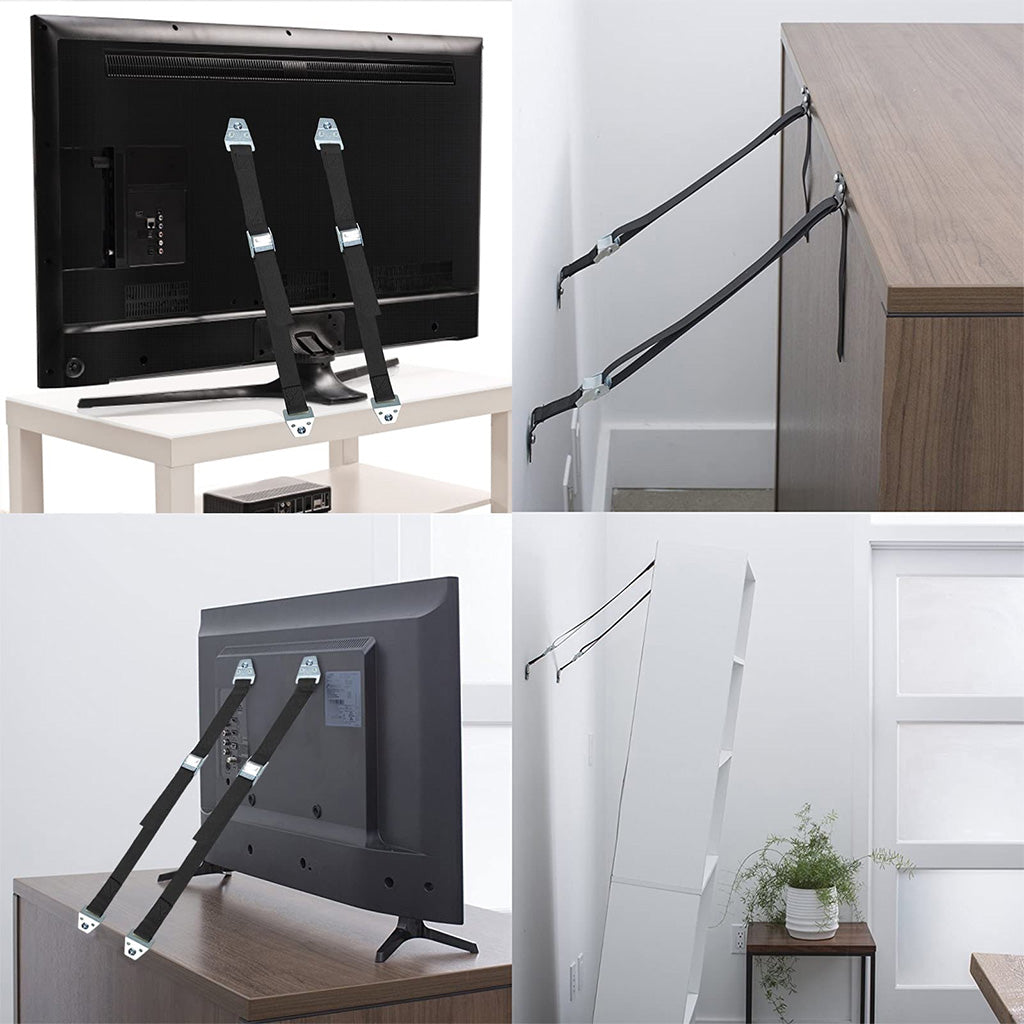
Credit: belleze.com
Frequently Asked Questions
How Do I Safely Anchor A Tv To The Wall?
To safely anchor a TV, use a sturdy wall mount designed for your TV size. Find wall studs, use proper anchors, and follow the mount instructions carefully.
What Tools Are Needed To Anchor A Tv?
You will need a drill, stud finder, screwdriver, level, measuring tape, and wall anchors. These tools ensure secure and precise installation.
Can I Anchor A Tv On Drywall Only?
Anchoring a TV on drywall alone is unsafe. Always locate studs or use appropriate heavy-duty anchors to support the TV’s weight.
How High Should I Mount My Tv On The Wall?
Mount your TV at eye level when seated, typically 42-48 inches from the floor to the center of the screen for comfortable viewing.
Conclusion
Anchoring a TV to the wall keeps it safe and saves space. Always use the right tools and follow instructions carefully. Check the wall type before starting the job. Secure the mount tightly to avoid accidents. Take your time and work step by step.
A properly anchored TV looks neat and stays steady. Enjoy your viewing without worries or clutter. Simple steps make a big difference in safety. Stay patient, and you will do a great job.