Have you ever wished you could control your home’s lighting without getting up from your seat? Imagine turning your lights on or off with just a tap on your phone or even with your voice.
Wifi light switches make this possible, bringing convenience and smart technology right into your hands. But how exactly do these switches work? Understanding the simple magic behind wifi light switches can help you decide if they’re the right upgrade for your home.
Keep reading to discover how these smart devices connect, communicate, and transform your everyday lighting experience.
3.0-171x118x65mm-02_normal_1517972512065l.jpg)
Credit: www.tp-link.com
Basics Of Wifi Light Switches
Wifi light switches let you control your lights using a smartphone or voice commands. They replace traditional switches and connect to your home network. This allows for remote control and scheduling of lights. Understanding the basics helps you see how they fit into smart homes.
Key Components
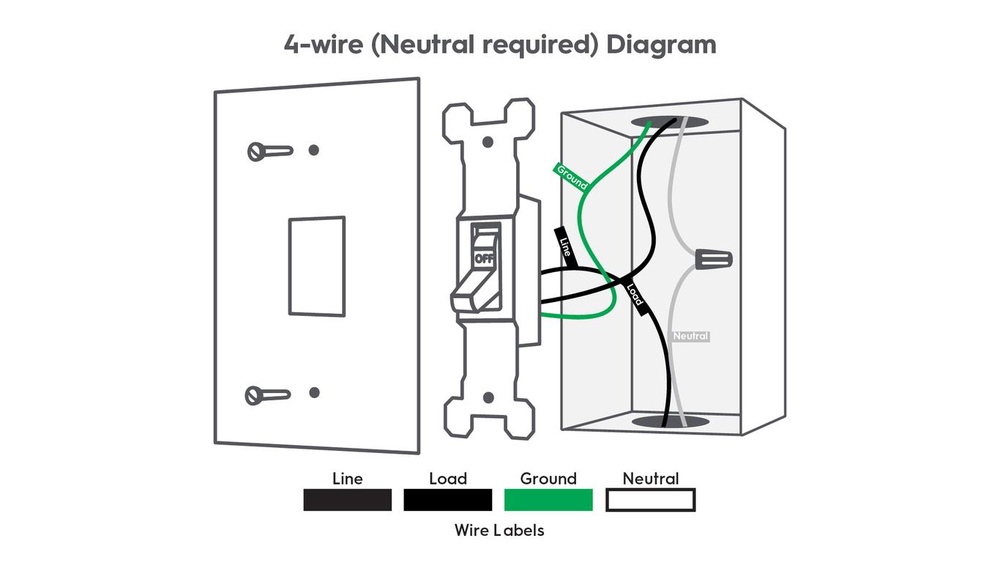
Wifi light switches have several main parts. The switch itself controls the flow of electricity to the light. Inside, a small circuit board manages wireless communication. The device also has a wireless chip to connect to your wifi network. Some models include a relay to handle the electrical load safely. A neutral wire connection is often needed for power.
How They Connect
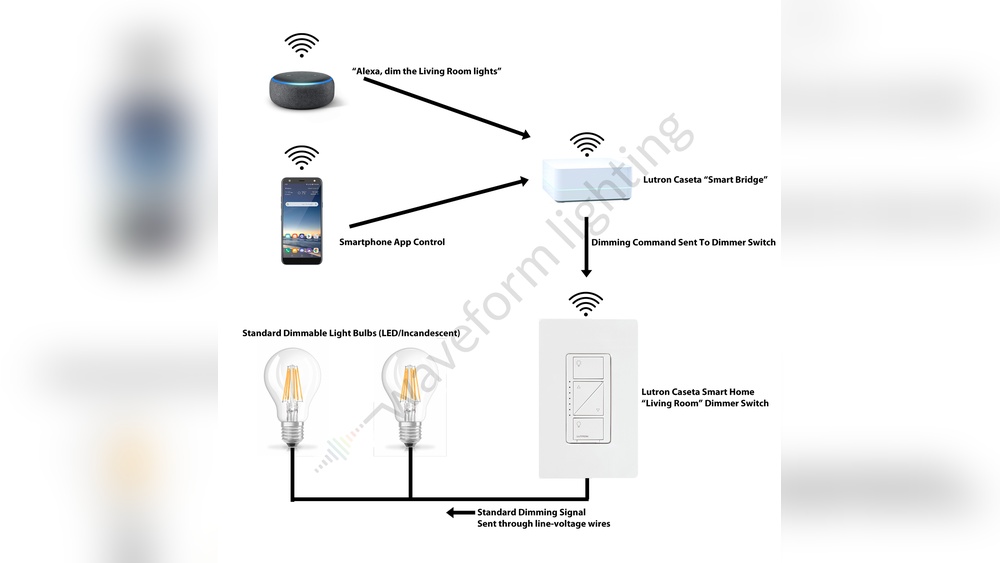
These switches link to your home wifi network. They use standard wireless signals to communicate with your router. After installation, you connect the switch to a mobile app. This app lets you turn lights on or off from anywhere. Voice assistants like Alexa or Google Home can also control the switch. The switch sends commands through wifi to control the light’s power.
Installation Process
Installing a WiFi light switch is simpler than many think. It lets you control lights using your phone or voice. The process involves a few basic steps and common tools. Safety is key; always turn off power before starting.
Tools Needed
- Screwdriver (flathead and Phillips)
- Voltage tester
- Wire stripper
- Electrical tape
- WiFi light switch kit
- Smartphone or tablet for setup
Step-by-step Setup
First, turn off power at the circuit breaker. Use the voltage tester to confirm power is off.
Remove the old switch by unscrewing it from the wall. Carefully pull it out to expose wires.
Identify the live, neutral, and ground wires. Use the wire stripper if needed to prepare wire ends.
Connect the wires to the new WiFi switch according to the manual. Usually, live to live, neutral to neutral, and ground to ground.
Secure the switch into the wall box with screws. Attach the switch faceplate.
Turn power back on at the breaker. Check that the switch powers on.
Download the switch’s app on your phone. Follow the app instructions to connect the switch to your WiFi network.
Test the switch using the app or voice commands. Adjust settings as needed for schedules or groups.
Smart Features
Wifi light switches come with smart features that make controlling your lights simple and flexible. These features help save energy and add comfort to your daily life. They let you manage your lighting even when you are not at home.
Smart features also improve safety by allowing you to turn lights on or off remotely. Let’s explore the main smart features that make wifi light switches so useful.
Remote Control
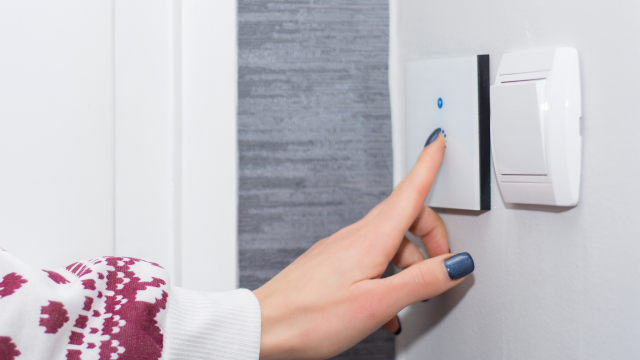
Remote control lets you turn lights on or off from anywhere. Use your smartphone or tablet to manage lights in your home. This is helpful if you forgot to switch off lights before leaving. It also allows you to turn lights on before you arrive. No need to walk into a dark room again.
Scheduling And Automation
You can set schedules for your lights to turn on or off automatically. This helps save energy by using lights only when needed. For example, set lights to turn off during the day. Or schedule them to turn on at sunset. Automation can also adjust lights based on your habits. It makes your home smarter and more efficient.
Voice Assistant Integration
Many wifi light switches work with voice assistants like Alexa or Google Assistant. You can control lights using simple voice commands. Say “turn on the living room light” without touching a switch. Voice control adds convenience, especially when your hands are full. It also supports accessibility for people with mobility issues.
Credit: www.vesternet.com
Benefits Of Wifi Light Switches
Wifi light switches offer many benefits that improve daily life at home. They help save energy, make lighting easy to control, and add safety features. These switches fit well in smart homes and bring comfort and peace of mind.
Energy Savings
Wifi light switches help reduce electricity use. You can turn off lights remotely, so no light stays on by mistake. Scheduling lights to turn off during the day saves power. This lowers electric bills and helps the environment.
Convenience
Control lights from anywhere using a smartphone or voice commands. No need to walk to the switch. Set timers or scenes to match your routine. This makes life easier and your home smarter.
Security Enhancements
Wifi switches improve home security by controlling lights while away. Turn lights on and off to make it look like someone is home. This deters burglars and keeps your home safer.
Common Issues And Fixes
Wifi light switches offer great convenience but can face some common issues. Understanding these problems helps keep your switch working smoothly. Simple fixes often solve most troubles quickly. This section covers typical issues and practical solutions to help you manage your device better.
Connectivity Problems
Wifi light switches need a steady internet connection to work well. Weak signals cause delays or failure to respond. Distance from the router affects connection strength. Walls and furniture can block the signal too.
Restarting the router often restores connection. Moving the switch closer to the router helps. Ensure the router uses the 2.4 GHz band, as many switches do not support 5 GHz. Check if other devices have internet issues. If yes, fix the main internet first.
Compatibility Concerns
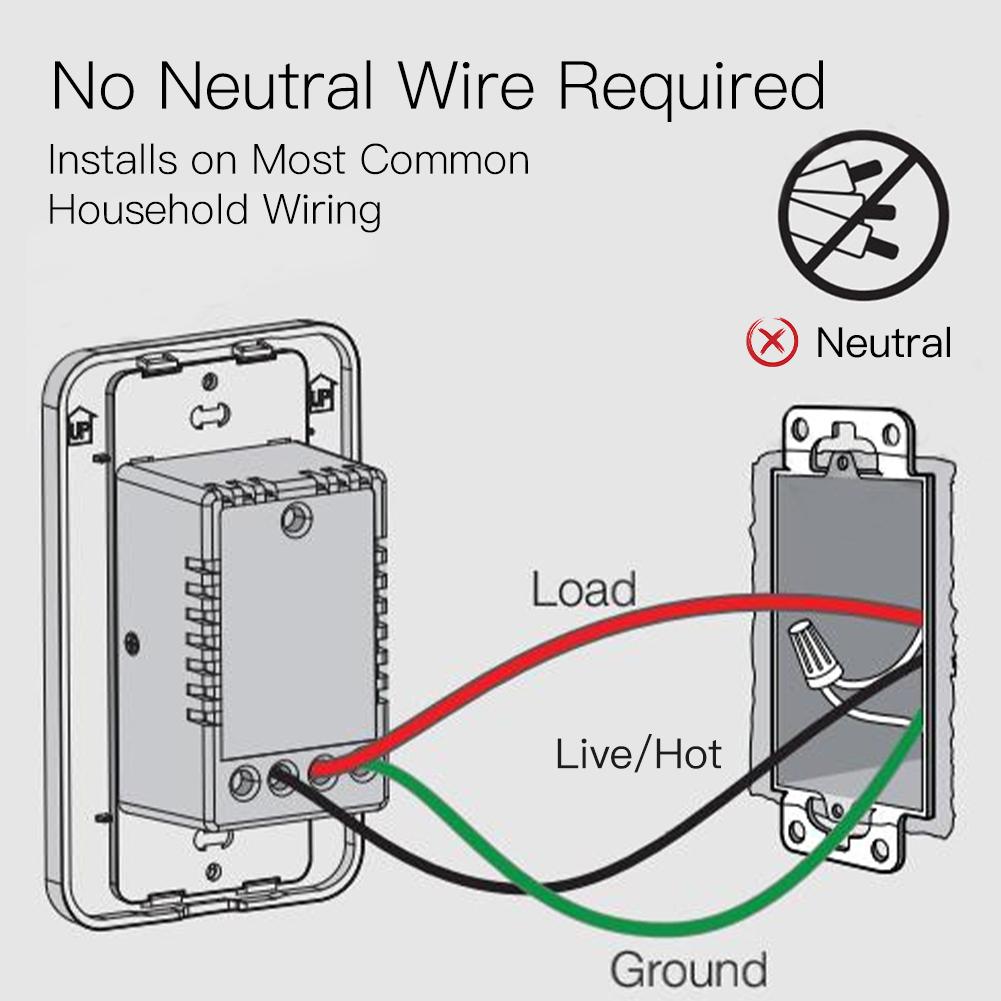
Not all Wifi switches work with every home system. Some need specific wiring setups. Old homes might lack the necessary neutral wire. Certain switches require a hub to connect to your phone.
Read product details before buying. Confirm compatibility with your home’s wiring. Check the app requirements for your phone. Look for switches that fit your current system. This saves time and frustration.
Troubleshooting Tips
Start by resetting the switch to factory settings. This clears previous errors. Update the switch firmware via its app for better performance. Use the app’s help section for step-by-step guides.
Check the switch’s indicator lights for error codes. Test the switch manually to ensure it works physically. Contact support if problems persist after these steps. Keep your device’s manual handy for quick reference.
Credit: moeshouse.com
Choosing The Right Wifi Light Switch
Choosing the right WiFi light switch is important for a smooth smart home experience. Different switches work with different systems. Not all switches fit all homes. Consider your home setup, budget, and trusted brands. This helps avoid problems and saves money.
Compatibility With Home Systems
Check if the switch works with your home’s WiFi and smart hub. Some switches only work with certain brands like Alexa or Google Home. Make sure it supports your home’s wiring. Some need a neutral wire, others don’t. Compatibility ensures the switch works well and connects easily.
Budget Considerations
WiFi light switches come in many price ranges. Decide how much you want to spend. Cheaper switches may lack some features but still work fine. Higher-priced switches often have better build quality and more options. Balance price with the features you need for your home.
Brand Recommendations
Choose brands with good reviews and reliable support. Popular brands usually offer better updates and customer service. Look for brands known for smart home devices. Brands like TP-Link, Leviton, and Lutron have good reputations. Trusted brands help ensure long-term satisfaction.
Frequently Asked Questions
What Technology Powers Wifi Light Switches?
Wifi light switches use wireless communication protocols like Wi-Fi or Zigbee. These protocols connect the switch to your home network. This allows remote control via smartphones or smart home systems. The switch also contains a microcontroller to process commands and control the light.
How Do Wifi Light Switches Connect To Devices?
They connect through your home’s Wi-Fi network or a smart hub. This connection enables communication between the switch and your smartphone or voice assistant. The switch sends and receives commands over the internet or local network for seamless control.
Are Wifi Light Switches Compatible With Voice Assistants?
Yes, most wifi light switches work with popular voice assistants like Alexa, Google Assistant, and Siri. This compatibility allows you to control lights using voice commands. Integration typically requires linking the switch’s app with your voice assistant platform.
Do Wifi Light Switches Require A Hub To Function?
Some wifi light switches need a hub, while others connect directly to Wi-Fi. Hub-based switches use Zigbee or Z-Wave protocols for stable communication. Direct Wi-Fi switches connect straight to your router, simplifying installation but may have shorter range.
Conclusion
Wifi light switches connect your lights to the internet. You control them using a phone or voice commands. They make managing home lighting easy and convenient. Installation is simple, needing only basic wiring skills. These switches save energy by allowing scheduled or remote use.
They fit well in smart homes and modern setups. Understanding how they work helps you choose the right one. Try them to enjoy smarter, flexible lighting every day.