Changing a light switch usually means turning off the power first. But what if you need to keep the power on?
It might sound risky, but with the right steps, you can do it safely. If you’re worried about cutting power or losing light while working, this guide is for you. You’ll learn how to change a light switch without shutting off the electricity—and avoid common mistakes that could cost you time or money.
Ready to take control and handle your light switch like a pro? Keep reading to find out how.
Credit: www.youtube.com
Why Change A Light Switch With Power On
Changing a light switch with the power on is not common practice. Many choose this method for speed or convenience. Some situations make it necessary to keep power active. Understanding the reasons helps you decide if this approach fits your need.
Common Reasons For Hot Switch Replacement
Some switches control devices that must stay on. For example, refrigerators or security lights. Turning off power might cause unwanted interruptions. Also, some people lack access to the main breaker. Immediate repair is needed to restore light quickly. Sometimes, the power indicator light guides the replacement process. These reasons lead people to work with power on despite risks.
Risks And Safety Concerns
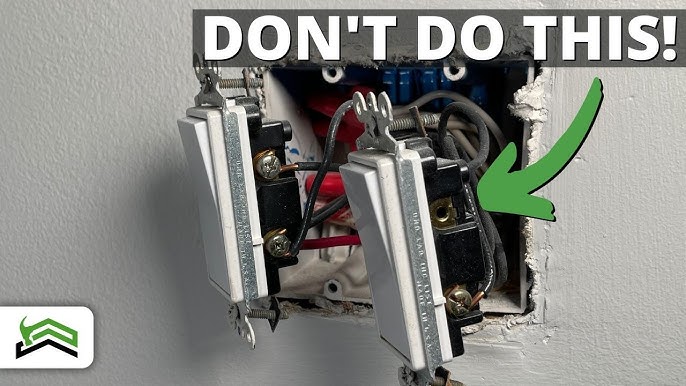
Working with power on can cause electric shock. Even small shocks may harm your health. Sparks may start fires or damage wiring. Tools slipping on live wires increase danger. Improper handling might short-circuit the system. Safety gear and caution reduce risks but do not remove them. Only skilled people should attempt hot switch replacement.
Credit: www.youtube.com
Tools And Materials Needed
Changing a light switch with power on requires the right tools and materials. Using proper equipment helps complete the job safely and correctly. Prepare all items before starting to avoid mistakes. Safety is the top priority when working with electricity.
Essential Tools
Gather these tools to change a light switch with power on. A voltage tester is necessary to check if wires carry current. Use a flathead and a Phillips screwdriver to remove and attach screws. Needle-nose pliers help bend wires for a tight connection. Wire strippers are needed to remove insulation from wires. A flashlight or headlamp provides light in dark areas.
Safety Gear
Wear safety gear to protect yourself during the process. Insulated gloves reduce the risk of electric shock. Safety glasses shield your eyes from sparks or debris. Use rubber-soled shoes to avoid grounding yourself. Avoid metal jewelry to prevent accidental contact with wires. Prepare a fire extinguisher nearby for emergencies.
Preparing For The Switch Replacement
Preparing for a light switch replacement requires careful steps. Safety is the top priority. Knowing what kind of switch you have helps avoid mistakes. Testing the switch and wires ensures a smooth process. Take your time to gather the right tools and understand the setup.
Identifying The Switch Type
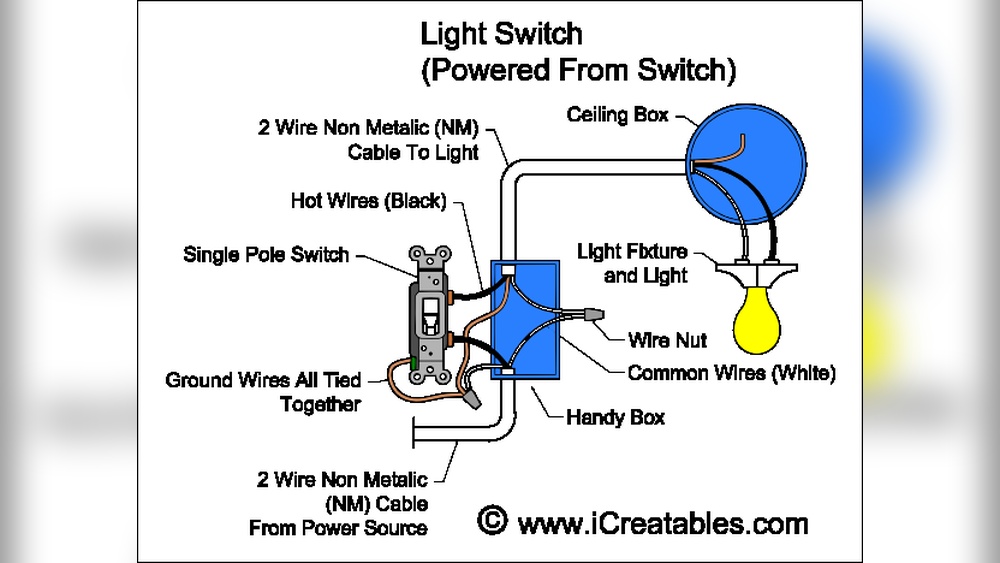
Check the switch’s shape and buttons. Look for common types like single-pole or three-way switches. Single-pole switches control one light from one spot. Three-way switches control lights from two places. Knowing the type helps you buy the correct replacement. It also guides you on how to connect wires later.
Testing The Switch And Wires
Use a voltage tester to check the switch. Confirm if power is on or off at the switch. Test the wires for any live current. Identify which wire is hot, neutral, or ground. Mark wires with tape if needed. Testing prevents electrical shocks and damage. It makes the replacement safer and easier.

Credit: icreatables.com
Step-by-step Switch Replacement Process
Changing a light switch with the power on needs care and clear steps. Follow this simple guide to replace a switch safely. Each step helps you work correctly and avoid mistakes. Take your time. Check each part before moving on.
Removing The Switch Cover
Start by removing the screws on the switch cover. Use a screwdriver that fits well. Pull the cover gently to avoid damage. Set the cover and screws aside safely.
Loosening The Switch Terminals
Next, find the screws holding the wires. Loosen these screws carefully. Do not remove them completely. This loosens the wires for easy removal later.
Disconnecting The Wires
Now, pull the wires away from the terminals. Hold the wire close to the terminal. Avoid pulling the wire itself. Keep the wires straight and organized for the new switch.
Connecting The New Switch
Match each wire to the new switch terminal. Insert wires firmly under the screws. Tighten the screws to hold the wires. Check that all wires are secure and no copper shows.
Securing The Switch In Place
Push the switch back into the box slowly. Align the screw holes with the box. Screw the switch into place tightly. Make sure the switch is steady and flush.
Replacing The Cover Plate
Put the cover plate back over the switch. Insert the screws and tighten them gently. Avoid over-tightening to prevent cracks. The cover should sit flat against the wall.
Safety Tips During The Process
Changing a light switch with power on requires extra care. Safety is the top priority. Small mistakes can cause serious injuries. Follow these safety tips to protect yourself during the process.
Avoiding Electrical Shock
Keep your hands dry at all times. Water conducts electricity and increases shock risk. Use insulated tools designed for electrical work. Never touch metal parts of the switch or wires directly. Stand on a dry, non-conductive surface like a rubber mat. Wear rubber-soled shoes to reduce shock chances.
Handling Live Wires Safely
Identify the wires carefully before touching. Use a voltage tester to confirm power is on. Hold wires by their insulation, not the bare metal. Do not force wires into connectors or terminals. Work slowly and avoid rushing to prevent slips. Keep metal objects like jewelry away from wires.
Testing The New Switch
Testing the new switch is a key step after installation. It ensures the switch works safely and correctly. Take your time to check all functions. This step helps avoid future electrical problems.
Checking For Proper Function
Turn the power back on at the breaker. Flip the switch to see if the light turns on. Test the switch several times to confirm it works smoothly. Listen for any unusual sounds like buzzing. Make sure the light stays steady and does not flicker.
Try the switch from different positions. It should respond immediately each time. Check if the switch feels secure in the wall. A loose switch can cause safety issues. If everything works well, the switch is ready to use.
Troubleshooting Common Issues
If the light does not turn on, double-check the wiring connections. Loose wires often cause failure. Turn off the power before rechecking wires. Tighten any loose screws holding the wires.
If the switch buzzes or feels hot, stop using it. This can mean a bad connection or wrong switch type. Replace the switch with one that matches the circuit. Flickering lights may need a different bulb or fixture check.
Use a voltage tester to ensure power reaches the switch. This tool helps find wiring problems quickly. Correcting these issues keeps your home safe and your switch working well.
When To Call A Professional
Changing a light switch with the power on can be risky. Sometimes, the job may be too tricky or unsafe for beginners. Knowing when to call a professional electrician is very important. It helps avoid accidents and ensures the work is done correctly.
Complex Wiring Situations
Some homes have wiring that is hard to understand. Older houses often have outdated or tangled wires. Multiple switches may control one light, making the setup confusing. Professionals have the tools and skills to handle these cases safely. They can find the right wires and avoid mistakes that cause damage.
Signs Of Electrical Hazards
Electric shocks, sparks, or burning smells are clear danger signs. Flickering lights or switches that feel hot also warn of problems. These issues need expert attention right away. An electrician can check the system and fix hazards before they cause harm. Safety must always come first with electrical work.
Frequently Asked Questions
How Can I Safely Change A Light Switch With Power On?
To safely change a light switch with power on, use an insulated screwdriver and wear rubber gloves. Avoid touching live wires. Work carefully and test the switch function without turning off the main power. Always follow safety protocols to prevent electric shocks.
Is It Risky To Replace A Light Switch Without Cutting Power?
Yes, replacing a light switch without cutting power is risky. Live wires can cause electric shocks or short circuits. Use insulated tools and protective gear if power remains on. However, turning off the circuit breaker is always the safest method.
What Tools Do I Need To Change A Live Light Switch?
You need insulated screwdrivers, rubber gloves, a voltage tester, and wire strippers. These tools protect you from electric shocks while working on a live switch. Always ensure your tools are in good condition and rated for electrical work.
Can I Use A Voltage Tester To Check Live Wires?
Yes, a voltage tester helps identify live wires before changing a switch. It ensures you know which wires are energized, reducing shock risk. Always test the wires even if the power is supposedly off for added safety.
Conclusion
Changing a light switch with power on can be done safely by following clear steps. Always stay careful and check the wires before touching anything. Use tools that protect you from shocks. Take your time and do not rush the process.
This way, you can fix or replace switches without turning off power. Safety matters most, so stay alert and work smart. You can handle simple electrical tasks with confidence and care.