Have you ever flipped a light switch only to find nothing happens? Before calling an electrician, you can quickly check if your light switch has power.
Knowing how to test your switch not only saves you time but also helps you understand what’s going on behind the walls. In this guide, you’ll learn simple, step-by-step methods to safely check your light switch for power. By the end, you’ll feel confident handling this common household task—and avoid unnecessary repairs or replacements.
Keep reading to uncover the easy tricks that anyone can use!
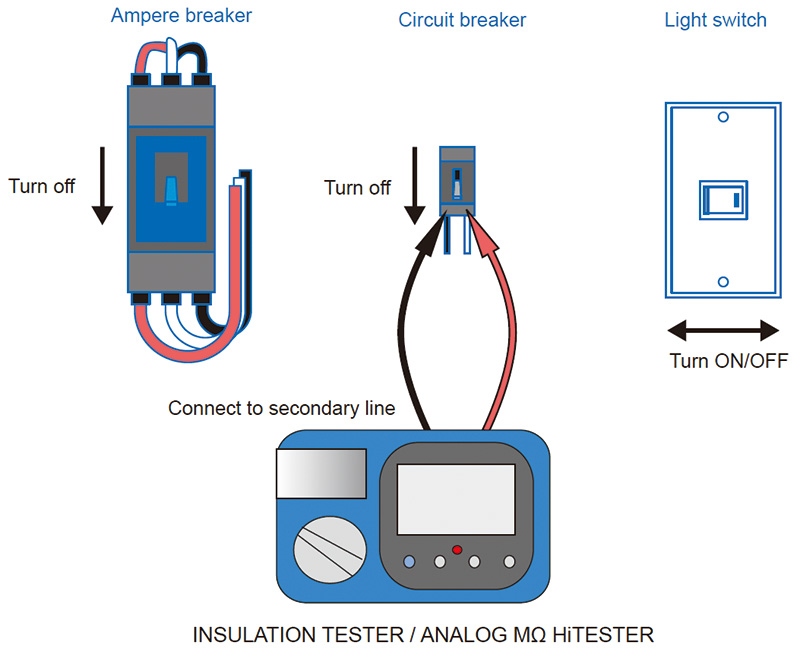
Credit: www.hioki.com
Tools Needed
Before you check a light switch for power, gather the right tools. These tools help you work safely and correctly. Each tool has a special role. Using the right tools makes the task easier and safer.
Voltage Tester
A voltage tester shows if electricity flows through the switch. It detects live wires without touching them. This tool helps avoid shocks. Choose a tester that is easy to use and reliable.
Screwdriver
A screwdriver removes the switch cover and screws. It lets you access the wiring behind the switch. Use the correct size and type of screwdriver. This prevents damage to screws and parts.
Safety Gear
Safety gear protects you while working with electricity. Wear insulated gloves to stop shocks. Use safety glasses to shield your eyes. Proper gear keeps you safe during the check.
Turn Off Power Safely
Turning off power safely is the first step before checking a light switch. This step protects you from electric shocks. It also prevents damage to your electrical system. Always treat electricity with respect and caution.
Locate Circuit Breaker
Find your home’s circuit breaker box. It is usually in the basement, garage, or utility room. The box contains switches that control electricity to different parts of your home. Look for a label or map inside the box cover. This shows which switch controls which area.
Switch Off Correct Breaker
Identify the breaker that powers the light switch. Flip the breaker switch to the OFF position. This stops electricity flow to that circuit. Double-check by trying the light switch. The light should not turn on. If unsure, turn off the main breaker for full safety.
Remove Switch Cover
Removing the switch cover is the first step in checking a light switch for power. It gives you access to the wiring and the switch itself. This allows a safe and clear inspection of the electrical parts. Make sure the power is off before starting. This prevents any risk of electric shock. Use a proper tool and work carefully.
Unscrew Faceplate
Locate the screws holding the faceplate in place. Use a screwdriver to remove them. Keep the screws safe for reassembly. Gently pull the faceplate away from the wall. Avoid forcing it to prevent damage. The switch and wiring will now be visible.
Inspect Wiring
Check the wires connected to the switch. Look for loose or damaged wires. Tighten any loose connections carefully. Notice if the wires are frayed or burnt. Such signs indicate a possible problem. Do not touch wires without confirming power is off.

Credit: www.youtube.com
Test For Power
Testing a light switch for power is a crucial step in electrical troubleshooting. It helps to confirm if the switch receives electricity and works correctly. This process avoids guesswork and unsafe handling of electrical parts.
Two common tools check for power safely: a non-contact tester and a multimeter. Each tool offers a clear way to detect electricity without opening wires blindly. Understanding how to use these tools ensures a safe and easy test.
Using Non-contact Tester
A non-contact tester detects electricity without touching wires directly. Hold the tester close to the switch or wire. If it lights up or beeps, power is present. This tool is safe and simple for beginners.
Make sure the tester has fresh batteries. Move it around the switch area slowly. The tester reacts to electrical fields, not physical contact. This method helps you check power quickly and avoid shocks.
Using Multimeter
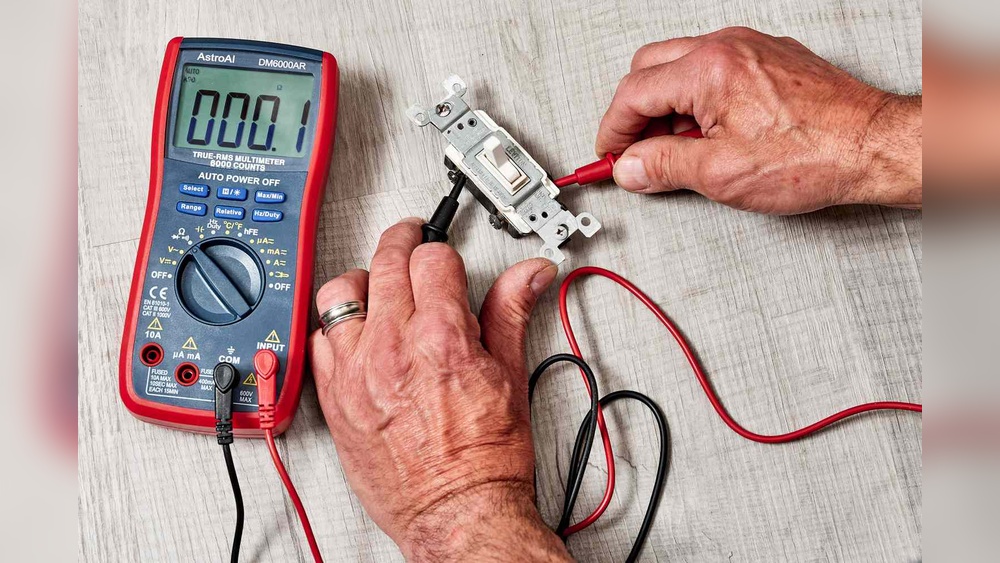
A multimeter measures voltage to check if the switch has power. Set the meter to measure AC voltage. Touch the probes to the switch terminals carefully. The screen shows the voltage level if power flows through.
Wear insulated gloves for safety. Place one probe on the live terminal and the other on the neutral terminal. A reading above zero means the switch has power. This method gives precise information about electrical flow.
Interpreting Results
Interpreting the results after testing a light switch is important. It shows if the switch and wiring work well or if there is a problem. Knowing the meaning of your test results helps decide the next steps. This section explains what to do when power is present or no power is detected at the switch.
Power Present
Power present means the switch receives electricity. The tester or multimeter shows voltage or a light glows. This result means the wiring to the switch is good. The problem may be the light bulb, fixture, or switch itself.
Check the light bulb and fixture for damage. Test the switch by turning it on and off. A working switch will let power flow and stop power when off. If the switch fails, replace it.
No Power Detected
No power detected means no electricity reaches the switch. The tester shows zero voltage or no light. This can mean a wiring issue or a tripped breaker.
Check the circuit breaker or fuse box for trips or blown fuses. Reset or replace as needed. If the breaker is fine, wiring problems like loose connections may exist. Call an electrician if unsure or unsafe.
Troubleshooting Tips
Troubleshooting a light switch can be simple with the right steps. Start by checking basic issues before calling an electrician. This saves time and money.
Follow these tips to find the problem quickly and safely. Each step helps you understand the situation better.
Check Circuit Breaker Again
Look at your home’s circuit breaker panel. Find the switch for the light circuit. Sometimes, breakers can trip without clear signs.
Flip the breaker off, then back on. This resets the power and may fix the issue. If the breaker trips again, there could be a bigger electrical problem.
Ensure the breaker is fully in the ON position. A partially on breaker will not supply power properly.
Inspect Wiring Connections
Turn off the power at the breaker before touching wires. Remove the switch cover gently. Check if wires are loose or disconnected.
Loose wires can stop power flow to the switch. Tighten any loose screws holding the wires. Look for damaged or burnt wires.
Damaged wires should be replaced by a professional. Good connections ensure the switch works correctly and safely.
Safety Precautions
Safety is the top priority when checking a light switch for power. Electricity can cause shocks or injuries if handled carelessly. Taking simple precautions can keep you safe and prevent accidents. Follow the steps below to protect yourself.
Avoid Wet Conditions
Never check a light switch with wet hands or in damp places. Water conducts electricity and raises the risk of shock. Make sure the area is dry before starting. Dry your hands and wear dry shoes to stay safe.
Use Insulated Tools
Use tools with insulated handles to avoid electric shocks. Insulated tools stop electricity from passing through to your body. Do not use damaged or metal-only tools. Always pick tools designed for electrical work.
:max_bytes(150000):strip_icc()/testing-single-pole-switches-1152811-03-8b89394a236d499ebee520df31a0ce27.jpg)
Credit: www.thespruce.com
Frequently Asked Questions
How Can I Safely Test A Light Switch For Power?
Turn off the circuit breaker first. Use a voltage tester or multimeter on the switch terminals. If the tester shows voltage, the switch has power.
What Tools Do I Need To Check A Light Switch?
You need a voltage tester or a multimeter. Both tools detect electrical current safely. Also, have a screwdriver to access the switch terminals.
How Do I Know If A Light Switch Is Faulty?
If the switch shows no voltage but the circuit is live, the switch may be faulty. Test continuity with a multimeter to confirm.
Can I Check A Light Switch Power Without Turning Off Electricity?
No, always turn off the power at the breaker to avoid shocks. Safety is crucial when handling electrical components.
Conclusion
Checking a light switch for power is simple and safe. Always turn off the main power before starting. Use a voltage tester or multimeter to see if power flows. Remember to follow safety steps carefully to avoid shocks. Knowing how to check a switch helps fix electrical issues quickly.
Stay cautious and take your time. This skill can save you time and money on repairs. Keep practicing, and you will feel more confident handling small electrical tasks.