If you’re looking to change the access code on your Schlage keypad deadbolt, you’re in the right place. Resetting your code is easier than you might think, and doing it yourself can save you time and hassle.
Whether you want to update your security or fix a forgotten code, this guide will walk you through every step clearly and quickly. Keep reading to take full control of your lock and keep your home safe with just a few simple moves.
Credit: www.youtube.com
Schlage Keypad Deadbolt Basics
The Schlage keypad deadbolt offers a secure way to lock and unlock doors without keys. It uses a code that you enter on a keypad. This makes it easy for family or friends to get in without a physical key. Understanding the basics helps you use it well and reset the code if needed.
Key Features
The keypad allows you to enter a code to open the door. It can store multiple user codes for different people. The deadbolt works with batteries, so no wiring is needed. Many models include a backup key option. The lock often has a sound or light to confirm code entry. It is designed to be strong and resist tampering.
Common Models
Popular Schlage keypad deadbolts include the Schlage BE365 and the Schlage FE575. The BE365 is simple and easy to install. The FE575 adds features like alarm technology. Both models fit most standard doors. They come in different finishes to match door styles. These models are widely trusted for home security.
When To Reset Your Code
Knowing when to reset your code on a Schlage keypad deadbolt is important. Resetting helps keep your home safe and secure. It also makes sure that only authorized people have access. Some situations call for a quick reset. Others need it for better protection.
Lost Or Forgotten Code
Forgetting your code is common. You cannot enter your home without it. Resetting the code lets you set a new one. This avoids the need to replace the entire lock. A quick reset restores your access fast.
Security Concerns
Security risks may arise anytime. Someone might see your code or guess it. Resetting the code stops unwanted access. It keeps your property safe from intruders. Change the code after a security alert or suspicion.
New User Setup
Adding a new user means sharing the code. Resetting the code before new users enter is smart. This way, old users lose access if needed. You control who can unlock the door. Reset codes help manage user permissions easily.
Tools And Preparation
Preparing to reset the code on a Schlage keypad deadbolt requires a few key tools and safety steps. Proper preparation makes the process smooth and safe. Keep everything ready before starting.
Required Items
Gather the following items before you begin:
- Small flathead screwdriver or a Phillips screwdriver
- New batteries (usually 9-volt or AA, check your lock model)
- Original programming code (found in the manual or on the lock)
- Pen and paper to note down new codes
- Flashlight, if working in a dim area
Having these items at hand saves time and avoids interruptions.
Safety Precautions
Follow these safety tips during the reset process:
- Work in a well-lit area to see all parts clearly
- Avoid forcing any parts to prevent damage
- Keep your hands dry to avoid slipping
- Do not share your programming code with others
- Test the lock after reset to ensure it works properly
These steps protect both you and your lock from harm.
Step-by-step Reset Process
Resetting the code on your Schlage keypad deadbolt is simple. Follow these clear steps to complete the process quickly. This guide helps you change your lock code safely and easily.
Accessing The Programming Mode
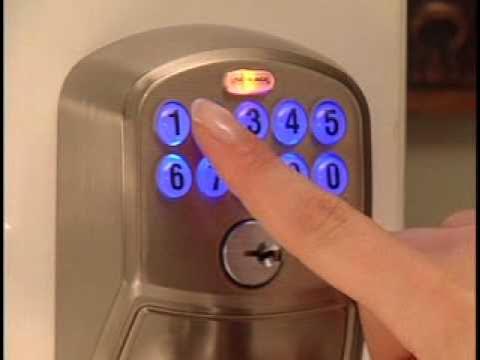
Start by finding the Schlage button on the keypad. Press and hold it until you hear a beep. The keypad lights will flash, showing you are in programming mode. This step lets you change settings on the lock.
Clearing Existing Codes
Press the Schlage button again. Enter the current programming code. Then press the number 2 on the keypad. This action clears all user codes stored in the lock. Your old codes will no longer work.
Setting A New Code
Press the Schlage button once more. Enter the programming code again. Choose a new user code between 4 and 8 digits. Enter the new code, then press the Schlage button to save it. The lock confirms with a beep and flashing lights.
Testing The New Code
Close the door and lock the deadbolt. Enter the new code on the keypad. The lock should click and open. Test it a few times to make sure the code works every time.
Troubleshooting Common Issues
Troubleshooting common issues with your Schlage keypad deadbolt can save time and frustration. Many problems arise from simple causes that you can fix quickly. This section covers the most frequent issues and their solutions. Follow these steps to keep your lock working smoothly.
Dead Battery Solutions
A dead battery is the main reason a keypad stops working. Replace the batteries with fresh ones. Use alkaline batteries for better performance. Remove the battery cover on the keypad to access them. After changing, test the lock to see if the keypad lights up. If the lock still does not respond, check battery contacts for dirt or corrosion. Clean gently with a dry cloth. Always keep spare batteries nearby for quick replacement.
Reset Not Responding
If the reset process does not start, the lock might be in programming mode. Exit programming mode by pressing the Schlage button until it beeps. Try the reset steps again carefully. Ensure you enter the correct programming code. Sometimes, a factory reset requires holding the Schlage button longer. Check the user manual for your specific model. If the reset button is stuck, press gently or clean around it. Avoid using too much force to prevent damage.
Programming Errors
Programming errors often happen because of wrong code entries. Enter the programming code slowly and clearly. Use only numbers on the keypad; letters do not work. If the lock rejects your code, wait a few seconds before trying again. Many locks limit the number of attempts to protect security. Reset the lock if you forget the programming code. Follow the reset instructions in the manual strictly. Write down new codes to avoid losing them.

Credit: www.wikihow.com
Tips For Secure Code Management
Managing your Schlage keypad deadbolt code carefully keeps your home safe. Secure code management stops strangers from guessing or stealing your code. Follow these simple tips to protect your lock and your property.
Choosing Strong Codes
Pick codes that are hard to guess. Avoid easy sequences like “1234” or “0000.” Use a mix of numbers that do not follow a pattern. Do not use birthdays or phone numbers. Strong codes make your lock safer.
Regular Code Updates
Change your code often to stay secure. Set a schedule to update the code every few months. This practice reduces the risk of old codes being used. Regular updates keep your lock’s security fresh.
Sharing Codes Safely
Only share your code with trusted people. Send the code through private messages or tell them in person. Avoid writing the code down where others can see it. Safe sharing protects your home from unwanted access.
Additional Resources
Finding the right help can make resetting your Schlage keypad deadbolt easier. Additional resources offer clear guidance and support. These tools help you avoid mistakes and save time.
Explore trusted sources to get step-by-step instructions and expert advice. Use these resources to feel confident while working on your lock.
Manufacturer Support
Schlage’s official support team provides accurate information. They answer common questions and offer detailed reset instructions. Contact them by phone or email for direct help. Their website has FAQs and user manuals available for download.
Online Tutorials
Many websites and video platforms show how to reset Schlage keypad deadbolts. These tutorials break down the process into simple steps. Visual guides help you see exactly what to do. Choose tutorials from trusted sources for reliable instructions.
Professional Assistance
Locksmiths have experience with Schlage locks and can reset codes safely. Hiring a professional ensures no damage to your lock. They can also advise on security improvements. This option suits anyone who prefers expert help or faces complex issues.

Credit: www.wikihow.com
Frequently Asked Questions
How Do I Reset The Schlage Keypad Deadbolt Code?
To reset the code, press the Schlage button, enter the existing code, then press 0 and 1. Enter a new code and confirm it. This process updates your keypad code securely and quickly.
What Tools Are Needed To Reset Schlage Keypad Code?
No special tools are required. You only need your existing user code and access to the keypad. The reset process is simple and can be done using the keypad itself.
Can I Reset The Schlage Code Without The Current Code?
No, you must know the current programming code to reset it. Without it, the lock cannot be reprogrammed for security reasons.
How Long Does It Take To Reset Schlage Deadbolt Code?
Resetting the code typically takes less than five minutes. The steps are straightforward, allowing quick changes to your lock’s security settings.
Conclusion
Resetting your Schlage keypad deadbolt code is simple and quick. Just follow the steps carefully. You can change the code anytime for safety. Keep your new code private and easy to remember. Doing this helps protect your home and gives you control.
Now you know how to manage your lock with ease. Stay secure and confident with your Schlage keypad.