Are you looking to change the codes on your Schlage deadbolt but don’t know where to start? Reprogramming your lock might sound tricky, but it’s easier than you think.
Whether you want to add a new code, delete an old one, or reset the lock completely, this guide will walk you through every step clearly and simply. By the end, you’ll have full control over your lock’s security and feel confident managing your own access.
Keep reading to learn how to reprogram your Schlage deadbolt quickly and without hassle.

Credit: www.youtube.com
Tools Needed
Gathering the right tools makes reprogramming a Schlage deadbolt easier. Having everything ready saves time and avoids frustration. Most tools are simple and common. You might already have them at home.
Flathead Screwdriver
A flathead screwdriver helps remove the battery cover and lock parts. It fits into small slots and lifts covers gently. Choose one with a comfortable handle for better grip.
New Batteries
Fresh batteries keep the deadbolt powered during reprogramming. Use the recommended type, usually AA or 9V. Avoid old or weak batteries to prevent errors.
Master Code Or Programming Code
The master code lets you enter programming mode. It appears in the lock’s manual or on a label inside the lock. Keep this code safe and handy before starting.
Smartphone Or Notebook
Use a smartphone or notebook to write down new codes. This helps avoid forgetting them later. A digital note or paper works well for this task.
Locate The Programming Code
Before you start reprogramming your Schlage deadbolt, find the programming code. This code lets you add or delete user codes on your lock. Without it, you cannot change the settings.
The programming code is a unique number. It is different from your user codes or PINs. You must keep this code safe. It is usually six digits long.
Check The User Manual
The easiest way to find the programming code is to check your user manual. The manual shows where to find this code on your lock or packaging. You may find it printed on a card or label.
Look Inside The Battery Compartment
Open the battery cover on the inside of the lock. The programming code often appears on a sticker inside this compartment. Write it down before you close the cover again.
Use The Default Code
If you never changed the programming code, try the default code. It is usually found in the manual or on the packaging. This code works for new locks until you change it.
Reset The Lock To Factory Settings
Lost the programming code? Reset the lock to factory settings. This will erase all user codes and restore the original programming code. Follow the reset steps in the manual carefully.
Enter Programming Mode
Entering programming mode is the first step to reprogram your Schlage deadbolt. This mode lets you change codes and settings easily. You must follow simple steps to access this mode safely.
Start by locating the programming button on the lock’s interior side. This button controls access to programming functions. Pressing it activates the mode, allowing changes to the lock codes.
Remove The Battery Cover
Open the battery cover on the inside of the deadbolt. This cover protects the battery compartment and programming button. Gently pull or slide it off to reveal the batteries and button.
Press The Programming Button
Find the small black button near the batteries. Press and release it once. The lock will beep, showing it is in programming mode. A red light might also blink to confirm.
Enter The Programming Code
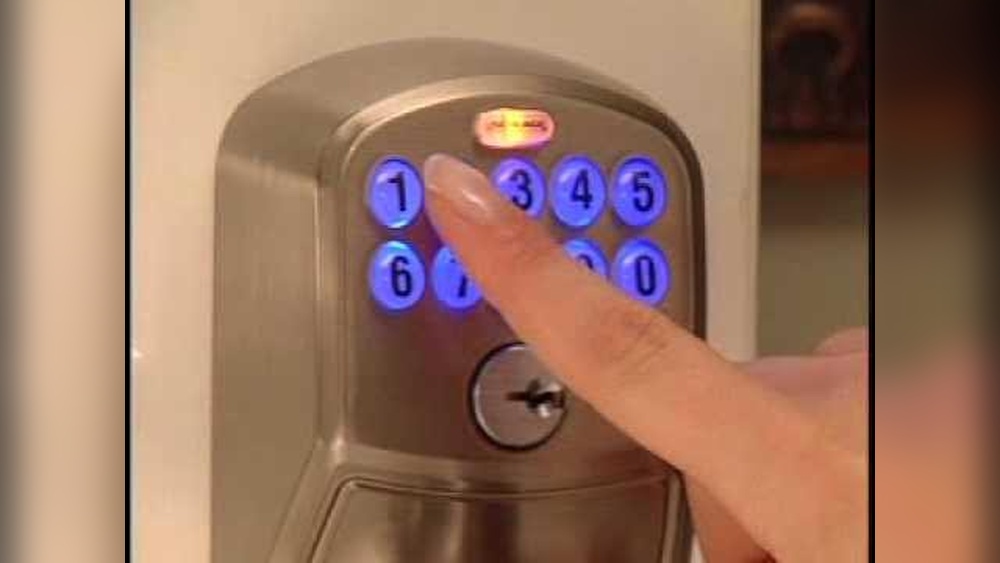
Use the keypad on the outside of the lock. Enter the 6-digit programming code you received with your lock. Press the Schlage button after entering the code. The lock will beep again if the code is correct.
Start Reprogramming
After entering programming mode, you can change user codes or settings. Follow the instructions for the specific change you want. Always wait for the beep before proceeding to the next step.
Add A New User Code
Adding a new user code to your Schlage deadbolt is a simple way to give access to family or friends. It keeps your home secure and lets you control who enters. The process takes just a few minutes and does not require special tools.
Each code is unique and easy to set up. You can add several codes, depending on your lock model. This helps manage access without sharing your main code.
Prepare Your Schlage Deadbolt For Programming
Start by locating the lock’s programming code. This code is on the inside of the lock or in the user manual. You need this code to enter programming mode.
Make sure the lock battery is charged. Low battery can stop the programming process. Check the battery status on your lock or replace it if needed.
Press the Schlage button on the keypad. Enter the 6-digit programming code. The Schlage button will flash, indicating programming mode is active.
Do not press any other buttons until you hear a beep or see a light signal.
Add The New User Code
Press the Schlage button again to start adding a user code. Enter a new 4 to 8-digit code that you want to add. Confirm the code by pressing the Schlage button once more.
The lock will beep and flash to confirm the new code is saved. Test the code before closing the door to ensure it works.
Delete Existing Codes
Deleting existing codes on your Schlage deadbolt is an important step before adding new ones. It helps keep your lock secure by removing old access codes that others might still use. This process clears all stored codes, allowing you to start fresh.
Let’s break down how to delete existing codes easily and safely.
The programming code is needed to delete any access codes. You can find it on the back of the keypad or in the user manual. This code is different from the user codes you enter to unlock the door.
Press the Schlage button on the keypad. Then enter the six-digit programming code. The Schlage button will flash, showing you are in programming mode. This step allows you to make changes to your lock.
Delete All User Codes
Press the Schlage button again. Then press 7 followed by 0. This command deletes all user codes stored in the lock. The Schlage button will flash green to confirm that codes are deleted.
Test The Lock
Try entering old user codes to make sure they no longer work. The lock should not open. This confirms all previous codes have been removed successfully.
Test The New Code
Testing the new code is a crucial step after reprogramming your Schlage deadbolt. It confirms the lock works correctly and secures your home. This step helps avoid lockouts and ensures peace of mind.
Test the code several times. Use the keypad and the new code to unlock the door. Make sure the lock responds immediately and smoothly. Check both locking and unlocking functions.
Verify The Code Entry
Enter the new code slowly and clearly. Watch for any delay or error signals from the lock. A quick beep or green light usually means success. If the lock does not respond, try the code again.
Test From Both Sides
Try unlocking the door from outside using the keypad. Then, test the lock from the inside with the thumb turn. Both actions should work without any problems. This confirms full lock functionality.
Check For Multiple Attempts
Enter the wrong code a few times on purpose. This helps test the lock’s security features. The lock may temporarily disable after several wrong tries. This is normal and improves your safety.
Update Your Backup Codes
If your lock supports backup codes, make sure to update them. Store them in a safe and easy-to-remember place. This ensures you can access your home if you forget the main code.
Troubleshooting Tips
Troubleshooting your Schlage deadbolt can save time and frustration. Small issues may stop your lock from working right. Knowing common problems helps fix them fast. Try these tips to keep your deadbolt working smoothly.
Check The Battery
A weak battery often causes programming errors. Replace old batteries with fresh ones. Use the right type recommended in the manual. Test the lock after changing batteries to see if it works.
Reset The Lock Properly
Resetting the lock clears old codes and settings. Follow the exact reset steps in the instructions. Hold the reset button long enough for a full reset. Restart programming after resetting the lock.
Use Correct Programming Codes
Enter the master code carefully during reprogramming. Mistakes in code entry can cause errors. Avoid pressing wrong buttons or skipping steps. Keep your master code handy and secure.
Clean The Lock Mechanism
Dirt and dust can block the deadbolt’s moving parts. Use a dry cloth to clean the outside and keyhole. Avoid using oil or wet cleaners inside the lock. Clean locks respond better to programming commands.
Check For Physical Damage
Inspect the lock for broken or loose parts. Bent or damaged components stop the lock from working. Tighten loose screws or replace damaged pieces. Physical problems need fixing before programming.
Verify Door Alignment
Misaligned doors can prevent the deadbolt from locking. Check if the door closes smoothly without force. Adjust hinges or strike plate if the bolt doesn’t fit well. Proper alignment ensures the lock works correctly.

Credit: www.wikihow.com
Credit: www.schlage.com
Frequently Asked Questions
How Do I Reset A Schlage Deadbolt Keypad?
To reset, remove the battery cover and batteries. Press and hold the Schlage button for 10 seconds. Release the button. The keypad will flash, indicating reset completion. This clears all user codes and restores factory settings.
Can I Add Multiple User Codes To Schlage Deadbolt?
Yes, you can add up to 30 unique user codes. Each code can be personalized and deleted anytime. Use the programming code and follow the user manual instructions to add new codes easily.
What If Schlage Deadbolt Won’t Reprogram?
Check battery power first; weak batteries cause issues. Ensure you follow programming steps precisely. If problems persist, try resetting the lock completely. Refer to the user manual or contact Schlage support for help.
How Long Does Schlage Deadbolt Programming Take?
Programming a Schlage deadbolt usually takes under 5 minutes. It involves simple steps like entering the programming code and adding user codes. Following instructions carefully ensures quick, successful reprogramming.
Conclusion
Reprogramming a Schlage deadbolt keeps your home safe and secure. The steps are clear and easy to follow. Take your time and double-check each code you enter. Regular updates help maintain control over who can enter. You can do this without special tools or skills.
Keep your manual handy for future reference. Feel confident managing your lock’s settings yourself. Safety starts with simple actions like these.