Have you ever wondered how to change the code on your Kwikset deadbolt without calling a locksmith? Whether you’ve just moved into a new home or want to improve your security, updating your lock’s code is easier than you think.
In this guide, you’ll discover simple, step-by-step instructions that anyone can follow. By the end, you’ll have full control over who can enter your home—giving you peace of mind and confidence in your security. Keep reading to learn how to quickly and safely change your Kwikset deadbolt code.
Tools Needed
Changing the code on a Kwikset deadbolt does not require many tools. Having the right tools makes the process faster and easier. Most tools are common and easy to find. Below is a list of tools needed to change the code safely and correctly.
Screwdriver
A screwdriver is essential to remove the deadbolt cover. Usually, a Phillips-head screwdriver fits most screws. It helps to access the inside parts of the lock.
New Codes Or Keypad Instructions
You need the new code or the keypad instructions ready. This helps to set the new code properly. Keep the instructions nearby to avoid mistakes.
Flashlight
A small flashlight helps to see inside the lock clearly. It is useful in low light or tight spaces. This tool makes the work easier and prevents errors.
Pen And Paper
Use a pen and paper to write down the new code. This helps to remember the code during the change. It prevents forgetting or mixing numbers.

Credit: www.wikihow.com
Locate The Programming Button
Start by opening the Kwikset deadbolt’s interior cover. Look for a small, often red or black, programming button inside. Pressing this button allows you to change the lock’s code easily.
Understanding The Programming Button
The programming button is key to changing your Kwikset deadbolt code. It lets you enter new codes safely and easily. Knowing its location saves time and hassle during setup.
This button is usually small and hidden inside the lock. It prevents accidental code changes and keeps your lock secure.
Finding The Programming Button On Your Kwikset Deadbolt
First, remove the interior cover of the deadbolt. Use a screwdriver if needed. The cover often snaps off or slides away gently.
Look for a small, round button on the inside part of the lock. It might be black, red, or another bright color. This is the programming button.
Tips For Easy Access
Check the user manual if you cannot find the button. Manuals show exact locations for different Kwikset models.
Keep the interior cover nearby after removal. This makes it easier to press the button and change codes.
Press the button firmly but gently. Avoid using sharp tools that could damage the lock.
Enter Programming Mode
Entering programming mode on a Kwikset deadbolt is the first step to change the code. This mode allows you to add or delete user codes easily. The process is simple and does not require special tools.
Before starting, make sure the door is closed and locked. This helps prevent errors during programming. Keep your current programming code handy. It is usually a 6-digit number found on the back of the lock or in the manual.
Locate The Program Button
Open the battery cover on the inside part of the lock. You will see a small black button. This is the program button. Pressing this button puts the lock into programming mode.
Press The Program Button
Press and release the program button once. The lock will beep and the LED light will flash. This means the lock is now in programming mode. You have 10 seconds to enter a new code or make changes.
Confirm Programming Mode Activation
Listen for a beep sound and check the LED light. A steady or blinking light shows the lock is ready. If the light does not flash, try pressing the program button again.
Delete Existing Codes
Deleting existing codes on a Kwikset deadbolt is an important step before adding new ones. This helps keep your lock secure and easy to manage. Removing old codes prevents unauthorized access from people who no longer need entry.
Deleting codes is simple and quick. You do not need special tools or skills. Just follow a few clear steps to clear all previous codes from your lock.
Open the interior part of your Kwikset deadbolt. Find the small black programming button. It is usually near the battery pack. Pressing this button starts the code deletion process.
Press And Hold The Programming Button
Press the programming button firmly. Hold it down for about 10 seconds. The lock will beep or flash to show it is ready to erase codes. This signal means all user codes are deleted.
Test To Confirm Code Deletion
Try to use an old code on the keypad. The lock should not open. This means the code is successfully deleted. If the lock still accepts the old code, repeat the steps carefully.
Add New Access Codes
Adding new access codes to your Kwikset deadbolt keeps your home secure and convenient. You can easily set codes for family members, friends, or service providers. This way, everyone has their own unique entry code. Changing or adding codes does not require professional help.
Follow the steps below to add new access codes quickly and safely. Keep your lock’s manual nearby for specific model details.
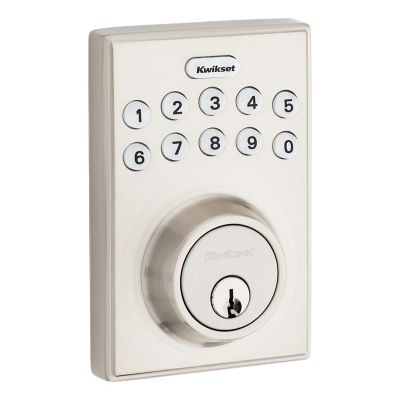
Start by pressing the lock’s programming button. Usually, this button is inside the lock on the interior side of the door. Press it until you hear a beep. This sound means the lock is ready for new codes.
Input The Master Code
Type your master code on the keypad. The master code is the main code that controls all programming. After entering it, press the lock button or the “” key. The lock will beep twice to confirm.
Add The New Access Code
Enter a new code that you want to add. Codes usually need to be 4 to 8 digits long. After typing the new code, press the lock button or “” again. The lock will beep three times to show the code is saved.
Test The New Code
Close the door and try the new code on the keypad. The lock should open smoothly. If it does not, repeat the steps carefully. Make sure you hear the confirmation beeps each time.
Credit: www.kwikset.com
Test The New Codes
Testing new codes on your Kwikset deadbolt is key to ensure security and ease. After changing the code, checking it helps avoid lockouts. This step confirms the lock accepts the new code correctly. It also shows if the lock resets properly after use.
Try the new code several times from outside the door. This practice ensures the lock responds well to the new combination. Make sure the door is closed while testing. It helps simulate real use and confirms the lock works smoothly.
Enter The New Code Carefully
Type the new code slowly and clearly. Watch the lock’s response each time. If the lock opens, the code works fine. If not, recheck the steps or try the code again.
Test The Lock Multiple Times
Repeat the code entry at least three times. This confirms the lock remembers the new code. It also shows if the locking mechanism works consistently. Multiple tests help catch any errors early.
Try The Old Code To Confirm Change
Enter the old code to ensure it no longer works. The lock should stay locked if the change is successful. This test verifies that your new code is active only.
Check The Lock From Inside
Use the thumb turn inside to lock and unlock. Ensure it moves smoothly without resistance. This step confirms the internal mechanism is not affected.
Reset And Test Again If Needed
If the new code does not work, reset the lock again. Follow the programming steps carefully. Test the new code after resetting to confirm success.
Troubleshooting Tips
Changing the code on a Kwikset deadbolt usually goes smoothly. Still, problems can happen during the process. Troubleshooting tips help solve common issues fast. They guide you step-by-step to fix your lock without extra tools or help.
Follow these tips to check your lock and get it working again. They cover common mistakes and easy fixes anyone can do.
Check The Battery Power
Low battery can stop the lock from working. Replace batteries with new ones. Use fresh alkaline batteries for best results. Weak batteries cause slow response or no response at all.
Reset The Lock Properly
Resetting the lock clears old codes. Follow the reset steps exactly. Press and hold the reset button for the right time. Releasing too soon means the reset fails. Make sure to hear the beep sound for confirmation.
Confirm The Programming Code
Use the correct programming code to change settings. The default code is on the instruction sheet or inside the lock. Enter the code carefully. Mistyping the code blocks further attempts temporarily.
Test The Lock After Each Change
Try the new code before closing the door. Test the lock multiple times to ensure it works. This helps catch problems early. Avoid locking yourself out by confirming the code first.
Inspect The Deadbolt Alignment
Misaligned deadbolts cause jamming or failure to lock. Check the door frame and strike plate. Adjust the screws to align the bolt smoothly. Proper alignment helps the lock operate without force.
Clean The Keypad And Buttons
Dirt or dust on the keypad blocks button presses. Wipe the surface with a dry cloth. Avoid using water or harsh cleaners. Keep the keypad clean for easy code entry.
Safety Precautions
Changing the code on a Kwikset deadbolt can improve your home security. Taking safety precautions helps prevent accidents and mistakes. It protects your property and keeps your family safe.
Prepare Your Tools And Workspace
Gather all tools before starting. Use a stable surface to work on the lock. Avoid crowded or dark areas to reduce errors.
Remove Existing Batteries Carefully
Turn off the lock before changing the code. Remove batteries gently to avoid damage. Keep batteries away from children and pets.
Keep Your New Code Private
Choose a strong but memorable code. Do not share your code with strangers. Change codes regularly to maintain security.
Follow Manufacturer Instructions
Read the Kwikset manual before changing the code. Follow steps exactly to avoid lock malfunction. Use only recommended parts for replacements.
Test The Lock After Changing Code
Check the lock works properly before leaving. Test the new code multiple times. Ensure the door locks and unlocks smoothly.

Credit: www.youtube.com
Frequently Asked Questions
How Do You Reset A Kwikset Deadbolt Code?
To reset a Kwikset deadbolt code, first remove the battery cover. Press and hold the program button until the light flashes. Enter a new 4-8 digit code and press the program button again to save it.
Can I Change The Kwikset Code Without A Key?
Yes, you can change the code without a key. Use the interior keypad to access the programming mode. Follow the manufacturer’s instructions to add or delete user codes safely.
How Long Does It Take To Change Kwikset Codes?
Changing Kwikset codes usually takes about 5 minutes. The process is quick and straightforward, requiring only a few button presses and code entries.
Is It Necessary To Remove The Lock To Change Codes?
No, removing the lock is not necessary to change codes. All code changes can be done from the interior keypad or programming button.
Conclusion
Changing the code on a Kwikset deadbolt is simple and quick. You only need a few steps to do it yourself. This helps keep your home safe and secure. Always remember to write down your new code somewhere safe. Test the lock after changing the code to make sure it works well.
Regularly updating your code adds extra security. Now, you can feel confident managing your Kwikset deadbolt with ease.