Have you ever wondered how a 2 way light switch works and why it lets you control a single light from two different spots? Understanding this simple yet clever device can save you time and money, especially when you want to fix or install switches in your home.
You’ll discover exactly how a 2 way light switch functions, broken down into easy steps. By the end, you’ll feel confident handling these switches and impress anyone with your new knowledge. Ready to light up your understanding? Let’s dive in!
Credit: www.litoelectrical.com
Basics Of Two-way Switches
Two-way switches let you control a light from two different places. This setup is common in homes to make lighting more convenient. It helps save time and effort by allowing control from multiple points.
Understanding how two-way switches work can help with basic electrical tasks. It also helps when planning home lighting or troubleshooting switch problems. The concept is simple but very useful in everyday life.
What Is A Two-way Switch
A two-way switch has three terminals: one common and two travelers. It connects and disconnects the electrical path between these terminals. This allows the light to be turned on or off from two locations.
The two switches work together by changing the connection of the travelers. Flipping either switch changes the current flow and turns the light on or off. This design makes controlling one light from two spots easy.
Common Uses In Homes
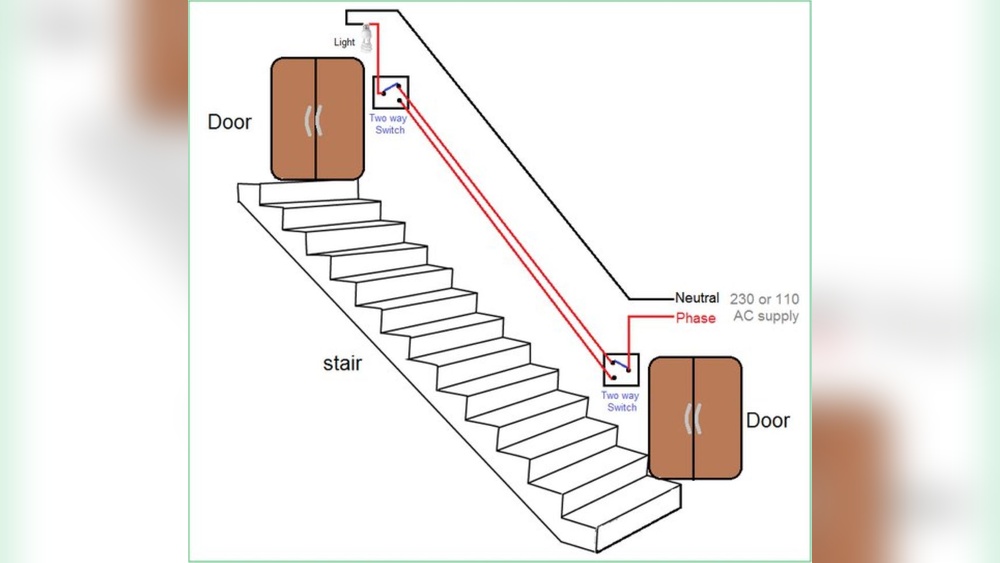
Two-way switches are often used in hallways and staircases. They let you switch lights on or off at both ends of a corridor or stairs. This adds safety and convenience when moving through these areas.
They also work well in large rooms with multiple entrances. You can control the lighting from different doors without walking across the room. This setup improves comfort and ease of use.
Wiring Setup Explained
The wiring setup of a 2 way light switch controls a light from two different places. It uses a simple circuit that lets you turn the light on or off from either switch. Understanding the wiring helps you install or fix the switches safely.
This setup is common in hallways, stairs, and large rooms. Each part plays a role in making the system work smoothly.
Components Needed
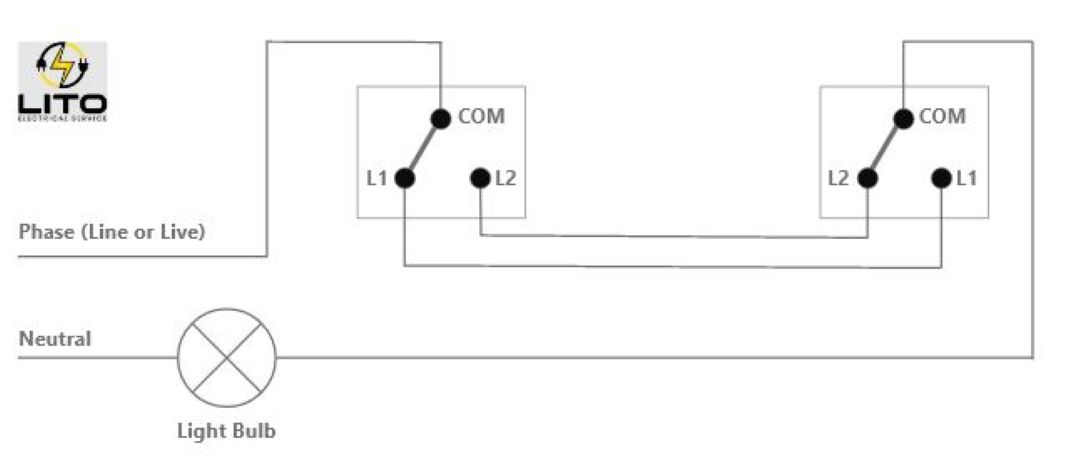
You need two 2 way switches for this wiring setup. Each switch has three terminals: one common and two travelers. The common terminal connects to the power or the light.
Two traveler wires link the switches. They carry current between the switches. A light bulb or fixture is the final part of the circuit.
Also, you need basic tools like wire strippers, screwdrivers, and electrical tape. Safety gear such as gloves is important too.
How The Circuit Is Connected
First, the live wire goes to the common terminal of the first switch. Two traveler wires connect the traveler terminals of both switches. These traveler wires carry current between switches.
The common terminal of the second switch connects to the light fixture. The neutral wire goes directly to the light. This completes the circuit for the light to work.
When you flip either switch, it changes the path of the current. This turns the light on or off from both places. The wiring allows easy control of one light from two spots.
Functioning Of Two-way Switches
Two-way switches control a light from two different points. This setup is common in hallways, staircases, and large rooms. Understanding how these switches work helps in troubleshooting and installation.
Each switch has three terminals. These switches connect in a way that allows the current to flow through different paths. This changes the light’s state from on to off or off to on.
Switch Positions And Current Flow
Each two-way switch has two positions. These positions connect the common terminal to one of two traveler terminals. The current flows through one traveler wire or the other.
The light turns on or off depending on which path the current takes. If the circuit is complete, the light turns on. If the circuit is broken, the light turns off.
How Switching Controls The Light
Flipping either switch changes the current path. This action either completes or breaks the circuit. The light responds instantly to this change.
The switches work together to control the light. Each switch can turn the light on or off independently. This gives control from two different locations.
Smart Lighting Integration
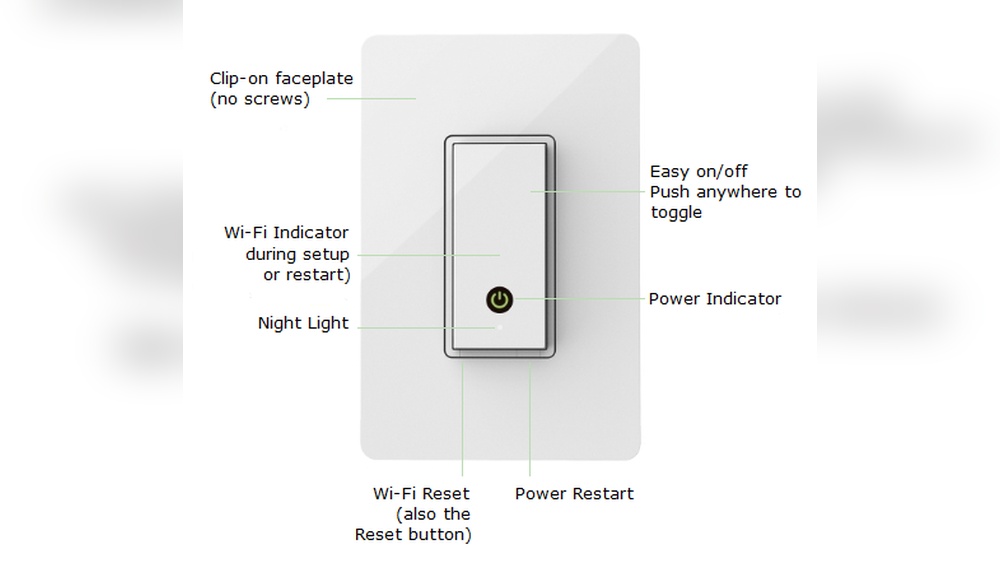
Smart lighting integration brings traditional two-way switches into the modern era. It allows control of your lights through apps, voice commands, or automation. This upgrade adds convenience and energy savings to your home. Smart two-way switches blend the old wiring setup with new technology. They keep the familiar switch control while adding remote and automatic options.
With smart integration, your lighting becomes more flexible and easier to manage. You can turn lights on or off from anywhere. Set schedules to save power and enhance security. Smart systems also work with sensors to adjust lighting based on your presence or time of day.
Advantages Of Smart Two-way Switches
Smart two-way switches offer many benefits. They provide remote control using smartphones or tablets. No need to be near the switch to operate the lights. Voice control support allows hands-free use with assistants like Alexa or Google.
Energy efficiency improves as you can schedule lights to turn off automatically. It helps reduce electricity bills and saves power. Some smart switches support dimming, creating the perfect lighting mood. They also send alerts if a light stays on by mistake.
Installation usually fits existing wiring, making upgrades easier. Smart switches add modern features without changing your home’s layout. They increase comfort and control for better daily living.
Compatible Smart Devices
Smart two-way switches work with many smart home devices. Voice assistants such as Amazon Echo and Google Nest are popular choices. These let you control lights using simple voice commands. Smart hubs like Samsung SmartThings connect various devices together.
Mobile apps on iOS and Android allow full control from anywhere. Some switches also support automation platforms like IFTTT. This means your lights can react to other devices or events automatically.
Compatibility depends on the switch brand and model. Most support Wi-Fi or Zigbee protocols for smooth connection. Check device compatibility before buying to ensure a seamless smart home setup.
Installation Tips
Installing a 2 way light switch is a practical skill for any home. Proper installation ensures safety and smooth operation. Follow clear tips to avoid common mistakes and complete the job efficiently.
Safety Precautions
Turn off the power at the circuit breaker before starting. Use a voltage tester to confirm no electricity flows to the wires. Wear insulated gloves to protect from shocks. Avoid working in wet or damp conditions. Keep tools dry and in good condition. Double-check wiring diagrams before handling wires. Safety must be the top priority throughout the process.
Step-by-step Installation
First, remove the old switch and label the wires. Identify the common terminal and traveler terminals on both switches. Connect the common wire to the common terminal. Attach traveler wires to the traveler terminals. Use wire nuts to secure connections and prevent shorts. Mount the switches into the wall boxes. Restore power and test the switches in different positions. Make sure the light responds correctly from both switches.

Credit: www.youtube.com
Troubleshooting Common Issues
Troubleshooting common issues with a 2 way light switch can save time and effort. Many problems arise from simple causes. Checking these issues can restore your switch’s function quickly. This section covers two frequent problems and how to fix them safely.
Switch Not Working Properly
A switch not working often means a loose connection. Switches have wires that can come loose over time. Turn off the power before inspecting the switch. Remove the switch cover and check if wires are tight. Use a screwdriver to secure any loose wires. If the switch still does not work, the switch itself might be faulty. Replace the switch with a new one. Always test the switch after fixing it to confirm it works.
Flickering Or Inconsistent Lighting
Flickering lights may indicate a poor connection or a bad bulb. Check the light bulb first by replacing it with a new one. If flickering continues, inspect the wiring at the switch. Loose or damaged wires cause flickering. Tighten any loose wires carefully. Sometimes the problem comes from the light fixture, not the switch. Test the fixture with another switch to be sure. If unsure, contact a professional electrician to avoid risks.

Credit: www.realpars.com
Frequently Asked Questions
What Is A 2 Way Light Switch?
A 2 way light switch allows control of a single light from two locations. It’s commonly used in hallways or large rooms for convenience.
How Does A 2 Way Light Switch Wiring Work?
It uses two switches connected by traveler wires. Flipping either switch changes the circuit’s path, turning the light on or off.
Can You Replace A Single Switch With A 2 Way Switch?
Yes, but you must install a second switch and proper wiring to enable dual control of the light.
Why Use A 2 Way Light Switch System?
It provides flexible lighting control from different spots, enhancing convenience and safety in homes or offices.
Conclusion
A 2 way light switch lets you control one light from two places. It works by changing the path of electricity. This helps you turn lights on or off from different spots. Knowing how it works can save time and effort.
It also makes your home more convenient and safe. Simple wiring connects the switches and light. Understanding this can help with basic repairs or upgrades. Now, you have a clearer idea of how these switches operate. Try checking your own switches to see it in action.