Are you worried about your home’s security? Changing the combination on your deadbolt is a simple step you can take to protect your family and belongings.
Whether you’ve just moved in, lost a key, or want to update your lock for peace of mind, knowing how to change your deadbolt’s code puts control right in your hands. You’ll discover easy, clear instructions that anyone can follow.
Keep reading, and you’ll feel confident making your home safer in no time.
Tools You’ll Need
Changing the combination on your deadbolt is easier with the right tools. Having these tools ready saves time and avoids frustration. You do not need many items, just a few basic tools.
Phillips Head Screwdriver
This tool helps remove screws from the lock. Most deadbolts use Phillips head screws. It fits perfectly and prevents damage to the screw heads.
Flathead Screwdriver
A flathead screwdriver helps pry apart parts gently. It is useful for small gaps or tight spots. Keep it handy for delicate work on the lock.
New Combination Code Instructions
Make sure you have the instructions for your lock model. These show the exact steps and code settings. Follow them closely to set a new combination correctly.
Replacement Batteries (if Electronic)
Some deadbolts require batteries to work. Check if your lock needs new batteries before starting. Fresh batteries help avoid interruptions during the process.
Pen And Paper
Write down your new code clearly. This prevents forgetting the combination later. It also helps to keep a backup of the code for safety.
Locate The Lock Model
Start by finding the model number on your deadbolt. This helps you know the exact steps to change the combination. Most models have the number inside the lock or on the back plate.
Identify The Brand Name
Start by finding the brand name on your deadbolt. It is often on the faceplate or the keyhole cover. The brand helps you find the right instructions for changing the combination.
Check For Model Number
Look closely at the lock for a model number. It may be stamped on the side or inside the lock. The model number is key to knowing the exact type of deadbolt you have.
Remove The Deadbolt For Inspection
Sometimes, the model details are hidden inside the lock. Remove the deadbolt carefully using a screwdriver. Check the back or inside parts for labels or stamps.
Use The Manual Or Manufacturer Website
If you find the brand and model number, use them to find the manual online. The manual often includes steps to change the combination safely. Manufacturer websites usually offer downloadable guides.
Remove The Deadbolt Cover
Start by carefully removing the deadbolt cover with a screwdriver. This exposes the inside mechanism needed to change the combination. Take your time to avoid damaging any parts.
Removing the deadbolt cover is the first step to changing the combination. The cover protects the inner parts of the lock.
Take your time and be careful. Damaging the cover can make the lock harder to fix.
Locate The Screws
Look for screws on the inside part of the deadbolt. These screws hold the cover in place.
Use a screwdriver that fits well. Loose or wrong tools can strip the screws.
Unscrew The Cover
Turn the screws slowly and carefully. Keep the screws safe after removing them.
Do not force the cover off. It should come off easily after removing screws.
Lift Off The Cover
Gently lift the cover away from the door. You will see the lock’s inner mechanism.
Keep the cover and screws together. This keeps everything ready for putting back later.
Access The Combination Mechanism
Accessing the combination mechanism is the first step to change your deadbolt code. This process reveals the part where you can reset the numbers. It is important to handle this carefully to avoid damage.
Most deadbolts have a cover on the inside part of the lock. Removing this cover gives you access to the combination mechanism. The cover may be held by screws or simply snap into place.
Before starting, gather basic tools like a screwdriver. Work in a well-lit area to see small parts clearly. Keep track of all screws and pieces you remove.
Remove The Interior Cover
Locate the screws holding the deadbolt’s interior cover. Use a screwdriver to remove these screws. Place the screws somewhere safe to avoid losing them.
Gently pull the cover away from the door. Avoid using too much force to prevent breaking the cover. Now, the combination mechanism will be visible.
Identify The Reset Lever Or Button
Inside the lock, find a small lever or button. This part allows you to change the combination. It may be labeled or colored differently.
Use your finger or a small tool to move the lever or press the button. This step prepares the lock to accept a new combination. Do not rush this process.
Understand The Combination Dials
Look at the combination dials near the reset lever. These dials control the lock’s code. Each dial turns to a specific number.
Make sure the dials move smoothly. If they stick, the lock may need cleaning or lubrication. Smooth dials make setting a new code easier.
Resetting The Combination
Resetting the combination on your deadbolt is a simple task. It helps keep your home secure and allows you to change your code anytime. Follow these steps carefully to set a new combination without trouble.
Aligning The Dials
Start by turning the dials to the current code. Make sure each number lines up exactly with the marker. This step is important to unlock the mechanism inside the lock. Without the correct alignment, you cannot reset the code.
Setting A New Code
After the dials are set, look for the reset button or lever. Press or slide it to enter the reset mode. Turn the dials to your new code while holding the button or lever. Release it to save the new combination. Test the lock by scrambling the dials and entering the new code. This confirms the change worked perfectly.

Credit: www.youtube.com
Reassemble The Lock
Reassembling the lock is the final step after changing the combination. It puts all parts back together so the lock works correctly. Careful reassembly prevents problems later.
Follow each step slowly. Check each part fits in the right place. This saves time and avoids mistakes.
Align The Internal Components
Start by placing the internal parts in the correct order. Make sure the tumblers and springs fit smoothly. Misalignment can stop the lock from turning.
Secure The Lock Cylinder
Next, push the lock cylinder back into the housing. It should slide in without force. Tighten any screws holding it firmly but not too tight.
Attach The Exterior And Interior Plates
Put the outer and inner plates over the lock. Align screw holes and tighten screws evenly. This keeps the lock steady and strong.
Test The Lock Function
Turn the knob or key to check the lock works well. Try locking and unlocking with the new combination. Everything should move smoothly without sticking.
Test The New Combination
Testing the new combination on your deadbolt is a crucial step. It ensures your lock works smoothly with the new code. This step helps prevent lockouts and saves time later.
Try the new combination several times. Turn the knob or key to check if the lock opens easily each time. Testing the code more than once confirms it is set correctly.
Test The Combination From Outside
Go to the door’s exterior side. Enter the new code carefully. Turn the knob or handle to unlock. If the door opens without trouble, the combination works well.
Test The Combination From Inside
Move to the inside of the door. Lock the deadbolt using the new combination. Try unlocking it from the inside. This ensures the lock works both ways.
Try The Old Combination
Enter the old code and try to unlock. The door should not open. This confirms the old combination no longer works and the new one is active.
Make Adjustments If Needed
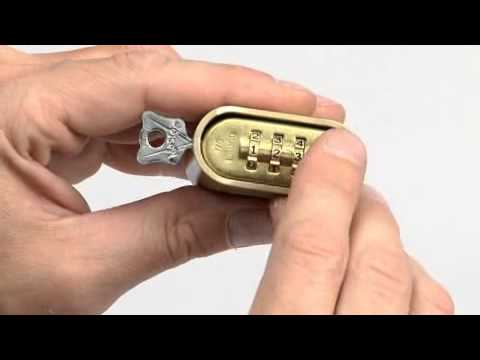
If the lock jams or won’t open, reset the combination. Follow the instructions again carefully. Test the new code after each reset until it works smoothly.
Credit: www.masterlock.com
Tips For Choosing A Strong Combination
Choosing a strong combination for your deadbolt is very important. It helps keep your home safe from unwanted visitors. A good combination is hard to guess but easy for you to remember.
Here are some tips to help you pick a strong combination. These tips make your lock more secure and reduce the chance of someone breaking in.
Use Numbers That Are Not Easy To Guess
Avoid simple patterns like 1234 or 0000. Do not use birthdays or anniversaries. These numbers are often easy for others to guess.
Choose A Combination With Mixed Digits
Use a mix of low and high numbers. Mix the sequence so it is not in order. This makes the combination harder to figure out.
Pick A Combination You Can Remember
Choose numbers you can recall without writing them down. Writing down your code can make it less safe. Use a pattern that means something only to you.
Change Your Combination Regularly
Update your deadbolt code every few months. Regular changes keep your lock secure. It lowers the risk of someone guessing or finding out your code.
Troubleshooting Common Issues
Changing the combination on a deadbolt can be simple, but sometimes issues arise. These problems may stop you from updating your lock code. Understanding common troubles helps you fix them quickly. This section covers typical challenges and easy solutions.
Deadbolt Won’t Turn After Changing Code
This problem often happens when the lock parts are out of place. Check if the new code was set correctly. Make sure all buttons or dials are in the right position. Try turning the deadbolt slowly. If it still sticks, remove the lock and reinstall it carefully.
Combination Reset Button Not Working
The reset button can get stuck or fail if pressed too hard. Press gently and hold it as per the instructions. Clean around the button to remove dirt or dust. If the button stays stuck, spray a little lubricant and try again. Avoid using too much force to prevent damage.
Forgot The Current Combination
Not remembering the old code stops you from changing it. Look for a default code in the instruction manual. Some locks have a backup key or reset method. Contact the lock’s manufacturer for help. Keep your new code written down in a safe place.

Credit: www.libertysafe.com
Frequently Asked Questions
How Do I Reset A Deadbolt Combination Safely?
To reset your deadbolt combination, locate the reset button or pinhole. Press it while turning the dials to your new code. Always test the new combination before locking to ensure it works properly and avoid getting locked out.
Can I Change My Deadbolt Code Without Tools?
Yes, many keypad deadbolts allow code changes without tools. Use the keypad to enter your current code, then follow the manufacturer’s instructions to set a new code. Always consult your deadbolt manual for specific steps.
How Often Should I Change My Deadbolt Combination?
It’s recommended to change your deadbolt combination every 6 to 12 months. Changing codes regularly enhances security, especially after moving or losing access to the previous code. This prevents unauthorized entry.
What If I Forget My Deadbolt Combination?
If you forget your deadbolt combination, check for a backup key or master reset option. Contact the manufacturer or a locksmith for assistance. Avoid forcing the lock to prevent damage.
Conclusion
Changing your deadbolt combination is simple and quick. Just follow the steps carefully to keep your home safe. Double-check the new code before locking the door. This small task helps protect your family and belongings. Stay confident knowing you control who can enter.
Regularly updating your lock code adds extra security. Take a moment today to change your deadbolt combination. It’s an easy way to feel safer and more secure at home.