Have you ever wanted to replace a fan switch with a light switch but didn’t know where to start? Changing a fan switch to a light switch might seem tricky, but with the right steps, you can do it yourself safely and quickly.
Imagine controlling your room’s lighting exactly how you want it, without the fan getting in the way. In this guide, you’ll discover simple, clear instructions that anyone can follow—even if you’re not an expert. Keep reading, and by the end, you’ll have the confidence to make this switch on your own.
Tools And Materials Needed
Changing a fan switch to a light switch requires some basic tools and materials. Having the right items ready makes the job easier and safer. This section lists everything needed to complete the task smoothly.
Tools Required
Start with a screwdriver set, including flathead and Phillips. A voltage tester is essential to ensure no power is running. Wire strippers help prepare the wires for connection. Needle-nose pliers make handling wires easier. A flashlight or work light improves visibility in dark spaces.
Materials Needed
Get a standard light switch that fits your wall box. Use electrical tape to secure wire connections. Wire nuts are necessary for joining wires safely. Have extra electrical wire on hand if extensions are needed. A faceplate matching the switch style finishes the look.
Safety Gear
Wear insulated gloves to protect against shocks. Safety glasses prevent debris from getting into your eyes. Use a dust mask if working in older homes with dust or insulation. Proper gear keeps you safe during the work.

Credit: community.smartthings.com
Safety Precautions
Changing a fan switch to a light switch involves working with electricity. Safety is the top priority. Taking the right precautions prevents accidents and injuries. Understanding basic safety steps helps you stay safe throughout the process.
Before starting, prepare your tools and workspace. Make sure the area is dry and well-lit. Keep children and pets away from the work zone. Never rush the job. Careful work leads to better results and safety.
Turn Off The Power
Always switch off the power at the circuit breaker. Do not rely on the wall switch alone. Use a voltage tester to check if wires are live. Confirming no electricity flows ensures your safety.
Wear Safety Gear
Use insulated gloves to protect your hands. Wear safety glasses to guard your eyes. Avoid loose clothing that can catch on wires or tools. Proper gear reduces the risk of injury.
Use Proper Tools
Choose tools designed for electrical work. Avoid using damaged or worn-out equipment. Using the right tools makes the job easier and safer. Keep tools organized to avoid accidents.
Follow Wiring Diagrams
Use clear wiring diagrams to guide your work. Incorrect wiring can cause short circuits or fires. Double-check connections before restoring power. Accurate wiring ensures the switch works properly and safely.
Test The Switch Before Closing
After wiring, test the switch operation carefully. Turn the power back on and check the light. Make sure the switch controls the light as expected. Testing prevents surprises after finishing the job.
Turning Off Power
Turning off the power is the first and most important step in changing a fan switch to a light switch. This step keeps you safe from electric shock. Always treat electricity with respect. Never start the work without cutting the power supply.
Before you begin, locate your home’s main electrical panel. This is where the circuit breakers are. You will need to find the right breaker that controls the fan switch.
Locate The Circuit Breaker
Open the electrical panel carefully. Look for the breaker labeled for the room or area with the fan. If the labels are missing, turn off the main breaker to cut power to the whole house.
Switch Off The Correct Breaker
Flip the breaker switch to the off position. This stops electricity from flowing to the fan switch. Double-check by trying to turn on the fan or light. If nothing works, the power is off.
Use A Voltage Tester
Use a voltage tester to be sure the power is off. Touch the tester to the wires in the switch box. No light or beep means no power. This is a safe sign to start working.
Removing The Fan Switch
Removing the fan switch is the first step to replace it with a light switch. This process needs care and safety. Always turn off the power at the breaker before starting. Working with electricity can be risky without proper precautions.
Take your time and follow each step carefully. This way, you avoid damage to wires or injury. The goal is to safely disconnect the fan switch for the new light switch.
Turn Off The Power
Find the circuit breaker for the fan switch. Flip it to the off position. Use a tester to confirm the power is off. This step protects you from electric shock.
Remove The Switch Cover Plate
Use a screwdriver to take off the cover plate. Keep the screws safe to reuse later. Removing the plate exposes the switch and wiring.
Unscrew The Fan Switch
Loosen the screws holding the fan switch in place. Pull the switch out gently. Be careful not to pull on the wires too hard.
Disconnect The Wires
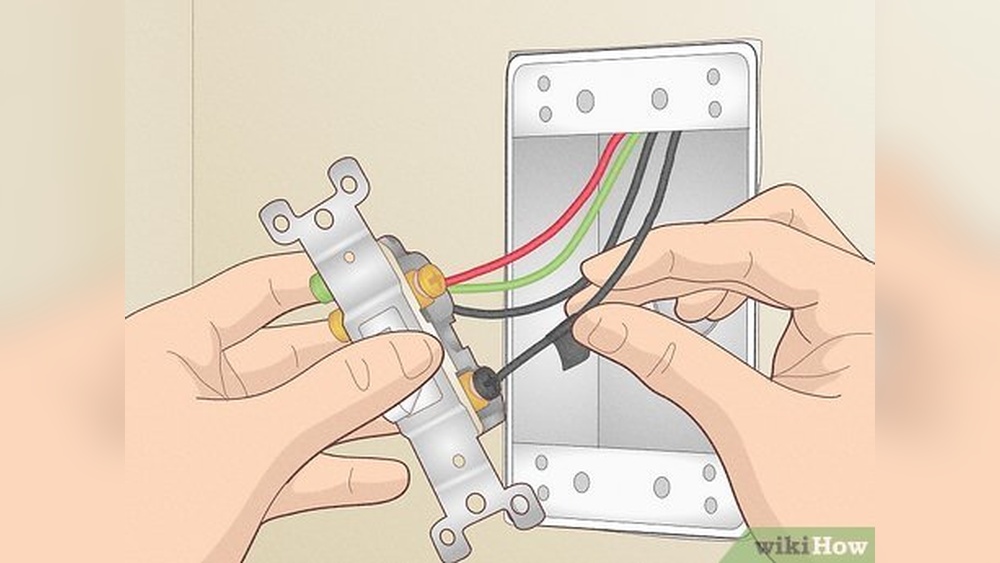
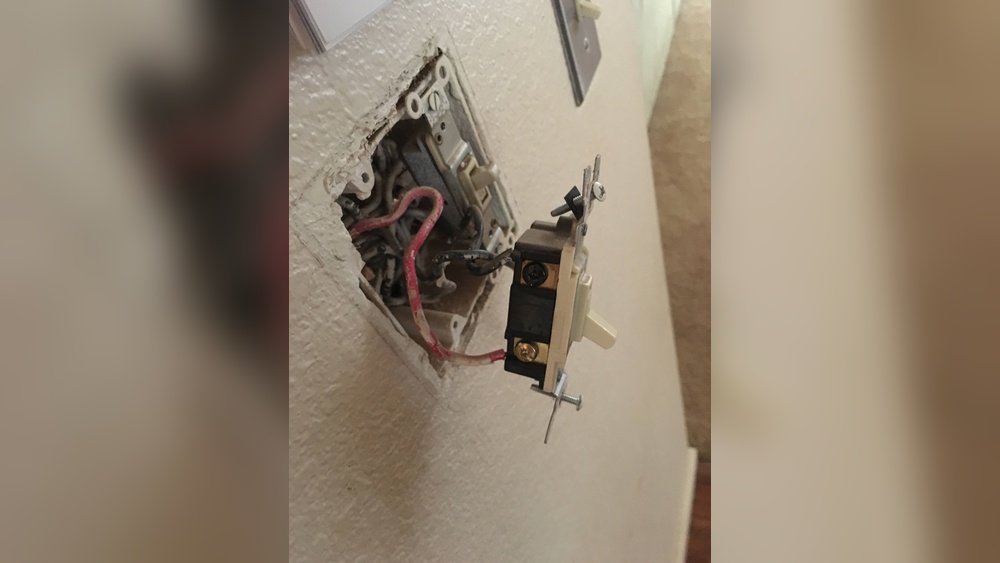
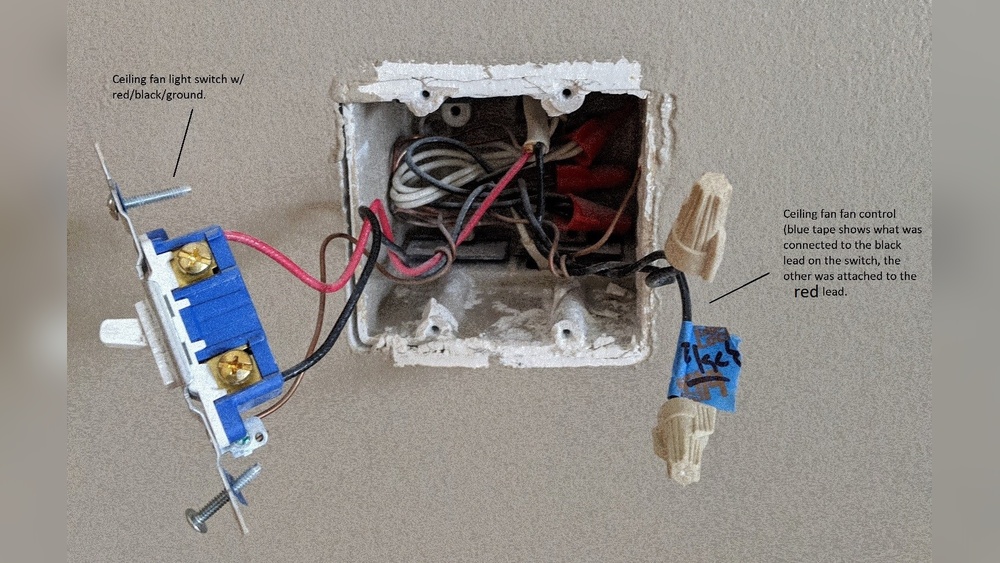
Note how the wires connect to the switch. Take a picture or label them for reference. Unscrew the wire terminals or release the wire connectors. Separate the wires from the fan switch carefully.
Identifying Wires
Identifying wires is the first step to change a fan switch to a light switch. Knowing which wire does what keeps you safe and helps the switch work correctly. Wires may look similar but have different jobs. Take time to find the right wire before starting any work.
Understanding Wire Colors
Wire colors tell you their function. Usually, black wires carry power. White wires are neutral and complete the circuit. Green or bare wires are for grounding. These colors may vary, but this is common in most homes. Check the wires carefully before touching them.
Using A Voltage Tester
A voltage tester helps find live wires. Turn the power on and touch the tester to each wire. The tester lights up or beeps if the wire is live. This tool helps avoid electric shock. Always test twice to be sure.
Labeling Each Wire
Label wires with tape or markers. Write down their color and role. This makes it easier to connect them to the new switch. Clear labels save time and prevent mistakes. Keep labels visible during the whole process.
Wiring The Light Switch
Wiring the light switch is a key step in changing a fan switch to a light switch. It involves connecting wires safely and correctly. This ensures the light works well and avoids electrical problems.
Before starting, always turn off the power at the breaker. Use a voltage tester to check the wires. Safety first.
Identify The Existing Wires
Open the switch box to see the wires inside. Usually, you will find black, white, and ground wires. The black wire is the hot wire, white is neutral, and the ground is green or bare copper.
Note which wires connect to the fan switch. This helps when wiring the new light switch.
Connect The Hot Wire To The Switch
Attach the black hot wire to the switch’s brass or black screw. This wire carries electricity to the light. Tighten the screw to hold the wire firmly.
Attach The Neutral Wire
Most light switches do not connect to the neutral wire. But if your switch has a neutral terminal, connect the white wire to it. Otherwise, twist the white wires together with a wire nut.
Connect The Ground Wire
Attach the ground wire to the green screw on the switch. Grounding helps protect from electrical shocks. Make sure the connection is tight and secure.
Secure The Switch And Test
Push the wires neatly into the box. Screw the switch to the box. Restore power and test the switch. The light should turn on and off smoothly.
Securing The Switch And Cover
Securing the switch and cover is a key step in changing a fan switch to a light switch. This step ensures the switch stays in place and looks neat. Properly securing the switch also prevents electrical hazards. Take your time to align everything correctly. Loose or crooked switches can cause problems later.
Aligning The Switch Properly
Place the switch into the wall box carefully. Check that the switch is straight and fits snugly. The switch should sit flush against the wall. Use your hand to hold it steady before tightening screws. Small adjustments make a big difference in appearance.
Tightening The Screws
Use a screwdriver to tighten the screws on the switch. Tighten each screw a little at a time. Avoid overtightening, which can crack the switch or wall box. Screws should be firm enough to hold the switch steady. Test by gently wiggling the switch after tightening.
Installing The Switch Cover Plate
Place the cover plate over the switch carefully. The cover should fit without forcing it. Align the screw holes on the cover with the switch. Secure the cover plate with screws. Tighten screws evenly to avoid a crooked plate.
Final Check For Security And Safety
Once the cover is on, check the switch’s stability. Press the switch a few times to ensure it works smoothly. Confirm no wires are visible around the switch. A secure, neat switch enhances room safety and appearance.
Restoring Power And Testing
Restoring power and testing are the last steps in changing a fan switch to a light switch. These steps confirm the new switch works correctly. Safety is the top priority when restoring power.
Testing ensures the light switch controls the light as intended. It also checks for any wiring problems. Proper testing avoids future issues and keeps your home safe.
Turning The Circuit Breaker Back On
Locate the circuit breaker panel. Find the breaker that was turned off earlier. Flip the breaker switch to the ON position. This action restores electricity to the switch and light fixture.
Be careful to avoid touching any wires or metal parts. Use a flashlight if the room is dark. Confirm the power is back by checking a nearby light or outlet.
Testing The New Light Switch
Stand near the new light switch. Flip the switch ON. Observe if the light turns on immediately. Flip the switch OFF and see if the light goes off.
If the light does not respond, double-check the wiring connections. Tighten any loose wires. Repeat the test after fixing any issues. The switch should control the light smoothly without flickering.
Safety Tips After Testing
Do not leave the switch unattended during testing. Watch for sparks or unusual sounds. If anything seems wrong, turn off the power immediately.
Use a voltage tester to confirm no current flows when the switch is off. Keep the area dry and clean. These steps reduce the risk of electrical shock or fire.
Troubleshooting Common Issues
Troubleshooting common issues helps fix problems fast. Changing a fan switch to a light switch might cause some errors. Knowing how to solve these issues saves time and effort. Below are common problems and how to handle them.
Check The Power Supply
First, ensure the power is off at the breaker. Use a voltage tester on the wires. No power means the switch won’t work. If power is missing, reset the breaker or call an electrician.
Identify The Correct Wires
Fan switches have more wires than light switches. Find the hot wire, neutral wire, and ground wire. Using the wrong wire causes the switch to fail. Label wires before disconnecting to avoid confusion.
Test The Switch Function
After wiring, turn the power back on. Test if the light switch controls the light. If nothing happens, the switch may be faulty. Try swapping the switch with a new one to check.
Secure All Wire Connections
Loose wires cause flickering or no light. Use wire nuts or connectors to join wires tightly. Tug gently to ensure connections are firm. Tight connections keep the switch working well.
Understand Switch Ratings
Light switches differ in voltage and current ratings from fan switches. Using a wrong-rated switch can damage the circuit. Match the new switch rating with the fan switch rating. This ensures safety and proper function.

Credit: www.amazon.com

Credit: www.youtube.com
Frequently Asked Questions
How Do I Safely Change A Fan Switch To A Light Switch?
Turn off the power at the circuit breaker first. Remove the fan switch cover, disconnect wires, and connect them to the light switch. Follow wiring diagrams carefully and use a voltage tester to ensure safety before handling wires.
What Tools Are Needed To Replace A Fan Switch With A Light Switch?
You will need a screwdriver, voltage tester, wire stripper, electrical tape, and the new light switch. These tools help ensure safe and precise wiring. Always use tools designed for electrical work to avoid accidents or damage.
Can I Use The Same Wiring For A Fan And Light Switch?
Yes, often the wiring is similar. However, check if the wires match the new switch’s terminals. Some fan switches control multiple functions, so ensure correct wire placement for the light switch to work properly.
How Long Does It Take To Replace A Fan Switch With A Light Switch?
The process usually takes 15 to 30 minutes. This depends on your familiarity with electrical work and the wiring complexity. Always prioritize safety and double-check connections before restoring power.
Conclusion
Changing a fan switch to a light switch is simple and useful. Follow the steps carefully to avoid mistakes. Always turn off power before starting the work. Use the right tools and check your wiring twice. This small project can save energy and improve your room’s lighting.
Take your time and work safely. Soon, you will enjoy having better control over your lights. It’s a small change with a big difference.