Are you tired of weak TV sound that ruins your favorite shows and movies? Connecting wall speakers to your TV can transform your viewing experience with richer, clearer audio.
But if you’re unsure where to start or worried it might be complicated, you’re in the right place. This guide will walk you through simple, step-by-step instructions to hook up your wall speakers to your TV quickly and easily. By the end, you’ll know exactly how to get powerful sound without any hassle.
Ready to upgrade your home entertainment? Let’s dive in.
Credit: kdfoundation.org
Check Tv Audio Output Options
Before connecting wall speakers to your TV, check the TV’s audio output options. This step helps you choose the right connection method. Different TVs have different audio outputs. Knowing what your TV offers makes the setup easier and faster.
Some TVs have multiple audio output types. Others might have only one option. Understanding these options helps avoid compatibility issues. It also improves sound quality by choosing the best connection type.
Identify Available Audio Ports
Look at the back or side of your TV to find audio ports. Common ports include HDMI ARC, optical audio, and headphone jacks. Each port looks different. HDMI ARC looks like a regular HDMI but supports audio return. Optical audio uses a small square port with a flap. Headphone jacks are round and usually 3.5mm in size.
Check Tv Settings For Audio Output
Go to your TV’s audio settings menu. Find the audio output or sound output option. Choose the output that matches your speaker connection. Some TVs allow you to switch between TV speakers and external speakers. Select external speakers or audio system for wall speakers.
Understand Digital Vs. Analog Outputs
Digital audio outputs send sound as data signals. Optical and HDMI ARC are digital outputs. They deliver clear and high-quality sound. Analog outputs use electrical signals. The headphone jack is an analog output. Analog may have lower sound quality than digital.

Credit: www.audioholics.com
Choose The Right Speaker Type
Choosing the right wall speakers is key for good sound quality. Different speakers offer various sound experiences. Picking the right one helps you enjoy your TV better. It also makes your room look neat and stylish.
Consider your room size and TV setup. Some speakers work well in small rooms. Others are better for large spaces. Think about the sound style you want. Clear voices or deep bass? This will guide your choice.
Bookshelf Wall Speakers
Bookshelf speakers are compact and fit well on walls. They offer clear sound and good bass for their size. These speakers suit small to medium rooms. Easy to install and affordable too.
In-wall Speakers
In-wall speakers blend into the wall surface. They save space and look clean. These speakers provide balanced sound across the room. Perfect for a minimalist and tidy setup.
Soundbars With Wall Mounts
Soundbars are long, slim speakers placed under the TV. Many come with wall mount kits. They improve TV sound without taking much space. Great for simple and fast installation.
Floor-standing Speakers Near Walls
Floor-standing speakers offer powerful sound and deep bass. Place them near walls for better sound reflection. Best for large rooms and serious audio lovers. They need more space but deliver rich sound.
Gather Necessary Cables And Adapters
Gathering the right cables and adapters is a key step to connect wall speakers to your TV. Without the proper tools, the setup can be confusing and may not work correctly. Prepare all items before starting to save time and avoid frustration.
Different TVs and speakers use different types of connections. Knowing what cables and adapters you need helps create a smooth setup process. This section explains the common cables and adapters needed for connecting wall speakers to a TV.
Identify Speaker Wire Types
Most wall speakers use speaker wire. This wire usually has two parts: positive and negative. Check the wire thickness, called gauge. Thicker wires carry better sound over long distances. Make sure the wire length fits your room size.
Check Tv Audio Output Ports
Look at your TV’s back or side panel for audio output ports. Common types are HDMI ARC, optical audio, RCA, and headphone jacks. Each port works with different cables. Note which ones your TV has to pick the right cable or adapter.
Choose The Right Audio Cable
Use an optical cable for clear digital sound if your TV has an optical port. RCA cables work with older TVs. HDMI ARC cables can send sound and video through one wire. Match the cable type to your TV and speaker inputs.
Use Adapters For Compatibility
Adapters help connect cables that do not fit directly. For example, a 3.5mm to RCA adapter can link your TV’s headphone jack to speakers. Check if your speakers need a special adapter for the TV’s audio output.
Connect Speakers To Tv Audio Output
Connecting your wall speakers to the TV audio output allows you to enjoy better sound quality. Most modern TVs have multiple audio output options. Each type works differently and uses different cables or wireless signals. Knowing how to connect speakers properly helps avoid sound problems and keeps setup simple.
Using Rca Cables
RCA cables are common and easy to use. Look for red and white audio output ports on your TV. Plug the cables into these ports and the matching input ports on your speakers. Make sure the colors match to avoid confusion. RCA connection works well with many older speakers and TVs.
Using Optical Or Hdmi Arc
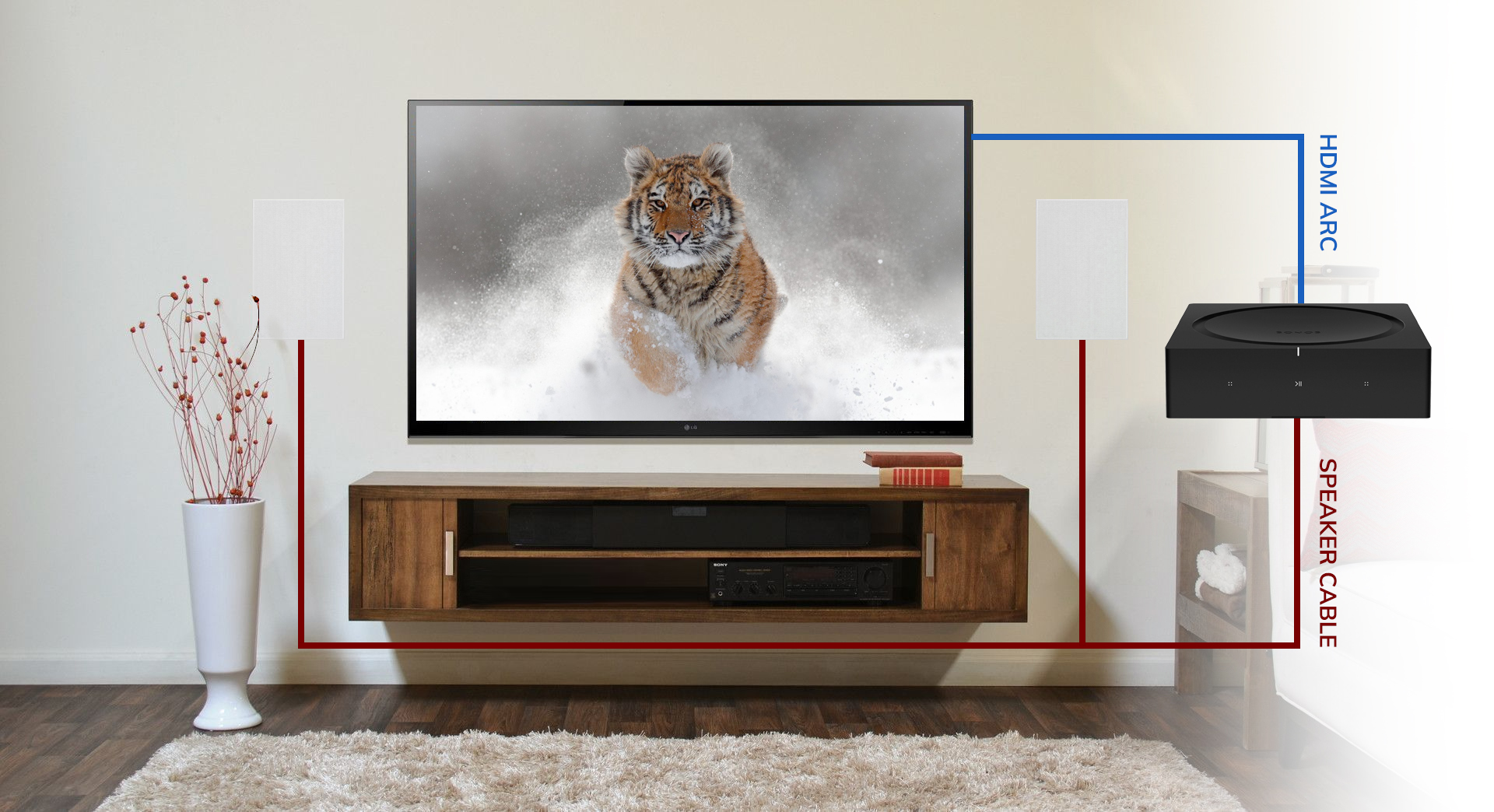
Optical cables carry digital sound from TV to speakers. Find the optical output port on your TV. Connect it to the optical input on your speakers. HDMI ARC is another option for newer TVs. Use an HDMI cable to link the HDMI ARC port on your TV to the speaker system. These connections deliver clear, high-quality audio.
Using Bluetooth Or Wireless
Some TVs and speakers support Bluetooth. Turn on Bluetooth on both devices. Pair them by selecting the speaker name on your TV. Wireless connections offer flexibility and reduce cable clutter. Sound quality may vary depending on distance and interference. Keep devices close for best results.
Power Up Your Speakers
Speakers need power to deliver clear, loud sound. Without power, they remain silent. Most wall speakers require an amplifier or receiver to work properly. This section explains how to power your speakers safely and effectively.
Check Your Speaker Type
First, identify if your wall speakers are passive or active. Passive speakers need an external amplifier. Active speakers have built-in amplifiers and only need a power outlet. Knowing this helps avoid damage and sound issues.
Choose The Right Amplifier
Match your amplifier’s power output with your speakers’ requirements. Too little power causes weak sound. Too much power risks damaging speakers. Look for an amplifier with similar wattage and impedance ratings.
Connect Speaker Wires Correctly
Use good quality speaker wires for a strong connection. Connect the positive terminal on the amplifier to the positive terminal on the speaker. Do the same for the negative terminals. Wrong connections cause poor sound or no sound at all.
Power On And Test
After connections, plug in the amplifier or active speakers. Turn on the power and set the volume low at first. Gradually increase volume to test sound quality. Listen for clear and balanced audio without distortion.
Configure Tv Audio Settings
Configuring your TV audio settings is important for clear sound. It helps your wall speakers work well with your TV. Adjusting these settings gives you the best listening experience. It makes sure the sound comes from the right place and sounds great.
Select External Speakers
Go to your TV’s audio or sound menu. Look for the option to choose speakers. Select “External Speakers” or “Audio System.” This tells the TV to send sound to your wall speakers. It stops the TV’s own speakers from playing sound.
Adjust Volume And Sound Modes
Set the volume level on your TV to a medium level. Control the main volume using your wall speakers or receiver. Find sound modes like “Standard,” “Movie,” or “Music.” Choose the mode that fits your watching style. Test different modes to hear which sounds best to you.
Test And Troubleshoot Sound
Testing and troubleshooting sound is an important step after hooking up wall speakers to your TV. It helps ensure the speakers work well and deliver clear audio. This process can also solve common sound problems. Follow simple steps to check your setup and fix issues fast.
Check Connections
First, check all wires and cables. Make sure speaker wires connect firmly to the TV and speakers. Look for loose or damaged cables. Confirm the TV’s audio output matches the speaker input. Tight connections prevent sound problems and improve audio quality.
Resolve Audio Delay
Audio delay happens when sound is out of sync with the picture. Adjust your TV’s audio settings to fix this. Some TVs offer a sound delay or lip-sync option. Lower the delay value little by little. Watch a video to see if sound matches the action.
Fix No Sound Issues
No sound can come from many causes. Check if the TV volume is muted or very low. Ensure the correct audio output is selected in the TV menu. Test speakers with another device to see if they work. Replace faulty cables or change input settings if needed.
Tips For Optimal Sound Quality
Getting the best sound from your wall speakers needs some care. Small changes make a big difference in sound quality. Follow these tips to enjoy clear and balanced audio from your TV setup.
Position Speakers Correctly
Place speakers at ear level for the best sound. Avoid placing them too close to corners. This helps reduce echo and muffled sound. Keep some distance from walls to prevent sound distortion.
Use Quality Cables
Choose good speaker wires to maintain sound clarity. Avoid cheap or damaged cables. Secure all connections tightly to stop signal loss. Clean cables improve the overall audio experience.
Adjust Tv Sound Settings
Check your TV’s audio menu for speaker options. Set the output to external speakers or audio system. Lower built-in TV volume to avoid sound overlap. Fine-tune bass and treble for clear voice and music.
Control Room Acoustics
Soft furniture absorbs sound and reduces echo. Add rugs or curtains to improve room acoustics. Avoid hard, flat surfaces near speakers. This setup helps sound spread evenly throughout the room.
Test And Fine-tune
Play different content types to test sound quality. Listen for distortion or imbalance between speakers. Adjust speaker angles or volume levels as needed. Small tweaks lead to better sound clarity.
Credit: dynaudio.com
Frequently Asked Questions
How Do I Connect Wall Speakers To My Tv?
Use speaker wire to connect wall speakers to your TV’s audio output. Match positive and negative terminals correctly. For better sound, use an amplifier or AV receiver between the TV and speakers.
Can I Use Bluetooth Speakers As Wall Speakers With Tv?
Most wall speakers are wired and don’t support Bluetooth. Use a Bluetooth transmitter on the TV if you want wireless audio. Wired connections usually provide better sound quality for wall speakers.
Do I Need An Amplifier For Wall Speakers With Tv?
Yes, an amplifier or AV receiver is usually needed. TVs often lack power to drive passive wall speakers directly. The amplifier boosts the audio signal and improves sound quality.
What Cables Are Best For Hooking Up Wall Speakers?
Use high-quality speaker wire, typically 16 or 14 gauge. Ensure the wire length matches your setup to avoid signal loss. Avoid using RCA or HDMI cables for wired wall speakers.
Conclusion
Connecting wall speakers to your TV can boost sound quality greatly. Follow simple steps to make sure wires connect properly. Double-check speaker placement for the best listening experience. Use the right cables to avoid signal loss or noise. Adjust TV settings to balance sound between speakers and screen.
Enjoy clearer, richer audio during movies and shows. This setup makes your room feel like a mini theater. Try it yourself and notice the difference in sound. Good sound makes watching TV more fun and relaxing.